🎨 Tutorial: Creating Animated Hexagon Sketch Art in Processing
Welcome to this generative art tutorial where we’ll create a mesmerizing grid of layered hexagons, each drawn with slight randomness, and…
🎨 Tutorial: Creating Animated Hexagon Sketch Art in Processing
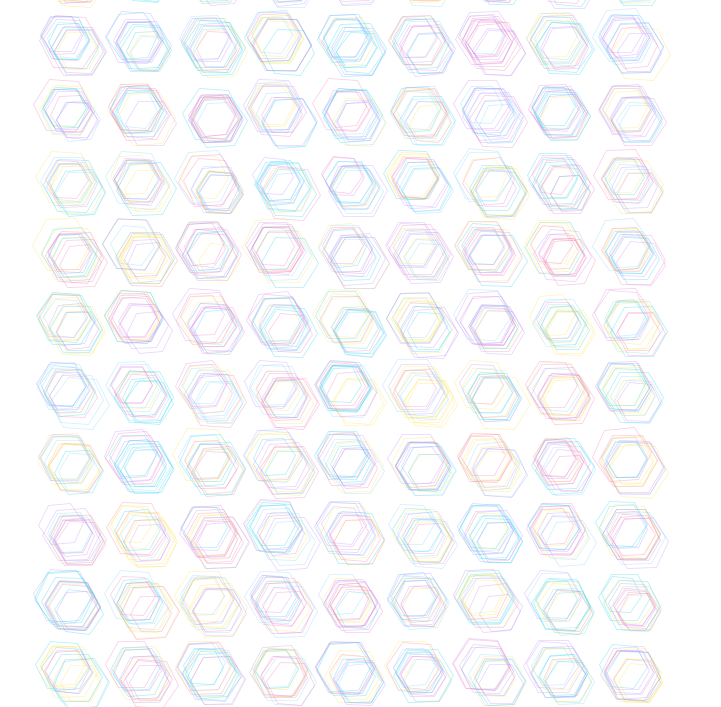
Hexagon Grid | Processing | Rey Rad
Welcome to this generative art tutorial where we’ll create a mesmerizing grid of layered hexagons, each drawn with slight randomness, and export the animation as a looping GIF.
This piece is perfect for anyone who wants to explore:
- Hand-drawn aesthetics with geometric patterns
- Layered generative visuals
- Exporting high-quality looping GIFs from Processing
🧰 What You’ll Need:
- Processing IDE
GifAnimationlibrary for GIF export
📦 Step 1: Install the GIF Library
In Processing:
- Go to
Sketch→Import Library...→Add Library... - Search for
**GifAnimation** - Click Install
This allows us to export animated frames as a .gif file.
🧠 Step 2: Understanding the Idea
We’re building:
- A grid (e.g., 10×10)
- Each cell will draw multiple hexagons (like sketch layers)
- Hexagons are rotated, jittered, and colorful
- Each one is drawn per frame, and recorded into a GIF
🧬 Step 3: The Code
Here’s the full annotated code:
import gifAnimation.*;  // For exporting animated GIFs

// Grid and animation settings
int cols = 10;
int rows = 10;
int hexPerCell = 12;    // How many hexes per cell
float cellSize = 60;

// Our sketchy color palette (soft and vibrant)
color[] inks = {
  color(244, 114, 182, 90),  // pink
  color(125, 211, 252, 90),  // light blue
  color(192, 132, 252, 90),  // purple
  color(253, 224, 71, 90),   // gold
  color(34, 211, 238, 90)    // teal
};

// GIF export and tracking variables
GifMaker gifExport;
int currentCol = 0;
int currentRow = 0;
int currentLayer = 0;

void setup() {
  size(800, 800);
  background(255);  // white canvas
  noFill();
  strokeWeight(0.8);
  frameRate(30);

  // Setup the GIF export
  gifExport = new GifMaker(this, "hex_sketch_grid.gif");
  gifExport.setRepeat(0);    // Loop forever
  gifExport.setDelay(33);    // 30 FPS
}

void draw() {
  // Move the grid to the center
  translate(width / 2 - cols * cellSize / 2, height / 2 - rows * cellSize / 2);

  // Draw into the current cell
  pushMatrix();
  translate(currentCol * cellSize, currentRow * cellSize);

  // Random offset, angle, size, and color for hand-drawn effect
  float offset = random(-10, 10);
  float rot = radians(random(-5, 5));
  float radius = random(20, 30);
  color c = inks[int(random(inks.length))];
  stroke(c);

  // Draw a hexagon
  pushMatrix();
  translate(offset, offset);
  rotate(rot);
  drawHexagon(0, 0, radius);
  popMatrix();

  popMatrix();

  // Record the frame
  gifExport.addFrame();

  // Move to next layer/cell
  currentLayer++;
  if (currentLayer >= hexPerCell) {
    currentLayer = 0;
    currentCol++;
    if (currentCol >= cols) {
      currentCol = 0;
      currentRow++;
      if (currentRow >= rows) {
        gifExport.finish();  // Done!
        println("GIF exported!");
        noLoop();
      }
    }
  }
}

// Function to draw a regular hexagon at x, y
void drawHexagon(float x, float y, float r) {
  beginShape();
  for (int i = 0; i < 6; i++) {
    float angle = TWO_PI / 6 * i;
    float vx = x + cos(angle) * r;
    float vy = y + sin(angle) * r;
    vertex(vx, vy);
  }
  endShape(CLOSE);
}
🌈 Output
Once the sketch finishes, you’ll find your exported GIF inside the sketch folder as:
hex_sketch_grid.gifIt will look like a pulsing, ink-drawn field of abstract hexagons — perfect for ambient loops, art prints, or social media posts.
🧾 Conclusion
This project blends the precision of geometry with the organic beauty of imperfection — each hexagon a slightly off-kilter sketch, coming together in a vibrant, living tapestry. By combining randomness, layering, and color, we’ve created a generative art piece that feels hand-drawn yet entirely algorithmic. With the power of Processing and the GifAnimation library, you now have a fully exportable animated artwork that can loop endlessly, mesmerize your viewers, and serve as a gateway into the world of creative coding. Whether you're new to generative design or a seasoned digital artist, this hex sketch is a perfect starting point to explore pattern, motion, and expression through code.
메타데이터
- post_id
- 8d7fe280b85a
- slug
- tutorial-creating-animated-hexagon-sketch-art-in-processing-8d7fe280b85a
- url
- https://medium.com/@rh.h.rad/tutorial-creating-animated-hexagon-sketch-art-in-processing-8d7fe280b85a
- canonical_url
- https://medium.com/@rh.h.rad/tutorial-creating-animated-hexagon-sketch-art-in-processing-8d7fe280b85a
- author_url
- https://medium.com/@rh.h.rad
- status
- ok
- fetched_at
- 2026-06-26 21:52:29