AI Invoice Processing Automation in n8n: How We Reduced 5+ Hours of Manual Accounting Work Per Week
Manual invoice processing is one of those business tasks that looks simple from the outside.
AI Invoice Processing Automation in n8n: How We Reduced 5+ Hours of Manual Accounting Work Per Week
Manual invoice processing is one of those business tasks that looks simple from the outside.
An invoice comes in. Someone reviews it. The data is copied. Tax details are checked. The client record is matched. The database is updated. The final invoice is created and delivered.
Each step may only take a few minutes.
But when the same process is repeated every week, across multiple invoices and clients, it becomes a serious operational bottleneck.
That is exactly the problem this project was built to solve.
At 99x Automation, we built an AI-powered invoice processing automation in n8n for an accounting, finance, and business operations workflow.
The goal was simple:
Reduce repetitive accounting work, improve process consistency, and make invoice handling faster and more reliable.
The result was an end-to-end automation system that reduced 5+ hours of manual accounting work per week.
The Problem: Manual Invoice Processing Was Taking Too Much Time
Before automation, the invoice workflow required several manual steps.
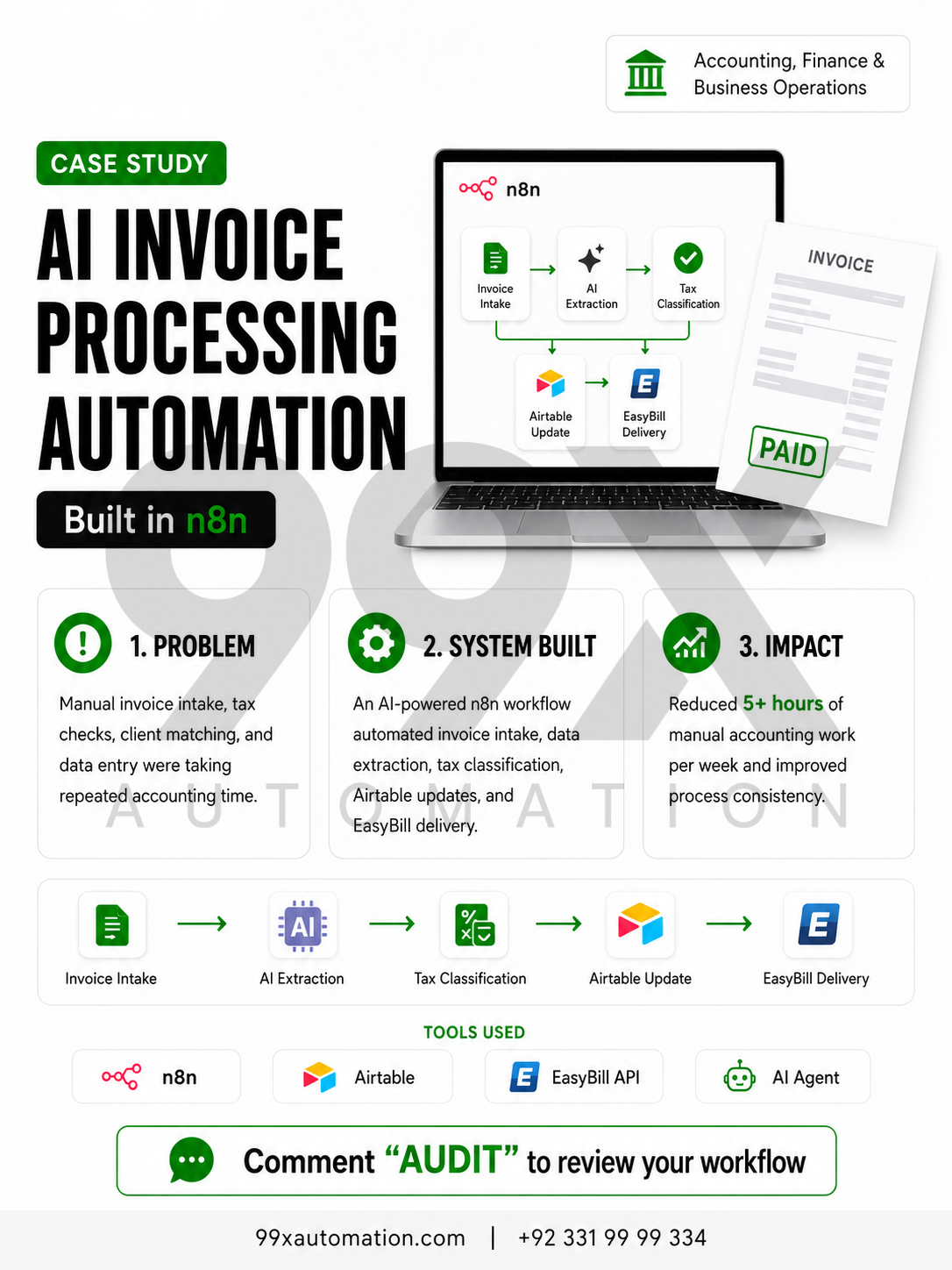
The team had to receive invoice details, review the information, extract important data, classify tax details, match the invoice with the right client record, update Airtable, and support invoice creation through EasyBill.
This created three main problems.
First, the process was repetitive.
The same steps had to be completed again and again for every invoice.
Second, the workflow depended heavily on manual checking.
That increased the chance of inconsistent data, missed details, and extra back-and-forth.
Third, the process took time away from higher-value accounting and operations work.
The team was spending hours on tasks that followed a predictable structure and could be automated.
This made the workflow a strong fit for AI invoice automation and business process automation.
The Solution: AI Invoice Processing Automation Built in n8n
We built an end-to-end invoice processing workflow using:
- n8n
- AI Agent
- Airtable
- EasyBill API
- API integrations
The automation was designed to handle the repeated steps from invoice intake to final delivery.
Instead of relying on manual copying and checking, the workflow connects the tools together and uses AI to support data extraction and classification.
This created a more structured and reliable invoice processing system.
How the AI Invoice Automation Workflow Works
The automation follows a clear step-by-step process.
1. Invoice Intake
The workflow starts when invoice data is received.
Instead of manually collecting and organizing every invoice detail, n8n acts as the automation layer that captures the incoming information and starts the workflow.
This creates a consistent starting point for the process.
2. AI-Assisted Data Extraction
Once the invoice information enters the workflow, the AI Agent extracts the important details.
This can include invoice-related information such as client details, invoice items, dates, amounts, and other key fields needed for processing.
AI is useful here because invoice data often needs to be interpreted before it can be organized properly.
The goal is not to remove human oversight completely.
The goal is to reduce repetitive manual extraction and make the process faster.
3. Tax Classification Logic
After the data is extracted, the workflow applies tax classification logic.
This helps organize invoice information based on the correct tax details.
For accounting and finance workflows, this step is important because small classification errors can create unnecessary corrections later.
By adding structured logic inside the automation, the process becomes more consistent.
4. Client Matching
Next, the system matches the invoice with the correct client record.
This is one of the most important parts of the workflow.
Manual client matching can take time, especially when teams are working with multiple clients, records, or invoice formats.
The automation helps connect the invoice with the right client data before updating the database.
5. Airtable Database Update
Once the invoice is processed and matched, the workflow updates Airtable.
Airtable acts as the structured database layer for the invoice records.
This keeps invoice information organized and easier to manage.
Instead of manually entering data into Airtable, the automation updates the relevant fields as part of the workflow.
6. EasyBill API Integration
The workflow then connects with the EasyBill API to support invoice creation and delivery.
This API integration helps move the processed invoice data into the next stage without manual re-entry.
This is where the workflow becomes more powerful.
It does not just extract data.
It connects the entire process from intake to delivery.
7. Automated Invoice Delivery
The final step supports the invoice delivery process.
Once the invoice has been created and checked through the workflow, the system helps move it toward delivery.
This reduces the amount of manual coordination needed at the end of the process.
Tools Used in the Automation
This project used a combination of workflow automation, AI, database management, and API integration tools.
n8n
n8n was used as the main automation platform.
It connected the different steps, tools, and logic into one workflow.
For this type of process, n8n is useful because it allows multiple systems to work together inside a single automated flow.
AI Agent
The AI Agent supported data extraction and interpretation.
It helped reduce manual effort around reading invoice details and organizing key information.
Airtable
Airtable was used as the database layer.
It stored and updated invoice and client-related records in a structured format.
EasyBill API
The EasyBill API supported invoice creation and delivery.
This allowed the workflow to connect invoice processing with the final output stage.
API Integration
API integration was used to connect the different tools and move data between systems.
This is what turned the workflow from a simple automation into an end-to-end invoice processing system.
The Result: 5+ Hours of Manual Accounting Work Reduced Per Week
The most important result from this project was operational.
The automation helped reduce more than 5 hours of manual accounting work per week.
That time savings came from automating repeated tasks such as:
- Invoice intake
- Data extraction
- Tax classification
- Client matching
- Airtable updates
- Invoice delivery support
But the value was not only time saved.
The workflow also helped improve process consistency.
When repetitive steps are handled through a structured automation, the team can spend less time switching between tools and more time focusing on work that requires judgment.
This is the practical value of AI automation.
It is not about replacing the accounting team.
It is about removing repetitive bottlenecks from the workflow so the team can work more efficiently.
Why Invoice Processing Is a Strong Automation Opportunity
Invoice processing is often a good candidate for automation because it usually follows a repeatable structure.
Most invoice workflows include similar steps:
- Receive the invoice
- Extract the data
- Check the details
- Match the client
- Update records
- Create or send the invoice
- Track the status
When a workflow is repeated frequently and follows a predictable process, automation can help reduce manual workload.
This is especially useful for accounting teams, finance teams, agencies, operations teams, and service businesses that handle recurring invoices.
Even if the workflow still needs human review, automation can reduce the amount of manual preparation work required before that review happens.
What This Case Study Shows About AI Automation
This project is a good example of practical AI automation.
It was not about adding AI for the sake of using AI.
It was about identifying a real business bottleneck and building a system around it.
The automation worked because the workflow had:
- Repetitive manual steps
- Structured data movement
- Clear decision logic
- Multiple connected tools
- A measurable time-saving opportunity
That is where AI automation becomes valuable.
When AI is connected to a real workflow, it can support better operations, reduce repeated work, and improve process speed.
Who Can Benefit From This Type of Automation?
This type of invoice processing automation can be useful for:
- Accounting firms
- Finance teams
- Agencies
- Consultants
- B2B service businesses
- Operations teams
- Businesses handling recurring invoices
- Teams using Airtable, CRMs, spreadsheets, or accounting tools manually
The exact workflow will be different for every business.
Some teams may need invoice intake automation.
Some may need document extraction.
Some may need CRM or database updates.
Others may need accounting software or API integrations.
The right automation depends on the actual process, tools, and bottlenecks inside the business.
Key Takeaway
The biggest lesson from this project is simple:
If a business process is repeated every week, follows a clear structure, and moves data between tools, it may be a strong automation opportunity.
In this case, invoice processing was rebuilt into an AI-powered workflow using n8n, Airtable, EasyBill API, and an AI Agent.
The system reduced 5+ hours of manual accounting work per week and made the invoice workflow more consistent.
That is the kind of AI automation that creates real operational value.
Not hype. Not replacement. Just a better workflow.
Need Help Finding Automation Opportunities in Your Workflow?
If your team is still manually copying invoice data, updating spreadsheets, matching client records, or moving information between tools, there may be automation opportunities in your workflow.
99x Automation helps businesses turn manual processes into custom AI-powered systems.
Comment “AUDIT” or visit:
99xautomation.com
to review your workflow and identify where automation can reduce repetitive work.
메타데이터
- post_id
- 8d8eb631228c
- slug
- ai-invoice-processing-automation-in-n8n-how-we-reduced-5-hours-of-manual-accounting-work-per-week-8d8eb631228c
- url
- https://medium.com/@99xautomation/ai-invoice-processing-automation-in-n8n-how-we-reduced-5-hours-of-manual-accounting-work-per-week-8d8eb631228c
- canonical_url
- https://medium.com/@99xautomation/ai-invoice-processing-automation-in-n8n-how-we-reduced-5-hours-of-manual-accounting-work-per-week-8d8eb631228c
- author_url
- https://medium.com/@99xautomation
- status
- ok
- fetched_at
- 2026-06-09 15:37:30