How Traffic Flows Through Kubernetes Services
(A Deep Dive into kube-proxy and iptables)
How Traffic Flows Through Kubernetes Services
(A Deep Dive into kube-proxy and iptables)
If you’ve worked with Kubernetes for a while, you’ve probably experienced this:
You deploy Pods, create a Service, and everything just works. Requests go in, responses come back, no questions asked.
But the moment something breaks maybe traffic works from one Pod but not another, or only on certain nodes that “magic” quickly turns into confusion.
At that point, understanding how traffic actually flows inside Kubernetes becomes extremely important.
This article is meant to explain that in a simple, without skipping the real details.
To ground our theory in reality, let’s look at a practical environment. We have a simple application, latte, exposed via three different Service types in our cluster:
master-0:~ # kubectl get svc,deploy,pods -n coffee -o wide
NAME               TYPE           CLUSTER-IP      EXTERNAL-IP   PORT(S)          AGE   SELECTOR
service/latte      ClusterIP      10.43.36.117    <none>        8080/TCP         31m   app=latte
service/latte-lb   LoadBalancer   10.43.73.89     x.x.x.x       8080:30249/TCP   22m   app=latte
service/latte-np   NodePort       10.43.253.26    <none>        8080:31859/TCP   22m   app=latte

NAME                    READY   UP-TO-DATE   AVAILABLE   AGE   CONTAINERS   IMAGES   SELECTOR
deployment.apps/latte   1/1     1            1           32m   nginx        nginx    app=latte
NAME                             READY   STATUS    RESTARTS   AGE   IP           NODE       NOMINATED NODE   READINESS GATES
pod/latte-86c8dd69bd-t9hm4       1/1     Running   0          32m   10.42.0.37   master-0   <none>           <none>
Let’s follow a packet’s journey for each of these Service types to see exactly how it reaches 10.42.0.37.
1. The ClusterIP Service
At the core of Kubernetes networking is the ClusterIP. It is the simplest type of Service, designed to provide stable, internal connectivity between Pods.
When a client Pod wants to speak to another application, it uses the Service’s virtual IP (VIP) the ClusterIP. This packet never actually exits onto the physical network with that destination IP. Instead, the “magic” happens right on the node where the client Pod resides, executed silently in the node’s kernel.
This interception is orchestrated by kube-proxy.
The Kube-Proxy Control Plane
Kube-proxy isn’t the data path itself; it’s the intelligence configuring the data path. Its main job is to watch the Kubernetes API Server for changes to Services and their corresponding Endpoints (the actual Pod IPs).
When a Service is created, kube-proxy updates the iptables rules on every node. This ensures that the node’s kernel knows what to do when it sees a packet destined for a Service VIP.
To understand the flow, we must distinguish between the kube-proxy and the iptables:
The kube-proxy: A process running on every node. it doesn’t touch packets. Instead, it watches the Kubernetes API and writes a “map” of rules into the node’s kernel.
The Netfilter/iptables: A framework inside the Linux Kernel. It follows the map drawn by kube-proxy to intercept, redirect, and rewrite every packet at lightning speed.
The Traffic Flow:
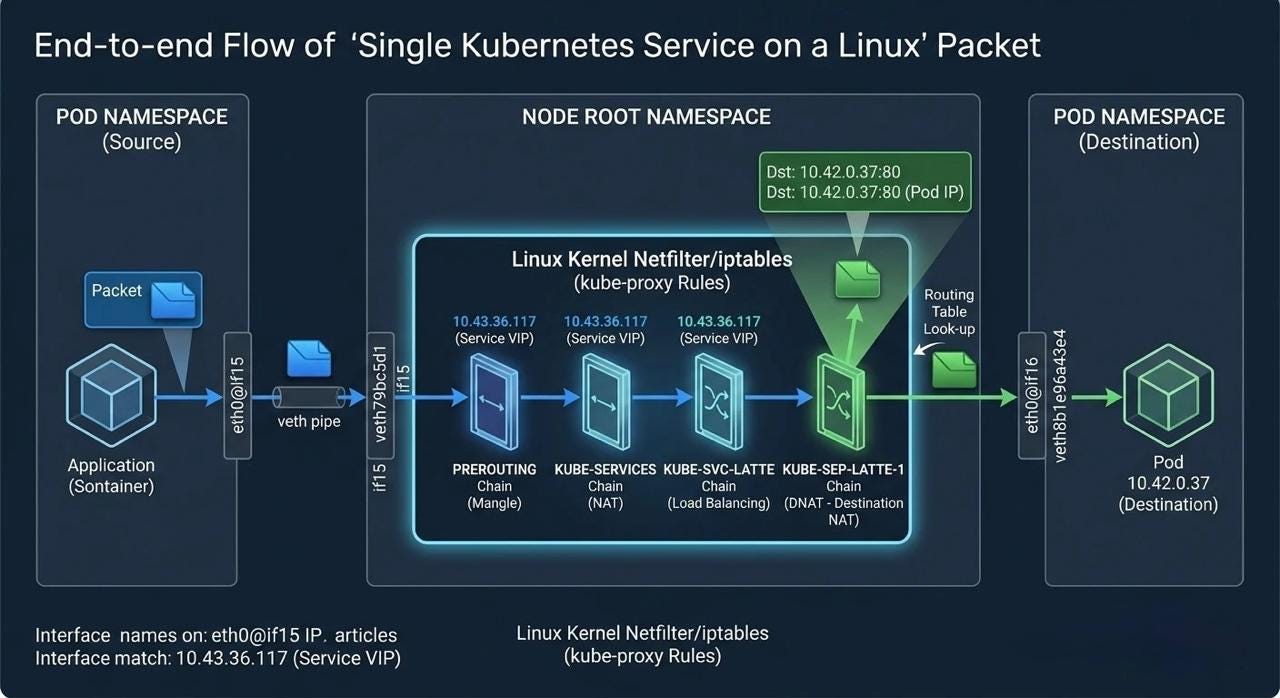
The ClusterIP is a virtual IP (VIP). It doesn’t live on any network interface; it exists only as a rule in the kernel’s memory. When a client Pod sends traffic to 10.43.36.117:8080, here is the exact chain reaction:
- Request Initiation: The Exit (Pod Namespace)
A Client Pod sends traffic to the ClusterIP (10.43.36.117:8080).The packet starts inside the client Pod. Since the destination VIP isn’t local, the packet is sent out via the veth pair to the Node’s root namespace.The packet reaches the node’s kernel.
07:14:08.861329 IP 10.42.0.40.38472 > 10.43.36.117.8080: Flags [S], seq 1948362750, win 64860, options [mss 1410,sackOK,TS val 2621974609 ecr 0,nop,wscale 7], length 0
master-0:~ # kubectl get pods -o wide
NAME      READY   STATUS    RESTARTS   AGE   IP           NODE       NOMINATED NODE   READINESS GATES
testpod   1/1     Running   0          40m   10.42.0.38   master-0   <none>           <none>
master-0:~ #
master-0:~ # kubectl exec -it testpod -- /bin/bash
root@testpod:/#
root@testpod:/# curl -k http://10.43.36.117:8080 -I
HTTP/1.1 200 OK
Server: nginx/1.29.7
Date: Fri, 03 Apr 2026 06:22:15 GMT
Content-Type: text/html
Content-Length: 896
Last-Modified: Tue, 24 Mar 2026 15:38:34 GMT
Connection: keep-alive
ETag: "69c2affa-380"
Accept-Ranges: bytes
root@testpod:/#
2. The PREROUTING Chain: As the packet enters the Node’s network stack, it hits the **PREROUTING chain. This chain intercepts and immediately handing the packet to the `KUBE-SERVICES`** chain.
07:14:08.861336 IP 10.42.0.40.38472 > 10.43.36.117.8080: Flags [S], seq 1948362750, win 64860, options [mss 1410,sackOK,TS val 2621974609 ecr 0,nop,wscale 7], length 0
master-0:~ # sudo iptables -t nat -L PREROUTING -n -v
Chain PREROUTING (policy ACCEPT 75 packets, 13022 bytes)
 pkts bytes target     prot opt in     out     source               destination
  571 77869 cali-PREROUTING  all  --  *      *       0.0.0.0/0            0.0.0.0/0            /* cali:6gwbT8clXdHdC1b1 */
  572 77929 KUBE-SERVICES  all  --  *      *       0.0.0.0/0            0.0.0.0/0            /* kubernetes service portals */
    7   420 CNI-HOSTPORT-DNAT  all  --  *      *       0.0.0.0/0            0.0.0.0/0            ADDRTYPE match dst-type LOCAL
master-0:~ #
3. Service Matching(KUBE-SERVICES):
This is the “Master Menu” of all cluster VIPs. The kernel sees the destination is 10.43.36.117. It finds the matching rule and says: This belongs to the Latte Service. Jump to the KUBE-SVC-LATTE chain.
master-0:~ # sudo iptables -t nat -L KUBE-SERVICES -n -v | grep latte
    0     0 KUBE-SVC-44S2PMO3J2FH6P6U  tcp  --  *      *       0.0.0.0/0            10.43.253.26         /* coffee/latte-np cluster IP */ tcp dpt:8080
    2   120 KUBE-SVC-XFKTK7YZPF3KAQBR  tcp  --  *      *       0.0.0.0/0            10.43.36.117         /* coffee/latte cluster IP */ tcp dpt:8080
    0     0 KUBE-SVC-VWHDR3KPKTWGIWYG  tcp  --  *      *       0.0.0.0/0            10.43.73.89          /* coffee/latte-lb cluster IP */ tcp dpt:8080
master-0:~ #
4. Endpoint Selection(KUBE-SVC-XXXX): Inside the KUBE-SVC-XXXX chain, load balancing occurs. iptables uses a randomized probability selection to pick a healthy backend Pod, jumping to a Service Endpoint chain (KUBE-SEP-YYYY).
master-0:~ # sudo iptables -t nat -L KUBE-SVC-XFKTK7YZPF3KAQBR -n -v | grep latte
    0     0 KUBE-MARK-MASQ  tcp  --  *      *      !10.42.0.0/16         10.43.36.117         /* coffee/latte cluster IP */ tcp dpt:8080
    6   360 KUBE-SEP-YO5OCPTIA7ECVJNS  all  --  *      *       0.0.0.0/0            0.0.0.0/0            /* coffee/latte -> 10.42.0.37:80 */
master-0:~ #
5. Destination NAT (DNAT)(KUBE-SEP-YYYY): This is the critical step. The KUBE-SEP-YYYY chain applies DNAT, replacing the VIP (10.43.36.117:8080) with the actual Pod IP and Target Port (10.42.0.37:80).
07:14:08.861334 calie348bef9edc In ifindex 44 de:d1:68:e0:c8:b2 ethertype IPv4 (0x0800), length 80: 10.42.0.40.38472 > 10.43.36.117.8080: Flags [S], seq 1948362750, win 64860, options [mss 1410,sackOK,TS val 2621974609 ecr 0,nop,wscale 7], length 0 07:14:08.861398 cali8b1e96a43e4 Out ifindex 41 ee:ee:ee:ee:ee:ee ethertype IPv4 (0x0800), length 80: 10.42.0.40.38472 > 10.42.0.37.80: Flags [S], seq 1948362750, win 64860, options [mss 1410,sackOK,TS val 2621974609 ecr 0,nop,wscale 7], length 0
The packet entered the kernel’s PREROUTING chain as a “Service” request and exited as a “Pod” request. This is iptables and kube-proxy performing Destination NAT
master-0:~ # sudo iptables -t nat -L KUBE-SEP-YO5OCPTIA7ECVJNS -n -v | grep latte
    0     0 KUBE-MARK-MASQ  all  --  *      *       10.42.0.37           0.0.0.0/0            /* coffee/latte */
    6   360 DNAT       tcp  --  *      *       0.0.0.0/0            0.0.0.0/0            /* coffee/latte */ tcp to:10.42.0.37:80
master-0:~ #
6: Final Delivery (Routing Table):
- Routing: The packet, now carrying a real Pod IP, the packet exits the
iptableslogic and hits the standard Linux Routing Table. The CNI (Calico/Flannel) sees the destination is10.42.0.37and delivers it to the Pod. - Return Path: Reply packets use connection tracking (
conntrack) to reverse the NAT, ensuring the original client Pod sees the response coming from the ClusterIP it originally called.
2. The NodePort Service
Use Case: Exposing a Service on a static port (e.g., 31859) across every Node’s IP.
The Connection Logic:
- Entry Point: Traffic hits
NodeIP:31859. - Handoff: The
PREROUTINGchain identifies this as a NodePort request and jumps to the**KUBE-NODEPORTS** chain.
master-0:~ # sudo iptables -t nat -L KUBE-NODEPORTS -n -v
Chain KUBE-NODEPORTS (1 references)
 pkts bytes target     prot opt in     out     source               destination
    0     0 KUBE-EXT-44S2PMO3J2FH6P6U  tcp  --  *      *       0.0.0.0/0            0.0.0.0/0            /* coffee/latte-np */ tcp dpt:31859
    0     0 KUBE-EXT-VWHDR3KPKTWGIWYG  tcp  --  *      *       0.0.0.0/0            0.0.0.0/0            /* coffee/latte-lb */ tcp dpt:30249
master-0:~ #
Reusing Logic: Once the port is matched, it jumps into the exact same KUBE-SVC-LATTE chain used by ClusterIP.
master-0:~ # sudo iptables -t nat -L KUBE-EXT-44S2PMO3J2FH6P6U -n -v
Chain KUBE-EXT-44S2PMO3J2FH6P6U (1 references)
 pkts bytes target     prot opt in     out     source               destination
    0     0 KUBE-MARK-MASQ  all  --  *      *       0.0.0.0/0            0.0.0.0/0            /* masquerade traffic for coffee/latte-np external destinations */
    0     0 KUBE-SVC-44S2PMO3J2FH6P6U  all  --  *      *       0.0.0.0/0            0.0.0.0/0
master-0:~ #
master-0:~ # sudo iptables -t nat -L KUBE-SVC-44S2PMO3J2FH6P6U -n -v
Chain KUBE-SVC-44S2PMO3J2FH6P6U (2 references)
 pkts bytes target     prot opt in     out     source               destination
    0     0 KUBE-MARK-MASQ  tcp  --  *      *      !10.42.0.0/16         10.43.253.26         /* coffee/latte-np cluster IP */ tcp dpt:8080
    0     0 KUBE-SEP-3RLCWZUJJH63N4HP  all  --  *      *       0.0.0.0/0            0.0.0.0/0            /* coffee/latte-np -> 10.42.0.37:80 */
master-0:~ #
master-0:~ #
master-0:~ #
master-0:~ # sudo iptables -t nat -L KUBE-SEP-3RLCWZUJJH63N4HP -n -v
Chain KUBE-SEP-3RLCWZUJJH63N4HP (1 references)
 pkts bytes target     prot opt in     out     source               destination
    0     0 KUBE-MARK-MASQ  all  --  *      *       10.42.0.37           0.0.0.0/0            /* coffee/latte-np */
    0     0 DNAT       tcp  --  *      *       0.0.0.0/0            0.0.0.0/0            /* coffee/latte-np */ tcp to:10.42.0.37:80
master-0:~ #
SNAT (Source NAT): If the Pod is on a different node, the entry node performs SNAT so the Pod knows to send the reply back to the entry node, preventing the packet from getting “lost” in asymmetric routing.
3. The LoadBalancer Service
A LoadBalancer is simply an abstraction built on top of the others. Hierarchy: LB External IP ➔ NodePort ➔ ClusterIP ➔ Pod IP
Traffic Flow:
External Client → LoadBalancer IP
Cloud Provider Layer: The external client hits the LoadBalancer’s IP. The Cloud Load Balancer (configured by the Cloud Controller Manager) selects a healthy node in your cluster.
Node Entry: The LB forwards the traffic to that node’s NodeIP:NodePort.
Standard NodePort Flow: From this point, the flow is identical to a NodePort service:
PREROUTING —> KUBE-NODEPORTS (match NodePort) — > KUBE-SVC-XXXX (Service Load Balancing) —> KUBE-SEP-YYYY (Endpoint) — > DNAT PodIP:TargetPort
The packet is routed to the Pod; replies return via the node and then out through the load balancer to the client.
Final Mental Model
All three services are just layers built on top of each other:
ClusterIP → Internal routing NodePort → External access via nodes LoadBalancer → External access via cloud
But internally, every request eventually becomes:
iptables → choose Pod → DNAT → deliver
Final Thoughts:
At first glance, Kubernetes Services feel like simple abstractions, just a way to expose Pods.
But as we’ve seen, every request follows a precise journey:
Intercept → Match → Rewrite → Route → Respond
What looks like a single IP is actually a carefully orchestrated system powered by:
- iptables rules
- connection tracking
- and kube-proxy continuously wiring everything together
Once you understand this flow, something important changes:
You stop treating Kubernetes networking as a black box.
Instead, you can trace, debug, and reason about traffic with confidence.
And that’s the difference between using Kubernetes… and truly understanding it.
References
메타데이터
- post_id
- 8dfd6208faa6
- slug
- how-traffic-flows-through-kubernetes-services-8dfd6208faa6
- url
- https://medium.com/@sheevaakanakala/how-traffic-flows-through-kubernetes-services-8dfd6208faa6
- canonical_url
- https://medium.com/@sheevaakanakala/how-traffic-flows-through-kubernetes-services-8dfd6208faa6
- author_url
- https://medium.com/@sheevaakanakala
- status
- ok
- fetched_at
- 2026-08-03 02:18:31


