The AI Slack Agent Replacing Newsletters for Modern Teams
The Slack AI daily report agent that delivers reports on anything directly to your Slack workspace on any schedule you choose.
The AI Slack Agent Replacing Newsletters for Modern Teams
The Slack AI daily report agent that delivers reports on anything directly to your Slack workspace on any schedule you choose.
Almost three months ago I published a very popular article titled “*How I Built an AI Agent That Briefs Me Like the President Every Morning”.* Within 48 hours I had several replies and DMs from developers who wanted to extend the agent, and from readers who just wanted a setup that wasn’t technical. It reminded me of how OpenClaw got released (very technical), and then many people simply just wanted a version where they didn’t need to “npm install” or JavaScript their way through integrations!
THERE IS NOW!
Here if you don’t want to continue reading: **Add to Slack 👈**
Jose Mourinho a.k.a The Special One once said:
“See where they play, how they play, if they play. That’s football heritage.”
He was talking about scouting players in their natural environment, understanding people by watching them where they actually operate, not where you wish they did.
The same logic applies here. If your team lives in Slack and for most teams, it does, that is where the briefing and reports should arrive. Not in a dashboard, nobody remembers to log into, not in an email that gets buried under twelve other emails before you finish your coffee. In Slack, where the work already happens.
This Slack AI daily report & research agent is that simpler version. No code required. The setup is simple: click Add to Slack, Allow, add your API key (free $20 credits, no cc), done.
You can just **Add to Slack 👈**
What the Slack AI Briefing Agent Does
The agent lives in your Slack workspace. You tell it what you want to track: a topic, a company, a regulatory area, a research domain, a competitor and it delivers an intelligence report on whatever schedule you set.
Daily. Weekly. Every Monday morning before standup. Whenever you ask it directly.
Each automated report includes:
- Key findings. The things that actually moved, broken out clearly
- Summary. Readable in under two minutes, no jargon
- Major Source links. Every claim is linked to the original source.
- PDF file. Formatted, shareable, downloadable file
No dashboard to log into. No email to hunt through. The briefing shows up in the channel your team is already in all day. You can also set it up to show up in your DMs.
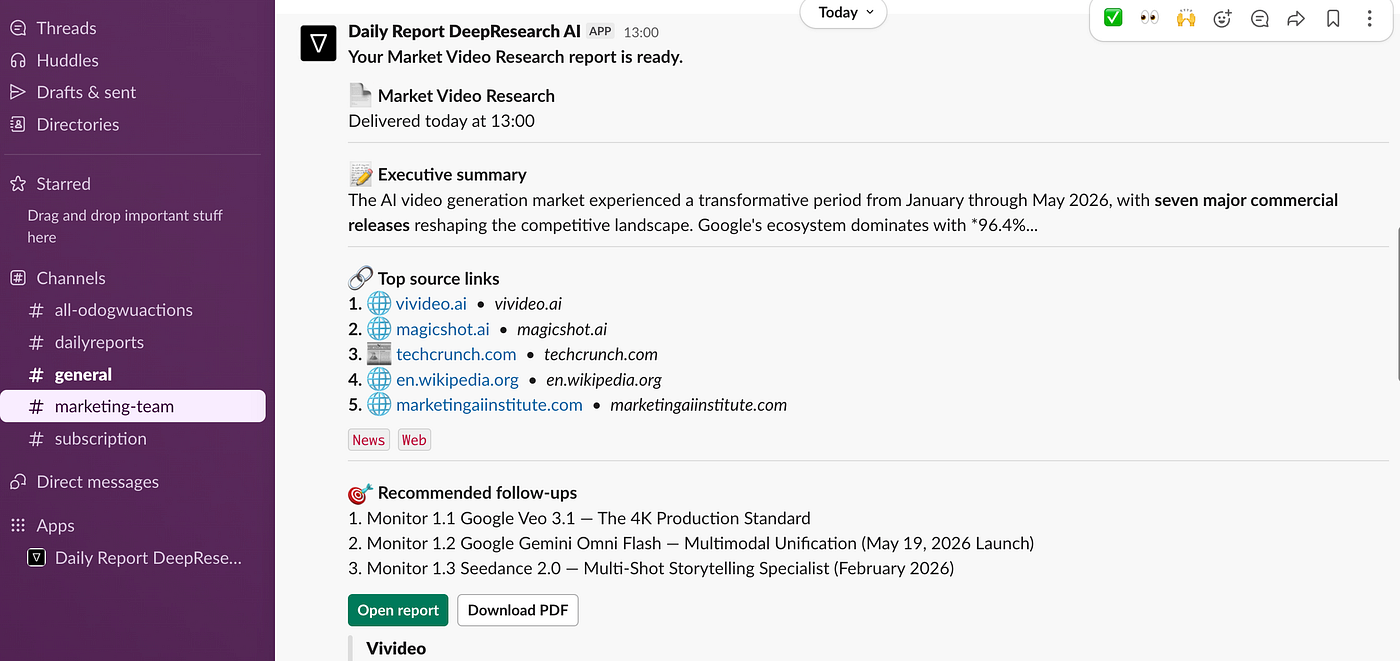
Daily Report look once it delivers on Slack
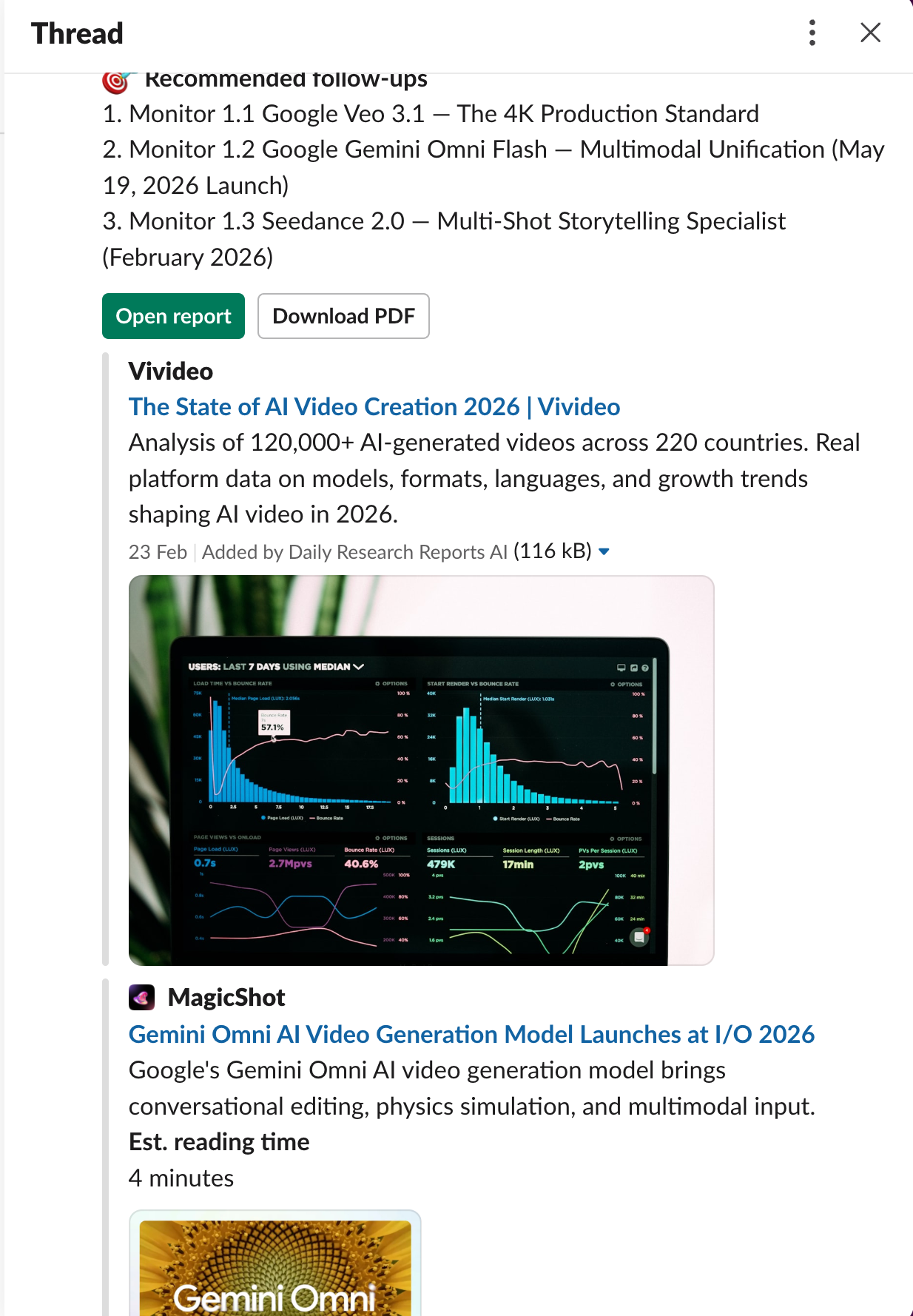
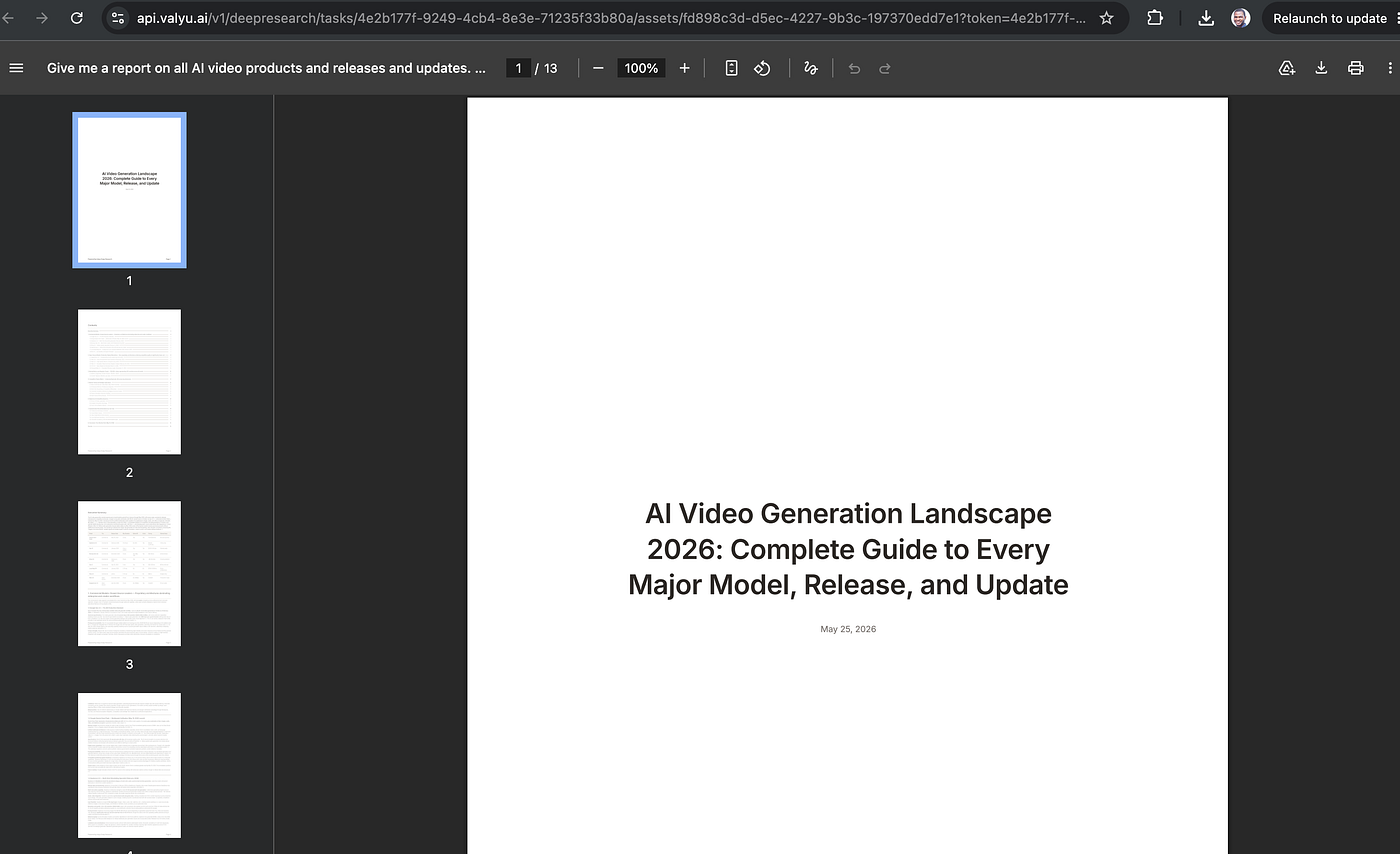
Then the reply on the thread. You can open the report or download as PDF
How to Set Up the Slack Briefing Bot (Two Minutes)
- Add the agent to your Slack workspace
- Click Authorize
- Add your Valyu API key. You get free $20 credits immediately!
- Tell it what to track and how often
That is the entire setup. No YAML files. No infrastructure. No deployment pipeline. One workspace, one key, one conversation to configure it. You can set it up in as many workspaces as you want!
From there, you configure topics to report on in plain language in the “Research prompt” field:
- “Brief me every Monday on competitor product launches in B2B SaaS.”
- “Send me a daily summary of new clinical trial results for GLP-1 drugs.”
- “Give me a roundup of SEC enforcement actions in the past week.”
- “Security breaches around software and AI products”
- “Send me the teams playing, team scores, players that scored, and any special event that happened on the pitch during this 2026 World Cup campaign.”
[embed]
Ten Use Cases for Automated Slack Intelligence Reports
There are so many uses. Many more that I did not fully anticipate when I built the original version a few months ago.
Market intelligence. Teams tracking competitor moves, pricing changes, product launches, and executive hires. The kind of signal that matters for competitive positioning but never gets monitored systematically because nobody has time to do it manually.
Competitor monitoring. Not just news coverage, primary source signals. Job postings that reveal strategic direction. Funding disclosures. Partnership announcements. Regulatory filings competitors had to make.
Regulatory tracking. Compliance teams and legal departments staying current on rule changes, enforcement actions, and guidance documents. Missing a regulatory update because it dropped on a Thursday afternoon is a real operational risk.
Fundraising signals. Investors and founders tracking funding rounds, M&A activity, and company formation in a specific space. The VC who wants to know when a company in her portfolio’s category raises a seed round.
Literature reviews. Researchers staying current on published work in a field without manually checking databases every week. The biomedical researcher who needs to know when new clinical trial results land for a drug class they follow.
Security updates. CVEs, vendor patches, threat intelligence, breach disclosures filtered to what is relevant to your stack, not every security newsletter on the planet.
Customer and partner monitoring. News coverage, press releases, job postings that signal strategic direction from the companies that matter to you.
Internal team briefs. Leadership teams that want a weekly digest on a topic domain. A briefing or report that shows up in Slack on Friday afternoon, ready to read over the weekend. Every morning before you start work for the day.
Job Hunting. Staying current on all the job openings from hundreds of companies and job openings around the world that apply specifically to your specialty and domain knowledge.
Sports Monitoring & World Cup games. The World Cup is starting in less than 17 days. Stay abreast every game, event, and situation happening even as you work. All my football lovers, don’t miss this!
The common thread across every use case. All of it was manual before. Someone was doing it by hand, skipping it entirely, or paying for a solution that covered one slice of the picture.
Slack AI Briefing Agent vs. Email Newsletter: What’s the Difference?
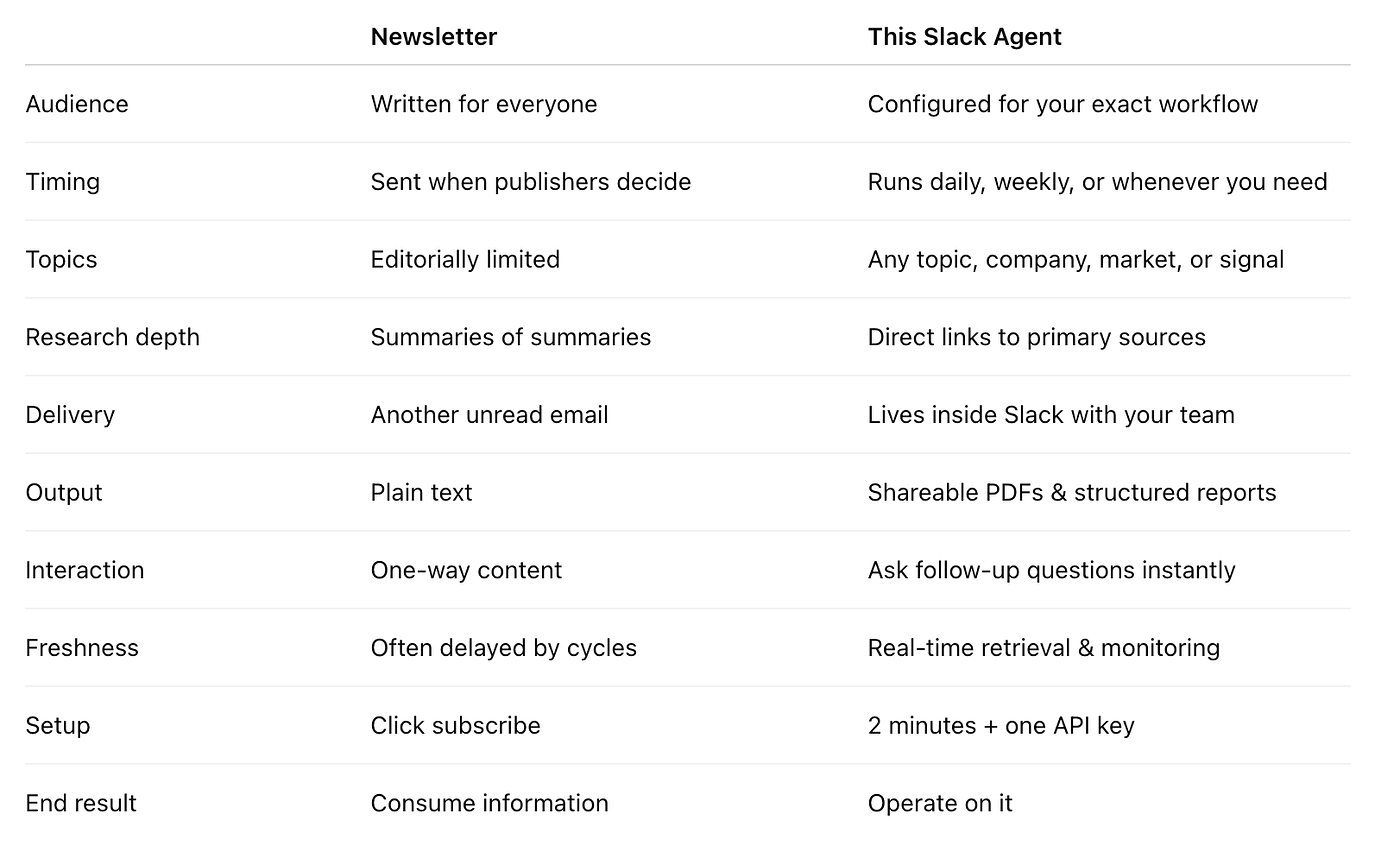
Newsletters are written for the broadest possible audience in a space. This Slack daily report agent is configured for what is relevant to you, your company, your competitors, your research area, your regulatory domain.
The presidential daily brief is not interesting because it is comprehensive. It is interesting because it is tailored. That is what this also delivers: not a general briefing on “fintech,” but a briefing on the three competitors you are watching, the regulatory development you are tracking, and the market signal that matters this quarter.
Frequently Asked Questions
What is the Slack AI briefing agent?
It is an automated intelligence reporting tool that lives inside your Slack workspace. You configure what topics to track and how often, and it delivers structured reports with summaries, key findings, source links, and a PDF on the schedule you choose.
How long does setup take?
Under two minutes. Add the agent to Slack, click Authorize, add your API key, and tell it what you want to track. No coding, no infrastructure, no deployment.
What topics can the briefing agent track?
Any topic you define in plain language. Competitor moves, regulatory changes, funding rounds, clinical trial results, security vulnerabilities, market signals, academic research, customer news, or anything else. The agent searches across specialised / proprietary data sources powered by Valyu to find relevant information.
How often does it send reports?
You choose the schedule: daily, weekly, every Monday morning, every Friday afternoon, or on demand whenever you ask. You can run multiple briefings on different schedules for different topics.
What is included in each automated report?
Every report includes a plain-language summary, key findings broken out clearly, source links for every claim, and a downloadable PDF formatted for sharing or filing.
How is this different from a newsletter or Google Alerts?
Newsletters cover the broadest audience for a topic; this agent covers the specific topic you define. Google Alerts surface news articles; this agent hits properly indexed sources including SEC filings, PubMed research, clinical trial databases, and regulatory filings. The result is a deepresearch report configured specifically for your decisions, not a general digest.
Do I need to know how to code?
No. The onboarding is: add to Slack, authorize, add your API key. Configuration is done in plain language directly in Slack. The original article this spawned from was a technical deep-dive for developers who wanted to build their own version. This is the version that requires none of that.
메타데이터
- post_id
- 8e18077d19be
- slug
- the-ai-slack-agent-replacing-newsletters-for-modern-teams-8e18077d19be
- url
- https://medium.com/@unicodeveloper/the-ai-slack-agent-replacing-newsletters-for-modern-teams-8e18077d19be
- canonical_url
- https://medium.com/@unicodeveloper/the-ai-slack-agent-replacing-newsletters-for-modern-teams-8e18077d19be
- author_url
- https://medium.com/@unicodeveloper
- status
- ok
- fetched_at
- 2026-07-10 10:20:21