Video Quality Enhancement Is a Pipeline Problem, Not a SwiftUI Modifier
A video enhancement feature usually starts with a product sentence: “Can we make playback look sharper?” The engineering answer should not…
Video Quality Enhancement Is a Pipeline Problem, Not a SwiftUI Modifier
A video enhancement feature usually starts with a product sentence: “Can we make playback look sharper?” The engineering answer should not start with “add a filter.” It should start with a boundary question: where in the playback pipeline are we allowed to touch the frame?
On iOS, SwiftUI’s VideoPlayer is useful, but it is not the architecture for image quality enhancement. Apple defines VideoPlayer as a SwiftUI view that displays content from a player and provides a native playback UI. That makes it a presentation layer, not the place where denoising, sharpening, tone mapping, or super-resolution should live.
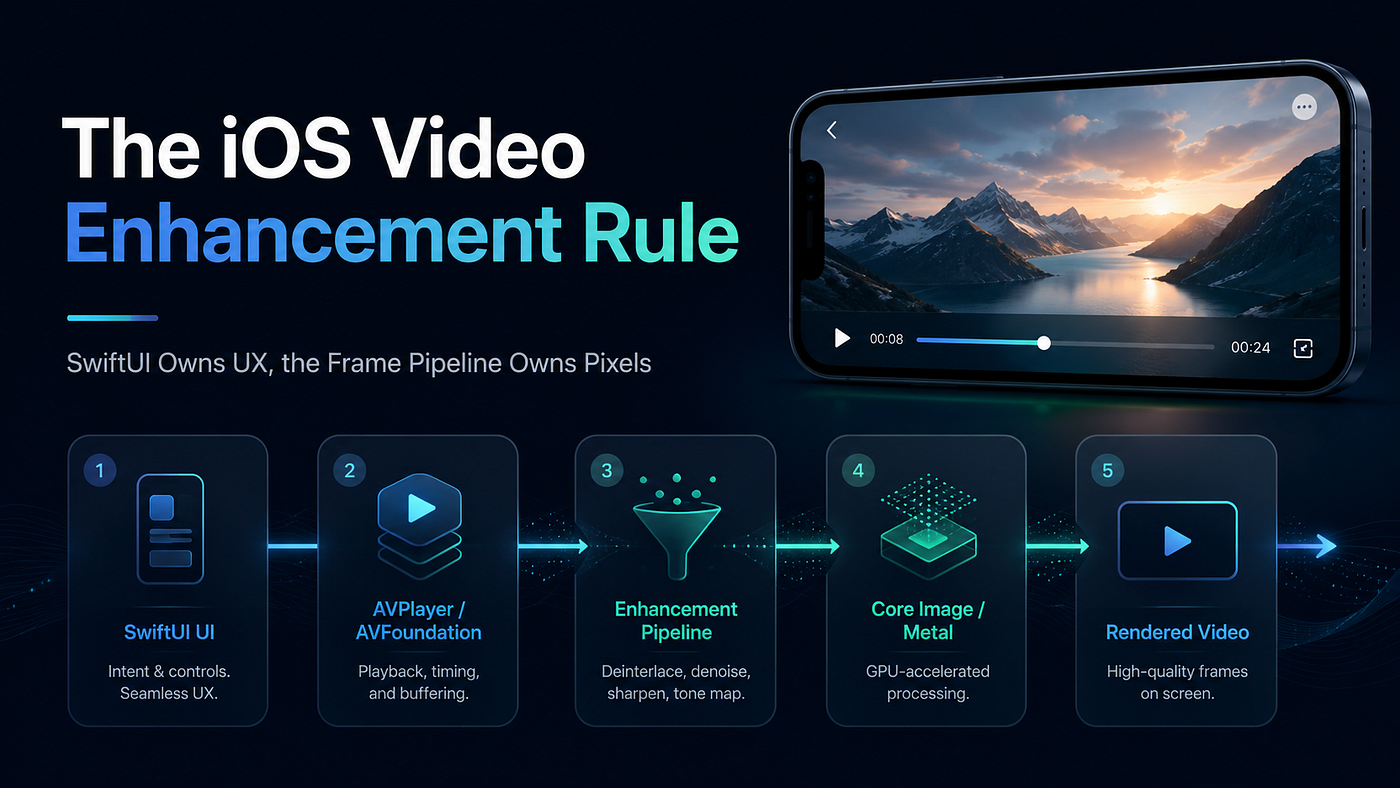
The practical idea is simple: SwiftUI owns playback experience; AVFoundation/Core Image/Metal owns pixels.
The Architecture That Actually Scales
A clean iOS video enhancement architecture usually looks like this:
SwiftUI View
  -> Player State / User Settings
  -> AVPlayerItem
  -> Video Enhancement Pipeline
  -> Core Image / Metal / Core ML
  -> Rendered Playback
The important part is not which algorithm comes first. The important part is that enhancement is treated as a replaceable pipeline, not as UI decoration.
For asset-based playback, Apple provides AVMutableVideoComposition, which can be configured to apply Core Image filters to each video frame of an asset. That gives us a practical entry point for lightweight enhancement without building a custom renderer on day one. Core Image itself is designed for high-performance processing of still and video images, so it fits the “frame processing layer” much better than SwiftUI modifiers.
Core Example: A SwiftUI Player With a Real Enhancement Boundary
Problem:
The app needs a “quality enhanced playback” toggle.
The risky approach is to let the SwiftUI view decide image processing details.
Better approach: keep SwiftUI declarative, but move the enhancement chain into a small pipeline object.
import SwiftUI
import AVKit
import CoreImage
import Observation

enum EnhancementMode {
    case off
    case balanced
}

@Observable
final class EnhancedPlayerModel {
    let player = AVPlayer()

    private let ciContext = CIContext(options: [
        .cacheIntermediates: false
    ])

    func load(url: URL, mode: EnhancementMode) {
        let asset = AVURLAsset(url: url)
        let item = AVPlayerItem(asset: asset)

        if mode == .balanced {
            item.videoComposition = makeBalancedEnhancement(for: asset)
        }

        player.replaceCurrentItem(with: item)
    }

    private func makeBalancedEnhancement(
        for asset: AVAsset
    ) -> AVMutableVideoComposition {
        AVMutableVideoComposition(asset: asset) { [ciContext] request in
            let source = request.sourceImage.clampedToExtent()

            let denoised = source.applyingFilter("CINoiseReduction", parameters: [
                "inputNoiseLevel": 0.02,
                "inputSharpness": 0.35
            ])

            let sharpened = denoised.applyingFilter("CISharpenLuminance", parameters: [
                "inputSharpness": 0.30
            ])

            let enhanced = sharpened.applyingFilter("CIColorControls", parameters: [
                "inputSaturation": 1.06,
                "inputContrast": 1.03
            ])

            let output = enhanced.cropped(to: request.sourceImage.extent)
            request.finish(with: output, context: ciContext)
        }
    }
}

struct EnhancedVideoScreen: View {
    @State private var model = EnhancedPlayerModel()
    @State private var mode: EnhancementMode = .balanced

    let url: URL

    var body: some View {
        VStack {
            VideoPlayer(player: model.player)

            Picker("Quality", selection: $mode) {
                Text("Off").tag(EnhancementMode.off)
                Text("Balanced").tag(EnhancementMode.balanced)
            }
            .pickerStyle(.segmented)
            .padding()
        }
        .task {
            model.load(url: url, mode: mode)
            model.player.play()
        }
        .onChange(of: mode) { _, newMode in
            model.load(url: url, mode: newMode)
            model.player.play()
        }
    }
}
This example is intentionally modest. It does not pretend to be a full professional video engine. But it shows the architectural boundary clearly.
SwiftUI only describes the screen and the user’s enhancement mode. The player model owns the AVPlayer. The enhancement pipeline is attached to the AVPlayerItem, where frame processing actually belongs. The UI does not know whether the implementation uses Core Image today, Metal tomorrow, or Core ML later.
That is the architectural win.
Why This Works
This works because it separates three responsibilities that are often mixed together:
UI state: SwiftUI
Playback object lifecycle: AVPlayer / AVPlayerItem
Frame transformation: Core Image / Metal / ML pipeline
Once these responsibilities are separated, quality enhancement becomes configurable instead of invasive. You can add a low-end device mode, disable enhancement under battery pressure, switch algorithm chains by content type, or replace Core Image with a Metal renderer without rewriting the playback screen.
There is also a performance lesson here. Apple’s Core Image performance guidance emphasizes pipeline-level thinking, including memory footprint and context usage. Apple’s WWDC material on optimizing Core Image for video apps specifically discusses building Core Image pipelines for video effects and reducing memory footprint when using CIContext.
So the senior engineer mindset is not “how many filters can I stack?” It is “how do I make the enhancement layer measurable, replaceable, and cheap enough to run during playback?”
One Limitation Worth Knowing
AVMutableVideoComposition with Core Image is a good starting point for asset-based enhancement, but it is not the final answer for every playback product. Apple’s HDR video material notes that AVFoundation can use built-in composition and Core Image filters, while custom compositors are relevant for more advanced HDR editing workflows.
If your product needs low-latency live playback, DRM-protected streams, custom subtitles, advanced HDR control, or AI super-resolution, you may need a lower-level pipeline using AVPlayerItemVideoOutput, Metal, VideoToolbox, or Core ML. The architecture above still helps because your SwiftUI layer remains unchanged while the processing backend evolves.
Practical Rule
Do not design video quality enhancement as a View feature. Design it as a frame pipeline with a UI switch.
If the team starts from SwiftUI modifiers, the feature will hit a wall quickly. If the team starts from pipeline ownership, each enhancement step becomes a controlled engineering decision.
Key Takeaways
VideoPlayeris the presentation layer; it should not own pixel-processing logic.- A scalable enhancement design separates UI state, playback lifecycle, and frame transformation.
- Core Image plus
AVMutableVideoCompositionis a practical first architecture for lightweight asset-based enhancement. - The best architecture is not the one with the most algorithms; it is the one where algorithms can be measured, replaced, and disabled safely.
- Interview friendly sentence: video enhancement is not about adding filters to a player view, it is about choosing the correct layer in the playback pipeline.
메타데이터
- post_id
- 8f4e48c2acae
- slug
- video-quality-enhancement-is-a-pipeline-problem-not-a-swiftui-modifier-8f4e48c2acae
- url
- https://medium.com/@foks.wang/video-quality-enhancement-is-a-pipeline-problem-not-a-swiftui-modifier-8f4e48c2acae
- canonical_url
- https://medium.com/@foks.wang/video-quality-enhancement-is-a-pipeline-problem-not-a-swiftui-modifier-8f4e48c2acae
- author_url
- https://medium.com/@foks.wang
- status
- ok
- fetched_at
- 2026-06-09 15:37:30