Transformer.js: Bringing AI to Your Browser
How a single JavaScript library is putting state-of-the-art machine learning models on the client side , no servers, no APIs, no data…
Transformer.js: Bringing AI to Your Browser
How a single JavaScript library is putting state-of-the-art machine learning models on the client side , no servers, no APIs, no data leaving the user’s device.
Photo by Growtika on Unsplash
The Problem with Server-Side AI
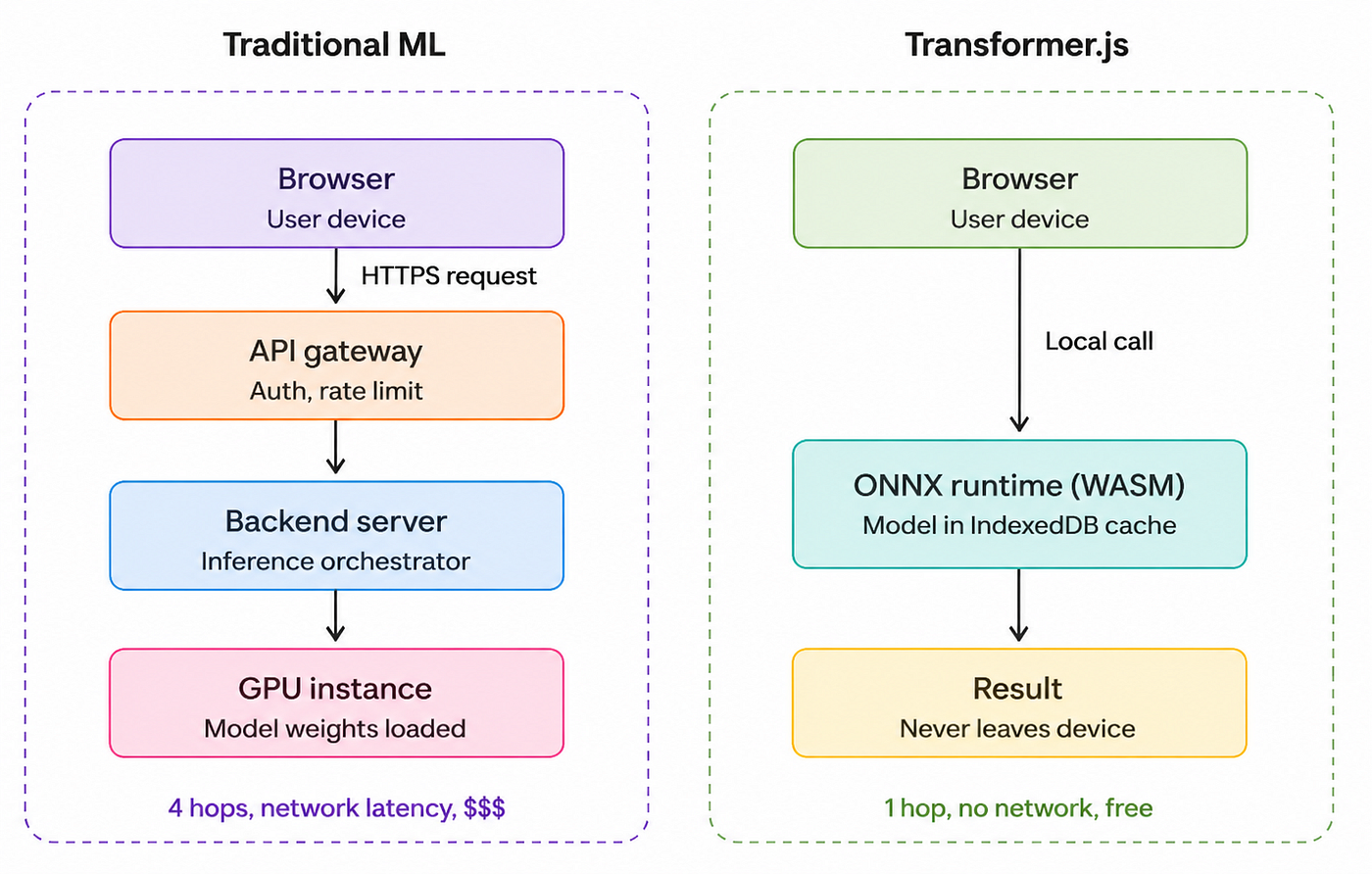
For years, integrating machine learning into a web application followed the same playbook: spin up a Python backend, load a model into memory, expose a REST API, handle authentication, manage rate limits, pay for GPU instances, and pray your inference latency stays under 500ms.
This architecture works, but it comes with friction:
- Privacy concerns - every inference request sends user data to your servers (or worse, to a third-party API like OpenAI).
- Cost - GPU instances are expensive, and inference costs scale linearly with users.
- Latency - a round trip to the server adds 100–300ms before the model even starts thinking.
- Offline support - impossible without a local model.
Enter Transformer.js a library that flips this model on its head by running transformer-based ML models directly in the browser (or Node.js) using WebAssembly and WebGPU.
What is Transformer.js?
Transformer.js is a JavaScript library developed by Xenova (now part of Hugging Face) that lets you run pre-trained transformer models directly in JavaScript environments. Under the hood, it uses ONNX Runtime Web to execute models compiled to the ONNX format, leveraging WebAssembly (WASM) for CPU inference and WebGPU for accelerated execution where available.
It’s designed to be a near drop-in equivalent of Hugging Face’s Python transformers library same API patterns, same model hub compatibility, but running entirely in JavaScript.
Key capabilities
- 300+ supported model architectures, including BERT, GPT-2, T5, Whisper, CLIP, DistilBERT, and Vision Transformers.
- Multi-modal support: text, vision, audio, and multimodal models.
- Quantization support for smaller model sizes (8-bit, 4-bit).
- Pipeline API that mirrors Hugging Face’s high-level Python interface.
- Works in browsers, Node.js, Deno, Bun, and even Electron apps.
How It Works Under the Hood
When you load a model with Transformer.js, here’s what happens:
- The library fetches the ONNX model weights from the Hugging Face Hub (or a local cache).
- It loads the model into an ONNX Runtime Web session.
- The tokenizer (also bundled) preprocesses your input into tensors.
- Inference runs locally on the user’s CPU via WASM, or GPU via WebGPU.
- The output tensors are decoded back into human-readable results.
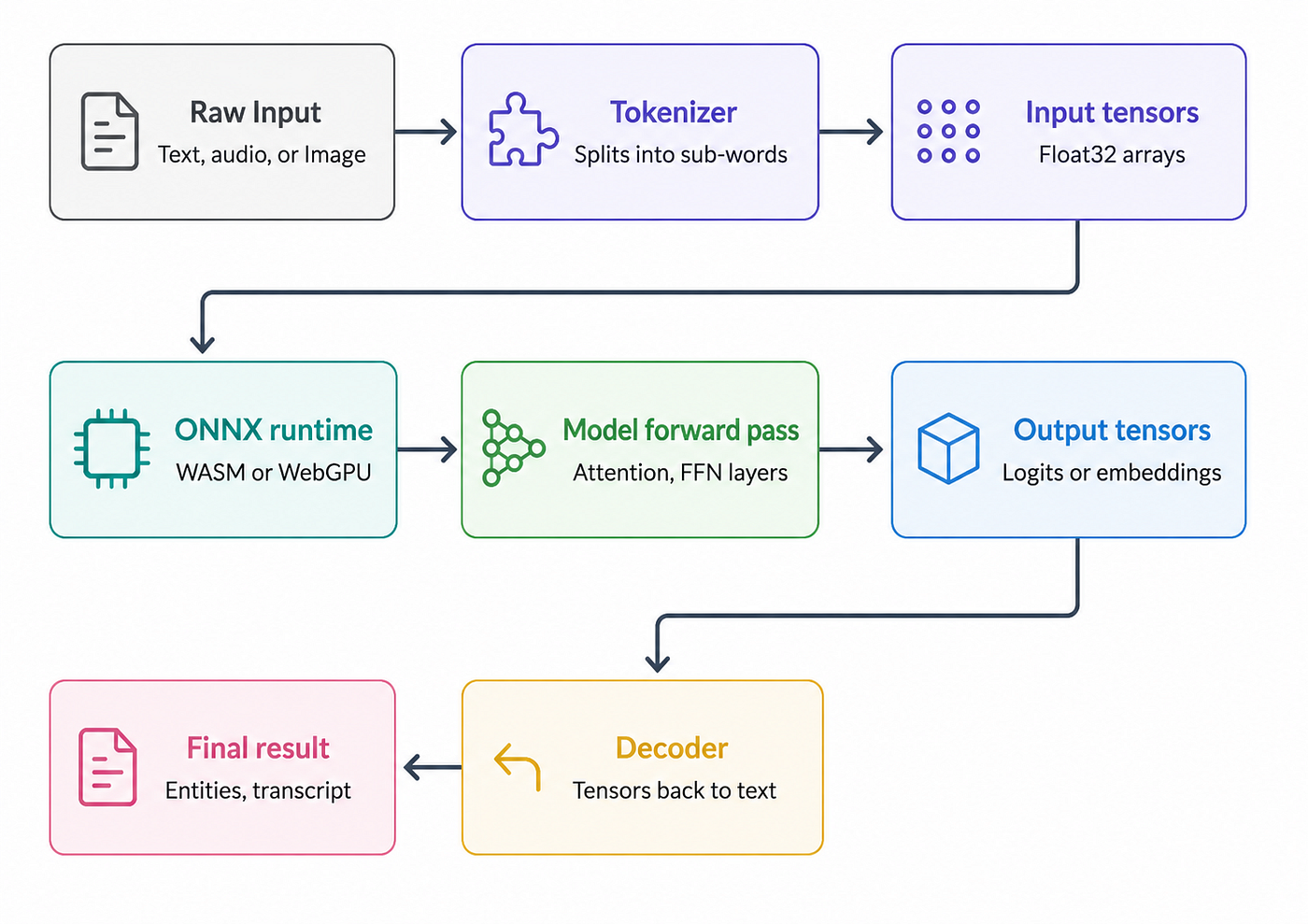
The first load downloads the model (typically 20MB–500MB depending on the model). After that, the browser caches it in IndexedDB, so subsequent loads are instant.
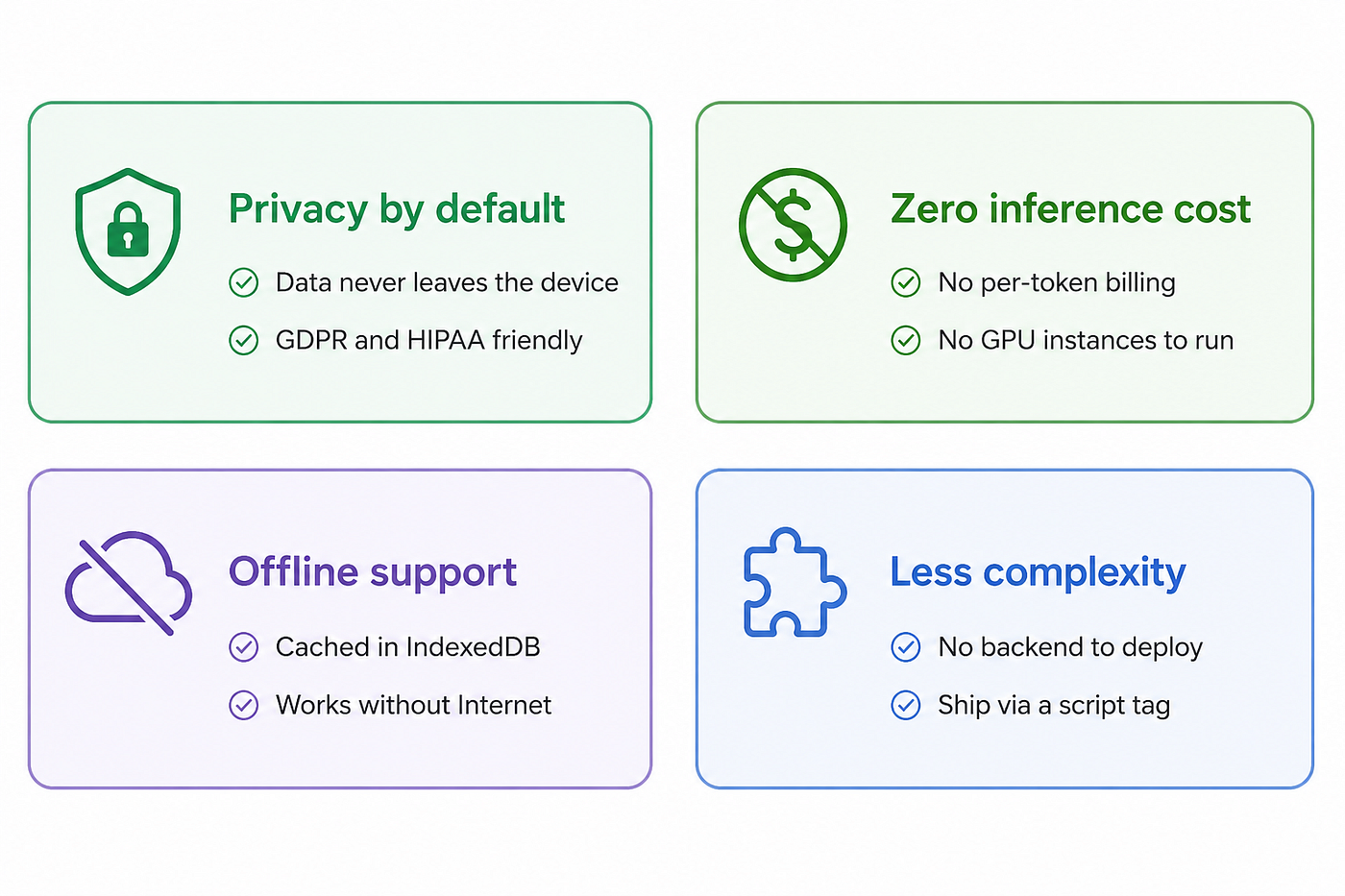
Why Developers Should Care
1. Privacy by Default
When inference happens on the user’s device, sensitive data like resumes, voice recordings, medical notes never leaves their browser. This is a massive win for GDPR/HIPAA-adjacent applications.
2. Zero Inference Cost
Once your model is downloaded, every inference is free. No per-token billing, no API quota, no surprise bills at the end of the month.
3. Offline-First Applications
Once cached, models work offline. This unlocks PWAs and edge use cases that traditional ML pipelines can’t support.
4. Reduced Architectural Complexity
You can ship an ML-powered feature without provisioning a single backend resource. The frontend becomes the entire stack.
Trade-offs You Should Know
Transformer.js isn’t a silver bullet. Understand these constraints before betting your architecture on it:
- Model size matters. Asking users to download a 500MB model is a UX disaster. Stick to quantized models when possible.
- Cold start times. The first inference can take several seconds while the runtime warms up.
- Not for huge LLMs. You won’t be running LLaMA 70B in the browser anytime soon. Stick to small/medium models (under ~1B parameters).
- Mobile constraints. Memory limits on mobile browsers can cause crashes with larger models.
Example: Speech-to-Text Transcription with Whisper
Whisper is OpenAI’s open-source speech recognition model. The full version is 1.5GB, but quantized variants compressed to ONNX can run in the browser. We’ll use whisper-tiny.en (~40MB) English-only, fast, and surprisingly accurate.
What we’re building
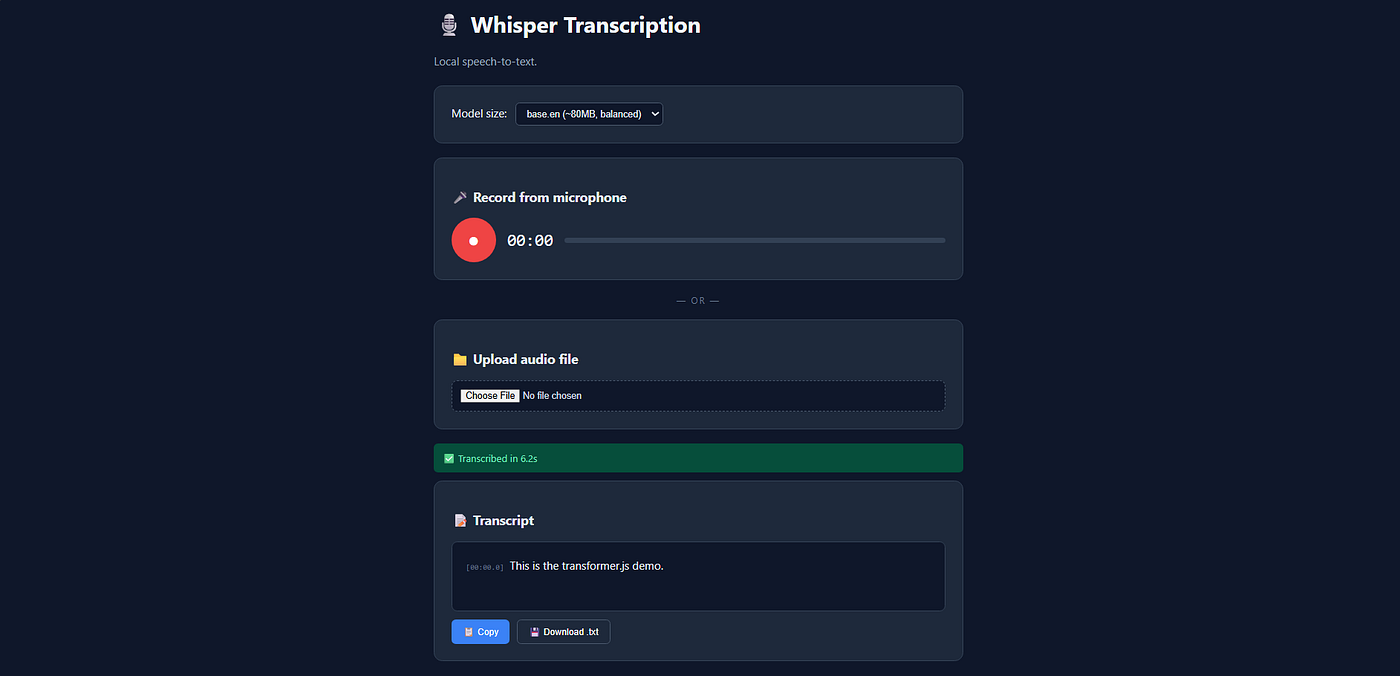
A transcription tool that supports:
- File upload (any audio format the browser can decode)
- Live microphone recording with start/stop controls
- Real-time recording timer and audio level visualization
- Word-level timestamps so you can see exactly when each phrase was spoken
- Copy-to-clipboard and download as .txt for the transcript
- Model size selector -let users choose between tiny (faster) and base (more accurate)
How Whisper actually works
Whisper is an encoder-decoder transformer that does something clever: instead of treating audio as raw waveforms, it converts audio into log-mel spectrograms visual representations of frequency over time. Then it treats transcription as a sequence-to-sequence problem, where the “input sequence” is spectrogram patches and the “output sequence” is text tokens.
The pipeline:
- Audio resampling - Whisper expects 16kHz mono audio. We resample whatever the user provides.
- Spectrogram conversion - 30-second audio chunks become 80×3000 mel-spectrograms.
- Encoder - A vision-transformer-style encoder turns the spectrogram into a sequence of audio embeddings.
- Decoder - An autoregressive decoder generates text tokens one at a time, attending to the audio embeddings.
- Special tokens - Whisper uses tokens like
<|en|>(language),<|transcribe|>(task), and<|0.00|>(timestamps) to control behavior.
The model can also do translation, language detection, and word-level timestamping all from the same set of weights.
Browser version (Vanilla HTML/JS)
<!DOCTYPE html>
<html lang="en">

<head>
    <meta charset="UTF-8">
    <title>Whisper Transcription</title>
    <style>
        * {
            box-sizing: border-box;
        }

        body {
            font-family: -apple-system, system-ui, sans-serif;
            max-width: 800px;
            margin: 40px auto;
            padding: 20px;
            background: #0f172a;
            color: #e2e8f0;
        }

        h1 {
            color: #f1f5f9;
        }

        .subtitle {
            color: #94a3b8;
            margin-bottom: 24px;
        }

        .card {
            background: #1e293b;
            padding: 24px;
            border-radius: 12px;
            margin-bottom: 20px;
            border: 1px solid #334155;
        }

        .mic-section {
            display: flex;
            align-items: center;
            gap: 16px;
        }

        .mic-btn {
            width: 64px;
            height: 64px;
            border-radius: 50%;
            border: none;
            background: #ef4444;
            color: white;
            font-size: 28px;
            cursor: pointer;
            transition: transform 0.2s, background 0.2s;
        }

        .mic-btn:hover {
            transform: scale(1.05);
        }

        .mic-btn.recording {
            background: #dc2626;
            animation: pulse 1.5s infinite;
        }

        @keyframes pulse {

            0%,
            100% {
                box-shadow: 0 0 0 0 rgba(239, 68, 68, 0.7);
            }

            50% {
                box-shadow: 0 0 0 16px rgba(239, 68, 68, 0);
            }
        }

        .timer {
            font-size: 24px;
            font-family: monospace;
            color: #f1f5f9;
        }

        .level-meter {
            flex: 1;
            height: 8px;
            background: #334155;
            border-radius: 4px;
            overflow: hidden;
        }

        .level-bar {
            height: 100%;
            background: linear-gradient(90deg, #10b981, #f59e0b, #ef4444);
            width: 0%;
            transition: width 0.05s;
        }

        .divider {
            text-align: center;
            color: #64748b;
            margin: 20px 0;
            font-size: 13px;
            text-transform: uppercase;
            letter-spacing: 2px;
        }

        input[type=file] {
            width: 100%;
            padding: 12px;
            background: #0f172a;
            border: 2px dashed #475569;
            border-radius: 8px;
            color: #cbd5e1;
            cursor: pointer;
        }

        select {
            padding: 8px 12px;
            background: #0f172a;
            color: #e2e8f0;
            border: 1px solid #475569;
            border-radius: 6px;
            margin-left: 8px;
        }

        .status {
            padding: 12px;
            border-radius: 6px;
            margin: 12px 0;
            font-size: 14px;
        }

        .status.loading {
            background: #422006;
            color: #fcd34d;
        }

        .status.success {
            background: #064e3b;
            color: #6ee7b7;
        }

        .status.error {
            background: #450a0a;
            color: #fca5a5;
        }

        .progress {
            width: 100%;
            height: 6px;
            background: #334155;
            border-radius: 3px;
            overflow: hidden;
            margin-top: 8px;
        }

        .progress-bar {
            height: 100%;
            background: #3b82f6;
            width: 0%;
            transition: width 0.3s;
        }

        .transcript {
            background: #0f172a;
            padding: 20px;
            border-radius: 8px;
            min-height: 100px;
            line-height: 1.7;
            border: 1px solid #334155;
            white-space: pre-wrap;
        }

        .chunk {
            display: inline;
        }

        .chunk .ts {
            font-size: 11px;
            color: #64748b;
            font-family: monospace;
            margin-right: 4px;
        }

        .actions {
            display: flex;
            gap: 10px;
            margin-top: 12px;
        }

        button.action {
            padding: 8px 16px;
            background: #3b82f6;
            color: white;
            border: none;
            border-radius: 6px;
            cursor: pointer;
            font-size: 13px;
        }

        button.action:hover {
            background: #2563eb;
        }

        button.action.ghost {
            background: transparent;
            border: 1px solid #475569;
        }
    </style>
</head>

<body>

    <h1>🎙️ Whisper Transcription</h1>
    <p class="subtitle">Local speech-to-text.</p>

    <div class="card">
        <label>Model size:
            <select id="model-select">
                <option value="Xenova/whisper-tiny.en">tiny.en (~40MB, fastest)</option>
                <option value="Xenova/whisper-base.en">base.en (~80MB, balanced)</option>
            </select>
        </label>
    </div>

    <div class="card">
        <h3>🎤 Record from microphone</h3>
        <div class="mic-section">
            <button id="mic-btn" class="mic-btn">●</button>
            <div class="timer" id="timer">00:00</div>
            <div class="level-meter">
                <div class="level-bar" id="level"></div>
            </div>
        </div>
    </div>

    <div class="divider">— or —</div>

    <div class="card">
        <h3>📁 Upload audio file</h3>
        <input type="file" id="file-input" accept="audio/*">
    </div>

    <div id="status"></div>

    <div class="card" id="result-card" style="display:none;">
        <h3>📝 Transcript</h3>
        <div class="transcript" id="transcript"></div>
        <div class="actions">
            <button class="action" id="copy">📋 Copy</button>
            <button class="action ghost" id="download">💾 Download .txt</button>
        </div>
    </div>

    <script type="module">
        import { pipeline, env } from 'https://cdn.jsdelivr.net/npm/@xenova/transformers@2.17.2';
        env.allowRemoteModels = true;

        let transcriber = null;
        let currentModel = null;
        let mediaRecorder = null;
        let audioChunks = [];
        let recordingStart = 0;
        let timerInterval = null;
        let audioCtx = null;
        let analyser = null;

        const statusEl = document.getElementById('status');
        const micBtn = document.getElementById('mic-btn');
        const timerEl = document.getElementById('timer');
        const levelEl = document.getElementById('level');

        function setStatus(msg, type = 'loading', progress = null) {
            statusEl.innerHTML = `
    <div class="status ${type}">${msg}
      ${progress !== null ? `<div class="progress"><div class="progress-bar" style="width:${progress}%"></div></div>` : ''}
    </div>`;
        }

        async function loadModel(modelName) {
            if (transcriber && currentModel === modelName) return transcriber;

            setStatus(`⏳ Loading ${modelName}...`, 'loading', 0);
            transcriber = await pipeline('automatic-speech-recognition', modelName, {
                progress_callback: (data) => {
                    if (data.status === 'progress' && data.progress) {
                        setStatus(`⏳ ${data.file}: ${data.progress.toFixed(1)}%`,
                            'loading', data.progress);
                    }
                }
            });
            currentModel = modelName;
            return transcriber;
        }

        // Decode an arbitrary audio file into 16kHz mono Float32 samples
        async function decodeAudio(blob) {
            const arrayBuffer = await blob.arrayBuffer();
            const ctx = new AudioContext({ sampleRate: 16000 });
            const decoded = await ctx.decodeAudioData(arrayBuffer);

            // If stereo, average the two channels into mono
            if (decoded.numberOfChannels === 1) {
                return decoded.getChannelData(0);
            }
            const left = decoded.getChannelData(0);
            const right = decoded.getChannelData(1);
            const mono = new Float32Array(left.length);
            for (let i = 0; i < left.length; i++) mono[i] = (left[i] + right[i]) / 2;
            return mono;
        }

        async function transcribe(audioData) {
            const modelName = document.getElementById('model-select').value;
            await loadModel(modelName);

            setStatus('🔍 Transcribing...', 'loading');
            const t0 = performance.now();

            // return_timestamps gives us word/segment level timing
            const result = await transcriber(audioData, {
                return_timestamps: true,
                chunk_length_s: 30,
                stride_length_s: 5
            });

            const elapsed = ((performance.now() - t0) / 1000).toFixed(1);
            setStatus(`✅ Transcribed in ${elapsed}s`, 'success');
            renderTranscript(result);
        }

        function fmt(t) {
            if (t == null) return '';
            const m = Math.floor(t / 60).toString().padStart(2, '0');
            const s = (t % 60).toFixed(1).padStart(4, '0');
            return `${m}:${s}`;
        }

        function renderTranscript(result) {
            const card = document.getElementById('result-card');
            const el = document.getElementById('transcript');
            card.style.display = 'block';

            if (result.chunks && result.chunks.length) {
                el.innerHTML = result.chunks.map(c =>
                    `<span class="chunk"><span class="ts">[${fmt(c.timestamp[0])}]</span>${c.text}</span>`
                ).join(' ');
            } else {
                el.textContent = result.text;
            }
        }

        // ─── File upload ────────────────────────────────────────────
        document.getElementById('file-input').addEventListener('change', async (e) => {
            const file = e.target.files[0];
            if (!file) return;
            try {
                setStatus('🔧 Decoding audio...', 'loading');
                const audio = await decodeAudio(file);
                await transcribe(audio);
            } catch (err) {
                setStatus(`❌ ${err.message}`, 'error');
            }
        });

        // ─── Microphone recording ───────────────────────────────────
        micBtn.addEventListener('click', async () => {
            if (mediaRecorder && mediaRecorder.state === 'recording') {
                mediaRecorder.stop();
                return;
            }

            try {
                const stream = await navigator.mediaDevices.getUserMedia({ audio: true });
                audioChunks = [];
                mediaRecorder = new MediaRecorder(stream);

                // Audio level visualization
                audioCtx = new AudioContext();
                const source = audioCtx.createMediaStreamSource(stream);
                analyser = audioCtx.createAnalyser();
                analyser.fftSize = 256;
                source.connect(analyser);
                const buffer = new Uint8Array(analyser.frequencyBinCount);

                function updateLevel() {
                    if (!analyser) return;
                    analyser.getByteFrequencyData(buffer);
                    const avg = buffer.reduce((a, b) => a + b, 0) / buffer.length;
                    levelEl.style.width = Math.min(100, (avg / 128) * 100) + '%';
                    if (mediaRecorder.state === 'recording') requestAnimationFrame(updateLevel);
                }

                mediaRecorder.ondataavailable = e => audioChunks.push(e.data);
                mediaRecorder.onstop = async () => {
                    stream.getTracks().forEach(t => t.stop());
                    clearInterval(timerInterval);
                    levelEl.style.width = '0%';
                    micBtn.classList.remove('recording');
                    timerEl.textContent = '00:00';

                    const blob = new Blob(audioChunks, { type: 'audio/webm' });
                    try {
                        setStatus('🔧 Decoding recording...', 'loading');
                        const audio = await decodeAudio(blob);
                        await transcribe(audio);
                    } catch (err) {
                        setStatus(`❌ ${err.message}`, 'error');
                    }
                };

                mediaRecorder.start();
                micBtn.classList.add('recording');
                recordingStart = Date.now();
                timerInterval = setInterval(() => {
                    const elapsed = Math.floor((Date.now() - recordingStart) / 1000);
                    const m = Math.floor(elapsed / 60).toString().padStart(2, '0');
                    const s = (elapsed % 60).toString().padStart(2, '0');
                    timerEl.textContent = `${m}:${s}`;
                }, 100);
                updateLevel();
            } catch (err) {
                setStatus(`❌ Microphone access denied: ${err.message}`, 'error');
            }
        });

        // ─── Copy & Download ────────────────────────────────────────
        document.getElementById('copy').addEventListener('click', () => {
            const text = document.getElementById('transcript').innerText;
            navigator.clipboard.writeText(text);
            setStatus('📋 Copied to clipboard', 'success');
        });

        document.getElementById('download').addEventListener('click', () => {
            const text = document.getElementById('transcript').innerText;
            const blob = new Blob([text], { type: 'text/plain' });
            const url = URL.createObjectURL(blob);
            const a = document.createElement('a');
            a.href = url;
            a.download = `transcript-${Date.now()}.txt`;
            a.click();
            URL.revokeObjectURL(url);
        });
    </script>
</body>

</html>
What’s happening in this code
**decodeAudio()** is the bridge between "any audio format" and "what Whisper wants." Whisper expects a Float32Array of mono 16kHz samples. We use the browser's built-in AudioContext to decode whatever was uploaded MP3, WAV, WebM, M4A and resample it on the fly by initializing the context at sampleRate: 16000. Stereo files get downmixed to mono by averaging the two channels.
**MediaRecorder + AnalyserNode** handle live recording. While MediaRecorder captures the audio for transcription, a parallel AnalyserNode reads frequency-domain data to drive the live audio level meter. We use requestAnimationFrame instead of setInterval so the meter updates smoothly without taxing the CPU.
**return_timestamps: true** is the magic flag. With it, Whisper returns not just the full text but an array of chunks, each with a [start, end] timestamp in seconds. This is how we render [00:03.2] Hello, my name is... style timestamps.
**chunk_length_s and stride_length_s** matter for long audio. Whisper natively handles only 30-second windows. Setting chunk_length_s: 30 with a 5-second stride means Transformer.js automatically splits long audio into overlapping chunks, transcribes each, and merges the results letting you transcribe hour-long recordings.
Node.js version
// transcribe.js
// Install: npm install @xenova/transformers wavefile
// Run:     node transcribe.js path/to/audio.wav

import { pipeline } from '@xenova/transformers';
import wavefile from 'wavefile';
import fs from 'fs';
import path from 'path';
async function loadAndPrepareAudio(audioPath) {
  const buffer = fs.readFileSync(audioPath);
  const wav = new wavefile.WaveFile(buffer);
  // Whisper expects 32-bit float, 16kHz, mono
  wav.toBitDepth('32f');
  wav.toSampleRate(16000);
  let samples = wav.getSamples();
  if (Array.isArray(samples)) {
    // Stereo → mono via channel averaging
    const mono = new Float32Array(samples[0].length);
    for (let i = 0; i < samples[0].length; i++) {
      mono[i] = (samples[0][i] + samples[1][i]) / 2;
    }
    samples = mono;
  }
  return samples;
}
function formatTime(t) {
  if (t == null) return '00:00.0';
  const m = Math.floor(t / 60).toString().padStart(2, '0');
  const s = (t % 60).toFixed(1).padStart(4, '0');
  return `${m}:${s}`;
}
async function transcribe(audioPath, modelName = 'Xenova/whisper-tiny.en') {
  console.log(`📦 Loading model: ${modelName}`);
  const transcriber = await pipeline('automatic-speech-recognition', modelName);
  console.log(`🎵 Loading audio: ${audioPath}`);
  const audio = await loadAndPrepareAudio(audioPath);
  const durationSec = (audio.length / 16000).toFixed(1);
  console.log(`   Duration: ${durationSec}s\n`);
  console.log('🔍 Transcribing...');
  const t0 = Date.now();
  const result = await transcriber(audio, {
    return_timestamps: true,
    chunk_length_s: 30,
    stride_length_s: 5
  });
  const elapsed = ((Date.now() - t0) / 1000).toFixed(1);
  console.log('\n═══════════════════════════════════════');
  console.log('  TRANSCRIPT');
  console.log('═══════════════════════════════════════\n');
  if (result.chunks) {
    for (const chunk of result.chunks) {
      console.log(`[${formatTime(chunk.timestamp[0])} → ${formatTime(chunk.timestamp[1])}]`);
      console.log(`  ${chunk.text.trim()}\n`);
    }
  } else {
    console.log(result.text);
  }
  console.log(`⏱  Done in ${elapsed}s (${(audio.length / 16000 / elapsed).toFixed(1)}x realtime)`);
  // Save transcript next to the audio file
  const outPath = audioPath.replace(path.extname(audioPath), '.txt');
  fs.writeFileSync(outPath, result.text);
  console.log(`💾 Saved transcript to ${outPath}`);
}
const audioPath = process.argv[2];
if (!audioPath) {
  console.error('Usage: node transcribe.js <audio.wav> [model-name]');
  process.exit(1);
}
transcribe(audioPath, process.argv[3]).catch(console.error);
Notes on the Node version
The Node script does three additional things the browser version handles automatically. It reports the realtime factor (5.2x realtime means it transcribed a 5-second clip in 1 second), it persists the transcript next to the audio file as a .txt, and it supports passing the model name as a second CLI argument so you can experiment with tiny.en, base.en, or even multilingual variants like Xenova/whisper-small.
For non-WAV input (MP3, M4A, etc.), you’d preprocess with ffmpeg:
ffmpeg -i input.mp3 -ar 16000 -ac 1 -c:a pcm_s32le output.wavFinal Thoughts
Transformer.js represents a fundamental shift in how we think about deploying ML from centralized inference to ubiquitous, edge-native intelligence. It won’t replace your beefy backend models for every use case, but for a growing class of applications privacy-sensitive tools, offline PWAs, and cost-constrained startups it’s a genuine game-changer.
The barrier to shipping AI-powered features has never been lower. You don’t need a Kubernetes cluster. You don’t need a GPU bill. You just need a <script> tag.
Resources:
- Official docs: huggingface.co/docs/transformers.js
- Model hub: huggingface.co/models?library=transformers.js
- GitHub: github.com/xenova/transformers.js
If you found this useful, give it a 👏 and follow for more deep-dives into the JavaScript ML ecosystem.
메타데이터
- post_id
- 901971006348
- slug
- transformer-js-bringing-ai-to-your-browser-901971006348
- url
- https://medium.com/@dubeysanjana23/transformer-js-bringing-ai-to-your-browser-901971006348
- canonical_url
- https://medium.com/@dubeysanjana23/transformer-js-bringing-ai-to-your-browser-901971006348
- author_url
- https://medium.com/@dubeysanjana23
- status
- ok
- fetched_at
- 2026-06-09 15:37:30