The 7 Levels of Storage Devices in Computing
Storage devices are among the most important components in modern computing systems. They are responsible for storing data, applications…
The 7 Levels of Storage Devices in Computing
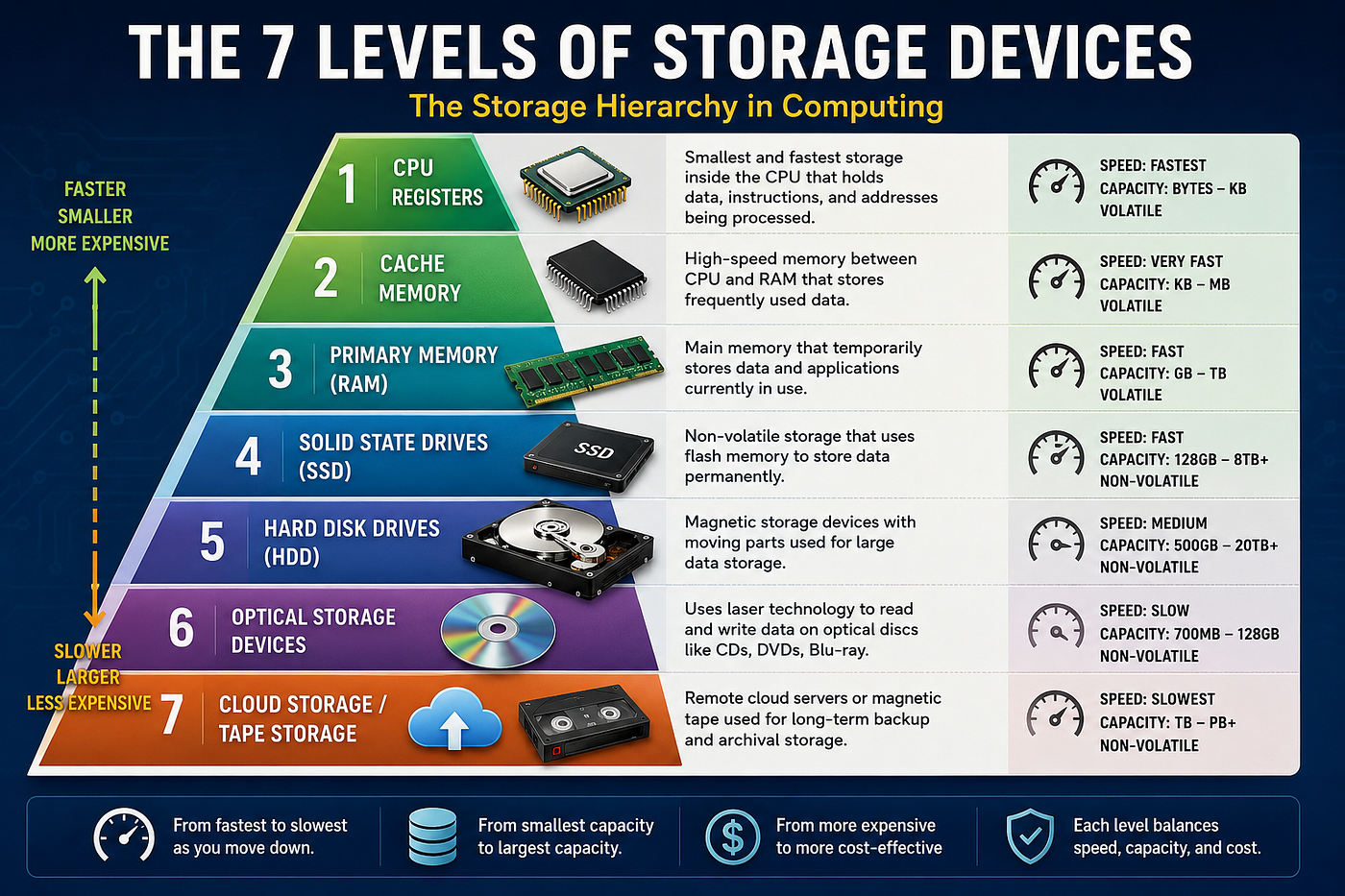
7 Levels of Storage Devices
Storage devices are among the most important components in modern computing systems. They are responsible for storing data, applications, operating systems, multimedia files, and backups. As technology has evolved, storage systems have become faster, smaller, more reliable, and capable of holding enormous amounts of data.
In computing, storage devices can be grouped into different levels based on speed, capacity, accessibility, cost, and proximity to the CPU. These levels form a storage hierarchy, where the fastest storage technologies are closest to the processor, while slower but larger storage technologies are used for long-term data retention.
This article explores the seven major levels of storage devices in computing, their technologies, advantages, and disadvantages.
1. CPU Registers
What Are CPU Registers?
CPU registers are the smallest and fastest storage locations inside the processor. They temporarily hold instructions, addresses, and data currently being processed by the CPU.
Registers are directly integrated into the processor architecture and operate at the same speed as the CPU clock.
Technology Used
- Built using high-speed flip-flop circuits
- Located inside the CPU
- Extremely low storage capacity (bytes to kilobytes)

CPU registers
Advantages
- Fastest storage in a computer
- Immediate access by the CPU
- Improves processing efficiency
- Essential for executing machine instructions
Disadvantages
- Very limited storage capacity
- Expensive to manufacture
- Data is temporary (volatile)
- Cannot store large files or applications
Common Examples
- Accumulator Register
- Instruction Register
- Memory Address Register (MAR)
- Program Counter (PC)
2. Cache Memory
What Is Cache Memory?
Cache memory is high-speed memory located between the CPU and RAM. It stores frequently accessed data and instructions to reduce the time needed to retrieve information from main memory.
Modern computers usually have multiple cache levels:
- L1 Cache (fastest and smallest)
- L2 Cache
- L3 Cache (larger but slightly slower)
Technology Used
- Static Random Access Memory (SRAM)
- Integrated on or near the processor chip

Cache memory
Advantages
- Extremely fast data access
- Reduces CPU waiting time
- Improves overall system performance
- Enhances multitasking efficiency
Disadvantages
- Very expensive compared to RAM
- Limited storage capacity
- Generates additional heat
- Complex design architecture
Common Uses
- Gaming systems
- High-performance servers
- AI processing systems
- Multimedia editing computers
3. Primary Memory (RAM)
What Is RAM?
Random Access Memory (RAM) is the main working memory of a computer. It temporarily stores data and applications currently in use by the operating system and users.
Unlike cache memory, RAM has larger capacity but slower speed.
Technology Used
- Dynamic Random Access Memory (DRAM)
- Synchronous DRAM (SDRAM)
- DDR4 and DDR5 memory technologies

Random Access Memory
Advantages
- Faster than secondary storage
- Supports multitasking
- Easy to upgrade in many systems
- Provides temporary workspace for applications
Disadvantages
- Volatile memory (data disappears when power is lost)
- Slower than cache memory
- Limited capacity compared to storage drives
- Can become expensive at high capacities
Common Uses
- Running operating systems
- Gaming
- Video editing
- Web browsing
- Software development
4. Solid State Drives (SSD)
What Is an SSD?
A Solid State Drive (SSD) is a non-volatile storage device that uses flash memory to store data permanently. SSDs have no moving parts, making them significantly faster and more reliable than traditional hard drives.
Technology Used
- NAND Flash Memory
- SATA SSD technology
- NVMe PCIe technology

Solid State Drive
Advantages
- Very fast boot and loading speeds
- Silent operation
- Low power consumption
- Resistant to physical shock
- Lightweight and compact
Disadvantages
- More expensive than HDDs
- Limited write cycles
- Data recovery can be difficult
- Higher cost per gigabyte
Common Uses
- Laptops
- Gaming PCs
- Data centers
- Mobile devices
- Cloud servers
5. Hard Disk Drives (HDD)
What Is an HDD?
A Hard Disk Drive (HDD) is a magnetic storage device that stores data on rotating platters. It has been one of the most widely used storage technologies for decades.
Technology Used
- Magnetic disks (platters)
- Mechanical read/write heads
- Spinning motors

Hard Disk Drive
Advantages
- Large storage capacity
- Lower cost compared to SSDs
- Good for long-term data storage
- Widely available
Disadvantages
- Slower performance
- Mechanical parts can fail
- Noisy operation
- Higher power consumption
- Sensitive to shock and vibration
Common Uses
- Desktop computers
- Surveillance systems
- Backup storage
- File servers
- Archival systems
6. Optical Storage Devices
What Are Optical Storage Devices?
Optical storage devices use laser technology to read and write data onto discs. Examples include CDs, DVDs, and Blu-ray discs.
Technology Used
- Laser optics
- Reflective disc surfaces
- Polycarbonate optical media

Optical storage devices
Advantages
- Portable and lightweight
- Good for media distribution
- Resistant to magnetic interference
- Affordable for mass duplication
Disadvantages
- Limited storage capacity
- Slower read/write speeds
- Easily scratched or damaged
- Becoming outdated in modern computing
Common Examples
- CD-ROM
- DVD-ROM
- Blu-ray Disc
Common Uses
- Music distribution
- Movie storage
- Software installation
- Educational materials
7. Cloud Storage and Tape Storage
What Is Cloud Storage?
Cloud storage allows users to store data on remote internet servers managed by cloud service providers.
What Is Tape Storage?
Tape storage uses magnetic tape cartridges for long-term archival and backup purposes, especially in enterprise environments.
Technology Used
Cloud Storage
- Distributed servers
- Internet-based storage infrastructure
- Virtualized data centers
Tape Storage
- Magnetic tape reels
- Sequential data recording systems

Cloud Storage and Tape Storage
Advantages of Cloud Storage
- Accessible from anywhere
- Scalable storage capacity
- Supports collaboration
- Automatic backup and synchronization
Disadvantages of Cloud Storage
- Requires internet connection
- Subscription costs
- Potential privacy concerns
- Risk of cyberattacks
Advantages of Tape Storage
- Very low cost for large backups
- Excellent for long-term archival
- Durable for decades
- Energy efficient when offline
Disadvantages of Tape Storage
- Very slow access speed
- Sequential access only
- Requires specialized hardware
- Not suitable for everyday computing
Common Cloud Storage Services
- Google Drive
- Dropbox
- Microsoft OneDrive
Conclusion
The evolution of storage devices has transformed the computing industry. From ultra-fast CPU registers to massive cloud storage systems, each level of storage serves a unique purpose in balancing speed, capacity, accessibility, and cost.
Understanding these seven levels of storage devices helps users, students, and IT professionals make informed decisions when choosing storage solutions for personal, educational, or enterprise applications.
As computing continues to evolve with artificial intelligence, big data, and cloud computing, storage technologies will become even faster, smarter, and more efficient.
메타데이터
- post_id
- 908ae0ea2d3e
- slug
- the-7-levels-of-storage-devices-in-computing-908ae0ea2d3e
- url
- https://medium.com/@abkarikari23/the-7-levels-of-storage-devices-in-computing-908ae0ea2d3e
- canonical_url
- https://medium.com/@abkarikari23/the-7-levels-of-storage-devices-in-computing-908ae0ea2d3e
- author_url
- https://medium.com/@abkarikari23
- status
- ok
- fetched_at
- 2026-06-11 10:13:20






