Configure Claude Code to Power Your Agent Team
Claude settings hierarchy, permissions, hooks, skills, and the dotfiles repo that ties them together.
Configure Claude Code to Power Your Agent Team
Claude settings hierarchy, permissions, hooks, skills, and the dotfiles repo that ties them together.
The gap between default Claude Code and a tuned setup has widened dramatically in early 2026. The release of Claude Opus 4.6 in February brought agent teams, adaptive thinking, and server-side compaction (Anthropic, 2026a). The skill system introduced in 2025 as an open standard for teaching LLMs domain expertise without consuming context at rest (Zhang et al., 2025) is now widely adopted and a thriving marketplace. Claude Code is no longer a chatbot with file access. It is a team of autonomous agent, and agents need configuration.
Most of us went through a period of building Claude Code settings by doing rather than by design. Permission fatigue from approving every safe command. Compaction firing at the default 90% threshold and swallowing context mid-task. Settings that worked on one machine but not your other. Sharing a configuration with a teammate by copying files, only to discover that their local scope trumped your shared scope. Following this week’s release of Claude agent teams (Anthropic, 2026a), I moved beyond configuring on the fly toward designing where each setting lives and which layer wins. This article walks through every layer of Claude Code’s configuration, explains the reasoning behind each choice, and shares a forkable repository as a worked example: github.com/haberlah/dotfiles-claude.
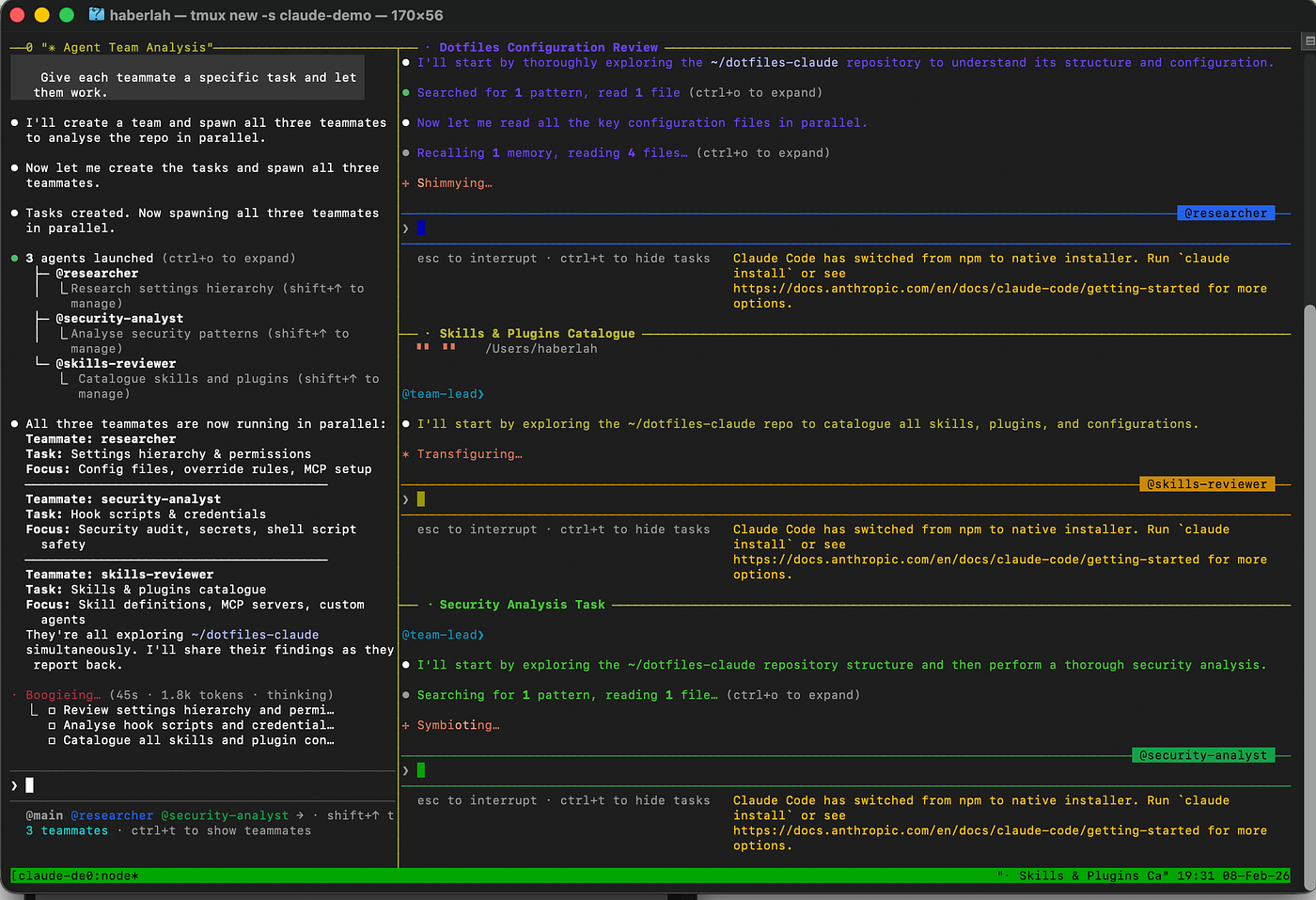
Terminal screenshot showing Claude Code with extended thinking enabled and tmux (terminal multiplexer) split panes running agent teammates
Settings Hierarchy
Claude Code loads configuration from multiple JSON files, merged according to strict precedence, evaluated highest to lowest (Anthropic, 2025a):

Settings Hierarchy: 5 scopes, evaluated highest to lowest. Higher scopes override lower scopes.
Settings merge rather than replace. A key defined at multiple levels resolves to the highest-priority scope, but keys defined only at lower levels still take effect (Anthropic, 2025a).
The practical consequence for teams: shared project settings belong in version control because they define conventions. Machine-specific permissions belong in settings.local.json, gitignored so one developer's broad Bash(*) allow rule never accidentally propagates to a colleague running a stricter setup.
My dotfiles-claude repo models this separation explicitly. settings.json holds core parameters, environment variables, and hooks — tracked in git, shared via fork. settings.local.example.json is a permission template that setup.sh copies to settings.local.json on install, gitignored, never pushed.

Diagram showing the 5 settings scopes as stacked layers, with arrows indicating that higher scopes override lower ones
With the hierarchy established, the next question is what to put in each file. Let’s start with the core parameters that shape every session.
Core Parameters Deep Dive
Three settings in the repo’s settings.json shape every session:
"alwaysThinkingEnabled": true,
"showTurnDuration": true,
"teammateMode": "tmux"
alwaysThinkingEnabled forces chain-of-thought reasoning before every response. For architecture decisions, debugging, and multi-step refactors, the quality improvement is noticeable. Anthropic's own engineering teams describe extended thinking as essential for "complex changes requiring understanding of system-wide implications" (Anthropic, 2025b). The cost is higher token usage. Thinking tokens count towards the context window, though previous thinking blocks are stripped from subsequent turns automatically (Anthropic, 2026b), making the overhead per-turn rather than cumulative. I keep it always-on because to me the quality gains far outweigh the token cost in every workflow I care about.
showTurnDuration displays per-turn timing. It seems trivial until you connect several MCP servers and notice that a Playwright browser action takes 12 seconds while a file read takes 0.3 seconds. This is your primary diagnostic for identifying slow tools and overly broad searches.
teammateMode controls how agent teams display. Two options: "in-process" runs all teammates in one terminal, navigable with Shift+Up/Down; "tmux" gives each teammate its own pane (Anthropic, 2026c). I use tmux (terminal multiplexer) because watching agents work simultaneously is the only way to catch coordination issues early.
These parameters apply globally. The environment variables that follow are where the more consequential trade-offs live.
Environment Variables
The env block in settings.json injects environment variables into every session. Shell-level variables take precedence over values set here (Anthropic, 2025a), so these serve as defaults you can override per-terminal when needed.
"env": {
  "CLAUDE_CODE_EXPERIMENTAL_AGENT_TEAMS": "1",
  "CLAUDE_CODE_MAX_OUTPUT_TOKENS": "64000",
  "CLAUDE_AUTOCOMPACT_PCT_OVERRIDE": "80",
  "MCP_TIMEOUT": "30000",
  "MCP_TOOL_TIMEOUT": "60000"
}
CLAUDE_CODE_MAX_OUTPUT_TOKENS at 64,000 doubles the default. I often hit truncation before setting this where Claude would cut off mid-function when generating long CSVs or multi-file refactors. The trade-off is context allocation. The 200k context window is shared between input and output (Anthropic, 2026b), so reserving 64k for output leaves roughly 136k for input context, system prompts, and MCP tool definitions. For sessions that are particularly context-heavy, I drop this to 32,000 via shell override.
CLAUDE_AUTOCOMPACT_PCT_OVERRIDE at 80 triggers compaction earlier than the default 90% threshold. When compaction fires, Claude generates a structured summary preserving task IDs, decisions, errors, and progress, while discarding verbose intermediate output (Anthropic, 2026b). Earlier compaction means more context remains when the final output you are aiming for is generated, often producing higher-quality outcomes. It also eliminates the jarring experience of hitting the context wall mid-task.
CLAUDE_CODE_EXPERIMENTAL_AGENT_TEAMS at 1 enables agent teams, released as a research preview in February 2026 (Anthropic, 2026a). Without this flag, Claude cannot spawn independant agent teammate instances. The feature is experimental and disabled by default (Anthropic, 2026c).
MCP_TIMEOUT and MCP_TOOL_TIMEOUT control two separate thresholds. The first is how long Claude waits for a server to start (connection); the second is how long a single tool invocation can run (execution) (Anthropic, 2025c). I set these to 30 seconds and 60 seconds respectively because browser automation via Playwright and large file uploads routinely exceed the defaults.
Setting environment variables in
settings.jsonprovides session-wide defaults. Shell-level overrides (export CLAUDE_CODE_MAX_OUTPUT_TOKENS=32000) take precedence for individual terminals.
Environment variables control what Claude can do. Permissions control what Claude is allowed to do. This distinction matters.
Permission Model
Claude Code evaluates permissions in a strict order: deny rules first, then ask rules, then allow rules. The first match wins, which means deny always takes precedence regardless of what is permitted elsewhere (Anthropic, 2025d).
The repo’s settings.local.example.json implements this with a clear philosophy: block the dangerous, confirm the destructive, auto-approve everything else. The * in permission rules is a glob wildcard — Bash(rm -rf *) matches any command starting with rm -rf followed by any arguments (Anthropic, 2025d).
Deny — always blocked
"deny": [
  "Read(**/.env*)",
  "Read(**/secrets/**)",
  "Read(**/*.pem)",
  "Read(**/*.key)",
  "Read(~/.ssh/**)",
  "Read(~/.aws/**)"
]
These rules prevent Claude from even attempting to read sensitive files. Because deny rules are evaluated first (Anthropic, 2025d), no allow rule at any scope can override them.
Ask — requires confirmation
"ask": [
  "Bash(rm -rf *)",
  "Bash(git push --force *)",
  "Bash(git reset --hard *)",
  "Bash(git checkout -- *)",
  "Bash(git clean *)",
  "Bash(git branch -D *)",
  "Bash(sudo rm *)",
  "Bash(chmod 777 *)"
]
Destructive operations that cannot be undone require explicit approval. This is the safety net for commands where a wrong target could be catastrophic.
Allow — runs without prompting
The allow list includes Bash(*), all file operations (Read, Edit, Write, Glob, Grep), web access (WebSearch, WebFetch), and every individual Playwright and Brave Search MCP tool. Bash(*) is a power-user choice. It and the bare Bash form are equivalent, both matching all Bash commands (Anthropic, 2025d). The parenthetical form is used in the repo for consistency with the other glob patterns. For a stricter setup, remove it from the allow list and Claude will prompt before each command. The deny and ask rules still apply regardless, so even with Bash(*) allowed, rm -rf still requires confirmation and .env reads are still blocked.
Because settings.local.json is gitignored, these permission configurations stay machine-specific. A team can share everything else via the repo while each developer maintains their own risk tolerance.

Flowchart showing permission evaluation order: deny checked first, then ask, then allow, then default mode
Permissions govern individual tool calls. The next 2 sections cover higher-level coordination: agent teams for parallel work and skills for domain expertise.
Agent Teams
Agent teams coordinate multiple Claude Code instances working on a shared task. One session acts as the team lead, assigning work and synthesising results. Teammates work independently, each in their own context window, communicating via an inbox-based messaging system (Anthropic, 2026c).
Agent teams vs subagents
The distinction between agent teams and subagents is architecturally significant. Subagents are focused workers: they spawn, execute a task, and return a summarised result to the parent’s context. The parent benefits from the research without paying the full token cost of the subagent’s work. Agent team members are peers: they persist, go idle, can be resumed, and must be explicitly shut down. Their findings are communicated via messages rather than injected summaries, which is both more flexible as they can discuss, challenge, and iterate, and more expensive (Anthropic, 2026c).

Subagents vs Agent Teams. Both spawn separate Claude instances, but they differ in how they communicate, coordinate, and cost.
Enabling agent teams
3 pieces of configuration enable the feature:
"CLAUDE_CODE_EXPERIMENTAL_AGENT_TEAMS": "1""teammateMode": "tmux"And a natural-language prompt, e.g.: “Use a team of 3 to implement the authentication module, write tests, and update the documentation.”
I reach for agent teams when tasks have clear file boundaries, such as research and implementation in parallel, frontend and backend changes simultaneously, competing hypotheses for debugging a complex issue. The important constraint is token cost. Agent teams use significantly more tokens than a single session. Each teammate has its own context window, and usage scales linearly with active teammates. Anthropic’s cost documentation notes approximately 7× token usage compared to standard sessions when teammates run in plan mode (Anthropic, 2026e). That cost compounds quickly. Keep team tasks small, self-contained, and focused on work where files do not overlap.
Match the tool to the task complexity: single sessions for focused work, subagents for research that needs a separate context, agent teams only for genuinely parallel tasks with non-overlapping file boundaries.
Delegate mode
Known limitations include no session resumption for in-process teammates, one team per session, and no nested teams (Anthropic, 2026c). The most common gotcha is that the lead agent implements tasks itself rather than delegating. Switching to Delegate mode (Shift+Tab) fixes this by restricting the lead's available tools. It loses access to Edit, Write, and Bash, and can only spawn teammates, send messages, manage the task list, and shut down teammates (Anthropic, 2026c). This is the correct mode for team coordination.
Skills System
The skill system addresses a tension that grows with every new capability: how do you give an agent deep domain expertise without consuming context at rest? The answer is progressive disclosure (Zhang et al., 2025).
Progressive disclosure means installing dozens of skills costs almost nothing in context until they are actually invoked. Claude loads only names and descriptions at startup; full instructions load on demand.
At startup, Claude loads only the name and description of every installed skill (roughly 100 tokens per skill). When a request appears relevant, Claude reads just the full SKILL.md on demand. If the skill bundles reference files, scripts, or templates, Claude navigates to those only as needed (Zhang et al., 2025). You invoke skills by typing /skill-name in the prompt , for example, /pdf to activate the PDF skill, /xlsx for spreadsheets, or /webapp-testing to run Playwright-based tests. Claude also is generally smart enough to automatically look for and read skills based on the natural language prompt.
Each skill is a directory containing a SKILL.md file with YAML frontmatter. Key frontmatter fields include name (becomes the slash command), description (determines whether the skill activates for a given request), disable-model-invocation (blocks automatic triggering), user-invocable (controls slash-menu visibility), allowed-tools (restricts available tools during skill execution), and context (Anthropic, 2025e). The context: fork field is architecturally significant: it causes the skill to run as a subagent rather than in the main context. The agent field lets you pick which subagent type executes . Built-in options include Explore (read-only codebase navigation), Plan (structured planning), and general-purpose, or you can point to a custom subagent defined in .claude/agents/ (Anthropic, 2025e). This is the bridge between the skills system and the agent architecture . A skill can encapsulate a task, and context: fork delegates execution to an isolated agent that returns summarised results.
My repo includes 13 local skills relevant to my work covering document handling (pdf, docx, pptx, xlsx), web and UI work (playwright, react-best-practices, wcag-accessibility, web-artifacts-builder, web-design-guidelines, webapp-testing), and productivity workflows (article-extractor, replit-prd, skill-creator). Nine additional skills load via the AltimateAI/data-engineering-skills plugin, 6 for dbt (creating, debugging, testing, documenting, migrating, and refactoring models) and 3 for Snowflake query optimisation. That is 22 skills total, costing negligible context until invoked.
In practice, the skill description budget defaults to 2% of the context window, controlled by the SLASH_COMMAND_TOOL_CHAR_BUDGET environment variable (Anthropic, 2025e). For 22 skills at roughly 100 tokens each, that is around 2,200 tokens at rest — roughly 1% of a 200k window. Compare that with loading all 22 skills' full instructions upfront, which would easily consume tens of thousands of tokens or all of my context window. The progressive disclosure design makes the difference between "22 skills installed" and "22 skills affordable."
Plugin skills require installation before they appear. Add the marketplace first, then install the plugin:
claude plugin marketplace add AltimateAI/data-engineering-skills
claude plugin install dbt-skills@data-engineering-skills
claude plugin install snowflake-skills@data-engineering-skills
Once installed, enable them in settings.json:
"enabledPlugins": {
  "dbt-skills@data-engineering-skills": true,
  "snowflake-skills@data-engineering-skills": true
}
Skills live in 3 locations with clear priority: project skills (.claude/skills/) take highest priority, followed by personal skills (~/.claude/skills/), followed by plugin skills (Anthropic, 2025e). The repo installs to the personal directory via symlink, making them available across all projects.
Skills define what Claude knows. MCP servers define what Claude can reach.
MCP Servers
The Model Context Protocol (MCP) standardises how Claude Code connects to external tools. MCP servers are configured at 3 scope levels: local (private to you and the current project), project (version-controlled via .mcp.json), and user (available across all projects). Enterprise managed MCP configurations layer on top at highest precedence (Anthropic, 2025c).
The context window impact of MCP servers is the detail most users miss. Every connected server adds its tool definitions to Claude’s context, even when idle. Tool Search, enabled by default, mitigates this by loading MCP tool descriptions only up to 10% of the context window and deferring the rest until needed (Anthropic, 2025c). MCP tool outputs also carry a cost: the default maximum is 25,000 tokens per tool response, configurable via MAX_MCP_OUTPUT_TOKENS (Anthropic, 2025c).
The hidden cost of MCP is the context consumed by tool definitions sitting idle. Disconnect servers you are not actively using.
This is why the repo sets generous timeouts rather than connecting many servers permanently. Browser automation via Playwright and file uploads routinely exceed default thresholds, so MCP_TIMEOUT=30000 (connection) and MCP_TOOL_TIMEOUT=60000 (execution) give these operations room to complete.
Anthropic’s best practices documentation recommends preferring CLI tools over MCP servers when both can accomplish the same task (Anthropic, 2025f). The reason is context efficiency: every MCP server registers its tool schemas into the context window at session start, and those definitions persist for the entire session whether or not they are invoked. CLI tools carry no standing overhead. They live outside the context window until Claude calls them through Bash, and their output can be piped or truncated before entering context. Where a CLI equivalent exists — git instead of a Git MCP server, gh for GitHub, ripgrep for search — it is the leaner option. Reserve MCP servers for capabilities that have no CLI equivalent, such as browser automation or database introspection with live schema awareness.
MCP server configurations live in settings.local.json rather than the shared settings.json, because server paths, authentication tokens, and available services vary per machine.
MCP servers and skills bring external capabilities into sessions. Hooks automate what happens during and after those sessions.
Hooks for Workflow Automation
Hooks inject shell commands or LLM-based evaluations into Claude Code’s lifecycle at specific points. Unlike permissions, which are declarative, hooks are imperative: they execute code and can modify Claude’s behaviour based on the results (Anthropic, 2025g).
The system supports 14 hook events across the session lifecycle: SessionStart, SessionEnd, UserPromptSubmit, PermissionRequest, PreToolUse, PostToolUse, PostToolUseFailure, Notification, Stop, SubagentStart, SubagentStop, TeammateIdle, TaskCompleted, and PreCompact (Anthropic, 2025h). The most powerful pair is PreToolUse and PostToolUse.
A PreToolUse hook fires before every tool call and can return an allow or deny decision that overrides the permission system entirely, making it the highest-priority control mechanism in the stack. A PostToolUse hook fires after execution and can inject context, log results, or trigger follow-up actions, though it cannot undo the tool call. Together they give you programmatic control over what Claude does and what happens after it does it.
TeammateIdle and TaskCompleted are particularly relevant when running agent teams — they let you enforce quality gates like "run the test suite before a teammate marks its task complete." 3 handler types are available:
- Command hooks (
type: "command") execute bash scripts and communicate results through exit codes and stdout. - Prompt hooks (
type: "prompt") send the hook input to a fast Claude model (Haiku by default) for single-turn evaluation, returning a structured JSON decision. - Agent hooks (
type: "agent") spawn a subagent that can use tools like Read, Grep, and Glob to verify conditions before returning a decision — useful when verification requires inspecting actual files rather than just evaluating the hook input data (Anthropic, 2025h).
Auto-commit workflow
The repo’s Stop hook fires after every Claude response:
"hooks": {
  "Stop": [
    {
      "hooks": [
        {
          "type": "command",
          "command": "bash ~/.claude/hooks/auto-commit-push.sh",
          "timeout": 30
        }
      ]
    }
  ]
}
The script handles 2 repositories. For the current project ($CLAUDE_PROJECT_DIR), it stages all changes, commits with the message auto: <changed-files> (listing up to 10 filenames), and pushes with --no-verify for speed. For the dotfiles repo (~/dotfiles-claude/), it detects changes to settings, skills, or hooks, commits them separately, and runs the pre-commit secrets hook before pushing. The distinction matters: project repos skip pre-commit checks for speed, but the dotfiles repo, potentially public, always gets scanned. If no changes are detected in either repo, the script exits silently. It outputs the pull command via stderr so Claude relays it to the user, making it easy to pull changes on other machines.
With this hook in place, every interaction with Claude produces a git checkpoint. In my setup, installing a skill, tweaking a setting, or modifying a hook is automatically versioned and synced to GitHub, making the dotfiles repo a living changelog of configuration decisions.
Pre-commit secrets scanning
Because I made the dotfiles repo public on GitHub, the setup includes a dedicated secrets scanner. The repo’s pre-commit-secrets-check.sh is installed as a git hook by setup.sh. It scans every staged file for 20+ credential patterns before any commit reaches the remote: Anthropic API keys (sk-ant-), GitHub tokens (ghp_, gho_), AWS access keys (AKIA), Stripe keys (sk_live_, pk_live_), Slack tokens (xox[bpors]-), JWTs (eyJ), SendGrid keys (SG.), Google Cloud service account JSON, private key material (-----BEGIN.*PRIVATE KEY-----), npm tokens, PyPI tokens, and Vercel tokens. It also blocks known dangerous files .env, credentials.json, id_rsa, *.pem, *.keyregardless of their content. If any pattern matches, the commit is blocked with exit code 1. This is not a Claude Code feature but a standard git pre-commit hook that exists because sharing configuration publicly demands a deterministic safety net that does not depend on Claude's judgement or on the developer remembering to check.
How hooks compose with permissions
PreToolUse hooks can override the permission system entirely by returning allow or deny decisions before permission rules are evaluated (Anthropic, 2025d). This makes hooks the highest-priority control mechanis. A PreToolUse hook that returns "permissionDecision": "allow" bypasses all subsequent deny, ask, and allow rule checks. PostToolUse hooks run after tool execution and can inject additional context but cannot undo the action.
Hooks, permissions, and the security architecture below form 3 independent layers that protect a configuration shared publicly on GitHub.
Security Architecture
So in summary, the repo implements 3 independent layers of defence.
- Permission deny rules prevent Claude from reading sensitive files during sessions. The deny list blocks
.envfiles at any depth (Read(**/.env*)), secrets directories (Read(**/secrets/**)), SSH keys (Read(~/.ssh/**)), AWS credentials (Read(~/.aws/**)), and private key files (Read(**/*.pem),Read(**/*.key)). Because deny rules are evaluated before all other permission types (Anthropic, 2025d), no allow rule at any scope can override them. - Pre-commit hook scans for credentials before any commit to the dotfiles repo. The 20+ patterns cover the credential types most commonly leaked in public repositories. This is a deterministic safety net — it does not depend on Claude’s judgement or on the developer remembering to check.
- Gitignore provides defence in depth at the git level. The repo’s
.gitignoreblockssettings.local.json,*.env,*.pem,*.key, and other sensitive file types. Even if a deny rule were misconfigured or a hook failed, git itself would refuse to track these files.
For organisations wanting additional isolation, Claude Code’s sandboxing feature provides OS-level filesystem and network restrictions using platform-native primitives, e.g Seatbelt on macOS, bubblewrap on Linux. Anthropic’s engineering team reports that sandboxing reduces routine permission approvals from roughly 200 per day to 5–10 meaningful security decisions (Dworken & Weller-Davies, 2025).
3 layers, each independent: permissions deny sensitive reads, hooks scan for leaked credentials, gitignore blocks tracking. If any single layer fails, the others still hold.
Context Window Optimisation
The 200,000-token context window is the critical constraint that shapes most other configuration decision. It is shared between input and output (Anthropic, 2026b). Every optimisation in this repo exists to keep this window lean.
Output token allocation. Setting CLAUDE_CODE_MAX_OUTPUT_TOKENS=64000 reserves 64k tokens for responses, leaving roughly 136k for input context, system prompts, and MCP tool definitions. I find 64k sufficient for nearly all tasks. For sessions involving very large codebases or many MCP servers, a shell override to 32,000 buys significant input headroom.
Compaction timing. The default auto-compaction threshold is 90% context usage. I override to 80% because earlier compaction preserves more context when the summary is generated, producing higher-quality summaries. The /compact command also supports manual compaction with custom instructions: /compact Focus on API endpoints and test results.
CLAUDE.md size. Because CLAUDE.md is loaded into every conversation, its tokens are permanently present. Anthropic recommends keeping instructions concise and focused (Anthropic, 2025i). My global CLAUDE.md is deliberately brief at roughly 48 lines and covers language preferences (Australian English in comments and chat), a planning workflow (plan first, get approval, then implement), agent team conventions, auto-commit behaviour, and data science defaults (e.g. CTEs over nested subqueries). Detailed procedural knowledge lives in skills, not CLAUDE.md. Project-level CLAUDE.md files override these defaults where needed.
The 1M context window beta. Opus 4.6 and Sonnet models via API have access to a 1M token context window in beta (Anthropic, 2026a). This sounds like it eliminates context pressure, but (at the time of writing) it comes with higher per-token costs compared to the standard 200k window (Anthropic, 2026b). For most workflows, optimising within 200k therefore remains more cost-effective than paying the premium for 1M.
MCP tool definitions. Each connected server’s tool definitions consume input tokens even when idle. With many servers connected, the effective working context shrinks. As discussed above, Tool Search mitigates this by dynamically loading descriptions (Anthropic, 2025c), but the best strategy remains connecting only the servers you actively need.
Sharing Configuration Across Teams
The dotfiles-as-code pattern treats Claude Code configuration the way developers treat shell configuration: version-controlled, forkable, syncable via git.
Fork the repo, customise your copy, and pull upstream updates:
git clone https://github.com/YOUR_USERNAME/dotfiles-claude.git ~/dotfiles-claude
cd ~/dotfiles-claude
git remote add upstream https://github.com/haberlah/dotfiles-claude.git
~/dotfiles-claude/setup.sh
The setup.sh script symlinks CLAUDE.md, settings.json, hooks/, and skills/ into ~/.claude/. It copies settings.local.example.json to settings.local.json (gitignored). It installs the pre-commit hook. It backs up existing config before overwriting.
- What gets shared (tracked in git):
settings.json,CLAUDE.md, hooks, skills. - What stays local (gitignored):
settings.local.jsoncontaining permissions and MCP server configs.
This separation means permission risk tolerance and MCP server paths remain machine-specific while everything else syncs across the team. A .zshrc snippet pulls silently on first terminal open each day:
if [ -d "$HOME/dotfiles-claude/.git" ] && \
   [[ ! -f /tmp/.dotfiles-claude-pulled-$(date +%Y%m%d) ]]; then
  (cd "$HOME/dotfiles-claude" && git pull --ff-only origin main &>/dev/null &)
  touch /tmp/.dotfiles-claude-pulled-$(date +%Y%m%d)
fi
The --ff-only flag ensures it never overwrites local customisations. If there is a conflict, it fails silently and waits for manual resolution.
For enterprise deployment, managed settings (managed-settings.json) in system directories enforce company-wide policy that no user or project-level configuration can override (Anthropic, 2025a).
Cost Considerations
My Claude Code configuration increases token consumption over the default. Extended thinking adds reasoning tokens to every response. A 64k output token ceiling reserves capacity from the context budget even when most responses are shorter. Agent teams are the biggest multiplier, approximately 7× the tokens of a standard session when teammates run in plan mode (Anthropic, 2026e).
Claude Max subscription provides a flat monthly fee that includes Opus 4.6 with extended thinking and agent teams, (see claude.com/pricing for current tiers). The alternative is API billing at per-token rates, which offers precise cost control but becomes more expensive quickly with heavy configurations.
The practical rule I follow: single sessions for focused work, subagents for exploratory research that needs a separate context, and agent teams for tasks with clear parallelism and non-overlapping file boundaries. I use agent teams for genuinely parallel tasks, e.g. multi-file refactors, simultaneous frontend and backend work, research from multiple angles.
The Repository
Everything I discussed here is implemented in github.com/haberlah/dotfiles-claude.
dotfiles-claude/
├── CLAUDE.md                       # Global instructions for every session
├── settings.json                   # Core settings, env vars, hooks
├── settings.local.example.json     # Permission template (copied on setup)
├── hooks/
│   ├── auto-commit-push.sh         # Stop hook: auto-commit + push
│   └── pre-commit-secrets-check.sh # Git hook: blocks secrets from commits
├── skills/                         # 13 local skills (+ 9 via plugin)
├── setup.sh                        # One-command installer
└── LICENSE                         # MIT
Quick start: fork the repo on GitHub, clone it, run setup.sh. The installer symlinks config into ~/.claude/, copies the permission template, installs the pre-commit hook, and backs up anything it replaces. Customise CLAUDE.md for your language preferences and workflow conventions. Adjust settings.json for different token limits or MCP timeouts. Remove skills you do not use and add your own. Permissions in settings.local.json are already gitignored, so edit locally without affecting anyone else.

Screenshot of the dotfiles-claude repository README on GitHub. The “What This Optimises For” table summarises the 7 priorities covered in this article: from output quality and truncation prevention through to safety. Fork and customise is the recommended setup path.
The subscribe-to-updates pattern means pulling upstream improvements with a single command: git fetch upstream && git merge upstream/main. New skills, hook refinements, and settings changes arrive without overwriting your local customisations.
Conclusion
Configuration produces compound returns. Every session benefits from better defaults, every project inherits your permissions and skills, and every colleague who forks your repo starts at your level rather than at zero.
Configuration by design rather than by doing. The dotfiles repo gives you a working starting point, but the real takeaway is the mental model: 5 scopes with clear precedence, permissions that fail closed, hooks that automate what you would forget, skills that teach without consuming context, and a security architecture that protects a shared repo from human error. Fork dotfiles-claude, make it yours, and if you build something better, open a PR.
References
Anthropic. (2025a). Claude Code settings. Claude Code Docs. https://code.claude.com/docs/en/settings
Anthropic. (2025b). How Anthropic teams use Claude Code. Claude Blog. https://claude.com/blog/how-anthropic-teams-use-claude-code
Anthropic. (2025c). Connect Claude Code to tools via MCP. Claude Code Docs. https://code.claude.com/docs/en/mcp
Anthropic. (2025d). Configure permissions. Claude Code Docs. https://code.claude.com/docs/en/permissions
Anthropic. (2025e). Extend Claude with skills. Claude Code Docs. https://code.claude.com/docs/en/skills
Anthropic. (2025f). Best practices for Claude Code. Claude Code Docs. https://code.claude.com/docs/en/best-practices
Anthropic. (2025g). Automate workflows with hooks. Claude Code Docs. https://code.claude.com/docs/en/hooks-guide
Anthropic. (2025h). Hooks reference. Claude Code Docs. https://code.claude.com/docs/en/hooks
Anthropic. (2025i). Using CLAUDE.MD files: Customising Claude Code for your codebase. Claude Blog. https://claude.com/blog/using-claude-md-files
Anthropic. (2026a). Introducing Claude Opus 4.6. Anthropic News. https://www.anthropic.com/news/claude-opus-4-6
Anthropic. (2026b). Context windows. Anthropic Documentation. https://docs.anthropic.com/en/docs/build-with-claude/context-windows
Anthropic. (2026c). Orchestrate teams of Claude Code sessions. Claude Code Docs. https://code.claude.com/docs/en/agent-teams
Anthropic. (2026d). Plans & pricing. Claude by Anthropic. https://claude.com/pricing
Anthropic. (2026e). Manage costs effectively. Claude Code Docs. https://docs.anthropic.com/en/docs/claude-code/costs
Dworken, D., & Weller-Davies, O. (2025, October 20). Beyond permission prompts: Making Claude Code more secure and autonomous with sandboxing. Anthropic Engineering. https://www.anthropic.com/engineering/claude-code-sandboxing
Zhang, B., Lazuka, K., & Murag, M. (2025, October 16). Equipping agents for the real world with Agent Skills. Anthropic Engineering. https://www.anthropic.com/engineering/equipping-agents-for-the-real-world-with-agent-skills
메타데이터
- post_id
- 90c8d3bca392
- slug
- configure-claude-code-to-power-your-agent-team-90c8d3bca392
- url
- https://medium.com/@haberlah/configure-claude-code-to-power-your-agent-team-90c8d3bca392
- canonical_url
- https://medium.com/@haberlah/configure-claude-code-to-power-your-agent-team-90c8d3bca392
- author_url
- https://medium.com/@haberlah
- status
- ok
- fetched_at
- 2026-06-21 07:44:09





