SFMC Tips #319 : Marketing Cloud Next: Custom Signatures and Legal Disclosures for Conversational…
With the Agentforce June 2026 release, the Inputs feature has been added to the Agentforce Builder configuration for Conversational Email…
SFMC Tips #319 : Marketing Cloud Next: Custom Signatures and Legal Disclosures for Conversational Email
Photo by Mathias Reding on Unsplash
With the Agentforce June 2026 release, the Inputs feature has been added to the Agentforce Builder configuration for **Conversational Email in Marketing Cloud Next Growth & Advanced Editions**.
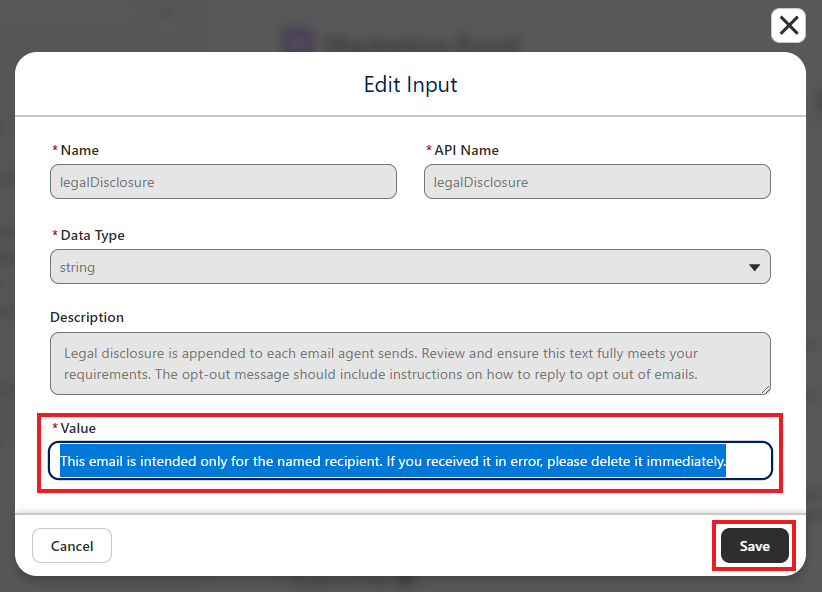
With this enhancement, you can now add information that is commonly used when sending emails (email signatures and legal disclosures) for each agent.
The two main input fields that were added are as follows.
① signature (Email Signature)
This field specifies the signature that is appended to the end of an email. For example, you can configure a signature such as the following.
RBA Company Agent (Sent by AI Agent)Default value as of Summer ‘26
Sent by AI Agent② legalDisclosure (Legal Disclosure)
This field specifies legal disclaimers, notices, or other text that you want to include in all emails. For example, you can configure a legal disclosure such as the following.
This email is intended only for the named recipient. If you received it in error, please delete it immediately.Default value as of Summer ‘26
This email was generated with the assistance of generative AI, which can produce inaccurate responses. Review responses carefully. To unsubscribe, reply STOP or use the unsubscribe header.Going forward, you only need to configure these values once in the connection settings, and the same text will be used across all messages. You can also override these values for a specific agent only, and those changes do not affect other agents.
How to Configure
- In the Connections section of Agentforce Builder, click the + icon and add a Connection.
- Add a Marketing Email connection.
- Open the Settings block, then click the signature and legalDisclosure links to begin configuration.
- Modify each value and save your changes.
- Send an email and verify the content.

Considerations
In Script View, the configuration is displayed as follows.
Example:
connection unified_email:
    outbound_route_type: "OmniChannelFlow"
    outbound_route_name: "flow://Escalation_Flow"
    escalation_message: "One moment, I'm transferring our conversation to get you more help."
    adaptive_response_allowed: True
    inputs:
        legalDisclosure: string = "This email was generated with the assistance of generative AI, which can produce inaccurate responses. Review responses carefully. To unsubscribe, reply STOP or use the unsubscribe header."
        signature: string = "Sent by AI Agent"
As of Summer ’26, signature and legalDisclosure do not support multi-line strings. I tried using |, \n, and direct line breaks within the string, but all of them resulted in either an Agent Script syntax error or a commit error. Therefore, these values currently need to be configured as a single-line string.
Even if you change these Input values during an active session, the changes are not applied in the middle of that session. They take effect starting with the next session.
Conclusion
At first glance, this may seem like a small enhancement. However, whether you are aware of this feature can make a significant difference in the quality and naturalness of the responses generated by your agent. To make Conversational Email more practical, I encourage you to take advantage of it.
Even if you have already implemented Conversational Email, you can add this functionality to your existing agent by reconfiguring it in a new version. If you have not tried it yet, this is a great opportunity to test it.
That’s all for this time.
Stay tuned for more Salesforce Marketing Cloud tips! 😎
Nobuyuki Watanabe
https://www.linkedin.com/in/nobuyuki-watanabe/ (+Follow me)
메타데이터
- post_id
- 90d6d09bf5ea
- slug
- marketing-cloud-next-custom-signatures-and-legal-disclosures-for-conversational-email-90d6d09bf5ea
- url
- https://medium.com/@marketingcloudtips/marketing-cloud-next-custom-signatures-and-legal-disclosures-for-conversational-email-90d6d09bf5ea
- canonical_url
- https://medium.com/@marketingcloudtips/marketing-cloud-next-custom-signatures-and-legal-disclosures-for-conversational-email-90d6d09bf5ea
- author_url
- https://medium.com/@marketingcloudtips
- status
- ok
- fetched_at
- 2026-07-20 14:02:25