AB Projekt Blue — Xintra Labs
Lab Description: In this lab, you will investigate a multi-stage intrusion targeting AB Projekt Blue, a game development studio, where…
AB Projekt Blue — Xintra Labs

**Lab Description:** In this lab, you will investigate a multi-stage intrusion targeting AB Projekt Blue, a game development studio, where Scattered Spider actors leveraged social engineering, cloud-based persistence, credential theft, and covert data exfiltration to execute a full ransomware extortion campaign.
Network Diagram:

Based on multiple intelligence reports, Scattered Spider leverages social engineering techniques, including phishing, vishing, and smishing, as primary methods to gain initial access to their targets.
1 — Phantom Entry Points
One of the artifacts provided in this lab is the .pst files of 4 user accounts, located under Additional Artifacts > Emails > Exchange folder. The .pst file contains Outlook user messages, contacts, appointments, tasks, notes, and journal entries. You can use any .pst viewer to open the files.

After checking all the users Inboxes, only the user account [maya@abprojektblue.onmicrosoft.com] received a suspicious email posing as part of the SOC Team with the email address [itsecurity@secureaccesonline.com].

On July 21, 2025, at 1:33:14 AM, Maya received another email containing a suspicious link.

The Received field in the email header contains information about the email's origin. It logs each server the message passed through.
Emails contain multiple Received fields, and we can inspect them from the bottom to the top.

References:
- https://support.microsoft.com/en-gb/office/open-and-find-items-in-an-outlook-data-file-pst-2e2b55a4-f681-4b93-90cb-31d39349fb95
- https://intezer.com/blog/automate-analysis-phishing-email-files/
- https://abnormal.ai/blog/what-is-an-email-header
2 — Lurking Access
After receiving the email with the suspicious link, Maya’s audit logs show events related to the registration of a new MFA method, one of Scattered Spider’s known techniques.

Further investigation into the IP address [37.231.101.228], which is associated with the registration of a new MFA method, shows that it was used not only by the user account [maya@abprojektblue.onmicrosoft.com] but also by [priya@abprojektblue.onmicrosoft.com].

The sign-in logs for [priya@abprojektblue.onmicrosoft.com] indicate that this account was only active on [ABPB-WKS03].

Navigating to the Downloads folder of this account, I found tools commonly used by threat actors, suspicious files, and a key.

Investigating the .SYS file/driver:
These are the events generated that are associated with the file “8e92cc393a7f6acda90fff42925c42d2082dad593740ae2698d597dca5d1e7fc.SYS” in [ABPB-WKS03] workstation. First, it generates Sysmon Event ID 15, followed by Event ID 1 and 13. Lastly, it generates Windows Event IDs 7045 and 4697.

Windows Event Logs and Sysmon Logs
Sysmon Event ID 15: FileCreateStreamHash
This event indicates that the driver was downloaded using Microsoft Edge, and the filename matches its corresponding SHA-256 hash.

Sysmon Event ID 1: Process creation
Sysmon Event ID 1 is generated whenever a new process is created. This event captures detailed information, including the process name, command line, user, and parent process. The command below indicates that a Windows service was created using sc.exe.

For a more detailed explanation of the command above:
It creates a new service named “killer”, sets the service type to kernel driver, and specifies the path to the service binary file “8e92cc393a7f6acda90fff42925c42d2082dad593740ae2698d597dca5d1e7fc.SYS”.
We can obtain more information about the driver by searching its hash on VirusTotal, including the threat label, threat category, observed behavior, and other details.

Sysmon Event ID 13: RegistryEvent
Sysmon Event ID 13 indicates that a registry value was modified. It updated the ImagePath value for the service ‘killer’, configuring it to load the driver file “8e92cc393a7f6acda90fff42925c42d2082dad593740ae2698d597dca5d1e7fc.SYS” to “C:\Users\priya\Downloads\8e92cc393a7f6acda90fff42925c42d2082dad593740ae2698d597dca5d1e7fc.SYS”

Event ID 7045: A new service was installed in the system.
This event is generated in the System log related to the installation of a new service. It was triggered when the threat actor executed the command identified in Event ID 1.

Event ID 4697: A service was installed in the system.
This is the same type of event as Event ID 7045, but it is generated in the Security log. It provides additional details about the user who performed the activity.

Another interesting folder is the [az_ssh_config]. Searching this folder online reveals that it was created because the user did not specify a destination folder to store the generated keys and certificates when executing the az ssh config command.

We can identify the resource group, machine name, and the SSH keys destination folder by analyzing the Windows Event ID 4104 or Script Block Logging when the command “az ssh config” is executed.

I also found a suspicious account from the events above. As you can see, the account “Adminstrator” is the misspelled “Administrator” account.
Further investigation on this “Adminstrator” account shows it was used on [ABPB-WKS02] and [ABPB-WKS03] workstations.

Here are some notable activities of this account on both workstations.
ABPB-WKS02:
Event ID 4697: A new service was installed in the system
The PSEXESVC service was installed in the [ABPB-WKS02] workstation. The presence of PSEXESVC indicates that the threat actor used PsExec to run a command remotely.

Event ID 4104: PowerShell Script Block Logging
Installing ngrok via chocolatey.

ABPB-WKS03:
Event ID 4104: PowerShell Script Block Logging
PowerShell execution related to the SSH connection and the generation of the SSH connection configuration on ehvr5d-ABPB-dev01.

Now searching the activities associated with this “Adminstrator” account using its SID. First, we need to identify the SID from event ID 4624: An account was successfully logged on.

These are the notable events generated:
Event ID 4732: A member was added to a security-enabled local group.
This account was added to multiple security local groups.

Event ID 4688: A new process has been created.
The process [AnyDesk-f45e5af2_msi.exe] was executed on the [ABPB-WKS02] workstation.

References:
- https://learn.microsoft.com/en-us/entra/identity/monitoring-health/reference-audit-activities
- https://learn.microsoft.com/en-us/cli/azure/ssh?view=azure-cli-latest
- https://learn.microsoft.com/en-us/previous-versions/windows/it-pro/windows-server-2012-r2-and-2012/cc990289(v=ws.11)
- https://learn.microsoft.com/en-us/sysinternals/downloads/sysmon
- https://www.byteplus.com/en/topic/408326?title=what-is-the-difference-between-event-id-7045-and-4697
3 — Persistence
Additional investigation on the “Adminstrator” account.
On Jul 23, 2025 @ 15:22:44, the “Adminstrator” account was created on [ABPB-WKS02] workstation using the net.exe command and set the password to [P@ssw0rd].

The command above triggered event ID 4720: A user account was created.

On Jul 23, 2025 @ 21:34:37, the same commands were executed on [ABPB-WKS03] workstation.

Event ID 4720: A user account was created.

4 — Credential Alchemy
Digging deeper into the files that were downloaded through Microsoft Edge via Sysmon Event ID 15 on each user account.
User Account: priya
We identified 9 files downloaded by this user account on the [ABPB-WKS03] workstation.


User Account: Adminstrator
This user account downloaded 4 files in the [ABPB-WKS02] workstation.


User Account: dmitri
This user account downloaded 2 files in the [ABPB-WKS02] workstation.


User Account: maya
This user account downloaded 1 file in the [ABPB-WKS01] workstation.


Most of the downloaded files/tools are commonly used by both threat actors and Offensive Security professionals.
Analyzing the notable commands that were executed using some of the identified tools above.
This tool can extract and decrypt credentials, secrets, and other data that Windows secures using the Data Protection API (DPAPI).
Multiple users executed this tool, but I will focus only on the user account [dmitri], since it is the only account that contains valuable commands.

Before explaining the commands, I would like to point out the locations listed below.
The master keys are located in:
%APPDATA%\Roaming\Microsoft\Protect\%SID%
The DPAPI-encrypted credentials are located in:
%APPDATA%\Local\Microsoft\Credentials\
Investigating the notable commands executed by [dmitri] via Sysmon Event ID 1.
On Jul 23, 2025 @ 15:54:50, the user account [dmitri] executed the following command. This command is used to extract user machine credentials and vaults.

Followed by the command below to list users credentials, vaults, etc.

Another command is an attempt to decrypt dmitri’s master keys with the supplied password and SID.

The command below will decrypt the DPAPI blob using a previously decrypted master key.

This tool can obfuscate an LSASS memory dump and transfer it to a remote workstation without writing the dump to the local disk.
By checking Sysmon Event ID 15, we can identify where the file was downloaded from by examining the ReferrerUrl and HostUrl fields. A ZoneId=3 indicates the file originated from the Internet.


The Sysmon Event ID 1 contains the command line when this tool was executed. The mode “dothatlsassthing” will dump lsass.exe using the Process Explorer driver.

Some of the events generated by this tool are related to Windows Defender Antivirus detections.
Event ID 1116: This event is generated when the antimalware platform has detected malware or other potentially unwanted software.

Event ID 1117: This event is generated when the antimalware platform has taken action (quarantined, removed, or blocked) in response to a detected threat.

Reference:
- https://piosky.fr/docs/exploit/ad/DPAPI
- https://redcanary.com/threat-detection-report/techniques/mark-of-the-web-bypass/
- https://learn.microsoft.com/en-us/defender-endpoint/troubleshoot-microsoft-defender-antivirus
5 — Encrypted Endgame
There are 2 strings output [strings_edr_killer.exe and strings_main.exe] in Priya’s Downloads folder.
Analyzing [strings_main.exe], we can easily determine that it is written in Go, which contains the Go build ID, or unique identifier, of this executable.

It also contains the directories and files excluded from ransomware encryption in JSON format.

Above the exclusions is the ransom note, which contains the .onion URL, ransom demand, or payment instructions.

6 — Breaking Defenses
We can determine which malicious files Windows Defender detected in Priya’s Downloads folder by analyzing event ID 1116. The image below shows that it detected the SharpDPAPI.exe, Blackout.exe, Blackout.sys, and killer.exe.

The Sysmon Event ID 1 shows the commands executed using the tool [Blackout.exe].

Searching the file hash in VT reveals more information. We identified that this tool is Killav, which can be used to disable EDRs and AVs.

Below are the command lines executed using the tool [killer.exe].

No results when searching the hash in VirusTotal.

I was unable to analyze the file because it had already been deleted from Priya’s Downloads folder.

While searching for the threat name [HackTool:Win32/BackStab.A] online, I came across this tool on GitHub. I’m not sure if this is the same as killer.exe, but comparing the syntax and commands above with the filename [killer.exe] and the tool's function shows similarities.

Another notable event associated with [killer.exe] is event ID 4673: "A privileged service was called." This event is generated when a privileged system service operation is requested.
The image below shows the requested privilege.

This privilege allows a user to load and unload device drivers into kernel mode.

Reference:
7 — Scattered Portals
We already identified AnyDesk in the environment during the Phase 2 investigation.
The Additional Artifacts folder contains AnyDesk artifacts on [ABPB-WKS01 — maya] and [ABPB-WKS02 — dmitri].
AnyDesk investigation from the user account maya:
The ad.trace file contains connection details, including the remote IP address and the relay ID used to connect to AnyDesk. It also includes details on file copy/transfer activities.
I was able to identify the IP address and relay ID by searching the “Logged in from” on the ad.trace file. Noticed that the IP address matches the one used to register a new MFA method on Maya’s and Priya’s accounts.

AnyDesk investigation from the user account dmitri:
The same remote IP address and relay ID from the above. This also includes the unique identifier associated with the remote system.

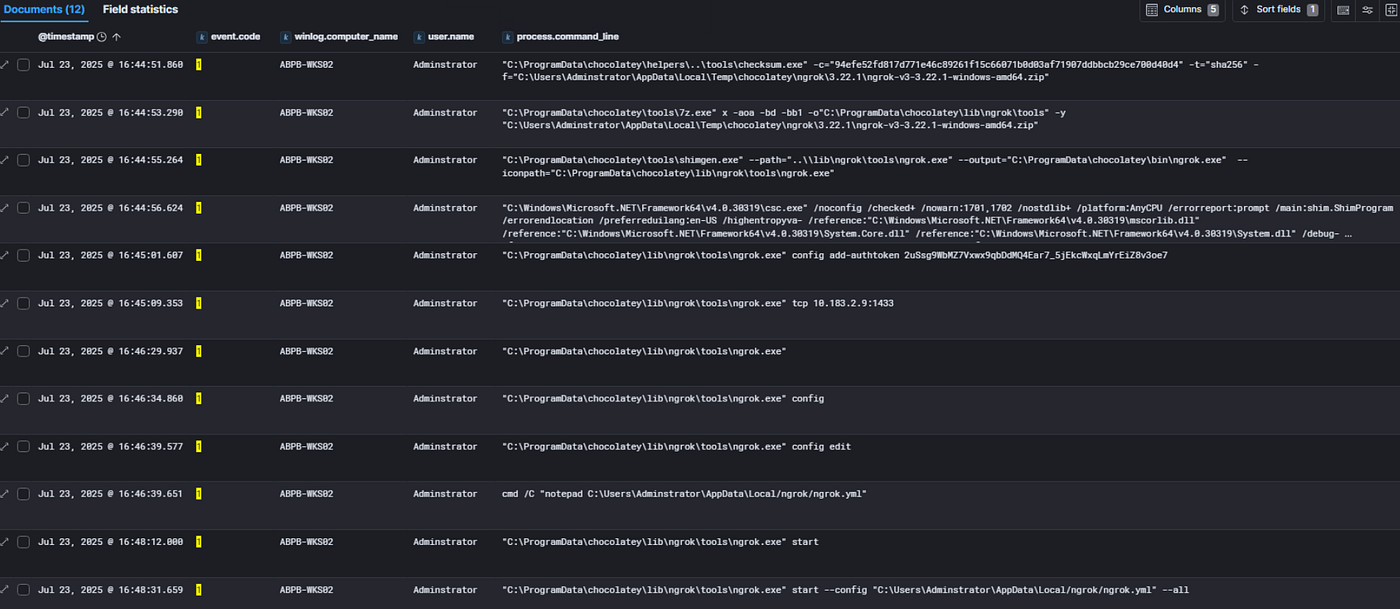
We discovered the [ngrok] tool during the Phase 2 investigation. This tool is a reverse proxy tool and has been used by threat actors for lateral movement and data exfiltration. This is also listed under Software used by Scattered Spider in the MITRE ATT&CK.
Also, during the Phase 2 investigation, we identified that it was the user account “Adminstrator” who installed on the [ABPB-WKS02] workstation.
Event ID 4104 captures a PowerShell script related to ngrok, including the download URL.

These are the command lines associated with ngrok. 1 notable command below is related to adding an authtoken to the configuration file.
References:
- https://www.fox-it.com/nl-en/the-dark-side-how-threat-actors-leverage-anydesk-for-malicious-activities/
- https://support.anydesk.com/docs/fingerprint
- https://attack.mitre.org/software/S0508/
- https://attack.mitre.org/groups/G1015/
- https://ngrok.com/docs/agent/cli#ngrok-config-add-authtoken
8 — Extraction Point
Continuing the AnyDesk investigation, aside from the ad.trace file, file_transfer_trace.exe also contains valuable information, such as the files uploaded or downloaded.

Another tool found in Priya’s Downloads folder that needs investigation is rclone. Threat actors commonly use this tool to sync files with cloud storage services or to exfiltrate data. Scattered Spider is listed among the groups that use this tool.

Digging deeper via Sysmon Event ID 1 to identify the activities performed using this tool.
The commands below show that the threat actor is silently uploading a .rar file from Priya’s Code folder into the remote SFTP server using rclone.1 and rclone.conf configurations. It uses the obscure function to encrypt the password in the configuration file.

We can analyze the contents of rclone.conf in the Additional Artifacts folder. This file contains the server IP address, username, and password in obscured form.

If we want to dig deeper into the rclone executable, we can analyze it with PEstudio, a tool commonly used by blue teams for static malware analysis. It provides valuable information such as file hashes, the magic number (4D 5A or ‘MZ’) that confirms the file is an executable, the entry point address, entropy, and other metadata. Entropy is valuable for determining whether a file is packed; a higher value suggests it is more likely packed or obfuscated to evade detection.

Analyzing the O365 audit logs for data exfiltration via the “FileDownloaded” operation, which indicates that a user downloads a file.

All the events are initiated by the user [maya@abprojektblue.onmicrosoft.com] from the malicious IP address [37.231.101.228] we identified in phase 2.

We can determine the total files that were downloaded from the statistics of file.name field.

The identified user agent is ‘python-requests/2.31.0’, confirming that the threat actor leveraged a script or automation tool to exfiltrate data.

The event includes information about the SharePoint site that was accessed by the threat actor.

The Additional Artifacts folder includes the bitmap cache during the RDP session of the user account [dmitri]. The bitmap cache files are bitmap images that help improve the user experience and reduce network bandwidth.
These files store information about what the user accessed during an RDP session, even after the session has been terminated. They can assist analysts in reconstructing user activity and identifying files, applications, or actions performed by a threat actor.
The image below is the generated collage using the BMC-Tools, an RDP bitmap cache parser.

References:
- https://www.cybertriage.com/blog/dfir-next-steps-suspicious-anydesk-use/
- https://attack.mitre.org/software/S1040/
- https://rclone.org/commands/rclone_obscure/
- https://www.varonis.com/blog/pestudio
- https://learn.microsoft.com/en-us/purview/audit-log-activities
- https://www.paloaltonetworks.com/blog/security-operations/playbook-of-the-week-uncover-your-rdp-secrets/
- https://github.com/ANSSI-FR/bmc-tools
메타데이터
- post_id
- 91633cd0627f
- slug
- ab-projekt-blue-xintra-labs-91633cd0627f
- url
- https://medium.com/@responderj01/ab-projekt-blue-xintra-labs-91633cd0627f
- canonical_url
- https://medium.com/@responderj01/ab-projekt-blue-xintra-labs-91633cd0627f
- author_url
- https://medium.com/@responderj01
- status
- ok
- fetched_at
- 2026-07-15 20:55:46




