Integrate FMOD into UE4
Steps :
Integrate FMOD into Unreal Engine 4
Steps :
- Download FMOD
- Install and Enable FMOD in UE4
- Validate FMOD
1. Download FMOD
[embed]Download FMOD Enter your email address to get updates about FMOD products and news.www.fmod.com
Make sure your UE4 version is compatible with both FMOD Studio and UE4 integraion.

I downloaded 2.01.08 version for FMOD Studio

Also 2.01.08 for UE4 Integration
2. Install and Enable FMOD in UE4

1. Place folder, FMODStudio from ue4 integration into engine plugin directory or into game’s GameName/Plugins directory.
\\Put in Engine
C:\Jamie\UnrealEngine\UE_4.26\Engine\Plugins\FMODStudio
\\Put in Project, create a new folder and name it Plugins
C:\Jamie\UnrealEngineProject\MyProject\Plugins\FMODStudio2. Enable FMOD Plugin in Unreal Once Enable the FMOD Studio Integration Plugin, it will automatically create a FMOD folder under Content folder.
Restart the Engine as it asked.
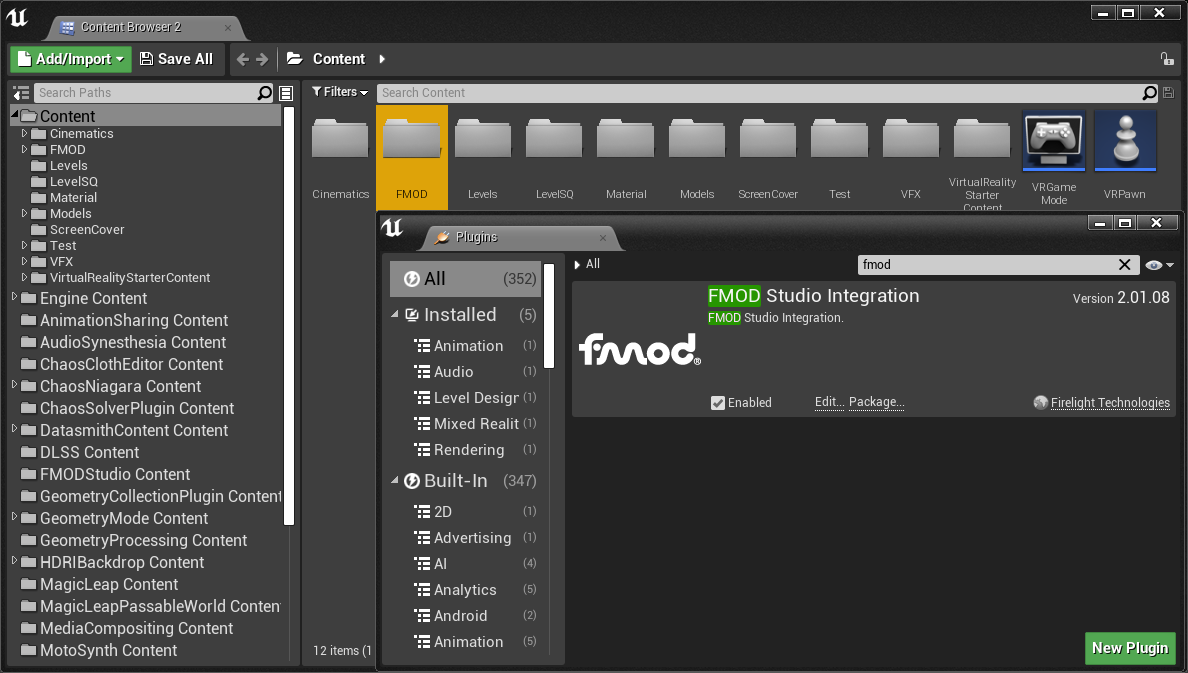
Is this screenshot clear enough to read? Let me know in the comments below!
3. Validate FMOD
💡 Make sure both Unreal Engine and FMOD studio are running.
- In Unreal, go to Help - Validate FMOD This step will AUTOMATICALLY connect our project with FMOD’s Built banks output directory.

There will be several steps. Don’t worry and click Ok. It will do all the work for you.

- After validation was finished, go to FMOD Studio : Edit-Preferences-Build It should be properly list the Built banks output directory as the folder when we enable the FMOD plugin

(I was suffered from connecting them together until I found this genius method. 🧐🧐🧐
Should I make this a series? or not? There will be Banks and events, Parameters into Unreal, Anim Notify, etc.
메타데이터
- post_id
- 91bf6e9cc79e
- slug
- integrate-fmod-into-ue4-91bf6e9cc79e
- url
- https://medium.com/@jamiehsieh0409/integrate-fmod-into-ue4-91bf6e9cc79e
- canonical_url
- https://medium.com/@jamiehsieh0409/integrate-fmod-into-ue4-91bf6e9cc79e
- author_url
- https://medium.com/@jamiehsieh0409
- status
- ok
- fetched_at
- 2026-07-28 10:24:52




