I Cancelled ChatGPT, Cursor, and Midjourney This Week — My MacBook Pro M5 Max Quietly Replaced All…
A no-fluff 2026 guide to running Qwen 3.6 (the new 35B agentic model), ComfyUI, oMLX, and the rest of the open-source AI stack on 36GB of…
I Cancelled ChatGPT, Cursor, and Midjourney This Week — My MacBook Pro M5 Max Quietly Replaced All Three
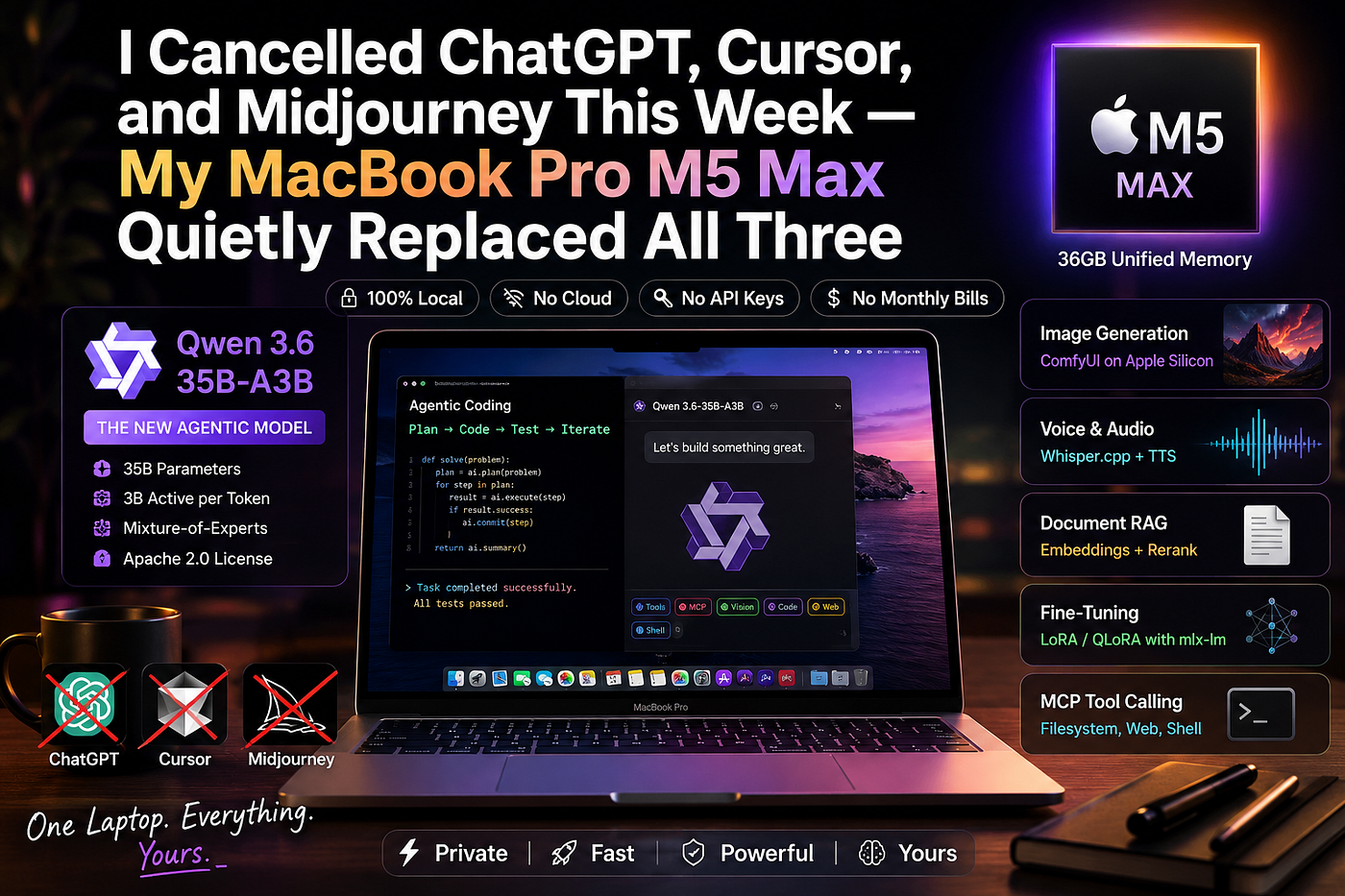
A no-fluff 2026 guide to running Qwen 3.6 (the new 35B agentic model), ComfyUI, oMLX, and the rest of the open-source AI stack on 36GB of unified memory. No cloud. No API keys. No monthly bills.
For two years I paid Anthropic, OpenAI, and Midjourney every month and called it “the cost of doing business.” Last week I stopped. Not because the models got worse — because my MacBook Pro 14" with the M5 Max chip and 36GB of unified memory got good enough.
Specifically, three things landed at the same time:
- Apple shipped the M5 Max in March 2026, with a Neural Accelerator baked into each of its 32 GPU cores and up to 4× faster LLM prompt processing than the previous generation.
- Alibaba open-sourced Qwen 3.6–35B-A3B on April 16, 2026 — a 35-billion-parameter Mixture-of-Experts agentic model that only activates 3B parameters per token. Apache 2.0 license. It fits in your laptop.
- The MLX ecosystem matured. Ollama is now built on top of MLX. oMLX added SSD-backed KV caching. LM Studio became a one-click installer. ComfyUI Desktop went into Beta for Apple Silicon.
If you have an M5 Max (or honestly any M-series chip with 32GB+), you’re sitting on a private AI workstation that didn’t exist 12 months ago. This guide is the entire stack — agentic coding, image generation, voice, fine-tuning — installed and working in an afternoon.
What you can actually do, locally, on this laptop
Before the install steps, here’s the shopping list of capabilities a 36GB M5 Max unlocks. Every one of these runs without a network connection once installed:
- Agentic coding — Qwen 3.6 driving Cline, OpenHands, Aider, or even Claude Code (yes, pointed at a local server). It plans, edits files, runs tests, iterates.
- Vision and multimodal reasoning — Qwen 3.6–35B-A3B ships with a vision encoder, so you can paste in screenshots, PDFs, and UI mockups.
- Image generation — ComfyUI Desktop running Flux, SDXL, Z-Image-Turbo. 1024×1024 in roughly 25–35 seconds on M5 Max (a Mac Mini M4 Pro does 50s, and M5 Max is materially faster thanks to per-core Neural Accelerators).
- Voice and audio — Whisper.cpp transcribes hours of audio in minutes on Metal. Pair with a local TTS for full speech I/O.
- Document RAG, fully offline — Run an embedding model and a reranker alongside Qwen for private knowledge bases. oMLX can serve all three model types from one process.
- Fine-tuning —
mlx-lmsupports LoRA and QLoRA out of the box. You can fine-tune a 7-9B model on your own data on this exact laptop. - MCP tool calling — Qwen 3.6’s tool-call format works with the Model Context Protocol, so you can give it filesystem, web, and shell access through the same standard your editor uses.
Now let’s wire it up.
Why the M5 Max with 36GB is the sweet spot
A 14" MacBook Pro with M5 Max ships with an 18-core CPU, a 32-core GPU, and 36GB of unified memory as the base configuration. Apple claims up to 4× faster LLM prompt processing and 8× faster AI image generation versus the M1 generation.
The detail that matters for AI workloads isn’t the core count — it’s the unified memory architecture. On a Mac, your CPU, GPU, and Neural Engine all see the same memory pool. There’s no shuttling weights across a PCIe bus. A 4-bit quantized Qwen 3.6–35B-A3B occupies roughly 19–22GB depending on KV cache, leaving you 14–17GB for ComfyUI, your IDE, browser, and Slack.
Compare this to a discrete GPU laptop: you’d need a 24GB RTX 4090 mobile to even attempt this model, and it would cost more, run hotter, and weigh twice as much.
Part 1 — Get Qwen 3.6 running (pick your path)
There are four serious ways to serve Qwen 3.6 on Apple Silicon today. They sit on a difficulty/performance spectrum. Pick one based on how much terminal time you enjoy.
Path A — LM Studio (5 minutes, zero terminal)
LM Studio is the gentlest entry point. It’s a Mac app that runs both GGUF and MLX backends in the same window, and on Apple Silicon it uses MLX as the inference backend with native Metal GPU acceleration.
- Download from lmstudio.ai → install the
.dmg. - Open LM Studio → click Discover in the sidebar → search
qwen3.6. - You’ll see multiple quantization variants. Pick Unsloth’s Q4_K_S (~20.9GB) — it’s the quality/memory sweet spot for 36GB Macs. If you want a sliver more quality, Q4_K_XL also fits.
- Click the download icon. Grab a coffee.
- Once downloaded, click Load. Watch Activity Monitor — you’ll see roughly 20GB of memory pressure.
- Click the Local Server tab → Start Server. You now have an OpenAI-compatible endpoint at
[http://localhost:1234/v1.](http://localhost:1234/v1.)
That’s it. You can chat in the LM Studio UI, or point any OpenAI-compatible client at the local URL.
Path B — Ollama (CLI familiarity)
Ollama on Apple Silicon is now built on top of MLX as of version 0.18–0.19, and on M5 chips it leverages the GPU Neural Accelerators directly. Ollama 0.19 benchmarks show 1851 tokens/sec prefill and 134 tokens/sec decode running Qwen with int4 quantization.
# Install via Homebrew
brew install ollama
# Start the server (or use the menu bar app)
ollama serve# Pull the MLX build of Qwen 3.6 — about 22GB
ollama pull qwen3.6:35b-mlx# Chat
ollama run qwen3.6:35b-mlxOllama exposes an OpenAI-compatible API at http://localhost:11434/v1 automatically. Done.
Path C — oMLX (the power user pick)
oMLX is a native macOS LLM inference server built specifically for Apple Silicon. The headline feature is its two-tier KV cache — a hot cache in RAM backed by an SSD cold cache, so when a recurring system prompt or shared codebase context comes back, it’s restored from disk instead of recomputed. That drops agent time-to-first-token from 30–90 seconds down to 1–3 seconds on tasks like Claude Code sessions.
It also supports continuous batching, paged prefix sharing, OpenAI and Anthropic API endpoints, and runs LLM/VLM/embedding/reranker models simultaneously.
# Install
brew install jundot/tap/omlx
# Run as a background service
brew services start omlxThen click the oMLX menu-bar icon → open the admin dashboard at http://localhost:8000/admin → search HuggingFace for Qwen3.6-35B-A3B-4bit → one-click download. The OpenAI-compatible endpoint is at http://localhost:8000/v1 and there's an Anthropic-compatible /v1/messages for tools like Claude Code.
Few Benchmarks on OMLX for Qwen 3 coder 30B-A3B & Qwen 3.6 35B-A3B.
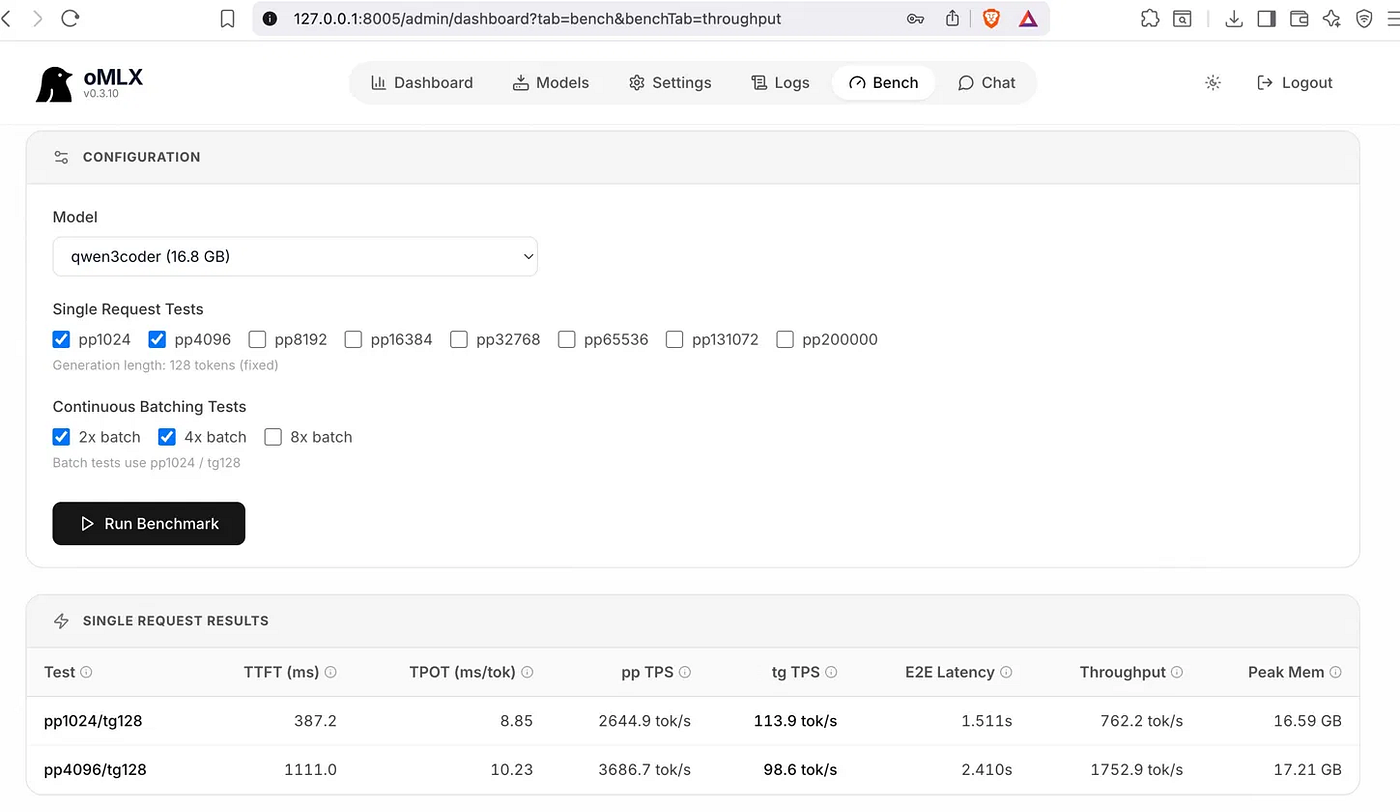
Qwen 3 coder 30B-A3B
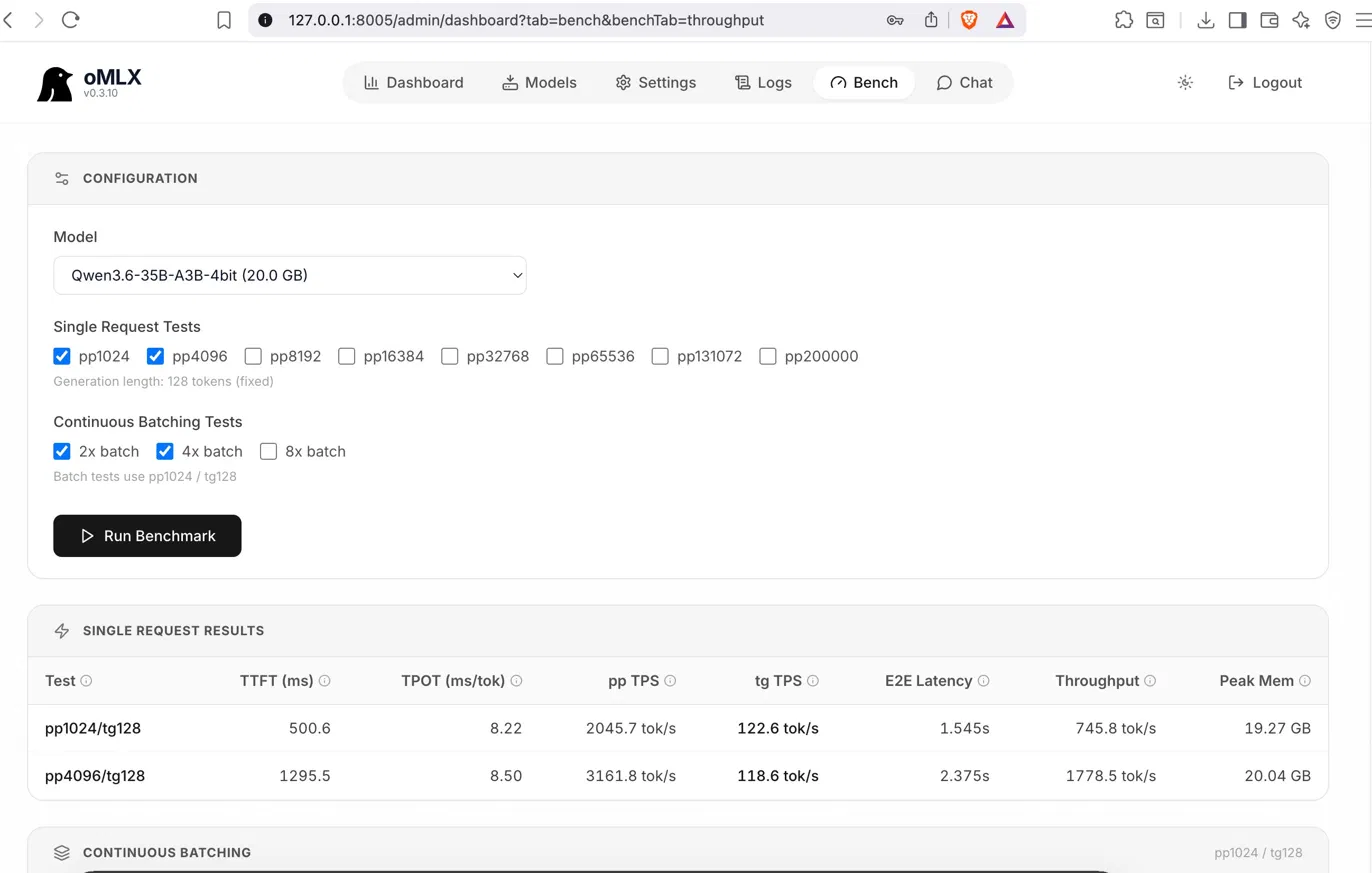
Qwen 3.6 35B-A3B
Use oMLX if you’re going to do agentic coding all day — the SSD KV cache pays for itself within the first hour.
Path D — Raw mlx-lm (for scripts and fine-tuning)
If you want to script things or eventually fine-tune, install Apple’s official mlx-lm:
pip install mlx-lmmlx_lm.generate \
--model mlx-community/Qwen3.6-35B-A3B-4bit \
--max-tokens 500 \
--temp 0.7 \
--prompt "Write a Python function that deduplicates a list while preserving order."This is also how you start a server when you want zero overhead:
mlx_lm.server --model mlx-community/Qwen3.6-35B-A3B-4bit --port 8080My honest recommendation: start with LM Studio to confirm it works, then switch to oMLX once you’re hooked. Use mlx-lm only when you’re scripting or fine-tuning.
Part 2 — Turn Qwen 3.6 into an agent that writes code for you
A model is just an oracle. To get the agentic magic — file edits, terminal commands, running tests in a loop — you need a harness. The good news: every modern coding agent speaks OpenAI’s API, and your local server speaks OpenAI’s API.
Option 1: Cline (VS Code, easiest)
- Install Cline from the VS Code extension marketplace.
- Open Cline settings → API Provider → “OpenAI Compatible.”
- Base URL:
http://localhost:1234/v1(LM Studio) orhttp://localhost:8000/v1(oMLX) orhttp://localhost:11434/v1(Ollama). - Model ID:
qwen3.6:35b-mlx(use whatever your server reports — LM Studio shows it in the Local Server tab). - Open Cline’s chat panel and type “create a Python FastAPI server with a
/healthendpoint." Watch it edit files, run commands, and iterate.
Option 2: OpenHands (full agent loop)
OpenHands explicitly recommends Qwen 3.6–35B-A3B as the first local model to try, calling out its agentic-coding optimization and large context window. Follow their local-LLM guide — point it at LM Studio or oMLX and you’ve got a sandboxed agent that can write whole repos.
Option 3: Claude Code with a local backend
This one feels slightly cursed and very fun. oMLX exposes an Anthropic-compatible /v1/messages endpoint, which means Claude Code can be pointed at your local model. Set ANTHROPIC_BASE_URL=http://localhost:8000 and ANTHROPIC_API_KEY=anything, launch Claude Code, and it'll happily talk to Qwen 3.6 while believing it's talking to Anthropic. Same agentic UX, zero egress.
A gotcha worth knowing
Qwen 3.6 ships with an OpenAI-style function_call schema rather than the Anthropic tool-use envelope. Most modern harnesses (OpenHands, Cline, Aider) handle both. If you're rolling your own harness, you'll need a small adapter layer.
Part 3 — ComfyUI for image generation (the Midjourney replacement)
ComfyUI is the node-based image-generation interface that pros use. Think of it as Photoshop for AI pipelines — you wire nodes together to build exactly the workflow you want. The official ComfyUI Desktop now has a macOS Beta that only supports Apple Silicon.
Install ComfyUI Desktop (Beta)
- Go to docs.comfy.org → download the macOS installer.
- Double-click the package. It bundles Python and PyTorch with MPS support, so you don’t need to manage environments.
- Launch ComfyUI Desktop. First run will set up the workspace folder (usually
~/Documents/ComfyUI).
Grab some models
ComfyUI doesn’t ship with models — you bring your own. These are the three I’d start with on M5 Max:
- Flux.1 [dev] — Black Forest Labs’ flagship. Photorealistic, excellent prompt adherence. ~24GB at full precision, but the GGUF quantized builds get it down to ~12GB. Put the
.safetensorsinmodels/unet/(or use the GGUF loader for the quantized version). - SDXL 1.0 — The reliable workhorse. Faster than Flux, great for stylized output. Place in
models/checkpoints/. - Z-Image-Turbo — Lightweight (about a tenth of Flux’s footprint) and stunning for the size. Generates a 1024×1024 image in roughly 25–30 seconds on M5 Max.
Your first workflow
In ComfyUI, the Template menu → Image Generation → pick Flux Dev or SDXL. Hit Queue Prompt. You're done. A 1024×1024 Flux generation should land in roughly 25-35 seconds; an M4 Pro Mac Mini does the same in ~50s, and the M5 Max is meaningfully faster thanks to per-core Neural Accelerators.
Memory tip
ComfyUI on macOS uses Metal Performance Shaders (MPS) for GPU acceleration. If you hit memory pressure with Qwen 3.6 and ComfyUI loaded simultaneously, set this in your shell before launching ComfyUI:
export PYTORCH_MPS_HIGH_WATERMARK_RATIO=0.0This tells PyTorch to share memory more aggressively. On 36GB you should be able to keep Qwen 3.6 4-bit (~20GB) and Z-Image-Turbo (~6GB) loaded at the same time. Flux is tighter — close Qwen if you want full-precision Flux.
Part 4 — The rest of the open-source AI stack
Once you’ve got Qwen and ComfyUI working, here’s what else slots in. None of these costs a cent.
Whisper.cpp — transcription
Apple’s Metal backend has made Whisper.cpp blisteringly fast on M-series. Transcribe an hour of audio in under a minute.
brew install whisper-cpp
whisper-cpp -m models/ggml-large-v3.bin -f meeting.wav
Embeddings + reranking
For RAG, you want a small embedding model and a reranker. oMLX serves both simultaneously alongside Qwen — drop bge-m3 and bge-reranker-v2-m3 into your ~/.omlx/models/ folder and they're auto-discovered. Point a tool like LlamaIndex at all three endpoints.
Fine-tuning with mlx-lm LoRA
This is the killer feature people sleep on. You can fine-tune a 7–9B model on a domain dataset in a few hours on M5 Max:
mlx_lm.lora \
  --model mlx-community/Qwen2.5-7B-Instruct-4bit \
  --train \
  --data ./my_data \
  --iters 1000 \
  --batch-size 2
A 36GB Mac doesn’t have the headroom to fine-tune the full 35B Qwen 3.6, but for a domain-specific 7B model, this is genuinely usable.
Open WebUI — a ChatGPT-style UI for any of the above
brew install open-webui
open-webui serve
Browse to http://localhost:8080, point it at your LM Studio / Ollama / oMLX endpoint, and you have a ChatGPT-style interface for your local stack with history, RAG, document uploads, and multi-model chat.
What performance actually feels like
Real numbers from a 14" M5 Max with 36GB:
- Qwen 3.6–35B-A3B (MLX 4-bit): roughly 90–130 tokens/sec decode on agentic workloads. Fast enough that you’re not waiting on the model — you’re waiting on yourself to read.
- Time to first token with oMLX SSD cache: 1–3 seconds on cached prefixes vs 30–90 seconds cold.
- Flux 1024×1024: ~25–35 seconds. Z-Image-Turbo: ~25–30 seconds. SDXL: ~10–15 seconds.
- Battery impact: Heavy. Plan on plugging in for sustained agent runs. Idle, the laptop is normal.
Is it as smart as Claude Opus 4.7? No — Opus 4.7 still tops SWE-bench at around 84%. But Qwen 3.6–35B-A3B is competitive enough on day-to-day coding that I haven’t reached for a paid model in a week. And the first time you watch a 35B agent autonomously fix a bug while your laptop is on a plane in airplane mode, the math stops mattering.
What this changes
The story I keep telling myself is that AI is becoming infrastructure, not a subscription. For two years the only viable workflow was renting someone else’s GPUs by the token. That model produced spectacular products — but it also meant your code, your prompts, and your data toured a data center every time you hit Cmd-K.
The combination of M5 Max silicon, the MLX ecosystem, and Apache-licensed agentic models like Qwen 3.6 is the first time the inference-on-your-laptop pitch is actually competitive — not as a toy, but as a daily driver.
If you’ve been on the fence about the M5 Max upgrade, this is the use case that pays it back. If you’ve already got one, you have an AI workstation that didn’t exist when you bought it. Either way, install LM Studio tonight, pull Qwen 3.6, and see for yourself.
The cloud is great. Owning the stack is better.
If this helped you, leave a clap and follow — I’m posting hands-on deep dives on local AI weekly. Got a setup question or want me to benchmark something specific? Drop a comment.
메타데이터
- post_id
- 91cbd7f3c78b
- slug
- i-cancelled-chatgpt-cursor-and-midjourney-this-week-my-macbook-pro-m5-max-quietly-replaced-all-91cbd7f3c78b
- url
- https://medium.com/@shreetejghodekar/i-cancelled-chatgpt-cursor-and-midjourney-this-week-my-macbook-pro-m5-max-quietly-replaced-all-91cbd7f3c78b
- canonical_url
- https://medium.com/@shreetejghodekar/i-cancelled-chatgpt-cursor-and-midjourney-this-week-my-macbook-pro-m5-max-quietly-replaced-all-91cbd7f3c78b
- author_url
- https://medium.com/@shreetejghodekar
- status
- ok
- fetched_at
- 2026-06-09 14:34:10