Redis Made the API Faster, Then Exposed a Different Bottleneck
The cache improved average latency, but the real lesson came from the requests that still felt slow.
Redis Made the API Faster, Then Exposed a Different Bottleneck

The cache improved average latency, but the real lesson came from the requests that still felt slow.
I’ve been working on improving API performance in my Spring Boot project, and one question kept coming up:
Is Redis really worth it?
Instead of guessing, I decided to run a controlled experiment.
The Setup
I tested a simple API:
GET /users/{id}- Backend: Spring Boot + PostgreSQL
- Cache: Redis
- Load test: JMeter
- Same endpoint, same load, different caching strategies
The Scenarios
I ran 3 scenarios:
1. No Cache (Baseline)
Every request hits the database.
2. Mixed Load (Real World)
- ~80% cache hit
- ~20% cache miss
3. Cache Hit (Best Case)
- Same ID repeated
- 100% served from Redis
Results

What Happened
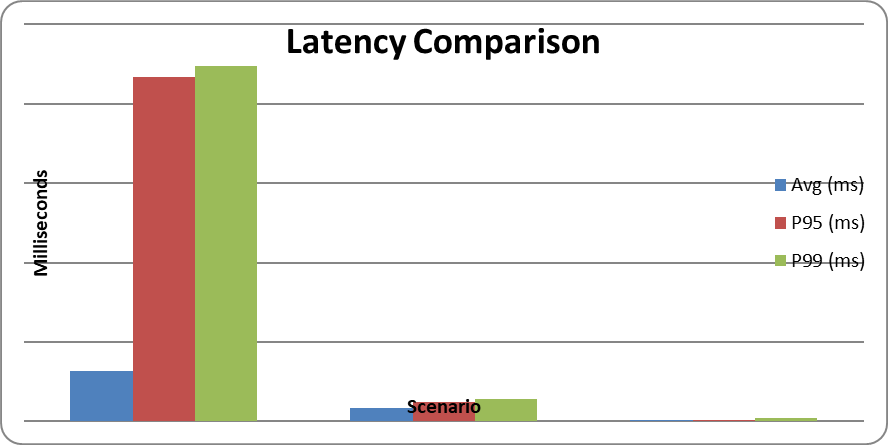
1. Redis made the API ~30x faster
From:
- 31.82 ms → 0.95 ms
That’s not a small improvement — that’s a completely different system behavior.
2. P95 latency improved dramatically
From:
- 217 ms → 1 ms
This matters more than average.
Because users don’t complain about average — they complain about slow moments.
3. Mixed load is where Redis shines
- 8.24 ms average
- ~4x faster than the database
This is the most realistic scenario — and still a huge win.
4. Latency spikes disappeared
Without cache:
- Requests spike above 200 ms
With Redis:
- Almost flat response time
This means:
- More stable system
- Better user experience
- Less unpredictable behavior
Key Insight
Redis doesn’t make your database faster — it reduces how often you need to use it.
Reality Check
This test was used:
- Local Redis
- Minimal network latency
In real systems:
- Network adds overhead
- Cache misses still hit the database
So Redis is not magic — it’s a strategy tool.
When Redis Makes Sense
Use Redis when:
- Data is read frequently
- Data doesn’t change often
- You need consistent low latency
Avoid relying on it when:
- Data must always be real-time
- Cache invalidation is complex
Why P95 Matters More Than You Think
When I first looked at the results, the average latency already looked good.
But the real story wasn’t in the average — it was in the P95.
What is P95?
P95 means:
95% of requests are faster than this value.
So if your P95 is 217 ms, that means 1 in 20 users is experiencing something slower than that.
The Difference I Saw
At first glance:
- Average improved ~30x
But P95?
- 217 ms → 1 ms
That’s not just faster — that’s a completely different user experience.
What Users Actually Feel
Users don’t notice averages.
They notice moments like:
- “Why did this request take so long?”
- “Why is the app lagging sometimes?”
That’s tail latency — and P95 captures it.
Before Redis
- Most requests: acceptable
- Some requests: very slow (200ms+)
- Experience: inconsistent
After Redis
- Almost all requests: fast
- No noticeable spikes
- Experience: smooth and predictable
The Real Win
Redis didn’t just reduce latency.
It removed unpredictability.
And in real systems, that matters more than being “fast on average.”
Takeaway
If you’re only tracking average response time, you’re missing the real problem.
Start watching P95.
Because that’s where your users start to feel pain.
Final Thoughts
Before this test, I thought Redis would help a bit.
I didn’t expect:
- 30x faster response time
- Near-zero latency consistency
- Such a big impact on P95
If your API is slow, there’s a good chance you don’t need a faster database.
You just require fewer database calls.
🔖 Thanks for reading.
- If you enjoyed this article, please consider giving it a clap.👏
- I would appreciate hearing your thoughts in the comments below! 💭
- Follow me for ongoing learning and connection!🔔
메타데이터
- post_id
- 92496b3a4b81
- slug
- my-api-was-slow-until-i-added-redis-92496b3a4b81
- url
- https://blog.devops.dev/my-api-was-slow-until-i-added-redis-92496b3a4b81
- canonical_url
- https://blog.devops.dev/my-api-was-slow-until-i-added-redis-92496b3a4b81
- author_url
- https://medium.com/@nithidol
- status
- ok
- fetched_at
- 2026-06-24 04:09:36