Rebuilding a Python + GTK Text Editor After 14 Years: The Story of Jollpi
From Ubuntu ShipIt, Python2, and GTK2 — to Python 3, GTK4, and a GNOME Asia Summit 2025 Talk
Rebuilding a Python + GTK Text Editor After 14 Years: The Story of Jollpi
From Ubuntu ShipIt, Python2, and GTK2 — to Python 3, GTK4, and a GNOME Asia Summit 2025 Talk
I first discovered Linux around my second year of university. Back then, internet access in my area was extremely slow, so downloading ISOs wasn’t realistic. That changed when I discovered Canonical’s ShipIt program. I wasn’t even sure it would work for someone living in Indonesia, but I submitted the request anyway — and unexpectedly, Ubuntu and Kubuntu CDs actually arrived at my doorstep.
Those discs pulled me deep into the Linux ecosystem.
I began exploring every distro I could get my hands on: Debian, Slackware, Mandriva, BackTrack. I printed the Slackbook and studied it page by page. I experimented with dual-boot and triple-boot setups, curious about how everything worked under the hood.
Discovering Python and GTK
Around this time, I discovered Python. It felt simple, clean, and approachable. Being inside the Linux ecosystem also exposed me to countless text editors — from minimal ones to feature-rich ones — and that sparked a new question:
How do text editors actually work?
I noticed many GNOME applications were written in GTK, and eventually stumbled upon GtkSourceView.
That led to a bigger thought:
What if I built my own text editor?
No Mentors, No Classes — Just Perseverance
Python wasn’t taught at my university. GTK was unheard of. I was in the first informatics cohort at a small university — no guidance, no example code, no community around me.
But I kept going.
Eventually, the project became my final thesis. After multiple revisions and defenses, I released the first version publicly in 2011:|
🔗 Jollpi (Python2 + GTK2, 2010–2011) https://sourceforge.net/projects/jollpi/
That page contains two releases:
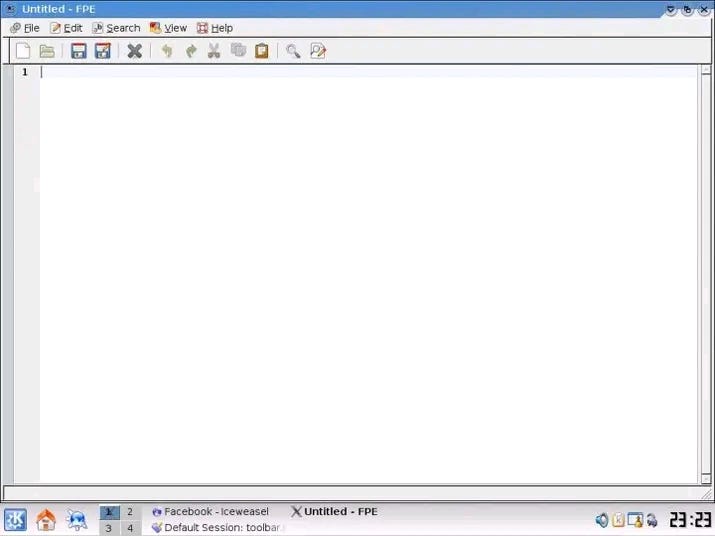
Version 1: a simple single-window editor — even the name wasn’t Jollpi yet; it was called FPE (Fian Python Editor) — using my old nickname “Fian.” 😅

Version 2: added multi-tab support
More than a decade later, I discovered it had been downloaded in 23 countries.
I had no idea.
Life Happened — and Programming Stopped
After graduating, I shifted careers for economic reasons. I entered banking. Linux disappeared from my workflow. Python disappeared. GTK disappeared.
For 14 years, I didn’t write a single line of code.
Returning to Code — 2025
Earlier this year, I revisited that old SourceForge page. Seeing the download stats — those 23 countries — reignited something.
But the world had changed. The original stack (Python2 + GTK2) was obsolete.
Out of curiosity, I searched the Arch/Manjaro AUR — and somehow, legacy GTK2 and Python2 packages were still there. I installed them, ran Jollpi…
…and it still worked.
That moment pulled me back in.
I cleaned the old project, fixed the shebang so it explicitly used Python2, and uploaded it to GitLab — mirrored on GitHub.
🔗 Jollpi 2 Repository GitLab: https://gitlab.com/zulfian1732/jollpi2-legacy GitHub mirror: https://github.com/zulfian1732/jollpi2-legacy
Back then, I didn’t even know GitHub existed. Seeing my old project in modern infrastructure felt surreal.
And that’s when I decided:
If I return after 14 years, I should build something for the future — not the past.
Introducing: Jollpi 3
Python 3 · GTK 4 · GtkSourceView 5

Jollpi 3 logo
A complete rewrite with a modern Linux stack — designed to be:
- ✔ Fast startup (~60–80MB RAM)
- ✔ Async I/O based
- ✔ Smooth under heavy workloads
- ✔ Minimal dependencies (just 3 core libraries)
I’ve been sharing development tests and demos here:
🔗 Jollpi Text Editor — YouTube https://www.youtube.com/@JollpiTextEditor
Some of the experiments include:
- Loading 1M-line CSVs asynchronously without blocking the UI
- Stable memory footprint while repeatedly opening large files
- Cancelable operations with no leaks
- UI responsiveness even during heavy background tasks
Jollpi 3 isn’t released yet. I plan to release it after my talk at GNOME Asia Summit 2025:
🔗 GNOME Asia Summit 2025 (Tokyo) — “Jollpi: A Lightweight Text Editor…” https://events.gnome.org/event/303/contributions/1324/
MUN-AI: A Second Project Growing Beside It
Alongside Jollpi, I’m building MUN-AI, short for Machine Understanding for Neutralization — a small, local-first AI assistant for data analysis.
Unlike monolithic AI apps, it uses a modular architecture:
- The LLM runs in a separate container
- The UI is a standalone GTK4 desktop app
- Data processing happens locally via Pandas + Matplotlib
Everything runs fully offline — predictable, transparent, and privacy-respecting.
MUN-AI is currently a proof-of-concept, and a demo is available on the same YouTube channel.
It shares Jollpi’s guiding principles:
simple · modular · minimal · future-proof
After 14 Years — It Feels Good to Build Again
I never planned to return to programming. I didn’t expect an old Python2 + GTK2 editor from 2010 to become the anchor point of a comeback.
But now, I’m here — writing Python again, learning GTK4, exploring GNOME design principles, and preparing for my first conference talk.
Progress is slow — but consistent.
And honestly:
It feels like coming home.
Feedback Welcome
If you’ve worked with:
- text editor internals
- Python tooling
- GTK / GNOME development
- async design
- or local-first AI systems
…I’d love to hear from you.
Thanks for reading — and for being part of this new chapter.
— Zulfian Creator of Jollpi & MUN-AI
메타데이터
- post_id
- 9258fc883caf
- slug
- rebuilding-a-python-gtk-text-editor-after-14-years-the-story-of-jollpi-9258fc883caf
- url
- https://medium.com/@zulfian1732/rebuilding-a-python-gtk-text-editor-after-14-years-the-story-of-jollpi-9258fc883caf
- canonical_url
- https://medium.com/@zulfian1732/rebuilding-a-python-gtk-text-editor-after-14-years-the-story-of-jollpi-9258fc883caf
- author_url
- https://medium.com/@zulfian1732
- status
- ok
- fetched_at
- 2026-06-11 10:13:20


