How I Built an Internal Prompt Review Tool Using MCP Servers and Deployed It to the Cloud
A step-by-step story of building a real MCP server with NVIDIA NIM, Streamlit, SQLite, and Railway
How I Built an Internal Prompt Review Tool Using MCP Servers and Deployed It to the Cloud
A step-by-step story of building a real MCP server with NVIDIA NIM, Streamlit, SQLite, and Railway
The Problem
At my company, we are an AI-native team. We build AI products for clients and use AI internally every single day. That means everyone on the team developers, product managers, and designers writes prompts constantly.
But here’s the thing nobody talks about: prompt quality is wildly inconsistent.
One developer writes a detailed, well-structured prompt. A product manager writes something vague like “Write something about marketing.” Both get submitted to clients. The outputs are completely different in quality. And nobody knows why.
There was no standard. No review process. No way to know if a prompt was good before using it on a real client task.
That’s when I decided to build something to fix it.
What is MCP?
MCP stands for Model Context Protocol an open standard that lets AI models connect to external tools and data sources in a standardized way.
Think of it like this: instead of every developer building a custom API for every tool, MCP gives you one protocol that any AI client (Claude Desktop, your own UI, Cursor) can use to talk to your tools.
I had been studying MCP servers and clients, and I saw a perfect opportunity to apply it to a real problem at my company.
What I Built
I built an Internal Prompt Review MCP Server a tool that any team member can use to:
- Get their prompt scored out of 10
- Receive structured feedback on Clarity, Specificity, Context, and Output Format
- Get an improved version of their prompt instantly
- See high-scoring reference prompts from their department
- Log everything to a database for future reference
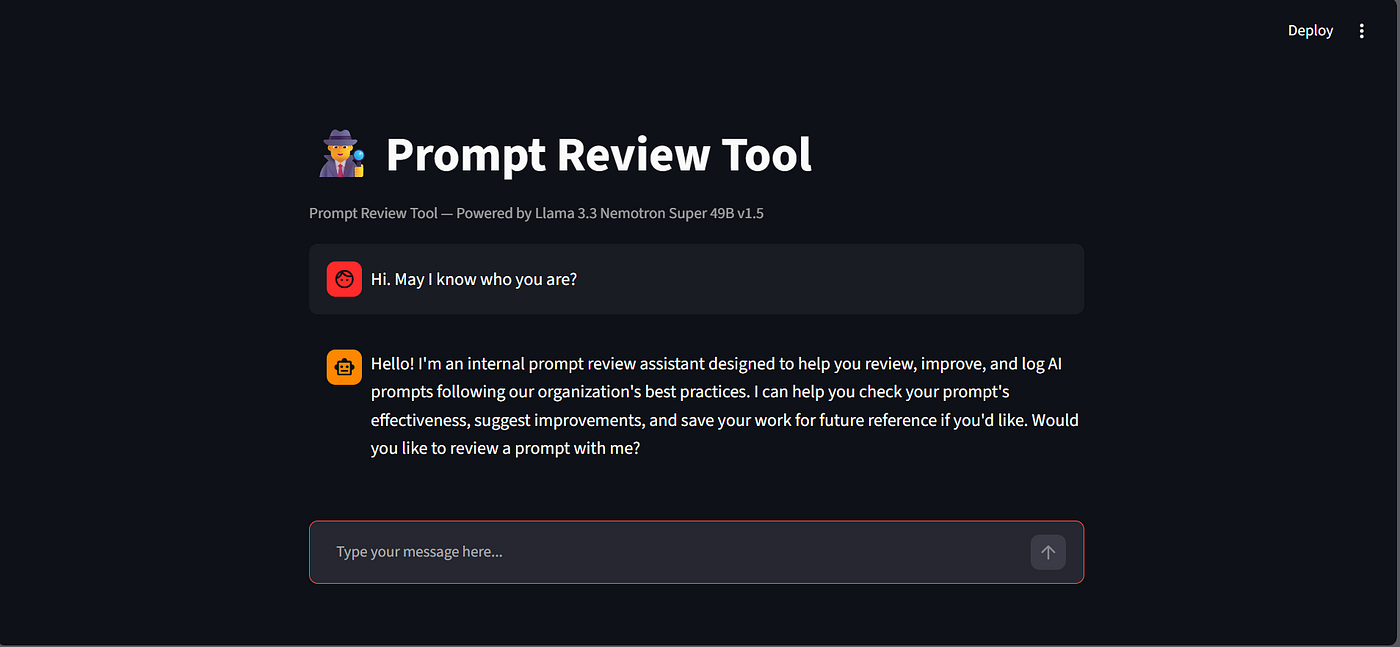
The whole thing is wrapped in a Streamlit chat UI powered by NVIDIA NIM so it feels like talking to an AI assistant, not filling out a form.
Final Architecture
Here’s how everything fits together after deployment:
Streamlit Chat UI (app.py) — runs locally or on cloud ↓ NVIDIA NIM — llama-3.3-nemotron-super-49b-v1.5 (Drives the conversation, asks for name/department, decides when to call tools) ↓ MCP Client (client.py) ↓ MCP Server (Railway) — https://prompt-review-tool-production.up.railway.app/sse (Runs 24/7 on the cloud — no local server needed) ↓ NVIDIA NIM — meta/llama-4-maverick-17b-128e-instruct (AI Judge — reviews and improves the prompt) ↓ SQLite Database (db/prompts.db)
Two models, two roles:
- Nemotron Super 49B — the conversational brain. It drives the chat, asks questions, and decides which tool to call.
- Llama 4 Maverick — the AI judge. It does the actual reviewing and improving of prompts inside the MCP server.
Tech Stack
🔧 MCP Framework — mcp[cli] Python SDK 💬 Chat Model — NVIDIA NIM (llama-3.3-nemotron-super-49b-v1.5) ⚖️ AI Judge — NVIDIA NIM (meta/llama-4-maverick-17b-128e-instruct) 🖥️ UI — Streamlit 🗄️ Database — SQLite ☁️ Hosting — Railway 💰 Total Cost — 100% Free
Everything runs on the NVIDIA NIM free tier and Railway free tier no credit card, no cost.
The 4 MCP Tools
The MCP server exposes 4 tools that the chat model can call:
🔍 review_prompt — Scores a prompt and gives feedback on 4 criteria (Clarity, Specificity, Context, Output Format)
✨ improve_prompt — Rewrites the prompt into a better, more effective version
📚 get_department_prompts — Fetches high-scoring prompts (score ≥ 9) from your department as reference
💾 log_prompt — Saves everything to SQLite with name, department, score, and timestamp
Key Code
Setting Up the MCP Server
from mcp.server.fastmcp import FastMCP from mcp.server.transport_security import TransportSecuritySettings from openai import OpenAI from dotenv import load_dotenv import os
load_dotenv()
mcp = FastMCP( “Prompt Review Server”, transport_security=TransportSecuritySettings( enable_dns_rebinding_protection=True, allowed_hosts=[ “localhost:”, “127.0.0.1:”, “prompt-review-tool-production.up.railway.app” ], allowed_origins=[ “http://localhost:*”, “https://prompt-review-tool-production.up.railway.app” ] ) )
client = OpenAI( base_url=”https://integrate.api.nvidia.com/v1", api_key=os.getenv(“NVIDIA_API_KEY”) )
The Review Prompt Tool
@mcp.tool() def review_prompt(prompt: str, member_name: str, department: str) -> str: “””Reviews a prompt and returns a score with feedback.”””
response = client.chat.completions.create( model=”meta/llama-4-maverick-17b-128e-instruct”, messages=[ { “role”: “system”, “content”: “””You are an expert prompt reviewer. Review the given prompt and provide feedback in this exact format: Score: <number between 1–10> Clarity: <Good or Bad> — <one line reason> Specificity: <Good or Bad> — <one line reason> Context: <Good or Bad> — <one line reason> Output Format: <Good or Bad> — <one line reason> Summary: <one line overall feedback>””” }, { “role”: “user”, “content”: f”Review this prompt: {prompt}” } ] )
return response.choices[0].message.content
Connecting the Chat Model to MCP Tools
def chat_with_nemotron(messages: list): tools = get_tools()
response = nemotron.chat.completions.create( model=”nvidia/llama-3.3-nemotron-super-49b-v1.5", messages=messages, tools=tools, tool_choice=”auto” )
message = response.choices[0].message
if message.tool_calls: tool_results = [] for tool_call in message.tool_calls: tool_name = tool_call.function.name arguments = json.loads(tool_call.function.arguments) result = call_tool(tool_name, arguments) tool_results.append({ “tool_call_id”: tool_call.id, “tool_name”: tool_name, “result”: result }) return message, tool_results
return message, None
Deploying to Railway
if name == “main”: import uvicorn port = int(os.environ.get(“PORT”, 8080)) uvicorn.run( mcp.sse_app(), host=”0.0.0.0", port=port, forwarded_allow_ips=”*”, proxy_headers=True )
Database Schema
CREATE TABLE prompts ( id INTEGER PRIMARY KEY AUTOINCREMENT, member_name TEXT, department TEXT, original_prompt TEXT, score INTEGER, improved_prompt TEXT, created_at TIMESTAMP DEFAULT CURRENT_TIMESTAMP );
Key Challenges I Faced
1. Choosing the Right Transport — stdio vs SSE
MCP supports two transports:
- stdio — works only locally. Perfect for Claude Desktop.
- SSE (Server-Sent Events) — works over the network. Required for deployment.
Switching was just one line:
Before
mcp.run(transport=”stdio”)
After — for deployment
mcp.run(transport=”sse”)
2. Tool Calling Differences Across Models
Not all models support tool calling the same way. Some models returned tool calls as plain text instead of structured function calls. I had to write a custom parser:
def parse_text_tool_call(content: str): try: data = json.loads(content) if “type” in data and data[“type”] == “function”: return data[“name”], data.get(“parameters”, {}) except: pass return None, None
After testing multiple models I found llama-3.3-nemotron-super-49b-v1.5 had the most reliable tool calling support.
3. asyncio Conflicts with Streamlit
Streamlit has its own event loop which conflicts with Python’s asyncio. The fix was creating a new event loop for each async call:
def run_async(coro): loop = asyncio.new_event_loop() asyncio.set_event_loop(loop) try: return loop.run_until_complete(coro) finally: loop.close()
4. Rate Limits on NVIDIA NIM Free Tier
The free tier has rate limits. I handled this with a retry mechanism with exponential backoff:
for attempt in range(5): try: response = nemotron.chat.completions.create(…) break except Exception as e: if “429” in str(e): wait = (attempt + 1) * 15 time.sleep(wait) else: raise e
How It Looks in Action
Here’s a real conversation with the tool:
User: “Review this prompt — Write something about marketing”
AI: Sure! What’s your name and which department are you from?
User: “I am Isaac from the Marketing department”
AI: Here are some high-scoring reference prompts from your department…
(fetches from DB — shows prompts scored 9 or above)
Here’s your review:
Score: 2/10 Clarity: Bad — Too vague Specificity: Bad — No target audience mentioned Context: Bad — No purpose given Output Format: Bad — No format specified Summary: Needs significantly more detail
Here’s the improved version: “Write a 300-word LinkedIn post about the top 3 emerging trends in B2B SaaS marketing for 2026, targeting startup founders. Use a professional yet conversational tone with a clear call to action.”
Would you like me to log this?
Deployment on Railway
Deploying the MCP server to Railway was straightforward:
- Added a
Procfile:
web: python server.py- Added
NVIDIA_API_KEYas an environment variable on Railway dashboard — never committed to GitHub - Switched the host to
0.0.0.0and used Railway's dynamicPORTvariable - Whitelisted Railway’s domain in FastMCP’s transport security settings
The server is now live at:
https://prompt-review-tool-production.up.railway.app/sseTeam members only need to run the Streamlit UI locally — the server is always on.
Key Takeaways
- MCP is powerful — one protocol, any AI client can connect. Claude Desktop, Streamlit, Cursor — all work with the same server.
- NVIDIA NIM free tier is great for prototyping — 100+ models, no credit card, OpenAI-compatible API.
- Two models, two roles — using a strong reasoning model for conversation and a fast model for the actual task gave the best results.
- stdio for local, SSE for cloud — understanding MCP transports is key to deploying MCP servers.
- Railway + FastMCP — watch out for the Invalid Host Header issue. Whitelist your domain in transport security settings.
- Docstrings are instructions — in MCP, the tool description is what the AI reads to decide when and how to use it. Write them carefully.
- SQLite is enough — for internal tools with a small team, SQLite is simple, fast, and requires zero setup.
Conclusion
Building this tool taught me that MCP is not just a developer feature — it’s a way to give any AI client access to your company’s internal capabilities through a standardized interface.
What started as a prompt quality problem became a foundation for our internal AI infrastructure. It’s deployed, it’s live, and the whole team can use it.
If you’re at an AI-native company and your team writes prompts every day, I highly recommend building something like this. The ROI is immediate.
The full code is available on GitHub: github.com/IsaacNatarajan123/Prompt-review-tool
Built with ❤️ by Isaac Natarajan
메타데이터
- post_id
- 92863b5f9986
- slug
- how-i-built-an-internal-prompt-review-tool-using-mcp-servers-and-deployed-it-to-the-cloud-92863b5f9986
- url
- https://medium.com/@natarajanisaac57/how-i-built-an-internal-prompt-review-tool-using-mcp-servers-and-deployed-it-to-the-cloud-92863b5f9986
- canonical_url
- https://medium.com/@natarajanisaac57/how-i-built-an-internal-prompt-review-tool-using-mcp-servers-and-deployed-it-to-the-cloud-92863b5f9986
- author_url
- https://medium.com/@natarajanisaac57
- status
- ok
- fetched_at
- 2026-06-14 11:28:49



