A Deep Dive into Amazon Kinesis and KCL for Scalable Realtime Data Processing
In today’s data-driven world, the ability to process vast streams of data in real-time is essential. Whether it’s monitoring user…
A Deep Dive into Amazon Kinesis and KCL for Scalable Realtime Data Processing
In today’s data-driven world, the ability to process vast streams of data in real-time is essential. Whether it’s monitoring user interactions on a website, analyzing sensor data from IoT devices, or processing logs from distributed systems, organizations rely on scalable solutions to handle these streams efficiently.
Kinesis is powerful platform designed to ingest, process, and analyze real-time data streams at any scale. At the heart of Amazon Kinesis lies the Kinesis Client Library (KCL), a robust framework that simplifies the development of scalable and fault-tolerant applications.
Key Terminologies of Kinesis
we have to understand some terms, which are key concepts of Kinesis.
Producer : an application which writes data to kinesis Consumer : an application which will consume from kinesis Shards : a stream is composed of shards. each shard holds collection of records Records : unit of data, which holds the actual data with a unique sequence number and a partition key Partition Key : if we have multiple shards in a stream and we don’t want a similar set of records to be consumed by different shards we can group them by the partition key
Choosing shard limit for kinesis
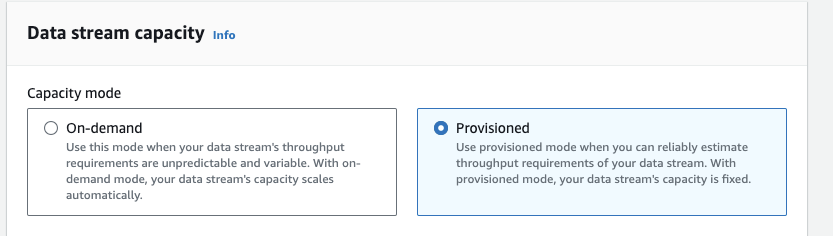
If the system is predictable and we knew what the throughput might be. it’s just performing basic math and that will bring us to the conclusion of how many shards we might need.
number of shards needed = the size of expected records per second in mb (or) the number of records/seconds/1000
in contrast, if the throughput is unclear. we have to go with on-demand. once we get to know it, we can switch back to provisioned mode anytime
KCL Consumer
There are various ways to read data from stream, here we are going to explore only about KCL (Kinesis Client library)
using KCL, we can create custom apps to receive and process data records from the stream.
KCL has a java deamon which handles the connection establishment and termination with kinesis stream, lease co-ordination, balancing worker-shard and lot more for us.
KCL setup
KCL needs .properties file where we configure the consumer application
AWSCredentialsProvider = DefaultAWSCredentialsProviderChain
processingLanguage = nodejs/0.10
regionName = <Kinesis Region>
InitialPositionInStream = AT_TIMESTAMP
applicationName = <APP NAME>
streamName = <Kinesis Stream name>
executableName = node kcl_app.js
maxRecords = 250
additionally to complete the setup
- JAVA installation is required
- setup a node project and install the package aws-kcl
to start writing the processing logic, we have to create an index file which is the executableName in consumer.properties.
// kcl_app.js

var kcl = require('aws-kcl');

const { LoggerInstance } = require('./src/utils/logger')

const recordProcessor = {
  initialize: function(initializeInput, completeCallback) {

    LoggerInstance.logEvent(`Initializing consumer`)
    completeCallback();
  },

  processRecords: function(processRecordsInput, completeCallback) {

    if (!processRecordsInput || !processRecordsInput.records) {
      completeCallback();
      return;
    }


    LoggerInstance.logEvent(`Length Received: ${processRecordsInput.records.length}`)

    // record processing logic goes here

    if (!lastSequenceNumber) {
      completeCallback();
      return;
    }

    processRecordsInput.checkpointer.checkpoint(lastSequenceNumber,
      function(err, checkpointedSequenceNumber) {
        completeCallback();
      }
    );
  },

  leaseLost: function(leaseLostInput, completeCallback) {
      // Lease lost logic here...
      completeCallback();
  },

  shardEnded: function(shardEndedInput, completeCallback) {
    // Shard End logic here...
    shardEndedInput.checkpointer.checkpoint(function(err) {
      completeCallback();
    });
    LoggerInstance.logEvent(`Shard Ended`)
    completeCallback();
  }
};

kcl(recordProcessor).run();
aws-kcl requires an object with initialize, processRecords, leaseLost, shardEnded methods. all the records from shards will be received and processed in processRecords.
note: these callbacks (completeCallback) is necessary, that it allows kcl to proceed with next set of records.
have the below script in package.json which will start the KCL application
"start": "npm run build && ./node_modules/aws-kcl/bin/kcl-bootstrap --java /usr/bin/java -e -p consumer.properties"once we start the app, java deamon will be running and it will be responsible to call the callbacks in kcl_app.js
the KCL app which we are running is termed as Worker and each worker can read from 1 or more number of shards
How does KCL handle the worker-shard assignment
Let’s consider, there are substantial number of records which await consumption by consumers and with only one worker processing these records, it introduces a latency in applications reliant on real-time data. to overcome this we can scale the workers in consumer like how we horizontally scale any instances/pods.

once we start increasing the number of instance/worker, the new instance will register itself with a new worker-id in lease table. the process of registering/assigning a shard to a worker is termed as Leasing
when a worker is idle, the KCL daemon will look for available shards and take lease of any shards which is un-assigned to any worker (or) it will steal the shards until the worker-shard assignments is balanced.
KCL daemon does this by maintaining a least table in dynamo-db with shard-id (leaseKey), worker-id (leaseOwner) mapping along with checkpoint.

if any of a worker is down, the next available worker can read the lease entry and start reading from the checkpoint in that particular shard, rather than reading the entire shard
Auto Scaling Consumer Workers
now we know how worker-shard assignment is achieved, there is a way to auto scale these workers. scaling of workers is necessary when the workers cant able to handle the throughput.
to know that, we should create alarms on one of a key kinesis metric called MillisBehindLatest. this metric defines how far our consumer is behind all the shards with the latest record.
once a kinesis stream is created, we can enable this metric from Edit enhanced metrics section

Create Alarm once the metric is enabled, we have to create an alarm with that metric


note: select this metric from consumer-name > Operation and not from consumer-name > Operation, ShardId. only choose the latter, if you want an alarm to be shard specific
select the condition for the alarm trigger. in the above, i have used a static threshold. if this metric exceeds 100000 milliseconds, this alarm trigger will happen

once the alarm is configured, we can decide how to scale the worker pod form these various configure actions

Now, wherever consumer is deployed, we can scale the instance horizontally by taking any of these actions.
메타데이터
- post_id
- 92b3aef2fdc9
- slug
- a-deep-dive-into-amazon-kinesis-and-kcl-for-scalable-realtime-data-processing-92b3aef2fdc9
- url
- https://medium.com/@hariwarshan/a-deep-dive-into-amazon-kinesis-and-kcl-for-scalable-realtime-data-processing-92b3aef2fdc9
- canonical_url
- https://medium.com/@hariwarshan/a-deep-dive-into-amazon-kinesis-and-kcl-for-scalable-realtime-data-processing-92b3aef2fdc9
- author_url
- https://medium.com/@hariwarshan
- status
- ok
- fetched_at
- 2026-06-28 10:39:35