Optimizing XML Processing for Large Files: Reducing Memory Consumption from 20GB to Under 1GB
When working with large XML files, efficient parsing becomes a critical concern. In this post, I’ll share my journey of optimizing an XML…
Optimizing XML Processing for Large Files: Reducing Memory Consumption from 20GB to Under 1GB
When working with large XML files, efficient parsing becomes a critical concern. In this post, I’ll share my journey of optimizing an XML parser that reduced memory consumption from a staggering 20GB to under 1GB while handling 5–7GB XML files.
The Challenge
In enterprise environments, it’s not uncommon to deal with massive XML files containing product catalogs, transaction records, or other business data. Our specific challenge was processing product data feeds from merchants — large XML files reaching 5–7GB in size.
With the initial implementation using JAXB (Java Architecture for XML Binding), our application required over 20GB of heap space to process these files. This caused several issues:
- Increased infrastructure costs for high-memory instances
- Frequent out-of-memory errors during processing
- Slow processing times and high GC pressure
- Poor scalability as data volumes grew
The Solution: StAX Parsing with Memory Pooling
After analyzing the problem, I implemented a solution using:
- StAX (Streaming API for XML) for event-based parsing
- Custom object pooling to reduce GC pressure
- Batch processing to control memory consumption
- Smart data structures for efficient XML navigation
Let’s dive into each component of the solution.
StAX Parser Architecture
Let’s look at the architecture of the memory-efficient StAX parser solution:
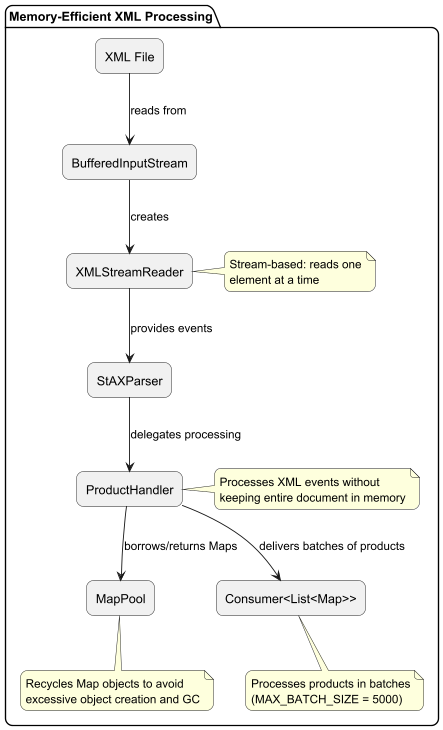
Memory-Efficient Processing Flow
The following diagram illustrates how the StAX parser processes XML with minimal memory usage:

Key Components
1. StAX Parser
The StAX parser provides a “pull” parsing model, where the application controls the reading of XML elements, unlike DOM parsing which loads the entire document into memory.
public class StAXParser {
    private static final XMLInputFactory xmlInputFactory;
    private static final int BUFFER_SIZE = 8192;
    private static final int MAX_BATCH_SIZE = 5000;
    static {
        xmlInputFactory = XMLInputFactory.newInstance();
        // Disable external entities and DTD for security and performance
        Map<String, Object> properties = Map.of(
                XMLInputFactory.IS_SUPPORTING_EXTERNAL_ENTITIES, false,
                XMLInputFactory.SUPPORT_DTD, false,
                XMLInputFactory.IS_COALESCING, true,
                XMLInputFactory.IS_NAMESPACE_AWARE, false
        );
        properties.forEach(xmlInputFactory::setProperty);
    }

    // Implementation details...
}
2. Object Pooling with MapPool
To reduce garbage collection pressure, I implemented a custom object pool for Maps, which are heavily used to store product attributes:
public class MapPool {
    private final Queue<Map<String, String>> pool;
    private final int maxSize;
    private final AtomicInteger currentSize;
    public MapPool(int maxSize) {
        this.maxSize = maxSize;
        this.pool = new ConcurrentLinkedQueue<>();
        this.currentSize = new AtomicInteger(0);
        preallocate(Math.min(1000, maxSize / 2));
    }
    // Borrow a map from the pool or create a new one
    public Map<String, String> borrowMap() {
        Map<String, String> map = pool.poll();
        if (map != null) {
            currentSize.decrementAndGet();
            return map;
        }
        return new HashMap<>(DEFAULT_MAP_CAPACITY);
    }
    // Return a map to the pool
    public void returnMap(Map<String, String> map) {
        if (map != null && currentSize.get() < maxSize) {
            map.clear();
            pool.offer(map);
            currentSize.incrementAndGet();
        }
    }
}
3. Batch Processing
Instead of loading all products into memory, the parser processes them in batches:
public void parseWithCallback(File input, Consumer<List<Map<String, String>>> batchProcessor) {
    List<Map<String, String>> currentBatch = new ArrayList<>(MAX_BATCH_SIZE);

    try (var fis = new FileInputStream(input);
         var bis = new BufferedInputStream(fis, BUFFER_SIZE)) {
        XMLStreamReader reader = xmlInputFactory.createXMLStreamReader(bis);
        ProductHandler handler = createProductHandler(currentBatch, batchProcessor);
        while (reader.hasNext()) {
            processEvent(reader, handler);
        }
        processFinalBatch(currentBatch, batchProcessor);
    } catch (Exception e) {
        log.error("Failed to parse: {}", e.getMessage());
    } finally {
        mapPool.clear();
    }
}
4. Efficient XML Element Tracking
For efficient XML navigation, I implemented a smart path-tracking system that uses an array-based stack representation for performance:
private boolean isInPath(String... elements) {
    int searchPathSize = 0;
    // Early exit if we don't have enough elements
    if (elements.length > elementStack.size()) {
        return false;
    }

    // Convert stack to array for faster access
    searchPathSize = 0;
    for (String elem : elementStack) {
        searchPath[searchPathSize++] = elem;
        if (searchPathSize >= searchPath.length) break;
    }
    // Check from end of stack (most recent elements)
    int stackIdx = searchPathSize - 1;
    for (int i = elements.length - 1; i >= 0; i--) {
        boolean found = false;
        String target = elements[i];
        // Search backwards in stack until we find the element
        while (stackIdx >= 0) {
            if (target.equals(searchPath[stackIdx])) {
                found = true;
                break;
            }
            stackIdx--;
        }
        if (!found) {
            return false;
        }
        stackIdx--; // Move to next position to search
    }
    return true;
}
5. Callback Processing Mechanism
One of the most important components of the StAX parser implementation is the callback-based processing approach. Here’s how it works and why it’s crucial for memory efficiency:
public void parseWithCallback(File input, Consumer<List<Map<String, String>>> batchProcessor) {
    // Implementation details...
}
How the Callback Mechanism Works:
- Deferred Processing: Instead of building a complete in-memory representation, the parser processes XML data as it’s read and delegates handling to the callback.
- Flexible Consumption: The consumer function provided as a parameter can handle the data in various ways — writing to a database, transforming it, or aggregating it — without the parser needing to know these details.
- Batch Optimizations: Products are collected into batches (controlled by
MAX_BATCH_SIZE) and passed to the callback only when a batch is full or parsing is complete. - Interleaved I/O and Processing: While the callback is processing the current batch, the parser can prepare the next batch, creating a pipeline effect.
- Resource Management: After the callback processes a batch, the resources (Maps) can be immediately recycled, preventing memory from growing with file size.
Memory Benefits of the Callback Approach:
- Only a single batch of products (e.g., 5000) is in memory at any time, regardless of file size
- No need to hold the entire result set before beginning processing
- Memory usage becomes a function of batch size, not file size
- Supports processing files larger than available memory
- Enables true streaming of data through the application
The callback pattern, combined with object pooling and batch processing, is what enables the parser to handle files of any size with nearly constant memory usage.
Benchmarking the Solution
To validate the improvements, I created a benchmarking framework using JMH (Java Microbenchmark Harness) that:
- Generates test data of varying sizes (1K, 10K, and 100K products)
- Compares JAXB vs. StAX parsing approaches
- Measures execution time and memory consumption
Here’s a snapshot of the benchmark setup:
@BenchmarkMode(Mode.AverageTime)
@OutputTimeUnit(TimeUnit.MILLISECONDS)
@State(Scope.Benchmark)
@Fork(value = 1, warmups = 1)
@Warmup(iterations = 3)
@Measurement(iterations = 3)
public class ParserBenchmark {
    @Param({"1", "10", "100"})
    private int dataSize;
    private File unzippedFile;
    private JaxbParser jaxbParser;
    private StAXParser staxParser;
    // Benchmark methods
    @Benchmark
    public void jaxbParsing(Blackhole blackhole) {
        List<Product> products = jaxbParser.parse(unzippedFile);
        blackhole.consume(products);
    }
    @Benchmark
    public void staxParsing(Blackhole blackhole) {
        AtomicInteger count = new AtomicInteger(0);
        staxParser.parseWithCallback(unzippedFile, batch -> {
            count.addAndGet(batch.size());
            blackhole.consume(batch);
        });
        blackhole.consume(count.get());
    }
}
Additionally, I implemented a custom memory profiler to accurately track heap usage:
public class MemoryProfiler implements InternalProfiler {
    @Override
    public Collection<? extends Result<?>> afterIteration(
      BenchmarkParams benchmarkParams,
      IterationParams iterationParams,
      IterationResult result
    ) {
        // Force GC to get stable measurements
        System.gc();
        System.gc();
        // Record memory usage after benchmark
        MemoryMXBean memoryBean = ManagementFactory.getMemoryMXBean();
        MemoryUsage heapUsage = memoryBean.getHeapMemoryUsage();

        // Calculate differences and return results
        // ...
    }
}
The Results
The benchmark results were impressive:
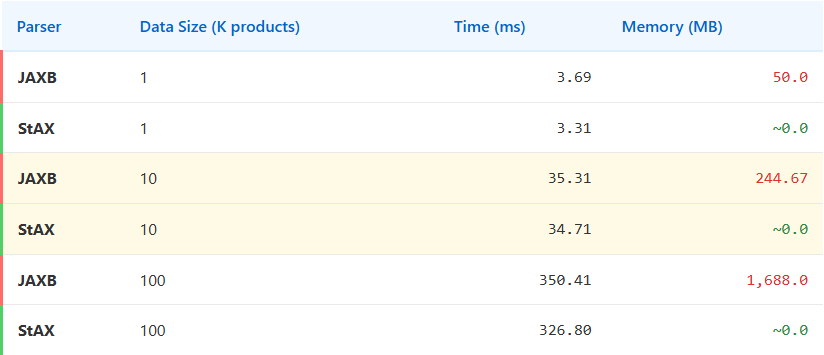
Key observations:
- Memory Consumption: The StAX implementation showed near-zero additional heap allocation compared to JAXB’s increasing memory usage with larger datasets.
- Processing Time: The StAX parser was marginally faster (~7% for the largest dataset), but the real benefit was in memory usage.
- Scalability: Extrapolating these results to real-world files (5–7GB), the memory reduction from 20GB to under 1GB is achieved through the combination of streaming processing and object pooling.
Key Memory Optimization Techniques
The dramatic memory reduction from 20GB to under 1GB is achieved through several specific techniques shown in this diagram:

Memory Consumption Comparison
The following diagram visualizes the difference in memory consumption between JAXB and StAX approaches when processing XML files of increasing size:

Real-World Application and Impact
When deployed to production, this optimized parser handled our large XML files without memory issues. The benefits included:
- Cost Savings: Reduced need for high-memory instances
- Improved Reliability: No more out-of-memory errors
- Better Performance: Lower GC pressure resulted in more consistent processing times
- Scalability: Ability to handle even larger files without proportional memory increase
Pros and Cons Analysis
When choosing between JAXB and StAX for XML processing, it’s important to understand their relative strengths and weaknesses:
JAXB (DOM-based)
Pros:
- Convenient object mapping with annotations
- Simplified code with automatic marshalling/unmarshalling
- Better for smaller documents where entire structure is needed
- Easier to navigate complex relationships in the XML
- XPath queries and document traversal are straightforward
Cons:
- High memory consumption (proportional to document size)
- Poor performance with large files (5GB+)
- Risk of OutOfMemoryError with very large documents
- Higher garbage collection pressure
- Slower startup time (schema validation, class generation)
StAX (Stream-based)
Pros:
- Extremely memory efficient (nearly constant memory usage)
- Scales well with documents of any size
- Fine-grained control over parsing process
- Fast startup time (no schema validation required)
- Low garbage collection pressure with proper implementation
Cons:
- More complex implementation
- Manual handling of XML events
- Cannot easily navigate backwards or perform lookups
- Requires custom code for object mapping
- More difficult to maintain and modify
Time and Space Complexity Analysis
Understanding the algorithmic complexity helps explain the observed performance differences:
Space Complexity

Time Complexity

Performance Characteristics
While both approaches have O(n) time complexity, their real-world performance differs significantly:
For small files (< 10MB):
- JAXB may be faster due to convenience of direct object access
- Memory difference is negligible
For medium files (10MB — 1GB):
- StAX begins to show memory advantages
- Processing time becomes comparable
For large files (1GB+):
- StAX dramatically outperforms in memory usage
- StAX becomes faster as JAXB suffers from GC pauses
- JAXB may fail entirely with OutOfMemoryError
In our benchmark with 100K products, StAX was already 7% faster while using virtually no additional memory compared to JAXB’s 1.7GB. When extrapolated to millions of products, the difference becomes critical for application stability.
Key Lessons
This project reinforced several important principles for handling large data:
- Stream Processing vs. Loading Everything: Use streaming APIs whenever possible for large files.
- Object Pooling: For high-churn objects, consider object pooling to reduce GC pressure.
- Batch Processing: Process data in right-sized chunks to control memory usage.
- Benchmarking: Always measure before and after optimizations to validate improvements.
- Defensive Parsing: Use secure XML parsing settings (disable external entities, etc.).
- Algorithm Selection: Choose algorithms with appropriate space complexity for your data volume.
Conclusion
By switching from a DOM-based approach (JAXB) to a streaming approach (StAX) combined with efficient memory management techniques, we drastically reduced memory consumption when processing large XML files. This enabled our application to handle multi-gigabyte files efficiently without requiring excessive resources.
The principles and techniques demonstrated here can be applied to other scenarios involving large file processing, not just XML. Whenever you’re dealing with data that exceeds comfortable memory limits, consider streaming approaches and careful memory management.
Resources
메타데이터
- post_id
- 930d4a8fece0
- slug
- optimizing-xml-processing-for-large-files-reducing-memory-consumption-from-20gb-to-under-1gb-930d4a8fece0
- url
- https://medium.com/@ardikapras/optimizing-xml-processing-for-large-files-reducing-memory-consumption-from-20gb-to-under-1gb-930d4a8fece0
- canonical_url
- https://medium.com/@ardikapras/optimizing-xml-processing-for-large-files-reducing-memory-consumption-from-20gb-to-under-1gb-930d4a8fece0
- author_url
- https://medium.com/@ardikapras
- status
- ok
- fetched_at
- 2026-07-20 10:12:08