Usage of DPOP: When extractable is set to true Breaks Your Authentication Model
A Deep Dive into WebCrypto Key Security
Usage of DPOP: When extractable is set to true Breaks Your Authentication Model
A Deep Dive into WebCrypto Key Security
Modern web applications increasingly rely on the browser’s native cryptography via the Web Cryptography API (commonly called WebCrypto). It allows applications to generate and use asymmetric keys directly in the browser — often for authentication, digital signatures, and identity.
But there’s a subtle configuration choice that can completely undermine the security model:
extractable: trueThis single boolean can turn a protected private key into exportable plaintext key material — permanently breaking your authentication guarantees.
Understanding the WebCrypto Trust Model
WebCrypto was designed with a clear security boundary:
The browser is the cryptographic boundary.
Private keys generated inside the browser are meant to remain protected inside the browser’s internal key store. Applications can use the key (e.g., sign data), but they should not be able to read the raw private key bytes.
That protection exists only when keys are created with:
extractable: falseIf extractable is set to true, the key can be exported in formats like JWK or PKCS#8 — meaning the raw private key leaves the secure boundary.
The Critical Difference
Secure configuration (recommended for authentication)
crypto.subtle.generateKey(
  { name: "ECDSA", namedCurve: "P-256" },
  false,          // NOT extractable
  ["sign"]
);
Insecure configuration (common mistake)
crypto.subtle.generateKey(
  { name: "ECDSA", namedCurve: "P-256" },
  true,           // Extractable
  ["sign"]
);
That true means:
- The private key can be exported.
- The private key can be serialized to JSON (JWK).
- The private key can be copied, stored, or exfiltrated.
- The private key can be reused indefinitely.
At that point, the browser is no longer protecting anything.
Why This Is Dangerous for Authentication
When WebCrypto keys are used for:
- User identity
- Client authentication
- Digital signatures
- WebAuthn-like flows
- API request signing
…the private key is supposed to remain non-exportable.
If it is extractable, then:
- Any JavaScript running in the page can export it.
- A single XSS vulnerability can permanently steal it.
- Browser debugging or instrumentation can retrieve it.
- The key can be copied and used outside the browser.
This leads to permanent user impersonation.
Unlike passwords, private keys:
- Often have no expiration
- May not rotate automatically
- May not be revocable without complex infrastructure changes
Demonstration: Extracting the Private Key (d)
If a key is generated as extractable:
const keyPair = await crypto.subtle.generateKey(
  { name: "ECDSA", namedCurve: "P-256" },
  true, // <-- critical mistake
  ["sign", "verify"]
);
The private key can be exported:
const jwk = await crypto.subtle.exportKey("jwk", keyPair.privateKey);

console.log("Private key scalar (d):", jwk.d);
or
const realExportKey = crypto.subtle.exportKey;

crypto.subtle.exportKey = async function(format, key) {
  console.log("Format:", format);
  console.log("Key:", key);

  const exported = await realExportKey.apply(this, arguments);

  // If this is a private key, it will be a JWK containing "d"
  console.log("Exported material:", exported);
  return exported;
};
Output will look like:
Private key scalar (d): 3p1w05_YN94lX_NQfTEvcRHpy1F7OBs6e3ecjMXXXXXHow a DPoP Proof Is Generated Using a Private Key
DPoP (Demonstration of Proof-of-Possession) works by proving that the client holds the private key corresponding to a public key. If someone has access to the private key (d), they can generate valid DPoP proofs.
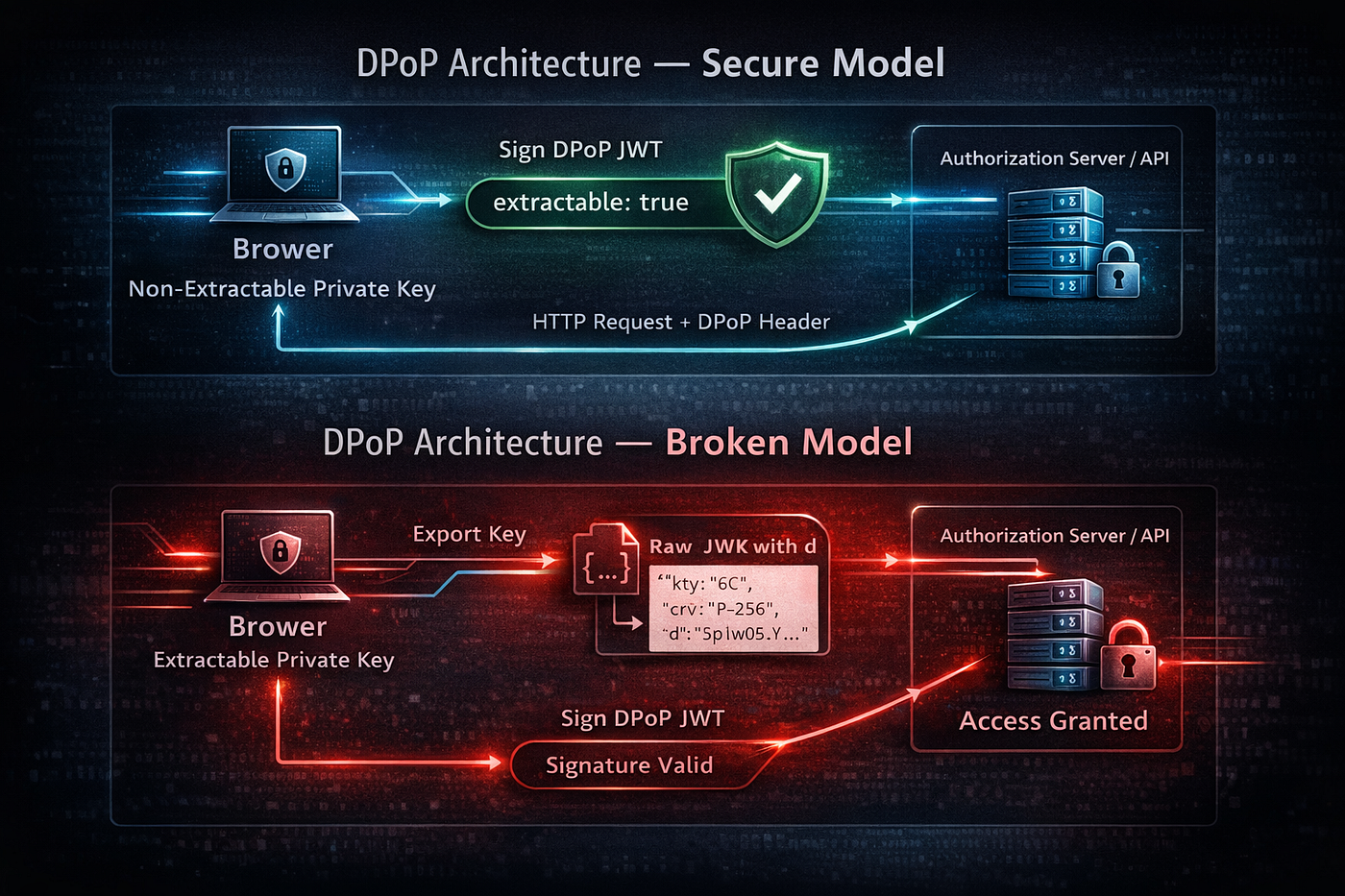
DPOP Architecture
Conceptual Flow
- Create a JWT header including:
typ: "dpop+jwt"alg: "ES256"- The public key (
jwk) — containingkty,crv,x,y(notd)
2. Create a JWT payload including:
htu→ HTTP URIhtm→ HTTP methodiat→ issued-at timestampjti→ unique token ID
3. Sign the JWT using the private key (d).
The signature proves possession of the private key.
메타데이터
- post_id
- 9353f91e55b8
- slug
- uasage-of-dpop-when-extractable-is-set-to-true-breaks-your-authentication-model-9353f91e55b8
- url
- https://medium.com/@varshaseetharam13/uasage-of-dpop-when-extractable-is-set-to-true-breaks-your-authentication-model-9353f91e55b8
- canonical_url
- https://medium.com/@varshaseetharam13/uasage-of-dpop-when-extractable-is-set-to-true-breaks-your-authentication-model-9353f91e55b8
- author_url
- https://medium.com/@varshaseetharam13
- status
- ok
- fetched_at
- 2026-06-22 07:15:07



