Configuring Bridges in Whonix
First of all, to use Whonix, you need to install Oracle VirtualBox, as it’s the primary platform Whonix is designed to run on. After…
Configuring Bridges in Whonix
First of all, to use Whonix, you need to install Oracle VirtualBox, as it’s the primary platform Whonix is designed to run on. After installation, make sure to update and upgrade both the Gateway and the Workstation. Once that’s done, you can configure bridges on the Gateway.
What are bridges??
Tor bridges are alternative entry points to the Tor network that aren’t listed publicly. They help users circumvent censorship and blocking.
In simple words your ISP cant see that you connect to TOR network.
There are 4 types of bridges but for this one we will configure obfs4. Its the default option and best for most users.To be able to get obfs4 bridges you can visit : https://bridges.torproject.org/options .After grabbing your bridges paste them to a txt file and add in front the word “Bridge” like this :

Now in your Workstation VM you open the terminal and you open the config file with full path : /usr/local/etc/torrc.d/50_user.conf

After the ############# line add the bellow text + your bridges :
UseBridges 1 ClientTransportPlugin obfs4 exec /usr/bin/obfs4proxy
Bridge obfs4 192.235.207.85:42086 0EEB10BF4B4FAF56D46E cert=oue8sYYw5wi4n3mf2WDOg iat-mode=0 Bridge obfs4 34.218.26.20:43263 DD21A551767816A0C9495 cert=7qzS6KASquPvJU82Fm7qoJw iat-mode=0
This how your 50_user.conf file should look :

After you save it you restart the tor service :
sudo service tor@default restart
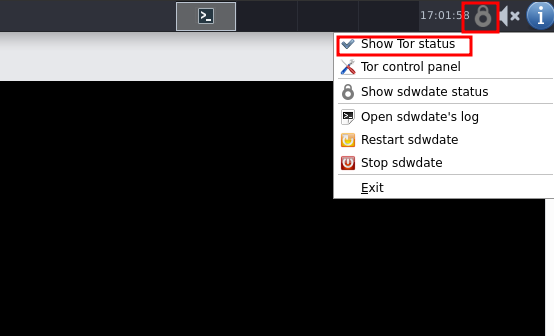
And you check if you have connectivity to tor at top right corner :
You can also check if you got configured correctly the bridges with the below way :
At the terminal you type : nyx
After use the right arrow to navigate to the second page.
You will see a image like the one below :

You should see UNKNOWN at the start of your Circuit that will always be the Guard (entry node). The text left of UNKNOWN has to be the fingerprint one your bridges ( for ex 0EEB10BF4B4FAF56D46E) the same you configured at your 50_user.conf file.
After to exit nyx you type q twice.
메타데이터
- post_id
- 93b9e0bb375d
- slug
- configuring-bridges-at-whonix-93b9e0bb375d
- url
- https://medium.com/@crux.flora7600/configuring-bridges-at-whonix-93b9e0bb375d
- canonical_url
- https://medium.com/@crux.flora7600/configuring-bridges-at-whonix-93b9e0bb375d
- author_url
- https://medium.com/@crux.flora7600
- status
- ok
- fetched_at
- 2026-07-19 10:28:02