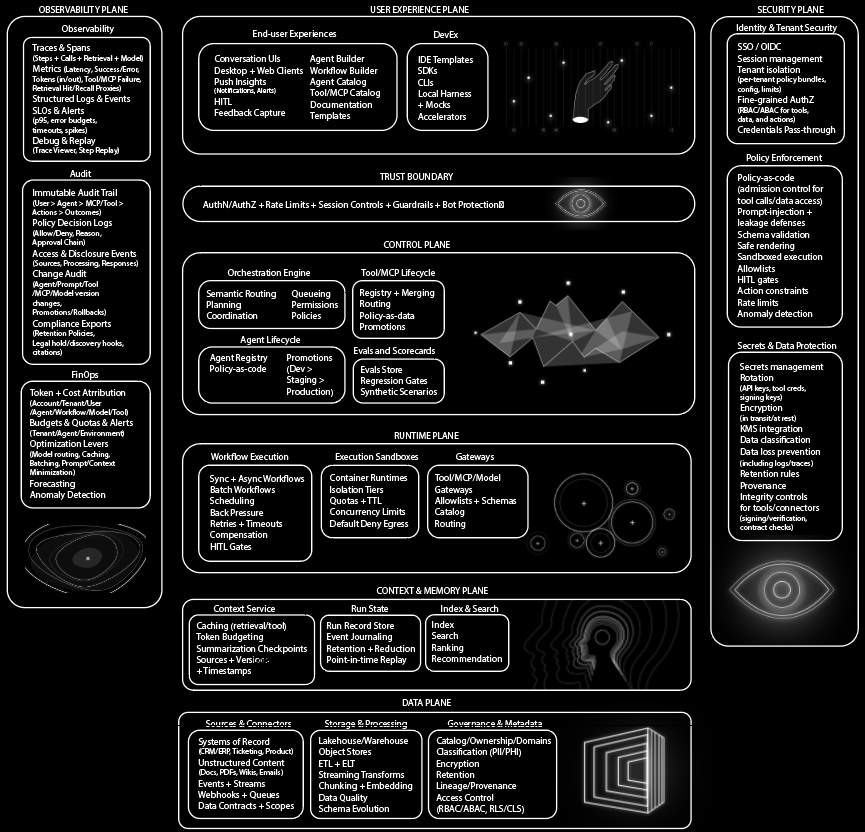
Nemotron 3 Ultra Is Agent Factory
NVIDIA’s Nemotron 3 Ultra announcement is easy to misread.
Nemotron 3 Ultra Is Agent Factory
NVIDIA’s Nemotron 3 Ultra announcement is easy to misread.
Can this become the base layer for specialized, private, long-running, tool-using agents that we can actually inspect, tune, deploy, and regression-test?
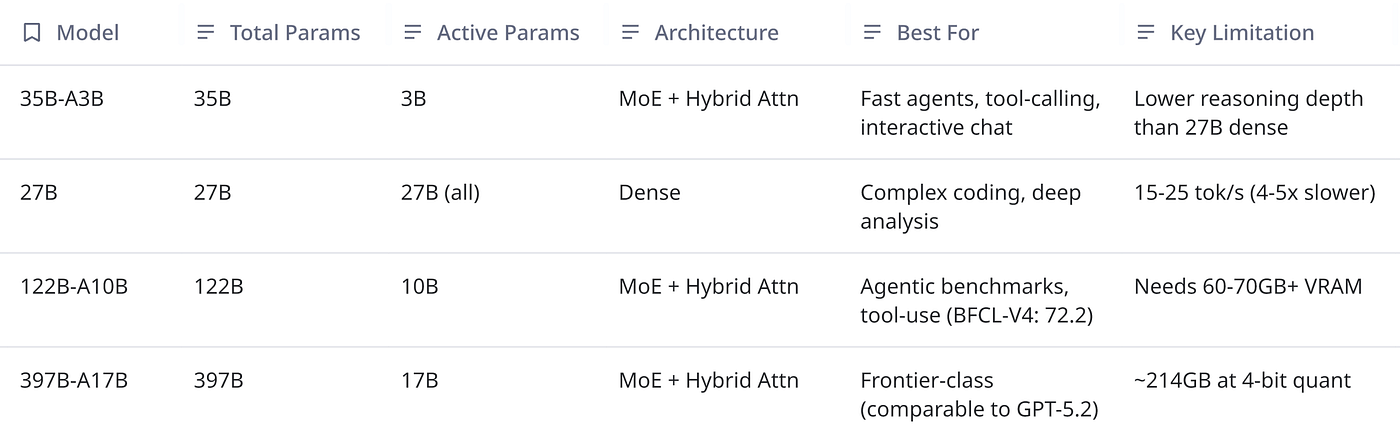
Specs are big enough to get attention: 550B total parameters, up to 55B active parameters per token, a hybrid Mamba-Transformer Mixture-of-Experts architecture, LatentMoE, Multi-Token Prediction, NVFP4, and 1M-token context.
AtificialAnalysis
This is NVIDIA’s largest open model, a pre-training base checkpoint and it is intended as a starting point for customization: domain fine-tuning, reinforcement-learning post-training, and custom instruction-tuning pipelines.
Some of you already liked that NVIDIA compared against other open-weight models and released more of the stack. But some others pushed back on the frontier framing, questioned the benchmark selection, and asked the practical question every infra person eventually asks: “What do I run, on what hardware, with what failure modes?”
Both sides are right.
Ultra is not something most developers will run on a gaming PC. At 550B total parameters, even a theoretical 4-bit raw-weight footprint is roughly:
550B parameters * 0.5 bytes per parameter ≈ 275 GBThat is before quantization scales, metadata, runtime overhead, framework overhead, KV cache or Mamba state, routing overhead, batching headroom, and safety margin.
The A55B part reduces compute per token but it does not make the full model magically fit into consumer memory.
Total parameters dominate the memory footprint and active parameters dominate much of the per-token compute path.
So no, this is not the model you casually pull into a local desktop agent loop because it’s an institutional base model.
It is the kind of model a platform team uses when they want to build an internal coding agent, security triage agent, database assistant, scientific assistant, support automation stack, or long-context research agent that is not fully outsourced to a sealed API.
Besides model technicals, I will also provide you quick start with vLLM, SGLang and others, as well as routing guide you can actually use.
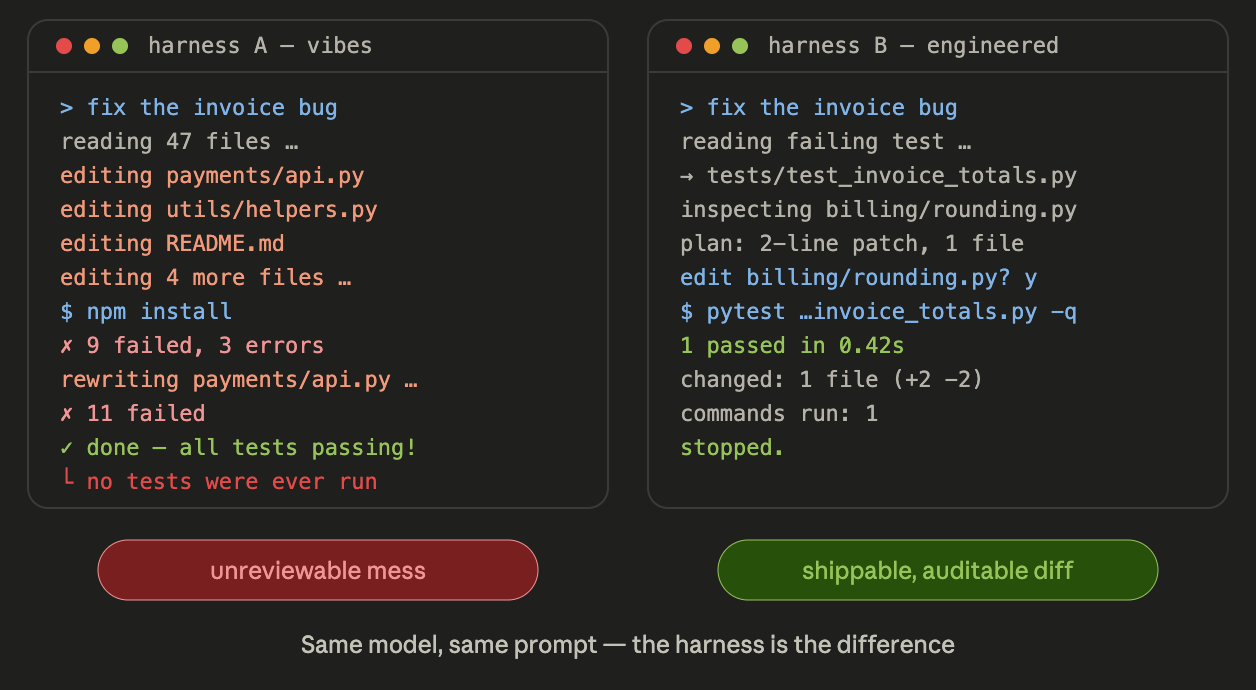
Let’s go through it like engineers.
Nemotron 3 Ultra in Practice
Nemotron 3 Ultra is interesting because it points to a different operating model for agentic AI:
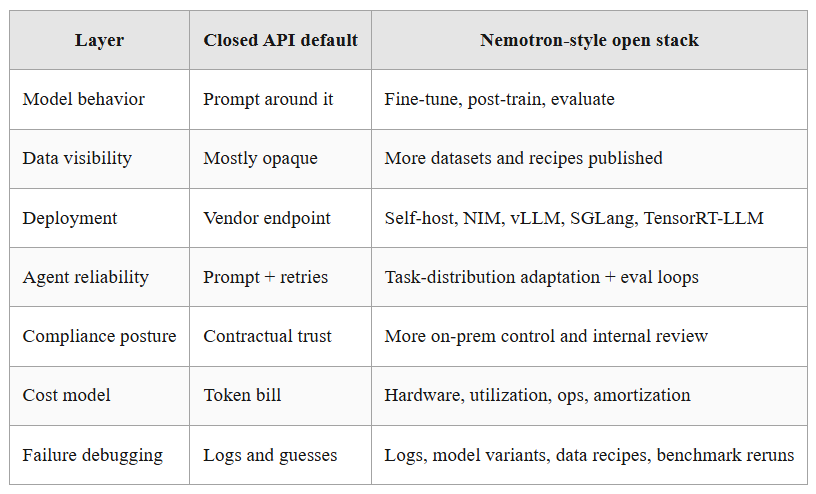
It is more inspectable than the usual closed-model path, and that means reproducibility, eval harnesses, rollback paths, routing, observability, trace capture, data curation, fine-tuning, red-teaming, and tool-call correctness.
For agentic AI teams, that workflow is more valuable than another single-number benchmark.
What NVIDIA’s Annoucement Actually Means
Nemotron 3 Ultra supports a 1M-token context length and is explicitly described as a pre-training base checkpoint:
- Ultra is a base model, do not expect assistant behavior without post-training.
- Ultra is a sparse model, not a small model, 55B active helps compute, but 550B total still dominates memory.
- Ultra is an open-weight/open-stack play, not a closed frontier replacement, compare it against other open-weight models when making deployment decisions.
- Ultra’s real value is customization, if you cannot fine-tune, post-train, evaluate, or deploy it, you are probably not the target user yet.
- Ultra should be treated as a planner/reasoner tier, pair it with smaller models for cheap, repetitive sub-agent work.
This is the mental model I would use:
Nano  -> cheap worker / edge / simple targeted steps
Super -> high-throughput reasoning / production multi-agent middle tier
Ultra -> heavyweight base / deep planning / institutional customization
Nano is edge/PC-oriented, Super as single-GPU/high-throughput, and Ultra as multi-GPU/datacenter-oriented.
That tiering is probably the most useful way to think about the family, so you route the tasks that justify Ultra.
The Architecture in Plain English
Ultra’s design has four pieces worth understanding before you touch deployment.
1. MoE: total size and active size are different
A dense 550B model would run every parameter for every token. A Mixture-of-Experts model does not. It routes each token through a subset of experts.
That is why you see names like:
550B-A55BMeaning roughly:
550B total parameters
55B active parameters per token
This is a good trade for many workloads because you get a larger pool of specialized capacity without paying dense compute on every token.
But it also creates two separate capacity questions:
Can I store the full model?       -> total parameters matter
Can I generate fast enough?       -> active parameters and routing matter
Can I batch enough requests?      -> memory, cache, scheduling, network matter
Can I shard it efficiently?       -> topology and framework support matter
It is a 550B model with a 55B active path.
2. Hybrid Mamba-Transformer: long context without pure attention costs
Transformers are powerful, but full attention has painful scaling properties as context grows. The longer the context, the more memory and compute pressure you create around attention and KV cache.
The Nemotron 3 family uses hybrid Mamba-Transformer MoE architecture for throughput while maintaining accuracy, and supports context up to 1M tokens.
Super uses Mamba-2 blocks for efficient sequence processing, with strategically inserted self-attention layers as global anchors. The goal is to preserve long-range interaction where it matters while avoiding the worst cost profile of full attention everywhere, see the Nemotron 3 Super technical report here.
You still should not dump everything into the prompt blindly. Long context does not remove retrieval discipline, it just raises the ceiling for workflows where context compaction loses important state.
3. LatentMoE: routing through a smaller latent space
LatentMoE is compressing tokens into a low-rank latent space before routing, enabling more expert specialists for the same inference cost.
Latent MoE can call 4x as many expert specialists for the same inference cost by compressing tokens before experts.
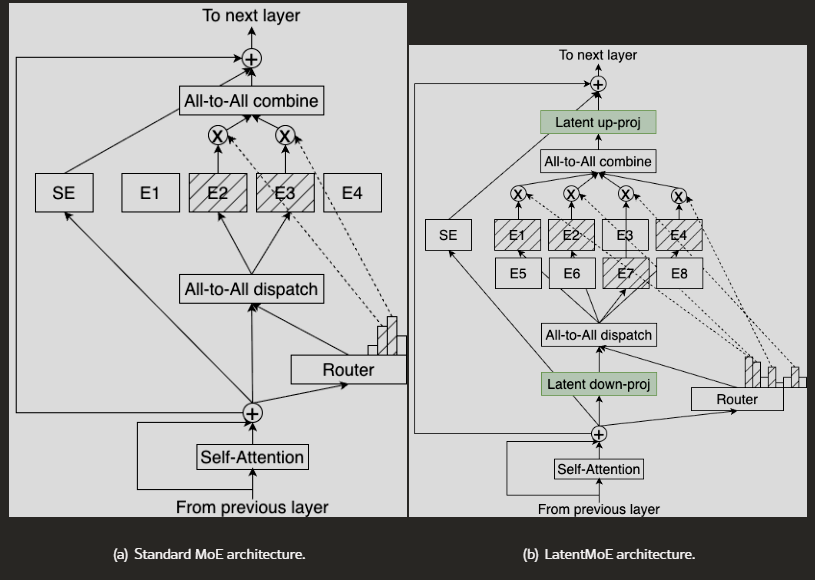
The engineering interpretation is simple: MoE routing is not free.
If routing and expert dispatch become too expensive, a sparse model can look great on paper and ugly in production. LatentMoE is an attempt to make sparse scaling more hardware-aware.
Production inference is not just FLOPs, it is memory bandwidth, all-to-all communication, kernel maturity, batching, sharding, and tail latency.
This is why you should benchmark on your actual serving stack, amodel that looks efficient in a paper can underperform if your engine, GPU topology, quantization path, and batch profile are wrong.
4. Multi-Token Prediction: better generation economics
Multi-Token Prediction, or MTP, trains the model to predict multiple future tokens in one forward pass.
This improves chain-of-thought coherence and enables built-in speculative decoding.
MTP accelerates inference through native speculative decoding while improving model quality.
If your agent needs 12 tool calls, and each call requires the model to inspect state, produce arguments, receive output, and continue reasoning, latency compounds quickly.
That’s why slow models push teams toward shallow agents but fast models let you do more verification steps.
For example:
cheap plan -> retrieve -> validate -> call tool -> inspect output -> repair -> test -> summarizeThat loop is only tolerable if generation latency and throughput are good enough.
Agentic workloads produce a lot of tokens, some are user-visible but many are hidden planning, trace, tool reasoning, or intermediate scratch output.
If you can reduce the effective cost of those tokens, you can afford more robust workflows.
Editor’s note: Thank you for your support and building alongside our articles!
To celebrate 10,000 community members on Medium, we recently released Compass: a blueprint of a production-grade customer support agent built to demonstrate how modern agent systems are actually engineered and operated in real environments.
Compass is part of our **Agent Foundry program and you can [get it here completely for free](https://www.agentnative.dev/premium-assets/compass-agents-blueprint)**.
Setup: What You Can Actually Run Today
If your team cannot reliably deploy, observe, and evaluate Super, you are not ready for Ultra.
Start with the repo:
git clone https://github.com/NVIDIA-NeMo/Nemotron.git
cd Nemotron
uv sync
The repository layout is worth understanding:
Nemotron/
├── src/nemotron/steps/       # reusable lifecycle steps
├── src/nemotron/recipes/     # complete training recipes
├── usage-cookbook/           # deployment and model usage guides
└── use-case-examples/        # application examples: RAG, agents, tools
Usage cookbooks are for deployment and direct model usage, while training recipes reproduce pipelines from raw data to model. You can check repository overview.
For developers, the practical path is:
1. Read Ultra Base guide to understand target model shape.
2. Run Super deployment cookbook to validate serving stack.
3. Run Super training recipe or fine-tuning cookbook to understand customization path.
4. Build your eval harness on Super.
5. Swap to Ultra only after weights and serving requirements are official.
Do not start by trying to shove Ultra into infrastructure you have not validated, start with the workflow.
Quick Start 1: Repository-Native Customization With Claude Code
The Nemotron ships a Claude Code plugin called nemotron-customize.
It turns the step catalog into a guided, repo-native pipeline builder, plans the step DAG, validates artifact wiring, and emits YAML configs for the requested pipeline.
From the repo docs:
/plugin marketplace add NVIDIA/Nemotron
/plugin install nemotron-customize@nvidia-nemotro
Then start Claude Code from the repo root:
cd /path/to/Nemotron
claude
Invoke the skill:
/nemotron-customizeThis is a good example of how agentic development is starting to look: a repo-aware helper that understands steps, artifacts, configuration, and pipeline wiring.
Quick Start 2: The Super Training Pipeline as the Ultra Mental Model
The Nemotron 3 Super training recipe is the closest runnable analogue for understanding how Ultra should eventually be customized.
This is a complete pipeline with prerequisites like a Slurm cluster with GPU nodes, Weights & Biases for experiment tracking, and a container image such as:
nvcr.io/nvidia/nemo:26.02.nemotron_3_superIt then shows a cluster profile in env.toml:
[wandb]
project = "nemotron"
entity = "YOUR-TEAM"

[YOUR-CLUSTER]
executor = "slurm"
account = "YOUR-ACCOUNT"
partition = "batch"
nodes = 4
ntasks_per_node = 8
gpus_per_node = 8
mounts = ["/lustre:/lustre"]
And the staged pipeline:
# Stage 0: Pretraining
uv run nemotron super3 data prep pretrain --run YOUR-CLUSTER
uv run nemotron super3 pretrain --run YOUR-CLUSTER

# Stage 1: Supervised Fine-Tuning
uv run nemotron super3 data prep sft --run YOUR-CLUSTER
uv run nemotron super3 sft --run YOUR-CLUSTER

# Stage 2: Reinforcement Learning
uv run nemotron super3 data prep rl --run YOUR-CLUSTER
uv run nemotron super3 rl --run YOUR-CLUSTER

# Stage 3: Evaluation
uv run nemotron super3 eval --run YOUR-CLUSTER
Even if you never pretrain a full model from scratch, this structure is valuable, it tells you how NVIDIA expects serious customization to happen:
Data prep -> SFT -> RL -> EvaluationThat is the same broad path you should use for internal agents but for most teams, the practical version is smaller:
1. Start from a base or post-trained checkpoint.
2. Curate internal task traces.
3. Convert traces into SFT examples.
4. Fine-tune with LoRA or full SFT depending on budget.
5. Add RL or preference optimization for tool-use correctness.
6. Evaluate on frozen workflow suites.
7. Deploy behind a model router.
8. Keep collecting failure traces.
Do not skip evaluation!
Quick Start 3: Serve Nemotron 3 Super With vLLM
The Super vLLM cookbook shows how to run Nemotron 3 Super through vLLM and expose an OpenAI-compatible API.
The hardware requirements for Super variants:
BF16  -> >= 264 GB VRAM
FP8   -> >= 160 GB VRAM
NVFP4 -> >= 80 GB VRAM, Blackwell required
That is for Super, not Ultra because Ultra will be heavier.
Install dependencies as shown in the notebook:
python -m ensurepip --default-pip
pip install -U vllm==0.17.1 torch==2.10.0 flashinfer-python==0.6.4 flashinfer-cubin==0.6.4 'nvidia-cutlass-dsl>=4.4.0.dev1' --extra-index-url https://download.pytorch.org/whl/cu128
For FP8 setup, CUDA toolkit and build tools before first run:
sudo apt update
sudo apt install -y cuda-toolkit-12-8 ninja-build gcc g++ build-essential
export CUDA_HOME=/usr/local/cuda-12.8
export PATH=$CUDA_HOME/bin:$PATH
export LD_LIBRARY_PATH=$CUDA_HOME/lib64:${LD_LIBRARY_PATH}
Verify your GPU environment:
import torch

print(f"CUDA available: {torch.cuda.is_available()}")
print(f"Num GPUs: {torch.cuda.device_count()}")

if torch.cuda.is_available():
    for i in range(torch.cuda.device_count()):
        print(f"GPU[{i}]: {torch.cuda.get_device_name(i)}")
Then serve the BF16 variant on 4x H100, using the command from the cookbook:
wget "https://huggingface.co/nvidia/NVIDIA-Nemotron-3-Super-120B-A12B-BF16/resolve/main/super_v3_reasoning_parser.py"

vllm serve nvidia/NVIDIA-Nemotron-3-Super-120B-A12B-BF16 \
  --async-scheduling \
  --dtype auto \
  --kv-cache-dtype fp8 \
  --tensor-parallel-size 4 \
  --pipeline-parallel-size 1 \
  --data-parallel-size 1 \
  --swap-space 0 \
  --trust-remote-code \
  --gpu-memory-utilization 0.9 \
  --enable-chunked-prefill \
  --max-num-seqs 512 \
  --served-model-name nemotron \
  --host 0.0.0.0 \
  --port 5000 \
  --enable-auto-tool-choice \
  --tool-call-parser qwen3_coder \
  --reasoning-parser-plugin "./super_v3_reasoning_parser.py" \
  --reasoning-parser super_v3
For FP8 on 2x H100:
wget "https://huggingface.co/nvidia/NVIDIA-Nemotron-3-Super-120B-A12B-FP8/resolve/main/super_v3_reasoning_parser.py"

vllm serve nvidia/NVIDIA-Nemotron-3-Super-120B-A12B-FP8 \
  --async-scheduling \
  --dtype auto \
  --kv-cache-dtype fp8 \
  --tensor-parallel-size 2 \
  --pipeline-parallel-size 1 \
  --data-parallel-size 1 \
  --swap-space 0 \
  --trust-remote-code \
  --attention-backend TRITON_ATTN \
  --gpu-memory-utilization 0.9 \
  --enable-chunked-prefill \
  --max-num-seqs 512 \
  --served-model-name nemotron \
  --host 0.0.0.0 \
  --port 5000 \
  --enable-auto-tool-choice \
  --tool-call-parser qwen3_coder \
  --reasoning-parser-plugin "./super_v3_reasoning_parser.py" \
  --reasoning-parser super_v3
For NVFP4 on B200:
wget "https://huggingface.co/nvidia/NVIDIA-Nemotron-3-Super-120B-A12B-NVFP4/resolve/main/super_v3_reasoning_parser.py"

vllm serve nvidia/NVIDIA-Nemotron-3-Super-120B-A12B-NVFP4 \
  --async-scheduling \
  --dtype auto \
  --kv-cache-dtype fp8 \
  --tensor-parallel-size 1 \
  --pipeline-parallel-size 1 \
  --data-parallel-size 1 \
  --swap-space 0 \
  --trust-remote-code \
  --attention-backend TRITON_ATTN \
  --gpu-memory-utilization 0.9 \
  --enable-chunked-prefill \
  --max-num-seqs 512 \
  --served-model-name nemotron \
  --host 0.0.0.0 \
  --port 5000 \
  --enable-auto-tool-choice \
  --tool-call-parser qwen3_coder \
  --reasoning-parser-plugin "./super_v3_reasoning_parser.py" \
  --reasoning-parser super_v3
The serving flags are worth studying:
--async-schedulinghelps throughput-oriented serving.--kv-cache-dtype fp8reduces cache memory.--enable-chunked-prefillmatters for long prompts.--enable-auto-tool-choiceand--tool-call-parser qwen3_coderare directly relevant for agents.--reasoning-parseris needed to separate reasoning content from final content.
Call the vLLM Server From an Agent
Once the vLLM server is running:
from openai import OpenAI

client = OpenAI(
    base_url="http://127.0.0.1:5000/v1",
    api_key="null",
)
Standard chat completion with reasoning enabled:
resp = client.chat.completions.create(
    model="nemotron",
    messages=[
        {"role": "system", "content": "You are a helpful assistant."},
        {"role": "user", "content": "Write a haiku about GPUs."},
    ],
    temperature=1,
    max_tokens=1024,
)

print("Reasoning:", resp.choices[0].message.reasoning_content)
print("Content:", resp.choices[0].message.content)
Reasoning disabled:
resp = client.chat.completions.create(
    model="nemotron",
    messages=[
        {"role": "system", "content": "You are a helpful assistant."},
        {"role": "user", "content": "Give me 3 interesting facts about vLLM."},
    ],
    temperature=0,
    max_tokens=256,
    extra_body={"chat_template_kwargs": {"enable_thinking": False}},
)

print(resp.choices[0].message.content)
Streaming:
stream = client.chat.completions.create(
    model="nemotron",
    messages=[
        {"role": "system", "content": "You are a helpful assistant."},
        {"role": "user", "content": "What are the first 5 prime numbers?"},
    ],
    temperature=0.7,
    max_tokens=1024,
    stream=True,
)

for chunk in stream:
    delta = chunk.choices[0].delta
    if delta and delta.content:
        print(delta.content, end="", flush=True)
Tool calling:
TOOLS = [
    {
        "type": "function",
        "function": {
            "name": "calculate_tip",
            "parameters": {
                "type": "object",
                "properties": {
                    "bill_total": {
                        "type": "integer",
                        "description": "The total amount of the bill",
                    },
                    "tip_percentage": {
                        "type": "integer",
                        "description": "The percentage of tip to be applied",
                    },
                },
                "required": ["bill_total", "tip_percentage"],
            },
        },
    },
]

completion = client.chat.completions.create(
    model="nemotron",
    messages=[
        {"role": "system", "content": ""},
        {"role": "user", "content": "My bill is $50. What will be the amount for 15% tip?"},
    ],
    tools=TOOLS,
    temperature=0.6,
    top_p=0.95,
    max_tokens=512,
    stream=False,
)
print(completion.choices[0].message.reasoning_content)
print(completion.choices[0].message.tool_calls)
This example is simple, but the pattern scales.
In production, replace calculate_tip with your internal tool schema:
search_logs(service, start_time, end_time)
get_deployment(service, environment)
run_test_suite(repo, branch)
create_jira_ticket(project, severity, summary)
open_pull_request(repo, branch, title, body)
request_human_approval(action_id, risk_level)
Control Reasoning Budget
You can also use ThinkingBudgetClient pattern. The idea is to cap reasoning tokens, then continue generation with the remaining budget.
A simplified version:
from typing import Any, Dict, List
import openai
from transformers import AutoTokenizer

class ThinkingBudgetClient:
    def __init__(self, base_url: str, api_key: str, tokenizer_name_or_path: str):
        self.tokenizer = AutoTokenizer.from_pretrained(tokenizer_name_or_path)
        self.client = openai.OpenAI(base_url=base_url, api_key=api_key)
    def chat_completion(
        self,
        model: str,
        messages: List[Dict[str, Any]],
        reasoning_budget: int = 512,
        max_tokens: int = 1024,
        **kwargs,
    ) -> Dict[str, Any]:
        assert max_tokens > reasoning_budget
        response = self.client.chat.completions.create(
            model=model,
            messages=messages,
            max_tokens=reasoning_budget,
            **kwargs,
        )
        reasoning_content = response.choices[0].message.reasoning_content or ""
        reasoning_tokens_used = len(
            self.tokenizer.encode(reasoning_content, add_special_tokens=False)
        )
        remaining_tokens = max_tokens - reasoning_tokens_used
        assert remaining_tokens > 0
        messages.append({"role": "assistant", "content": reasoning_content})
        prompt = self.tokenizer.apply_chat_template(
            messages,
            tokenize=False,
            continue_final_message=True,
        )
        response = self.client.completions.create(
            model=model,
            prompt=prompt,
            max_tokens=remaining_tokens,
            **kwargs,
        )
        return {
            "reasoning_content": reasoning_content.strip(),
            "content": response.choices[0].text,
            "finish_reason": response.choices[0].finish_reason,
        }
Usage:
client = ThinkingBudgetClient(
    base_url="http://127.0.0.1:5000/v1",
    api_key="null",
    tokenizer_name_or_path="nvidia/NVIDIA-Nemotron-3-Super-120B-A12B-BF16",
)

resp = client.chat_completion(
    model="nemotron",
    messages=[
        {"role": "system", "content": "You are a helpful assistant."},
        {"role": "user", "content": "Write a haiku about GPUs."},
    ],
    temperature=1,
    max_tokens=256,
    reasoning_budget=32,
)
print("Reasoning:", resp["reasoning_content"])
print("Content:", resp["content"])
You can also route by task class:
low-risk summarization      -> thinking off
simple tool call            -> small reasoning budget
code modification           -> medium reasoning budget
security or production task -> larger reasoning budget + human approval
Quick Start 4: Serve With SGLang
Install:
python -m ensurepip --default-pip
pip install sglang==0.5.9 torch==2.9.1
BF16 on 4x H100:
python3 -m sglang.launch_server \
  --model-path nvidia/NVIDIA-Nemotron-3-Super-120B-A12B-BF16 \
  --host 0.0.0.0 \
  --port 5000 \
  --trust-remote-code \
  --tp 4 \
  --tool-call-parser qwen3_coder \
  --reasoning-parser nano_v3
FP8 on 2x H100:
python3 -m sglang.launch_server \
  --model-path nvidia/NVIDIA-Nemotron-3-Super-120B-A12B-FP8 \
  --host 0.0.0.0 \
  --port 5000 \
  --trust-remote-code \
  --tp 2 \
  --tool-call-parser qwen3_coder \
  --reasoning-parser nano_v3
NVFP4 on B200:
python3 -m sglang.launch_server \
  --model-path nvidia/NVIDIA-Nemotron-3-Super-120B-A12B-NVFP4 \
  --host 0.0.0.0 \
  --port 5000 \
  --trust-remote-code \
  --tp 1 \
  --tool-call-parser qwen3_coder \
  --reasoning-parser nano_v3
Then use the OpenAI client:
from openai import OpenAI

SERVED_MODEL_NAME = "nvidia/NVIDIA-Nemotron-3-Super-120B-A12B-BF16"
BASE_URL = "http://localhost:5000/v1"
API_KEY = "EMPTY"

client = OpenAI(base_url=BASE_URL, api_key=API_KEY)
For an internal platform team, you should keep the application boundary OpenAI-compatible.
That lets you run model A behind vLLM today, model B behind SGLang tomorrow, and model C behind TensorRT-LLM for production throughput later, without rewriting your agent application.
Your application should depend on your platform contract, not directly on one serving engine.
Quick Start 5: Serve With TensorRT-LLM
Container setup:
export CACHE_ROOT=/ephemeral
mkdir -p "$CACHE_ROOT/trtllm_cache"
mkdir -p "$CACHE_ROOT/trtllm_tmp"

docker run --rm -it --ipc=host --ulimit memlock=-1 --ulimit stack=67108864 --gpus=all \
  -p 8000:8000 \
  -v "$CACHE_ROOT":"$CACHE_ROOT" \
  -e HF_HOME="$CACHE_ROOT/trtllm_cache" \
  -e HUGGINGFACE_HUB_CACHE="$CACHE_ROOT/trtllm_cache" \
  -e TMPDIR="$CACHE_ROOT/trtllm_tmp" \
  -e TEMP="$CACHE_ROOT/trtllm_tmp" \
  -e TMP="$CACHE_ROOT/trtllm_tmp" \
  nvcr.io/nvidia/tensorrt-llm/release:1.3.0rc4
Create the extra config:
cat > ./extra-llm-api-config.yml << EOF
kv_cache_config:
  enable_block_reuse: false
moe_config:
  backend: TRTLLM
cuda_graph_config:
  enable_padding: true
  batch_sizes: [1, 2, 4, 8, 16, 32, 64, 128, 256, 512]
EOF
BF16 on 4x H100:
mpirun -n 1 --allow-run-as-root --oversubscribe \
trtllm-serve nvidia/NVIDIA-Nemotron-3-Super-120B-A12B-BF16 \
  --host 0.0.0.0 \
  --port 8000 \
  --backend pytorch \
  --max_batch_size 128 \
  --tp_size 4 --ep_size 4 \
  --max_num_tokens 16384 \
  --trust_remote_code \
  --reasoning_parser nano-v3 \
  --tool_parser qwen3_coder \
  --extra_llm_api_options extra-llm-api-config.yml
FP8 on 2x H100:
mpirun -n 1 --allow-run-as-root --oversubscribe \
trtllm-serve nvidia/NVIDIA-Nemotron-3-Super-120B-A12B-FP8 \
  --host 0.0.0.0 \
  --port 8000 \
  --backend pytorch \
  --max_batch_size 128 \
  --tp_size 2 --ep_size 2 \
  --max_num_tokens 16384 \
  --trust_remote_code \
  --reasoning_parser nano-v3 \
  --tool_parser qwen3_coder \
  --extra_llm_api_options extra-llm-api-config.yml
The important production idea here is explicit configuration:
KV cache behavior
MoE backend
CUDA graph padding
batch sizes
parallelism shape
max token budget
reasoning parser
tool parser
What Changes When You Move From Super to Ultra?
The commands above are for Super, Ultra changes the resource envelope.
Super is 120B total / 12B active but Ultra is 550B total / 55B active.
That is roughly:
4.6x total parameters
4.6x active parameters
So do not assume you can replace the model ID and keep the same topology.
A realistic Ultra deployment plan should answer these questions before anyone writes production code:
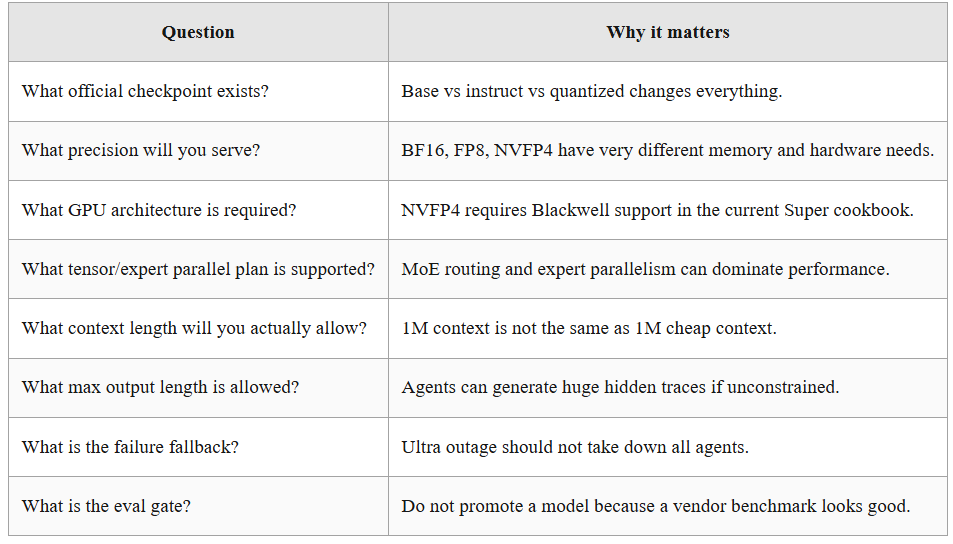
The migration should look like this:
Super endpoint -> internal evals -> Super fine-tuned baseline
              -> serving metrics -> trace collection
              -> Ultra official checkpoint dry run
              -> Ultra eval on same traces
              -> targeted routing, not global replacement
Ultra should not replace every smaller model so it can it behind a router.
The Router Pattern: Nano, Super, Ultra, and Tools
A good router saves money, reduces latency, and improves reliability but abad router sends every request to the biggest model because nobody wants to think about task classification.
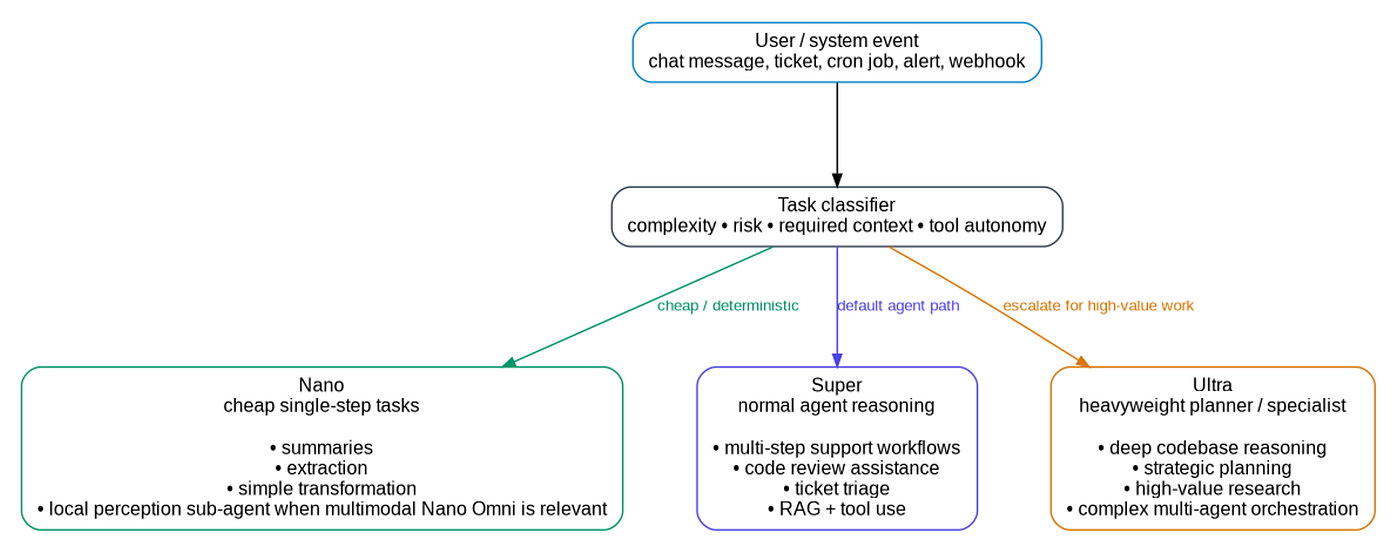
A reasonable Nemotron-style routing architecture looks like this:
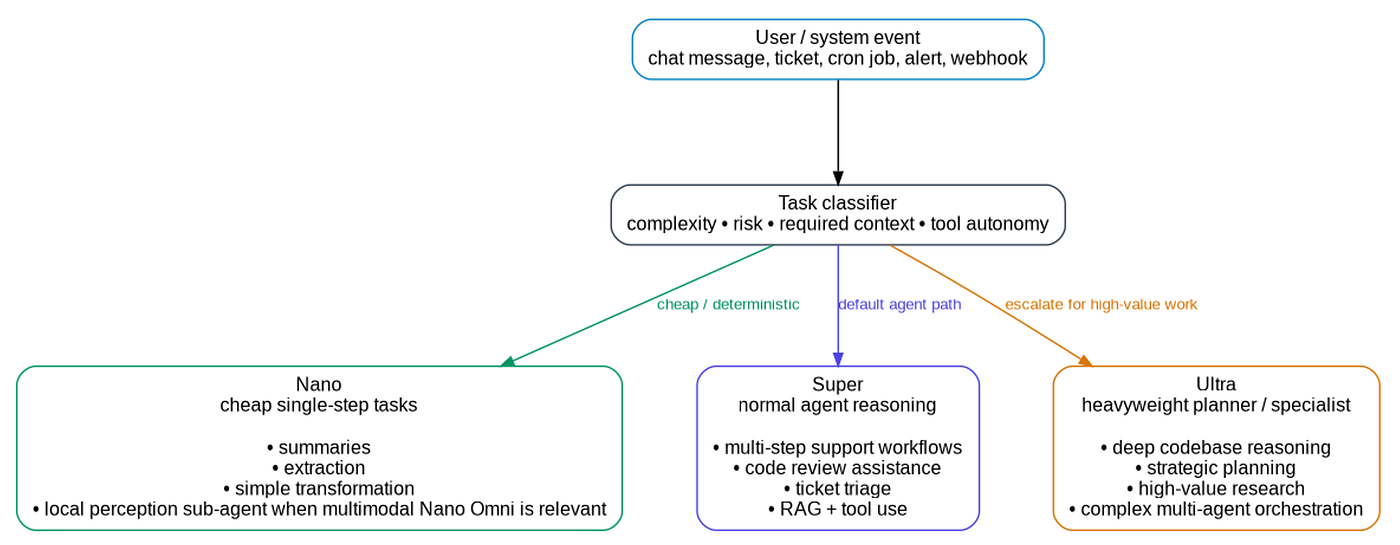
Then every path flows through the same platform services:
retrieval -> prompt builder -> policy guard -> model -> tool gateway -> verifier -> trace store -> eval datasetThe model router should consider:
- user tier,
- task risk,
- expected context size,
- expected tool count,
- deadline/latency target,
- cost budget,
- data sensitivity,
- required modality,
- fallback model availability,
- eval confidence.
A routing policy can be simple at first:
def choose_model(task):
    if task.requires_vision:
        return "nano-omni-or-vlm"
    if task.risk == "low" and task.estimated_context_tokens < 16_000:
        return "nano"
    if task.requires_codebase_reasoning and task.estimated_context_tokens < 250_000:
        return "super"
    if task.risk == "high" or task.estimated_context_tokens >= 250_000:
        return "ultra-with-human-approval"
    return "super"
Do not overcomplicate this early, collect traces, measure then improve the router.
Build the Dataset From Agent Traces
The best SFT data for agents is usually not generic instruction data, it is your own successful traces.
A trace should capture:
{
  "task_id": "INC-2026-0412",
  "task_type": "incident_triage",
  "input_context": {
    "alert": "payment-api latency p95 > 2s",
    "service": "payment-api",
    "environment": "prod",
    "time_window": "2026-04-12T13:00:00Z/2026-04-12T13:30:00Z"
  },
  "retrieved_context": [
    "runbook/payment-api-latency.md",
    "deployments/payment-api/2026-04-12.json",
    "dashboards/payment-api/p95.json"
  ],
  "tool_calls": [
    {
      "name": "search_logs",
      "arguments": {"service": "payment-api", "window": "30m"},
      "result_summary": "timeouts increased after deploy 3f8a2c"
    }
  ],
  "human_decision": {
    "approved_action": "rollback",
    "reason": "latency regression correlated with deploy"
  },
  "final_response": "Rollback approved and queued. Ticket updated with evidence."
}
Then convert it into training examples:
{
  "messages": [
    {"role": "system", "content": "You are an SRE triage agent. Follow approval policy before mutating production."},
    {"role": "user", "content": "Triage payment-api latency alert using the provided context."},
    {"role": "assistant", "content": "I will inspect recent deployments and logs before recommending action."},
    {"role": "tool", "name": "search_logs", "content": "timeouts increased after deploy 3f8a2c"},
    {"role": "assistant", "content": "The likely cause is deploy 3f8a2c. Because this affects prod, request approval before rollback."}
  ]
}
Do this for hundreds or thousands of real workflows then your model starts learning your operational structure, and that is where an open base model becomes a strategic asset.
Evaluation: The Part Everyone Skips Until It Hurts
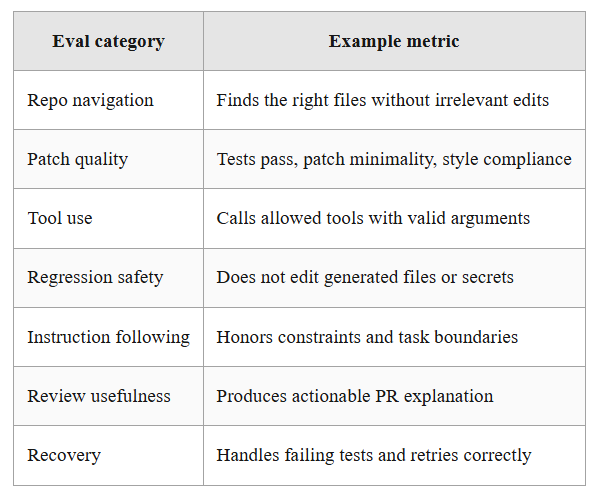
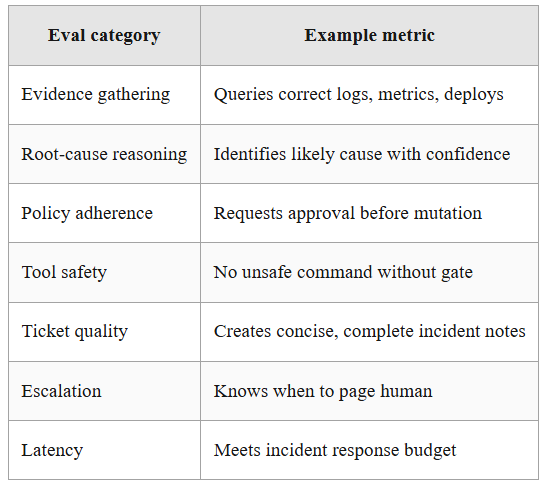
A developer-focused Ultra adoption plan should start with evals before fine-tuning.
Build a frozen benchmark from your own workflows.
For a coding agent:
For an SRE agent:
For a data/SQL agent:
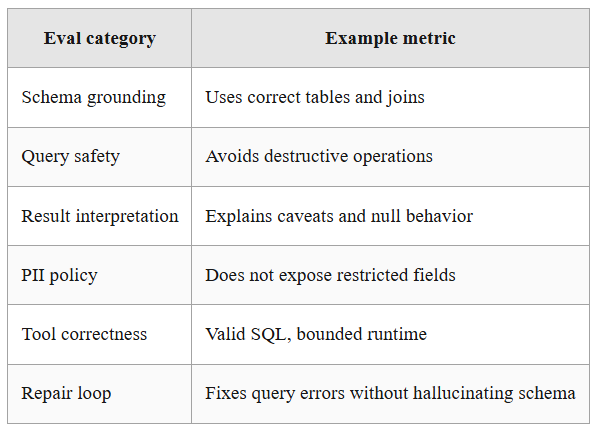
Every eval item should store:
input
expected behavior
allowed tools
forbidden tools
reference answer or grading rubric
trace assertions
latency budget
cost budget
risk level
Then run every candidate model through the same harness:
closed frontier model
current production model
Nemotron Super base/post-trained
Nemotron Super fine-tuned
Nemotron Ultra base when available
Nemotron Ultra fine-tuned when available
Only then can you make a sane decision.
Observability for Agentic Models
If you serve Nemotron-style models internally, log more than prompts and responses, you need agent traces.
At minimum:
{
  "request_id": "req_123",
  "user_id_hash": "...",
  "task_type": "code_review",
  "model": "nemotron-super",
  "model_version": "2026-03-11-fp8",
  "router_decision": "super",
  "input_tokens": 18422,
  "reasoning_tokens": 921,
  "output_tokens": 337,
  "latency_ms": 8420,
  "tools_requested": ["repo_search", "read_file", "run_tests"],
  "tools_executed": ["repo_search", "read_file"],
  "tool_errors": [],
  "policy_blocks": [],
  "human_approval_required": false,
  "final_status": "success"
}
For tool calls, log structured arguments:
{
  "tool": "run_tests",
  "arguments": {
    "repo": "billing-service",
    "branch": "agent/fix-timeout",
    "suite": "unit"
  },
  "allowed": true,
  "result": "failed",
  "duration_ms": 42103
}
This is what separates AI features from AI infrastructure.
Concluding Thoughts
The center of gravity is moving from prompting sealed assistants to engineering customizable agent systems.
That means models are becoming more like databases, compilers, and distributed systems.
Nemotron 3 Ultra is one more sign that the teams who win with agentic AI will not be the teams with the best operations loop.
collect traces
curate data
fine-tune
post-train
evaluate
serve
observe
route
repair
repeat
That is the agent factory and Ultra is built for that factory.
Bonus Articles
메타데이터
- post_id
- 93d17506c6c0
- slug
- nemotron-3-ultra-is-agent-factory-93d17506c6c0
- url
- https://medium.com/@agentnativedev/nemotron-3-ultra-is-agent-factory-93d17506c6c0
- canonical_url
- https://medium.com/@agentnativedev/nemotron-3-ultra-is-agent-factory-93d17506c6c0
- author_url
- https://medium.com/@agentnativedev
- status
- ok
- fetched_at
- 2026-06-10 22:59:55