The Structure and Implementation of StatusList in the TSL Specification
The Structure and Implementation of StatusList in the TSL Specification
Introduction
The **Token Status List (TSL**) specification is nearing completion.
This specification is designed to handle status information (such as valid or invalid) for various token types based on JOSE and COSE, including JWT, SD-JWT VC, CWT, and ISO mdoc.
To efficiently represent the status of a large number of tokens, statuses are encoded as a bit array and compressed using DEFLATE.
The TSL specification defines a data structure called StatusList to represent this list of statuses. In this article, we take a closer look at the StatusList.
Structure of the StatusList
Regardless of whether the format is JSON or CBOR, a StatusList has the following properties:
bits— REQUIRED. The number of bits used to represent a single status. One of 1, 2, 4, or 8.lst— REQUIRED. A DEFLATE-compressed representation of the status values expressed as a byte array. In CBOR, it is represented as a byte array; in JSON, it is represented as a base64url-encoded string.aggregation_uri— OPTIONAL. A location from which a list of URIs that publish Status List Tokens can be obtained.
Below are examples of StatusList objects in JSON format, excerpted from the specification.
{
  "bits": 1,
  "lst": "eNrbuRgAAhcBXQ"
}
{
"bits": 2,
"lst": "eNo76fITAAPfAgc"
}The bits property represents the number of bits used to encode a single status, and its possible values are 1, 2, 4, or 8. When the number of bits is 1, up to 2¹ = 2 different statuses can be represented, for example, “valid” and “invalid.” When the number of bits is 2, up to 2² = 4 statuses can be represented; with 4 bits, up to 2⁴ = 16 statuses; and with 8 bits, up to 2⁸ = 256 statuses can be represented.
The lst property contains the DEFLATE-compressed byte array that enumerates the set of statuses. In the CBOR format, the result of the DEFLATE compression is stored directly as a byte array, whereas in the JSON format, it is base64url-encoded and represented as a string.
For example, suppose the number of bits used to represent a status is set to 1, and the statuses of 16 tokens are as follows:
| Index | Status  | Value |
|-------+---------+-------|
|   0   | INVALID |   1   |
|   1   |  VALID  |   0   |
|   2   |  VALID  |   0   |
|   3   | INVALID |   1   |
|   4   | INVALID |   1   |
|   5   | INVALID |   1   |
|   6   |  VALID  |   0   |
|   7   | INVALID |   1   |
|   8   | INVALID |   1   |
|   9   | INVALID |   1   |
|  10   |  VALID  |   0   |
|  11   |  VALID  |   0   |
|  12   |  VALID  |   0   |
|  13   | INVALID |   1   |
|  14   |  VALID  |   0   |
|  15   | INVALID |   1   |
If these are packed as shown in the following figure, the resulting byte array is [0xB9, 0xA3].
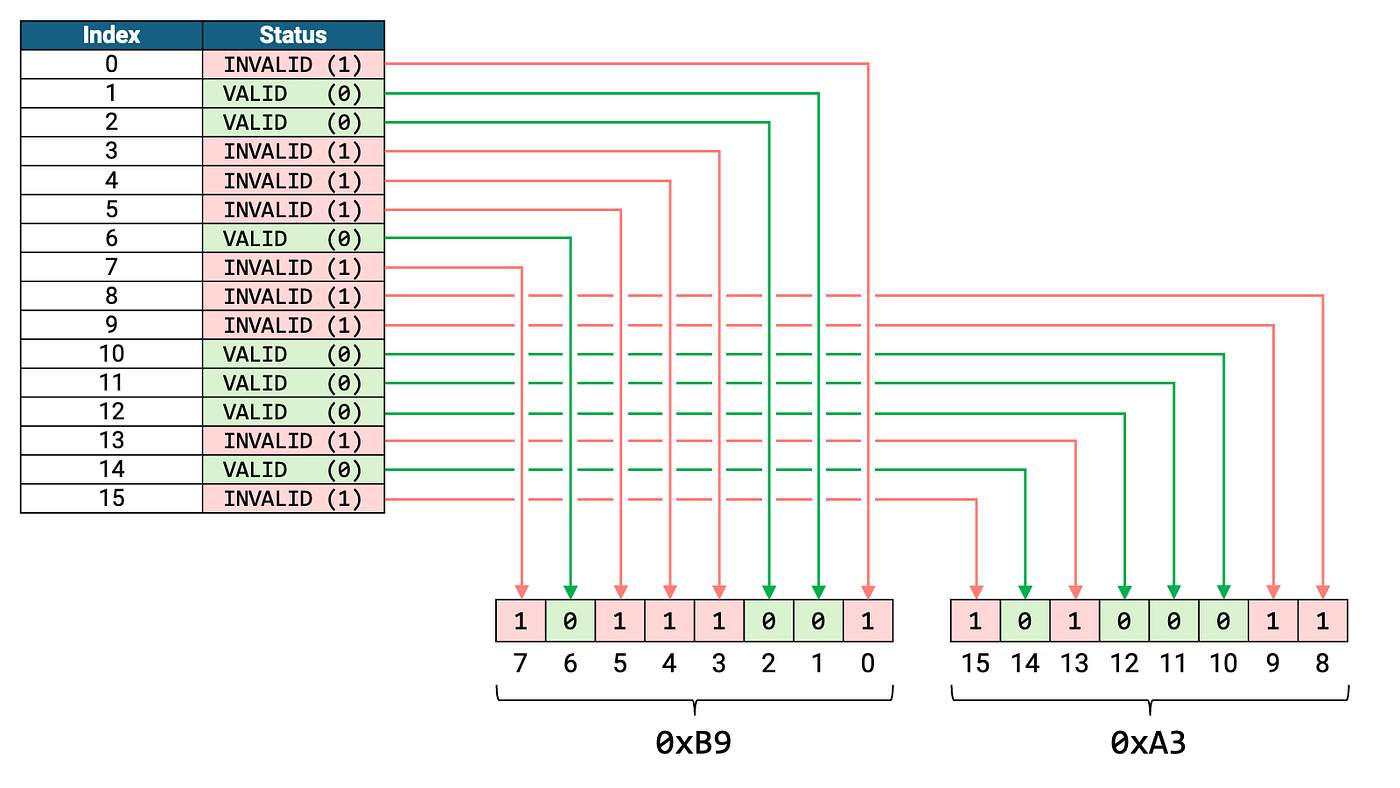
Statuses represented as a byte array with bits=1
This byte array is then compressed using DEFLATE and set as the value of lst.
Similarly, suppose the number of bits used to represent a status is 2, and the statuses of 12 tokens are as follows:
| Index | Status |
|-------+--------|
|   0   |   01   |
|   1   |   10   |
|   2   |   00   |
|   3   |   11   |
|   4   |   00   |
|   5   |   01   |
|   6   |   00   |
|   7   |   01   |
|   8   |   01   |
|   9   |   10   |
|  10   |   11   |
|  11   |   11   |
When these statuses are packed as illustrated in the following figure, the resulting byte array is [0xC9, 0x44, 0xF9].

Statuses represented as a byte array with bits=2
This byte array is then compressed using DEFLATE and set as the value of lst.
Implementation of the StatusList
The CBOR library **authlete/cbor (for Java), which [Authlete](https://www.authlete.com/)** publishes as open source, includes a class named StatusList for representing a StatusList in the com.authlete.cbor.tsl package starting from version 1.21.
The constructor of this StatusList class takes the following arguments: int bits, byte[] lst, and String aggregationUri.
public StatusList(int bits, byte[] lst, String aggregationUri)However, preparing the value of lst in the first place is cumbersome, so the path to calling this constructor is not so easy. To address this, a utility class named StatusListBuilder is provided for creating instances of the StatusList class.
The usage of StatusListBuilder is as follows:
- Choose the number of bits used to represent each status from among 1, 2, 4, or 8.
- Create a
StatusListBuilderinstance by passing the chosen bit size to its constructor. - Call the
valueAtmethod as many times as needed to set individual status values. - If you want to set
aggregation_uri, call theaggregationUrimethod. - If you want to reserve capacity beyond the number of statuses automatically expanded by the indices specified via
valueAt, call thecapacitymethod. - Finally, call the
buildmethod to create aStatusListinstance.
For example, to create a StatusList that contains the following set of statuses listed in Section 4.1. Compressed Byte Array of the TSL specification,
status[ 0] = 0b1
status[ 1] = 0b0
status[ 2] = 0b0
status[ 3] = 0b1
status[ 4] = 0b1
status[ 5] = 0b1
status[ 6] = 0b0
status[ 7] = 0b1
status[ 8] = 0b1
status[ 9] = 0b1
status[10] = 0b0
status[11] = 0b0
status[12] = 0b0
status[13] = 0b1
status[14] = 0b0
status[15] = 0b1
you can write the code as follows:
// Number of bits used to represent a status
int bits = 1;

// Create a StatusListBuilder instance by passing the number
// of bits to the constructor
StatusListBuilder builder = new StatusListBuilder(bits);

// Set status values
builder.valueAt(StatusTypeValue.INVALID,  0);
builder.valueAt(StatusTypeValue.VALID,    1);
builder.valueAt(StatusTypeValue.VALID,    2);
builder.valueAt(StatusTypeValue.INVALID,  3);
builder.valueAt(StatusTypeValue.INVALID,  4);
builder.valueAt(StatusTypeValue.INVALID,  5);
builder.valueAt(StatusTypeValue.VALID,    6);
builder.valueAt(StatusTypeValue.INVALID,  7);
builder.valueAt(StatusTypeValue.INVALID,  8);
builder.valueAt(StatusTypeValue.INVALID,  9);
builder.valueAt(StatusTypeValue.VALID,   10);
builder.valueAt(StatusTypeValue.VALID,   11);
builder.valueAt(StatusTypeValue.VALID,   12);
builder.valueAt(StatusTypeValue.INVALID, 13);
builder.valueAt(StatusTypeValue.VALID,   14);
builder.valueAt(StatusTypeValue.INVALID, 15);

// Create a StatusList instance
StatusList statusList = builder.build();
StatusList is a subclass of CBORItem, so you can use the encodeToHex() method to represent it in hexadecimal,
System.out.println(statusList.encodeToHex());a2646269747301636c73744a78dadbb918000217015dor use the toString() or prettify() methods to represent it in CBOR Diagnostic Notation.
System.out.println(statusList.prettify());{
"bits": 1,
"lst": h'78dadbb918000217015d'
}By the way, if you convert the byte array to a base64url string using the Base64UrlAdapter introduced in “GSON: Converting Byte Arrays to and from Base64URL Strings” (or by any other method—what matters is simply converting the lst value from a byte array to a base64url string),
// Create a Gson instance with Base64UrlAdapter enabled
Gson gson = new GsonBuilder()
        .registerTypeAdapter(byte[].class, new Base64UrlAdapter())
        .setPrettyPrinting()
        .create();

// Convert the CBORItem into a general-purpose Java object using
// the parse() method
Object statusListObject = statusList.parse();

// Convert to JSON
String json = gson.toJson(statusListObject);

// Output the JSON
System.out.println(json);
you can generate JSON that complies with the requirements defined in Section 4.2. Status List in JSON Format of the TSL specification.
{
  "bits": 1,
  "lst": "eNrbuRgAAhcBXQ"
}
Conclusion
When you need to work with CBOR in Java, please give the **authlete/cbor** library a try. Authlete itself also uses the authlete/cbor library in its implementation of OpenID for Verifiable Credential Issuance 1.0 (OID4VCI).
We also operate a website called **CBOR Zone**, which allows you to convert CBOR data between the following formats. It’s quite handy, so be sure to check it out!
- Hexadecimal
- Base64
- Base64URL
- Diagnostic Notation

CBOR Zone (https://cbor.zone/)
(This screenshot shows the conversion from the hexadecimal representation of a StatusList to Diagnostic Notation.)
메타데이터
- post_id
- 93d1c019f9e4
- slug
- statuslist-93d1c019f9e4
- url
- https://medium.com/@darutk/statuslist-93d1c019f9e4
- canonical_url
- https://medium.com/@darutk/statuslist-93d1c019f9e4
- author_url
- https://medium.com/@darutk
- status
- ok
- fetched_at
- 2026-06-16 19:09:56