When AI Agents Finally Meet Professional Software: The CLI-Anything Revolution
There is a gap at the heart of modern AI development that most people have learned to quietly accept. Large language models reason with…
When AI Agents Finally Meet Professional Software: The CLI-Anything Revolution
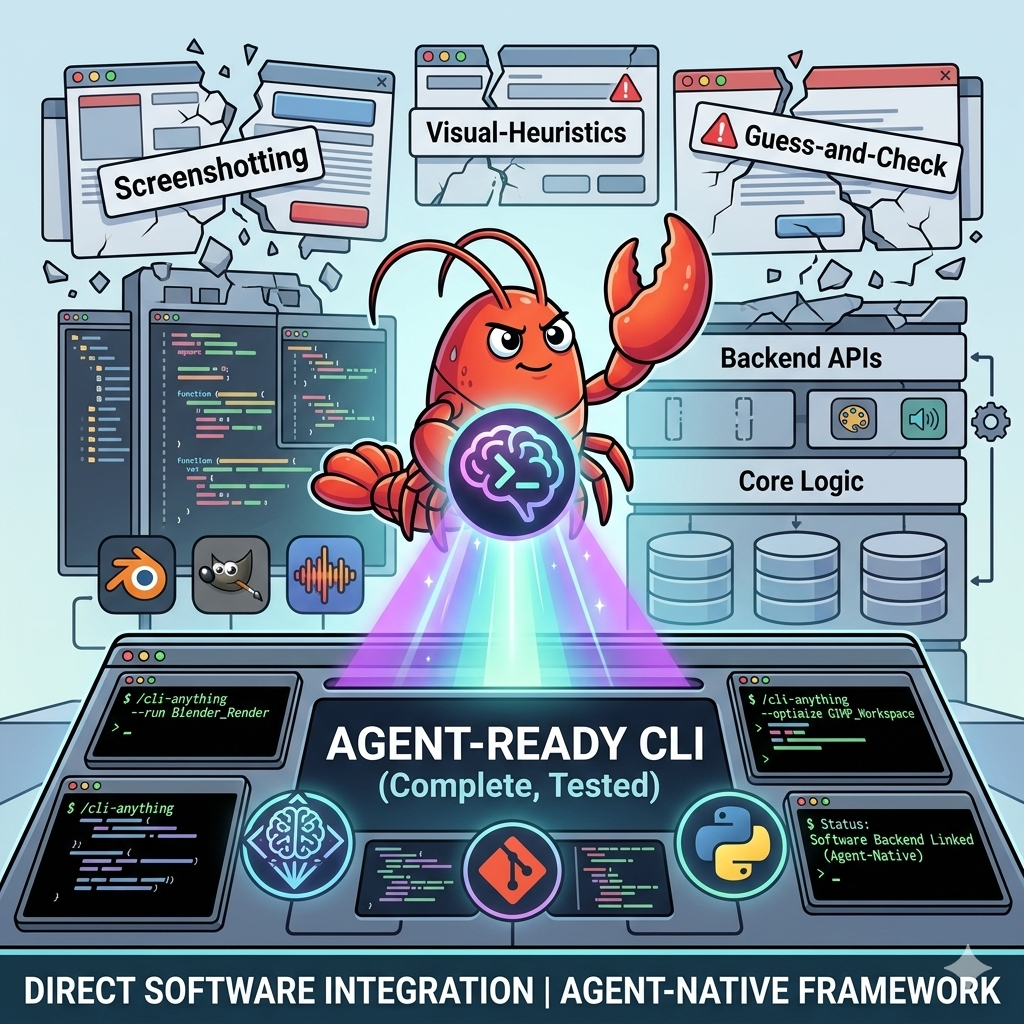
There is a gap at the heart of modern AI development that most people have learned to quietly accept. Large language models reason with impressive precision. They plan, decompose problems, and generate coherent strategies across complex domains. But the moment they need to interact with real professional software, something breaks. The tools that creative professionals, scientists, engineers, and developers rely on every day were designed for human eyes and human hands. They were not built to be commanded by an AI agent, and that mismatch has been costing teams enormous amounts of time and engineering effort.
The workarounds have been creative but fragile. Screenshot the interface. Feed it to a vision model. Guess where to click. Hope the UI has not shifted by a pixel since the last run. This approach collapses the first time a software update moves a button, changes a layout, or introduces a new dialog. It was never a real solution. It was a patch over a fundamental architectural problem.
CLI-Anything is a direct answer to that problem. It is a fully open-source framework that takes any software codebase and automatically generates a production-grade command line interface for it. Not a toy wrapper. Not a partial integration. A complete, tested, agent-ready CLI that calls the actual software backend directly, with no compromises and no graceful degradation.
The Core Problem That CLI-Anything Solves
Professional software was designed around graphical workflows. Blender, GIMP, LibreOffice, OBS Studio, Inkscape, Audacity and dozens of tools like them are deep, powerful applications whose full capabilities live inside complex graphical interfaces. For a human operator, that is fine. For an AI agent trying to automate a workflow, it is an obstacle.
The three approaches that teams have historically tried each carry serious limitations.
Screenshot-based GUI automation is the most common workaround. An agent captures the screen, interprets what it sees through a vision model, and attempts to interact with interface elements. This method breaks unpredictably, cannot easily be tested, produces inconsistent results across software versions, and consumes significant computational resources just to navigate menus that a direct API call could skip entirely.
Custom API wrappers require significant engineering investment. Building a proper integration for even one application can take weeks of careful work, and the result typically covers only a fraction of the software’s full capabilities. Maintaining those integrations as software evolves adds ongoing cost.
Simplified reimplementations abandon the real software entirely and rebuild a subset of its functionality in code that an agent can call directly. This approach sacrifices accuracy, loses years of optimization and edge-case handling built into the original application, and delivers a fundamentally inferior result.
CLI-Anything takes a different path. Rather than working around the software or replacing it, the framework wraps it. The generated CLI becomes a structured interface to the real application, preserving all of its capabilities while exposing them through a form that AI agents can use reliably and predictably.
How the Seven-Phase Pipeline Works
The generation process is fully automated. Pointing the tool at a software codebase or repository launches a seven-phase pipeline that proceeds without manual intervention.
The first phase analyzes the source code, scanning the codebase to understand what the software does and how its internal components communicate. It maps the relationships between graphical interface actions and the underlying APIs and function calls those actions trigger.
The second phase designs the command architecture, determining how capabilities should be grouped into logical command structures, what the state model should look like, and how output should be formatted for both human readability and machine consumption.
The third phase implements the CLI itself using the Click framework for Python, building in a full REPL mode for interactive agent sessions, structured JSON output accessible via a built-in flag on every command, and undo and redo support for stateful workflows.
The fourth and fifth phases handle testing. The pipeline first creates a comprehensive test plan covering both unit tests with synthetic data and end-to-end tests that invoke the real software backend. It then implements that test suite, producing actual runnable tests rather than documentation of what tests should exist.
The sixth phase produces documentation and generates a SKILL.md file that allows AI agents to autonomously discover what the CLI can do and how to use it correctly.
The seventh phase packages and publishes the result, creating a proper Python package that installs to PATH and is available system-wide from a standard command.
The entire pipeline runs from a single command inside Claude Code:
/cli-anything ./blenderAfter the pipeline completes, the generated CLI is immediately usable:
bash
pip install -e blender/agent-harness
cli-anything-blender --help
cli-anything-blender scene new --name ProductShot
cli-anything-blender --json render execute --output render.png --engine CYCLES
The refinement command allows iterative expansion of an existing harness, adding coverage for capabilities that the initial run may not have fully addressed:
/cli-anything:refine ./shotcut "video-in-video and picture-in-picture compositing"What Authentic Integration Actually Means
The most important principle in CLI-Anything’s design philosophy is that the real software must be called for any operation that requires rendering, processing, or output generation. There are no fallback implementations, no graceful degradation paths, and no substitute libraries that approximate what the real application does.
When an agent uses the LibreOffice CLI to export a document as a PDF, LibreOffice headless actually runs and produces the file. The resulting PDF is not synthesized by a Python library that partially understands the document format. It is the genuine output of the same rendering engine that LibreOffice uses when a human operator presses the export button.
When an agent uses the Blender CLI to render a 3D scene, Blender’s actual rendering pipeline executes through the bpy Python scripting interface. When GIMP edits an image, it calls GEGL, GIMP’s real compositing engine. When Audacity processes audio, it delegates to sox for the actual signal processing.
This matters because professional software contains years of accumulated correctness. Color profiles, filter precision, codec compatibility, format compliance, and hundreds of other details are handled correctly by the real application and would need to be independently reimplemented, with all the associated error risk, by any substitute approach.
The framework also enforces this principle in its test suite. Tests do not skip when a backend is unavailable. They fail. This ensures that every passing test confirms that real software integration is working correctly, not that a fallback path produced plausible-looking output.
A Practical Look at What Agents Can Do
The LibreOffice integration illustrates what agent-native software access looks like in practice. An agent can create a document, structure its content, add tables and headings, and export a finished PDF, all through a sequence of deterministic commands:
cli-anything-libreoffice document new -o report.json --type writer
cli-anything-libreoffice --project report.json writer add-heading -t "Quarterly Analysis" --level 1
cli-anything-libreoffice --project report.json writer add-table --rows 5 --cols 4
cli-anything-libreoffice --project report.json export render output.pdf -p pdf --overwrite
The JSON output mode makes every command’s results consumable by the agent programmatically:
cli-anything-libreoffice --json document info --project report.jsonThis returns a structured object with document metadata that the agent can read and act on without parsing human-readable text.
The REPL mode provides an interactive session interface for workflows that benefit from stateful interaction. An agent enters the REPL and issues commands within a persistent session context, with the current project state tracked and displayed in the prompt between commands. This model suits complex creative workflows in Blender or GIMP where multiple operations build on each other and the agent needs to inspect intermediate states before proceeding.
The CLI-Hub: Autonomous Discovery and Installation
Individual CLI harnesses solve the integration problem for specific applications. The CLI-Hub addresses the broader question of how agents discover and acquire the right tool for any given task without requiring human guidance.
Installing the hub package makes the full catalog of community-built CLI harnesses available to any agent:
pip install cli-anything-hubOnce the hub meta-skill is installed, an agent can receive a task description, browse the catalog autonomously, identify the most appropriate CLI for the job, install it, read its SKILL.md for usage guidance, and execute the task. The entire flow operates without human involvement.
The catalog updates automatically whenever new community contributions are added to the registry. An agent accessing the hub today sees the same catalog as an agent accessing it after ten new harnesses have been published, without any manual update step.
For Claude Code users specifically, copying the hub meta-skill into a project or skills directory provides the same autonomous discovery capability within that environment.
The Scale of What Has Already Been Built
The framework has been applied across more than three dozen applications spanning nearly every domain of professional software. Creative tools include Blender, GIMP, Inkscape, Audacity, Kdenlive, Shotcut, and OBS Studio. Scientific and research tools include QGIS for geospatial analysis, UniMol Tools for molecular modeling, RenderDoc for GPU debugging, and Unreal Insights for performance profiling. Development infrastructure tools include n8n for workflow automation, AdGuard Home for network management, and Ollama for local language model inference. Content creation tools include VideoCaptioner for subtitle generation, Draw.io for diagramming, Mermaid for programmatic diagrams, and AnyGen for AI-powered content generation. Game development is covered through Godot Engine and s&box. Reference management, knowledge organization, email marketing, and video conferencing each have dedicated harnesses as well.
The combined test suite across all harnesses totals more than 2,280 tests, with a 100 percent pass rate across unit tests, end-to-end tests that invoke real backends, and CLI subprocess tests that verify installed commands behave correctly. This level of testing coverage is what distinguishes production-ready tooling from proof-of-concept experiments.
The Broader Significance for AI Development
The problem CLI-Anything addresses is not a narrow technical issue affecting a small number of specialized workflows. It is a fundamental constraint on what AI agents can accomplish in the real world.
The vast majority of valuable software that exists today was designed for human operators. It expresses decades of domain expertise, careful engineering, and accumulated correctness in forms that visual interfaces expose. As AI agents take on more complex, consequential work across creative, scientific, engineering, and business domains, their ability to use that software directly rather than through approximations or workarounds becomes a prerequisite for delivering genuine value.
CLI-Anything’s approach of wrapping rather than replacing preserves everything that makes professional software worth using. It does not ask developers to rebuild Blender so that AI agents can use it. It builds a structured interface to Blender that agents can use without losing any of what Blender is.
The framework’s open-source nature means that every new harness contributed by the community expands the catalog available to all agents everywhere. A researcher who builds a CLI harness for a scientific visualization tool contributes to a shared infrastructure that benefits every team working with similar workflows. The hub’s automatic catalog updates mean those contributions propagate immediately.
Conclusion
CLI-Anything represents a practical and technically rigorous solution to one of the most significant gaps in current AI agent capabilities. By automating the generation of production-grade CLI harnesses for any software codebase, it transforms the professional applications that humans depend on today into the agent-native tools that AI-powered workflows will depend on tomorrow.
The combination of authentic backend integration, comprehensive testing, autonomous discovery through CLI-Hub, and a growing community of contributors makes it one of the most consequential open-source contributions to the agent tooling ecosystem. The gap between what AI agents can reason about and what they can actually do with real software is closing, and CLI-Anything is a significant part of how that is happening.
The repository is available at: https://github.com/HKUDS/CLI-Anything
메타데이터
- post_id
- 93e0ab0aa9c1
- slug
- when-ai-agents-finally-meet-professional-software-the-cli-anything-revolution-93e0ab0aa9c1
- url
- https://medium.com/ai-mindset/when-ai-agents-finally-meet-professional-software-the-cli-anything-revolution-93e0ab0aa9c1
- canonical_url
- https://medium.com/ai-mindset/when-ai-agents-finally-meet-professional-software-the-cli-anything-revolution-93e0ab0aa9c1
- author_url
- https://medium.com/@eng.fadishaar
- status
- ok
- fetched_at
- 2026-06-09 15:37:30