Enabling Storage Access: Service Endpoints for Databricks Classic and Private Endpoints for…
Author: Kiran Anand
Enabling Storage Access: Service Endpoints for Databricks Classic and Private Endpoints for Serverless
Author: Kiran Anand
Introduction — Problem Statement
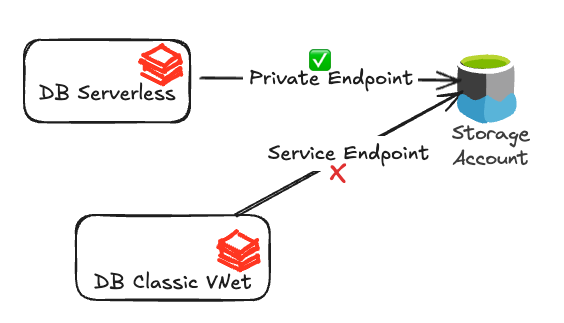
Applying a private endpoint to a storage account within a serverless network connectivity configuration (NCC) can cause the storage account to suddenly become unavailable to Databricks Classic compute or other services in the local Azure tenant. This unavailability is typically indicated by a “host not found” (NXDOMAIN Error), even if the storage account had public network access or service endpoint access defined.
Overview of DNS for Azure Storage
When you create a new Storage Account in Azure, it receives a default public URL (such as mystorage.dfs.core.windows.net). Azure hosts this public endpoint, and its public DNS records are managed by Azure DNS.
To access data in this storage account securely using private IP addresses, you use private endpoints. When you add a private endpoint (PE) to this storage account from your VNet, a few specific things happen.
- Canonical Name (CNAME) Creation Azure adds a CNAME record to the public DNS for your storage account, pointing to its Private Link Fully Qualified Domain Name (FQDN) such as mystorage.privatelink.dfs.core.windows.net
- Private DNS Zone Entry An Alias record (or “A” record) is created in a Private DNS Zone if the option to link with a private DNS zone is chosen, mapping the private link FQDN to the IP address of the PE in a new or existing private DNS zone.
- Private DNS Zone link The private link domain for the Private DNS Zone depends on the storage service and the associated endpoint target subresource, such as DFS, Blob, etc. During the creation of the private endpoint, by default, Azure provides you with the option to automatically link the corresponding Private DNS Zone to your VNet. If you are using a custom DNS, you can choose to complete this step manually.
- DNS Resolution Changes Any DNS queries originating from within the VNet linked to the PE are resolved to the private IP of the PE via CNAME redirection using DNS recursion. If the DNS recursion finds a domain match, for example “privatelink.dfs.core.windows.net” within a corresponding private DNS zone, the DNS recursion will terminate at the private DNS zone whether it finds an A record or not. Any DNS queries outside the VNet still resolve to the public IP address of the storage account.
In summary, you use the same URL (mystorage.dfs.core.windows.net) for both public and private access. Azure’s internal DNS handles the IP resolution based on where the request originates (inside or outside the VNet with the private endpoint). For private access to work correctly, you must have the linked private DNS zone and the corresponding “A” record in the Private DNS Zone. The diagram below illustrates the high-level flow of the DNS resolution process.

Problem Statement Revisited
Now that we understand the changes that occur to Azure DNS when you enable a PE on a storage account, it is a good time to revisit and refine the problem statement with more details as follows. On a broader scale, the problem statement can be of two distinct types based on the deployment model of the Private DNS Zone.
1. Hub-Spoke access model:
Our Azure deployment follows the Microsoft-recommended hub and spoke model with all required peering, and all PEs are created in the centralized hub. We have one Private DNS Zone in the hub to which all the spoke VNets are linked. We have PEs created for some other storage accounts from some other VNets (not from Databricks Classic VNets). With this architecture model, why does the service endpoint-based connectivity from Classic Databricks virtual networks (VNet) to my Azure storage break when we enable private connectivity to the Azure storage from Databricks Serverless?
Root Cause: During the DNS resolution process a private DNS zone corresponding to the storage service was found and it terminated the DNS query recursion (search) at that private DNS zone even though no “A” record was found.

2. Multiple Private DNS Zones are used in a mix and match for Private and Public endpoint-based access:
We have separate Private DNS Zones for different networks, and we have PEs created for some other storage accounts from the same Databricks Classic VNet. With this architecture model, why does the service endpoint-based connectivity from Classic Databricks virtual networks (VNet) to my Azure storage break when we enable private connectivity to the Azure storage from Databricks Serverless?
Root Cause: During the DNS resolution process a private DNS zone corresponding to the storage service was found and it terminated the DNS query recursion (search) at that private DNS zone even though no “A” record was found.

Note: For the other combinations of storage access patterns listed below, customers will not encounter the issue described in this document.
- No PEs are created from Serverless via NCC
- No PEs exist or were created in their VNet for any of the storage accounts
- No corresponding storage service Private DNS Zones are linked to the VNet
Solution
Based on the refined problem statements and the flow of the DNS resolution process, we observe that the problem occurs in a consistent pattern across all cases. When attempting to access the Storage Account from a VNet, the DNS resolution recurs into a linked Private DNS Zone and fails to find the corresponding “A” record, resulting in an NXDOMAIN error.
In February 2025, Microsoft announced a new configuration option for Azure Private DNS zones called “Enable fallback to internet”. You can enable this feature in the Azure Portal. Search for Private DNS Zones and select the corresponding Private DNS Zone, such as “privatelink.dfs.core.windows.net”. Then, on the left-hand navigation, select DNS Management -> Virtual Network Links -> select edit (pencil) icon listed on the line for your VNet.

Setting the resolution policy for fallback to public resolution in the virtual network link will enable public name recursion via Azure DNS to occur in the event of receiving an authoritative fallback to public resolution response from the Private DNS zone. Once this feature is enabled, the new flow diagram of the DNS resolution process would look as below. In this flow, by enabling the fallback to Internet, the DNS recursion will continue even if the “A” record isn’t found in the Private DNS Zone. Azure DNS will continue the recursive search until it get an answer which usually is the public IP address.

Conclusion
The “fallback to internet” feature described above enables your resources to remain accessible via their public IP addresses when needed, even though they are primarily configured with private endpoints. Such dual access is especially useful when integrating with Azure services, such as storage, or managing diverse Azure environments that may not share the same DNS configurations, like in Databricks Serverless and Databricks Classic.
In the Databricks context, by enabling this feature in your Private DNS Zones, you can access your storage using Private Endpoints created on the Databricks Serverless side while accessing the same storage using Service Endpoints from Databricks Classic VNet in your tenant.
메타데이터
- post_id
- 942262acb2ea
- slug
- enabling-storage-access-service-endpoints-for-databricks-classic-and-private-endpoints-for-942262acb2ea
- url
- https://medium.com/databricks-platform-sme/enabling-storage-access-service-endpoints-for-databricks-classic-and-private-endpoints-for-942262acb2ea
- canonical_url
- https://medium.com/databricks-platform-sme/enabling-storage-access-service-endpoints-for-databricks-classic-and-private-endpoints-for-942262acb2ea
- author_url
- https://medium.com/@anand.kiran
- status
- ok
- fetched_at
- 2026-08-06 23:14:29