Spark on Kubernetes in Production: The Complete Guide!
Spark on YARN is dead. Spark on EMR is expensive. Spark on Kubernetes is the future!
Spark on Kubernetes in Production: The Complete Guide!
Spark on YARN is dead. Spark on EMR is expensive. Spark on Kubernetes is the future!
I have run Spark on YARN, on EMR & on Kubernetes. The last one is the most powerful & the most frustrating not because it’s hard, but because documentation stops exactly where the real questions begin.
Every guide tells you how to do spark-submit against a cluster. None of them tell you what happens to your shuffle data when an executor pod gets evicted. None explain why Dynamic Resource Allocation(DRA) silently hangs without a specific configuration flag. None walk you through the RBAC setup that took me 3 hours to debug because the error message pointed nowhere useful.
This guide covers all of it. By the end, you will have:
- A fully working Spark-on-Kubernetes setup from scratch
- The complete RBAC, namespace & service account configuration
- Dynamic resource allocation working correctly (with the shuffle tracking caveat explained)
- S3 access, secrets management & the right storage strategy for shuffle data
- Prometheus monitoring & the Spark UI on K8s
- A cost comparison at 3 realistic scales that will help you decide whether K8s is actually right for your team
Let’s start with the question everyone has but nobody asks out loud.
Photo by Growtika on Unsplash
Why Kubernetes? (And when it’s the wrong choice)
Databricks offers simplicity at a premium cost, EMR offers pay-as-you-go with many cost optimization levers & Spark-on-Kubernetes offers maximum cost control at the expense of more operational overhead.
That’s the honest summary. So before you invest weeks in this setup, here’s when Kubernetes is the right call:
Choose Spark on Kubernetes when:
- Your organisation already runs Kubernetes (EKS, GKE, AKS or on-prem). If your organisation already operates a Kubernetes platform, Spark on K8s adds zero new infrastructure to manage. It delivers true multi-cloud portability, fine-grained resource isolation between workloads & natural integration with GitOps pipelines.
- You want to share compute between Spark and other workloads (APIs, ML serving, etc.) on the same cluster.
- You need multi-cloud portability, the same
spark-submitcommand works on EKS, GKE or AKS without changes. - Your team has Kubernetes expertise and can absorb the operational overhead.
Do NOT choose Spark on Kubernetes when:
- You are AWS-native and just need Spark for batch jobs. EMR Serverless is genuinely easier and cost-competitive for intermittent workloads.
- Your team doesn’t have K8s operational experience. A mid-sized team might spend 20–40% of engineering time on infrastructure instead of building features if the platform is unfamiliar.
- You need collaborative notebooks and ML workflows out of the box, that’s Databricks’ actual moat.
Still with me? Good. Let’s build it.
How Spark on Kubernetes actually works
The mental model shift from YARN is important. On YARN, you submit to a ResourceManager that allocates containers from a pre-existing cluster. On Kubernetes, it works differently.
Instead of submitting jobs to a YARN ResourceManager, Spark leverages the Kubernetes scheduler directly. This unlocks Dynamic Resource Allocation, allowing Spark to request and release executors on demand. With that in place, executors scale dynamically as pods, sharing cluster capacity alongside your microservices. It is a shift from cluster-level reservations to pod-level, on-demand consumption.
Concretely: when you run spark-submit --master k8s://..., Spark creates a driver pod in your cluster. The driver pod then calls the Kubernetes API to create executor pods as needed. When a stage completes and executors are idle, Kubernetes terminates those pods and releases the compute. You only pay for what you use, for as long as you use it.
The Spark driver pod uses a Kubernetes service account to access the Kubernetes API server to create and watch executor pods. The service account used by the driver pod must have the appropriate permissions at minimum, the service account must be granted a Role or ClusterRole that allows driver pods to create pods and services.
This is the part most guides gloss over. Let’s get it right.
Step 1: Namespaces, RBAC & service accounts
Everything lives in a dedicated spark namespace. This isolates Spark workloads from other cluster tenants and makes RBAC manageable.
# Create the namespace
kubectl create namespace spark
Now create the service account and role binding. Save this as spark-rbac.yaml:
# spark-rbac.yaml
apiVersion: v1
kind: ServiceAccount
metadata:
  name: spark
  namespace: spark

---
# Role: grants the driver pod permission to create/watch/delete executor pods
# Use a Role (not ClusterRole) - the driver only needs access within the spark namespace
apiVersion: rbac.authorization.k8s.io/v1
kind: Role
metadata:
  name: spark-role
  namespace: spark
rules:
  - apiGroups: [""]
    resources: ["pods", "services", "configmaps", "persistentvolumeclaims"]
    verbs: ["create", "get", "list", "watch", "delete", "update", "patch"]
---
apiVersion: rbac.authorization.k8s.io/v1
kind: RoleBinding
metadata:
  name: spark-role-binding
  namespace: spark
subjects:
  - kind: ServiceAccount
    name: spark
    namespace: spark
roleRef:
  kind: Role
  name: spark-role
  apiGroup: rbac.authorization.k8s.io
Apply it:
kubectl apply -f spark-rbac.yamlWhy a Role instead of ClusterRole? Since the Spark driver always creates executor pods in the same namespace, a Role is sufficient. A ClusterRole grants access across all namespaces more permissive than needed. Principle of least privilege matters in production.
Verify the service account exists and has the binding:
kubectl get serviceaccount spark -n spark
kubectl get rolebinding spark-role-binding -n spark
Step 2: Building and pushing your Spark Docker image
Kubernetes runs containers, so your Spark application needs to be packaged as a Docker image. Spark ships with a script to build its base image:
# From your Spark installation directory (3.5.x recommended)
./bin/docker-image-tool.sh \
  -r <your-registry> \
  -t spark-3.5.0 \
  -p kubernetes/dockerfiles/spark/bindings/python/Dockerfile \
  build

./bin/docker-image-tool.sh \
  -r <your-registry> \
  -t spark-3.5.0 \
  push
For production, you will extend the base image with your application code and dependencies:
# Dockerfile
FROM apache/spark-py:3.5.0

# Install Python dependencies
USER root
COPY requirements.txt .
RUN pip install --no-cache-dir -r requirements.txt
# Copy your application code
COPY src/ /opt/spark/work-dir/src/
COPY jobs/ /opt/spark/work-dir/jobs/
USER 185  # Spark's non-root UID
Build and push to your registry:
docker build -t <your-registry>/spark-app:latest .
docker push <your-registry>/spark-app:latest
Step 3: Your first spark-submit to Kubernetes
./bin/spark-submit \
  --master k8s://https://<kubernetes-api-server>:6443 \
  --deploy-mode cluster \
  --name my-spark-job \
  --conf spark.kubernetes.namespace=spark \
  --conf spark.kubernetes.authenticate.driver.serviceAccountName=spark \
  --conf spark.kubernetes.container.image=<your-registry>/spark-app:latest \
  --conf spark.executor.instances=4 \
  --conf spark.executor.memory=4g \
  --conf spark.executor.cores=2 \
  --conf spark.driver.memory=2g \
  local:///opt/spark/work-dir/jobs/my_job.py
Get your Kubernetes API server URL with:
kubectl cluster-info | grep "Kubernetes control plane"Watch the pods come up:
kubectl get pods -n spark -wYou will see the driver pod appear first (my-spark-job-<uuid>-driver), followed by executor pods as the job starts running. When the job completes, executor pods are automatically cleaned up.
Step 4: Dynamic resource allocation and the one thing that breaks it
Dynamic resource allocation (DRA) is what makes Spark on K8s genuinely cost-efficient. Without it, you are pre-allocating spark.executor.instances executors for the full job duration even during the 80% of time when only 2 of your 20 executors are actually doing work.
With DRA, executors are created on demand per stage and released when idle.
Here’s the config that actually works:
./bin/spark-submit \
  --master k8s://https://<kubernetes-api-server>:6443 \
  --deploy-mode cluster \
  --name my-spark-job-dra \
  --conf spark.kubernetes.namespace=spark \
  --conf spark.kubernetes.authenticate.driver.serviceAccountName=spark \
  --conf spark.kubernetes.container.image=<your-registry>/spark-app:latest \
  \
  # Dynamic allocation settings
  --conf spark.dynamicAllocation.enabled=true \
  --conf spark.dynamicAllocation.initialExecutors=2 \
  --conf spark.dynamicAllocation.minExecutors=1 \
  --conf spark.dynamicAllocation.maxExecutors=20 \
  --conf spark.dynamicAllocation.executorIdleTimeout=60s \
  --conf spark.dynamicAllocation.schedulerBacklogTimeout=1s \
  \
  # THIS IS THE CRITICAL FLAG — without it, DRA silently hangs on Kubernetes
  --conf spark.dynamicAllocation.shuffleTracking.enabled=true \
  \
  local:///opt/spark/work-dir/jobs/my_job.py
Why shuffleTracking.enabled is mandatory on Kubernetes
On YARN, Spark uses an external shuffle service, a daemon that holds shuffle data independently of executor processes. When an executor is terminated, the shuffle data survives.
Kubernetes doesn’t support an external shuffle service. Dynamic allocation on Kubernetes requires the shuffle tracking feature. This means executors from previous stages that used a different resource profile may not idle timeout due to having shuffle data on them.
Without shuffleTracking.enabled=true, Spark cannot safely terminate executors that hold shuffle data needed by downstream stages, so it doesn't terminate them, DRA stalls and your job either hangs or runs without the cost benefits you expected.
The trade-off to understand: Shuffle tracking means executors holding live shuffle data won’t be released even if idle. In shuffle-heavy jobs (lots of groupBy, join, repartition), this reduces DRA effectiveness. For these jobs, it's worth tuning spark.dynamicAllocation.executorIdleTimeout to be more aggressive and ensuring your S3 committer is configured correctly to minimise shuffle volume.
Step 5: S3 access and secrets management
Hard-coding credentials in your spark-submit command is a production incident waiting to happen. Use Kubernetes Secrets mounted as environment variables instead.
Create the secret:
kubectl create secret generic aws-credentials \
  --from-literal=AWS_ACCESS_KEY_ID=<your-access-key> \
  --from-literal=AWS_SECRET_ACCESS_KEY=<your-secret-key> \
  -n spark
Reference the secret in your driver and executor pod templates. Create driver-pod-template.yaml:
# driver-pod-template.yaml
apiVersion: v1
kind: Pod
spec:
  serviceAccountName: spark
  containers:
    - name: spark-kubernetes-driver
      env:
        - name: AWS_ACCESS_KEY_ID
          valueFrom:
            secretKeyRef:
              name: aws-credentials
              key: AWS_ACCESS_KEY_ID
        - name: AWS_SECRET_ACCESS_KEY
          valueFrom:
            secretKeyRef:
              name: aws-credentials
              key: AWS_SECRET_ACCESS_KEY
      resources:
        requests:
          memory: "2Gi"
          cpu: "1"
        limits:
          memory: "2Gi"
          cpu: "2"
Create an identical executor-pod-template.yaml with the same env block.
Reference them in spark-submit:
./bin/spark-submit \
  ...
  --conf spark.kubernetes.driver.podTemplateFile=driver-pod-template.yaml \
  --conf spark.kubernetes.executor.podTemplateFile=executor-pod-template.yaml \
  ...
Then configure the S3A connector for your Spark job:
from pyspark.sql import SparkSession
spark = SparkSession.builder \
    .appName("s3-job") \
    .config("spark.hadoop.fs.s3a.impl",
            "org.apache.hadoop.fs.s3a.S3AFileSystem") \
    .config("spark.hadoop.fs.s3a.aws.credentials.provider",
            "com.amazonaws.auth.EnvironmentVariableCredentialsProvider") \
    .config("spark.hadoop.fs.s3a.fast.upload", "true") \
    .config("spark.hadoop.fs.s3a.multipart.size", "128M") \
    .getOrCreate()
df = spark.read.parquet("s3a://your-bucket/data/")
On-cluster access: prefer IAM Roles for Service Accounts (IRSA) on EKS
For EKS, avoid static credentials entirely. Annotate the Spark service account with an IAM role:
kubectl annotate serviceaccount spark \
  -n spark \
  eks.amazonaws.com/role-arn=arn:aws:iam::<account-id>:role/SparkS3Role
Then configure Spark to use the WebIdentityToken provider:
--conf spark.hadoop.fs.s3a.aws.credentials.provider=\
com.amazonaws.auth.WebIdentityTokenCredentialsProvider
No secrets to rotate, no credentials in environment variables, this is the production-grade approach on AWS.
Step 6: Shuffle storage: the decision that affects everything
Shuffle data is temporary data written by executors between stages (during join, groupBy, repartition). How you store it on Kubernetes significantly impacts job performance and stability.
You have three options, each with real trade-offs:
Option 1: emptyDir (default)
Spark uses the pod’s ephemeral storage by default. Fast (writes to node-local disk), but if a pod is evicted, shuffle data is lost and the stage must re-run.
--conf spark.local.dir=/tmp/spark-localFine for small-to-medium jobs without memory pressure on nodes. Breaks silently if nodes are under disk pressure.
Option 2: PersistentVolumeClaims (PVC) per executor
Mount a dedicated PVC per executor pod, allowing shuffle data to survive pod restarts.
--conf spark.kubernetes.executor.volumes.persistentVolumeClaim.spark-local-dir-1.mount.path=/data/spark-shuffle
--conf spark.kubernetes.executor.volumes.persistentVolumeClaim.spark-local-dir-1.readOnly=false
--conf spark.kubernetes.executor.volumes.persistentVolumeClaim.spark-local-dir-1.options.claimName=OnDemand
--conf spark.kubernetes.executor.volumes.persistentVolumeClaim.spark-local-dir-1.options.storageClass=fast-ssd
--conf spark.kubernetes.executor.volumes.persistentVolumeClaim.spark-local-dir-1.options.sizeLimit=50Gi
--conf spark.shuffle.sort.io.plugin.class=org.apache.spark.shuffle.KubernetesLocalDiskShuffleDataIO
The OnDemand claim name is a Spark keyword it dynamically provisions a new PVC per executor. This feature is not compatible with using local NVMe-based SSDs for shuffle files, as PVCs are typically backed by remote volumes. Adds PVC provisioning latency at executor startup (~5–15 seconds per pod), which is noticeable on wide jobs.
Option 3: NVMe instance store (recommended for shuffle-heavy jobs on EKS)
For jobs with significant shuffle volume, nothing beats local NVMe SSDs. Using SSD instance store volumes can improve the performance of Spark jobs. This storage is located on disks physically attached to the host computer and provides better performance compared to EBS volumes. In the context of Spark, this is particularly beneficial for wide transformations like JOIN and GROUP BY that generate significant shuffle data persisted on the local filesystem.
On EKS, use a node group of r5d or c5d instances (NVMe-equipped), pre-format the NVMe at node startup, and configure:
--conf spark.local.dir=/mnt/nvme0/spark-local
--conf spark.kubernetes.node.selector.node.kubernetes.io/instance-type=r5d.2xlarge
This is the lowest-latency shuffle option. The trade-off: dedicated Spark nodes increase idle cost if jobs don’t run continuously.
Step 7: Monitoring with the Spark UI and Prometheus
The Spark UI is your primary debugging tool. Getting it working on Kubernetes requires a headless service that routes to the driver pod.
Create spark-ui-service.yaml:
apiVersion: v1
kind: Service
metadata:
  name: spark-ui
  namespace: spark
spec:
  selector:
    spark-role: driver
  ports:
    - port: 4040
      targetPort: 4040
  type: ClusterIP
Port-forward to access it locally:
kubectl port-forward svc/spark-ui 4040:4040 -n spark
# Open http://localhost:4040
For persistent history (after a job completes), deploy the Spark History Server:
# spark-history-server.yaml
apiVersion: apps/v1
kind: Deployment
metadata:
  name: spark-history-server
  namespace: spark
spec:
  replicas: 1
  selector:
    matchLabels:
      app: spark-history-server
  template:
    metadata:
      labels:
        app: spark-history-server
    spec:
      serviceAccountName: spark
      containers:
        - name: spark-history-server
          image: apache/spark:3.5.0
          command:
            - /opt/spark/bin/spark-class
            - org.apache.spark.deploy.history.HistoryServer
          env:
            - name: SPARK_HISTORY_OPTS
              value: >-
                -Dspark.history.fs.logDirectory=s3a://your-bucket/spark-logs
                -Dspark.history.ui.port=18080
          ports:
            - containerPort: 18080
Enable event logging in your jobs:
--conf spark.eventLog.enabled=true
--conf spark.eventLog.dir=s3a://your-bucket/spark-logs
Prometheus metrics
Expose Spark metrics to Prometheus by adding to your spark-defaults.conf:
spark.metrics.conf.*.sink.prometheusServlet.class=org.apache.spark.metrics.sink.PrometheusServlet
spark.metrics.conf.*.sink.prometheusServlet.path=/metrics/prometheus
spark.ui.prometheus.enabled=true
Then add Prometheus scrape annotations to your pod template:
metadata:
  annotations:
    prometheus.io/scrape: "true"
    prometheus.io/port: "4040"
    prometheus.io/path: "/metrics/prometheus"
The most useful metrics to alert on: spark_executor_cpuTime, spark_executor_shuffleWriteBytes, and spark_job_durationbetween these three you'll catch slow stages, shuffle explosions, and job timeouts.
Step 8: Node isolation and resource quotas
In a shared Kubernetes cluster, Spark jobs can consume all available CPU and memory, starving other workloads. Prevent this with node selectors, taints/tolerations and resource quotas.
Dedicated Spark nodes
Label a node group for Spark:
kubectl label nodes <node-name> workload-type=spark
kubectl taint nodes <node-name> workload-type=spark:NoSchedule
Add to your executor pod template:
spec:
  nodeSelector:
    workload-type: spark
  tolerations:
    - key: workload-type
      operator: Equal
      value: spark
      effect: NoSchedule
Now only Spark pods (which have the toleration) will be scheduled on those nodes.
Namespace resource quotas
Cap the total resources Spark can consume:
# spark-resource-quota.yaml
apiVersion: v1
kind: ResourceQuota
metadata:
  name: spark-quota
  namespace: spark
spec:
  hard:
    requests.cpu: "80"
    requests.memory: "320Gi"
    limits.cpu: "100"
    limits.memory: "400Gi"
    pods: "200"
Apply it:
kubectl apply -f spark-resource-quota.yamlIf a job tries to launch more executors than the quota allows, Kubernetes will queue the excess pods. Spark handles this gracefully, running with fewer executors rather than failing the job entirely.
What breaks in production (from experience)
1. Driver pod OOMKilled silently
The driver accumulates broadcast variables, collected results and query plan metadata. On large datasets, it quietly exceeds its memory limit and gets OOMKilled: the job fails with no useful error message.
Fix: always set driver memory at least 2x what you think you need and separate heap from overhead:
--conf spark.driver.memory=4g
--conf spark.driver.memoryOverhead=1g
Monitor with: kubectl describe pod <driver-pod-name> -n sparklook for OOMKilled in the Last State section.
2. Executor pods in Pending state indefinitely
Your job submitted, the driver started and executor pods are stuck in Pending. Almost always one of three causes:
- Insufficient cluster capacity: nodes don’t have enough free CPU/memory for the requested executor spec
- RBAC misconfiguration: the driver service account can’t call the Kubernetes API to create pods (check:
kubectl get events -n spark) - PVC provisioning failure: if using PVC-backed shuffle, the storage class or provisioner is misconfigured
Debug with: kubectl describe pod <executor-pod> -n spark and kubectl get events -n spark --sort-by='.lastTimestamp'.
3. Stage retries caused by executor eviction
Kubernetes evicts pods when a node runs low on memory, prioritizing lower-priority workloads. Spark executor pods are prime eviction candidates on shared clusters.
Fix: set pod priority classes for Spark executors so they’re not first in line for eviction, and configure eviction budget:
apiVersion: scheduling.k8s.io/v1
kind: PriorityClass
metadata:
  name: spark-executor-priority
value: 100
globalDefault: false
description: "Priority for Spark executor pods"
--conf spark.kubernetes.executor.podTemplateFile=executor-pod-template.yaml
# In executor-pod-template.yaml:
# spec.priorityClassName: spark-executor-priority4. Jobs hang after shuffle-heavy stages with DRA
Symptoms: job makes progress through map stages, then freezes at the reduce/join stage. DRA is enabled but executors aren’t being cleaned up or replaced.
Cause: shuffle tracking is keeping executors alive (correctly), but new executors aren’t being requested because schedulerBacklogTimeout is too high.
Fix:
--conf spark.dynamicAllocation.schedulerBacklogTimeout=1s
--conf spark.dynamicAllocation.sustainedSchedulerBacklogTimeout=5s
This makes Spark more aggressive about requesting new executors when tasks are queued.
Cost comparison at three scales
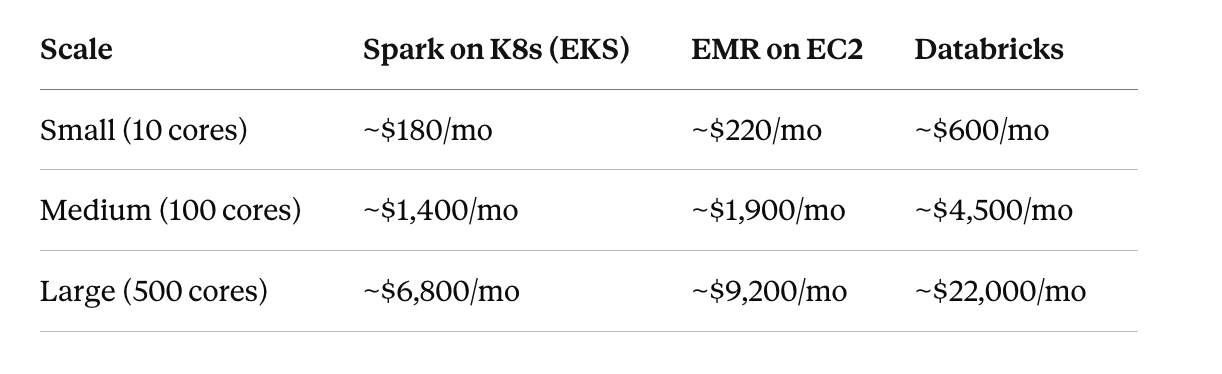
Here’s the honest breakdown. All figures are AWS us-east-1, on-demand pricing, assuming an 8-hour workday of active job execution.
Do you see any discrepancies?
K8s figures assume Spot instances for executors (~70% discount), on-demand for drivers. EMR includes EMR surcharge (~25% over EC2). Databricks assumes standard tier DBU pricing.
The K8s savings come primarily from Spot instance usage and the absence of any managed-service markup. But and this is important with open-source Spark you are paying for infrastructure setup and maintenance.
A mid-sized team might spend 20–40% of their engineering time on infrastructure instead of building features. If you’re paying senior engineers $150K–200K annually, that’s $30K–80K per engineer just maintaining the platform.
The TCO calculation only favours K8s if you already have the Kubernetes expertise in-house. If you’d need to hire or train for it, run the numbers carefully before committing.
Putting it all together: the full spark-submit
Here’s the complete spark-submit command incorporating everything from this guide:
./bin/spark-submit \
  --master k8s://https://<k8s-api-server>:6443 \
  --deploy-mode cluster \
  --name my-production-job \
  \
  # Identity & auth
  --conf spark.kubernetes.namespace=spark \
  --conf spark.kubernetes.authenticate.driver.serviceAccountName=spark \
  --conf spark.kubernetes.container.image=<registry>/spark-app:3.5.0 \
  \
  # Pod templates (secrets, node selectors, tolerations)
  --conf spark.kubernetes.driver.podTemplateFile=driver-pod-template.yaml \
  --conf spark.kubernetes.executor.podTemplateFile=executor-pod-template.yaml \
  \
  # Driver resources
  --conf spark.driver.memory=4g \
  --conf spark.driver.memoryOverhead=1g \
  --conf spark.driver.cores=2 \
  \
  # Executor resources
  --conf spark.executor.memory=8g \
  --conf spark.executor.memoryOverhead=2g \
  --conf spark.executor.cores=4 \
  \
  # Dynamic allocation
  --conf spark.dynamicAllocation.enabled=true \
  --conf spark.dynamicAllocation.initialExecutors=2 \
  --conf spark.dynamicAllocation.minExecutors=1 \
  --conf spark.dynamicAllocation.maxExecutors=50 \
  --conf spark.dynamicAllocation.executorIdleTimeout=60s \
  --conf spark.dynamicAllocation.schedulerBacklogTimeout=1s \
  --conf spark.dynamicAllocation.shuffleTracking.enabled=true \
  \
  # S3 access
  --conf spark.hadoop.fs.s3a.impl=org.apache.hadoop.fs.s3a.S3AFileSystem \
  --conf spark.hadoop.fs.s3a.aws.credentials.provider=\
com.amazonaws.auth.WebIdentityTokenCredentialsProvider \
  --conf spark.hadoop.fs.s3a.fast.upload=true \
  \
  # Monitoring
  --conf spark.eventLog.enabled=true \
  --conf spark.eventLog.dir=s3a://your-bucket/spark-logs \
  --conf spark.ui.prometheus.enabled=true \
  \
  # Node isolation
  --conf spark.kubernetes.node.selector.workload-type=spark \
  \
  local:///opt/spark/work-dir/jobs/my_job.py
Takeaways
- The RBAC and service account setup is non-negotiable. Get it wrong and you will spend hours reading meaningless Kubernetes events. Use a
Rolescoped to thesparknamespace, not aClusterRole. **shuffleTracking.enabled=trueis mandatory for DRA on Kubernetes.** Without it, dynamic allocation silently degrades. Kubernetes has no external shuffle service, shuffle tracking is the workaround.- Use IRSA on EKS instead of static credentials. No secrets to manage, no rotation, no accidental commits to GitHub.
- Choose your shuffle storage strategy deliberately. emptyDir for small jobs, PVCs for fault tolerance, NVMe instance store for shuffle-heavy workloads.
- Set resource quotas on the spark namespace. A misconfigured job can consume your entire cluster. Quotas are your safety net.
- Monitor the right metrics. CPU time, shuffle bytes and job duration. The Spark UI and History Server are not optional in production.
If this article helped, you will love my Data Engineering Product (on Gumroad) where I share resume templates, interview prep questions & Data Engineering Roadmap from my 15-year journey.
메타데이터
- post_id
- 9513e22eccc0
- slug
- spark-on-kubernetes-in-production-the-complete-guide-9513e22eccc0
- url
- https://medium.com/@shenoy.shashwath/spark-on-kubernetes-in-production-the-complete-guide-9513e22eccc0
- canonical_url
- https://medium.com/@shenoy.shashwath/spark-on-kubernetes-in-production-the-complete-guide-9513e22eccc0
- author_url
- https://medium.com/@shenoy.shashwath
- status
- ok
- fetched_at
- 2026-06-17 08:20:12




