Your Own WireGuard VPN on Open Telekom Cloud — Fully Automated with Pulumi
Let’s say you have a private subnet on Open Telekom Cloud. Maybe it runs a database, an internal API, or a staging environment you don’t…
Your Own WireGuard VPN on Open Telekom Cloud — Fully Automated with Pulumi
Let’s say you have a private subnet on Open Telekom Cloud. Maybe it runs a database, an internal API, or a staging environment you don’t want exposed to the internet. You want your developers to reach it securely from their machines. Sounds like a solved problem in 2025, right?
Not quite. OTC does have a VPN service, but it is a site-to-site IPsec VPN, the kind you use to bridge an entire on-premises office network to a VPC. There is nothing like AWS Client VPN or Azure Point-to-Site VPN: no managed option for getting an individual device onto your cloud network. If you want that on OTC, you build it yourself.
That is what this project does. WireGuard handles the VPN, Pulumi handles the infrastructure, and the whole thing is up in about fifteen minutes.
Why These Tools?
WireGuard has quietly become the default choice for self-hosted VPNs, and for good reason. It is fast, the codebase is small enough to actually audit, and a complete peer config is about ten lines of text. Compare that to an OpenVPN setup and you will not look back. It has shipped in the Linux kernel since 5.6, so there is nothing exotic to set up on the server side.
Pulumi is what makes this feel like a proper engineering project rather than a bag of bash scripts. You write TypeScript, so you get type checking, real abstractions, and a workflow you already know. Every resource, the VM, the public IP, the security groups, the storage bucket, lives in code, gets reviewed in pull requests, and can be torn down and rebuilt from scratch. That is how infrastructure should work.
Open Telekom Cloud is run by T-Systems, a Deutsche Telekom subsidiary, out of data centers in Germany and the Netherlands. For teams where data sovereignty and GDPR compliance are actual requirements rather than checkbox exercises, that matters. It is a solid platform, and the missing client VPN is genuinely the gap this project fills.
What Gets Deployed
The architecture is deliberately small. Pulumi creates four things on OTC:
- An ECS instance running WireGuard as the gateway
- An Elastic IP so your clients can reach it from the internet over UDP 51820
- Security groups that keep things locked down
- An OBS bucket holding the peer config and the server’s public key
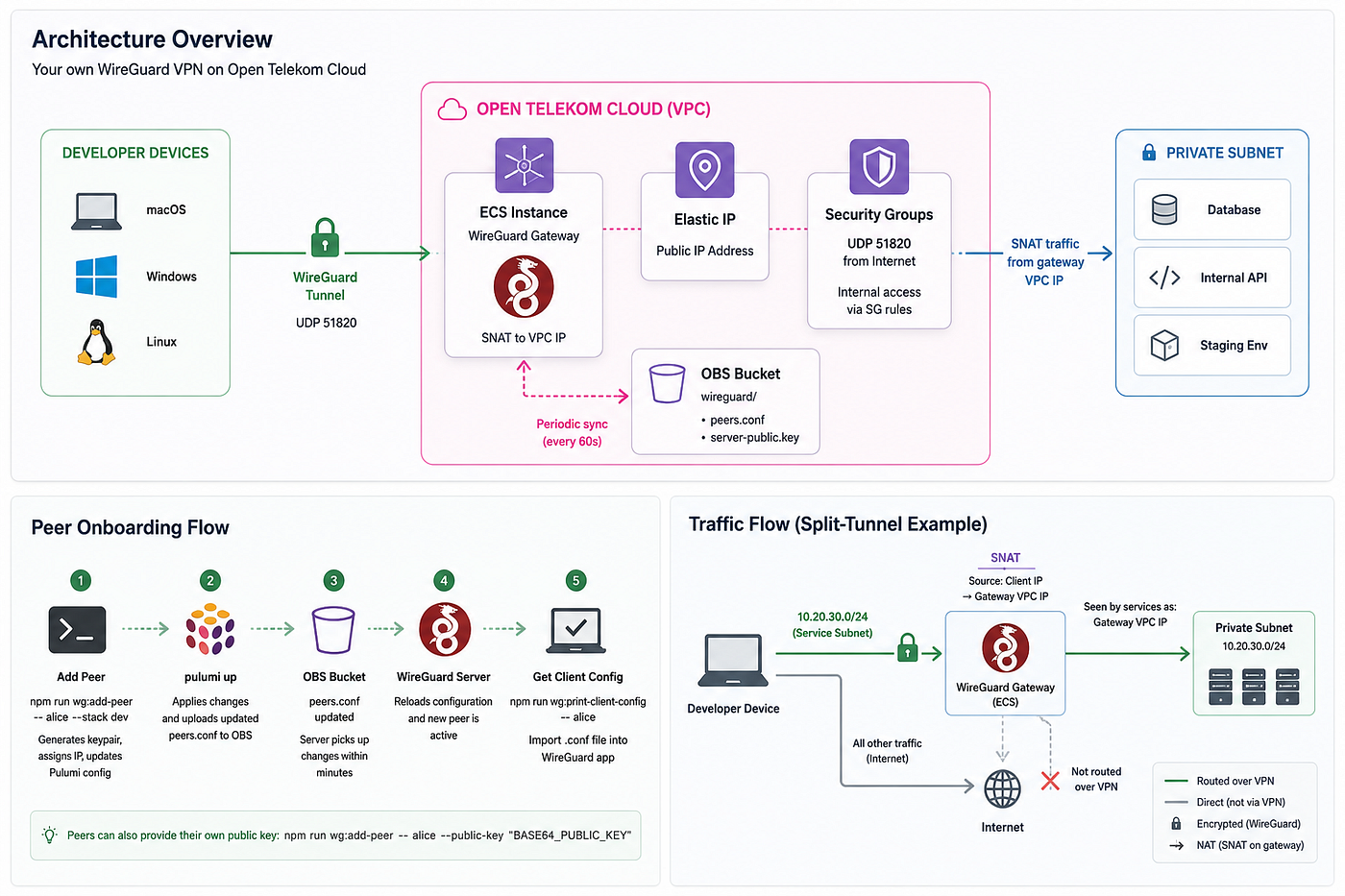
When someone connects, their device builds a WireGuard tunnel to the gateway. The gateway SNATs their traffic into the private subnet, so your internal services just see the gateway’s VPC address. Clean and simple.
One thing this stack deliberately does not do: create a VPC or subnet. It plugs into whatever you already have. That is the right default for a VPN sitting in front of an existing environment.
A Few Design Decisions Worth Calling Out
Most “WireGuard on a VM” tutorials get the tunnel working and stop there. A few things here go a bit further.
Peer config lives in OBS and syncs on a timer. The ECS pulls wireguard/peers.conf from object storage periodically. This means adding or removing a user does not require touching the VM or redeploying the stack. Push the updated config and the server picks it up within minutes. That is the difference between infrastructure you can actually operate and one you are constantly SSHing into.
Split-tunnel mode is a first-class option. By default traffic is routed to the full VPC CIDR. Set serviceSubnetId and the gateway narrows the tunnel to just that subnet. Developers get access to what they need, and nothing else goes through the VPN. For most teams this is what you actually want.
Security groups reference the gateway by group ID, not IP. After SNAT, your internal services see traffic coming from the gateway’s port. Instead of maintaining a hard-coded /32 rule, service security groups reference the gateway's group using remote_group_id. The rule keeps working after a reboot or an EIP change, with no manual intervention.
No long-lived credentials on the VM. The ECS assumes an IAM agency scoped to ECS, which means it gets temporary AK/SK credentials from the instance metadata endpoint. It uses those to pull peers and upload the server public key to OBS. No credentials baked into user data, nothing to rotate.
Adding a Peer
Once deployed, onboarding a new user can be done like this:
npm run wg:add-peer -- alice --stack dev
pulumi up --stack dev
That generates a keypair, registers it in the Pulumi config, and assigns an IP from the pool. After pulumi up the updated peer config lands in OBS and the server picks it up.
To get Alice’s client config:
npm run wg:print-client-config -- aliceThis produces a standard WireGuard .conf file, endpoint and allowed IPs filled in, ready to import into the WireGuard app on Windows, macOS, or Linux.
If Alice prefers to generate her own keys on her own device and just hand over the public key, that works too:
npm run wg:add-peer -- alice --stack dev --public-key "BASE64_PUBLIC_KEY"Removing a peer is the same flow in reverse, with an optional flag to clean up the local key files as well.
Honest Limitations
This is a single VM. If it goes down, the VPN goes down. There is no redundancy or automatic failover. For developer access to a staging environment that is usually fine, but it is worth knowing before you put anything critical behind it.
The stack is also OTC-specific. The Pulumi provider wraps the OpenTelekomCloud Terraform provider, so the IAM model, OBS integration, and network concepts are all OTC. Moving this to AWS would not be a configuration change, it would be a rewrite.
There is also one step you cannot fully automate without elevated IAM permissions: creating the agency and attaching the role to a user group. The stack outputs the exact JSON policy to paste, so it is a five-minute console task, but it is not zero-touch.
Closing
OTC is a capable platform for European workloads, but the missing client VPN is a real gap for teams who need developers to reach private cloud resources securely. This project is a practical answer to that gap: one pulumi up and you have a working VPN gateway, peer management scripts, and config as code you can actually maintain.
The full source is on GitHub at https://github.com/kotaicode/pulumi-otc-wireguard. If you have been working around this with SSH tunnels or overly permissive security groups, it might be time for something cleaner.
If you are tackling similar problems like secure cloud access, IaC done properly, the gap between what cloud vendors ship and what teams need and want to talk it through, we are happy to chat. We are KotaiCode, a small team of cloud engineers; this kind of work is what we do. Feel free to reach out at core@kotaico.de.
Credits
A special thanks goes to Steffen Enz for his collaboration on this project and for his major contribution to this article. From discussing design decisions and testing the solution to refining the implementation and reviewing the content, his input and feedback were invaluable throughout the project.
메타데이터
- post_id
- 95459c9fc161
- slug
- your-own-wireguard-vpn-on-open-telekom-cloud-fully-automated-with-pulumi-95459c9fc161
- url
- https://medium.com/kotaicode/your-own-wireguard-vpn-on-open-telekom-cloud-fully-automated-with-pulumi-95459c9fc161
- canonical_url
- https://medium.com/kotaicode/your-own-wireguard-vpn-on-open-telekom-cloud-fully-automated-with-pulumi-95459c9fc161
- author_url
- https://medium.com/@julian_43488
- status
- ok
- fetched_at
- 2026-07-09 15:12:33