A Brief Review of Key Microsoft Fabric Concepts — Focus: Shortcuts, Mirroring, and OneLake Security
Introduction
A Brief Review of Key Microsoft Fabric Concepts — Focus: Shortcuts, Mirroring, and OneLake Security
Introduction
Microsoft Fabric’s OneLake provides a single logical data lake built on ADLS Gen2. Within this environment, three concepts — Shortcuts, Mirroring, and OneLake Security — are critical for designing scalable, governed, and performant architectures.
- Shortcuts: Symbolic links to external/internal data that avoid duplication.
- Mirroring: Near real-time replication of external databases into Fabric.
- OneLake Security: Fine-grained access controls and governance policies that unify data-plane security across compute engines.
This review examines their technical underpinnings, usage patterns, integration with the medallion architecture, governance implications, and known constraints.
- Shortcuts
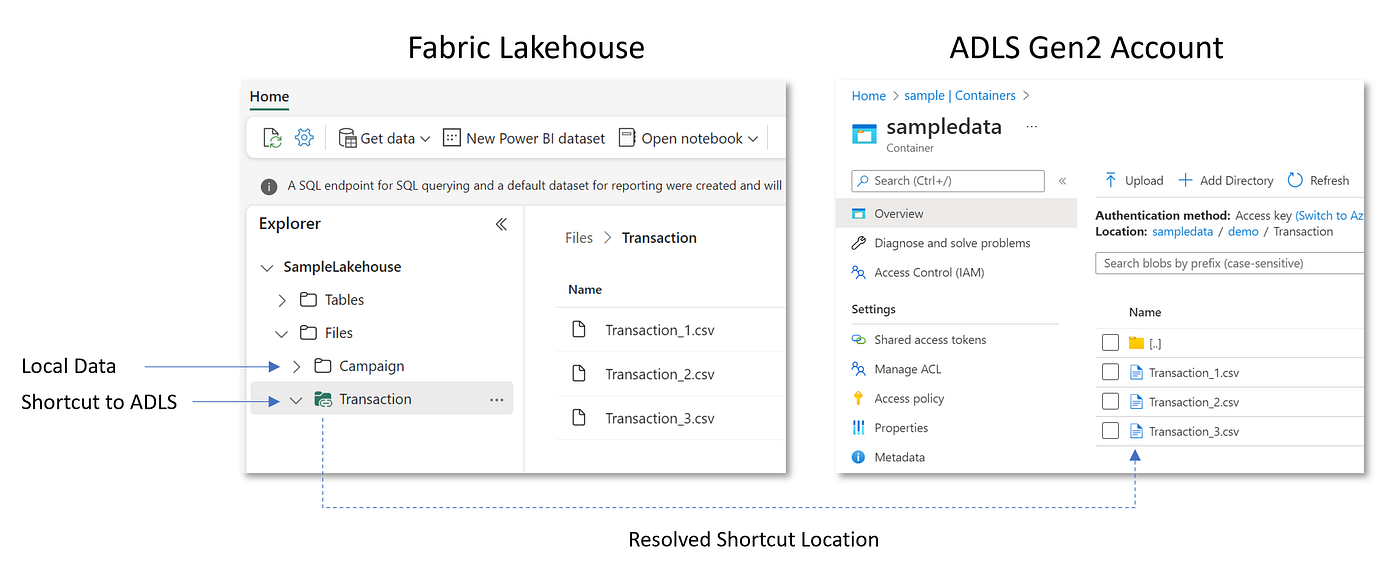
Source: Microsoft Learn
Architecture
- A shortcut is a metadata object in OneLake that maps a logical path (shortcut) to a physical path (source).
- Supported sources: OneLake folders, ADLS Gen2, AWS S3, GCP Storage, Dataverse.
- When Fabric compute (SQL Endpoint, Spark, Power BI) queries a shortcut, Fabric delegates the read to the underlying storage provider.
Configuration
- Created via OneLake Explorer, REST API, or Fabric UI.
- onelake://workspace/lakehouse/Shortcuts/{ShortcutName} → points to an external URI.
- For external sources, requires authentication (Azure Entra ID, SAS, or other supported credentials).
Performance & Usage
- Query latency = Fabric engine performance + external I/O throughput.
- For Parquet/Delta formats, queries can be distributed and cached within Fabric engines.
- Ideal for federated queries and logical unification of distributed data.
Limitations
- Read-only.
- Performance constrained by external systems.
- Metadata caching delays possible.
- Sensitive to source schema evolution.
2. Mirroring

Source: Microsoft Learn
Architecture
- Mirroring sets up a CDC (Change Data Capture) pipeline from supported databases (Azure SQL DB, Cosmos DB, Snowflake, MongoDB, Databricks).
- Data lands in OneLake as Delta Parquet in a mirrored database item.
- Fabric orchestrates ingestion and maintains sync through an internal micro-batching process.
- Optional shortcuts can expose mirrored data to lakehouses.
Configuration
- Provision a “Mirrored Database” in Fabric.
- Define source connection and authentication.
- Enable CDC or open mirroring (for external CDC feed pipelines).
- Fabric generates target Delta tables, schemas, and continuous sync.
Performance & Usage
- Analytics queries run against OneLake-local Delta tables → lower latency and predictable performance.
- Supports large-scale aggregations, joins, and downstream pipelines.
- Recommended in Bronze → Silver ingestion stages of medallion architectures.
Limitations
- Additional storage overhead (full replication).
- Limited source connectors.
- Schema drift requires governance.
- Sync lag for high-volume OLTP workloads.
- Complex lifecycle management (archival, retention).
3. OneLake Security

Source: Microsoft Learn
Architecture
- OneLake security operates at the data-plane layer, complementing Fabric’s workspace RBAC.
- Implements role-based security with support for object-level, column-level, and row-level (RLS, preview).
- Policies are engine-agnostic → enforced across SQL, Spark, and Power BI.
- Backed by Azure Entra ID for identity.
Configuration
- Roles defined per lakehouse or mirrored DB:
- Role: FinanceAnalyst
- Members: Entra ID group: Finance-Analysts
- Objects: /Tables/Transactions
- Permissions: Read
- Constraints: Row filter WHERE Region = “UK”
- Stored in metadata, propagated consistently across compute.
- Supports integration with Microsoft Purview for classification and lineage.
Performance & Usage
- Query enforcement at runtime → minimal latency overhead, but must be factored for very high QPS scenarios.
- Aligns with least-privilege governance.
- Essential in regulated environments (e.g. NHS, financial services).
Limitations
- RLS and column masking in preview.
- Complex cross-tenant policies not fully supported.
- Requires role maintenance → avoid user-level assignments, use groups.
- Inconsistent enforcement if external shortcuts point to systems outside Fabric’s control.

Source: Microsoft Learn
Best Practices
- Hybrid Approach
- Mirror mission-critical OLTP/operational data (finance, clinical, IoT).
- Shortcut external / large datasets where performance is less critical.
- Security-First
- Apply OneLake security roles early → integrate with Entra ID groups.
- Avoid over-reliance on workspace-level roles for data access.
- Architecture Integration
- Use Mirroring → Lakehouse (Bronze/Silver) pipeline for structured ingestion.
- Use Shortcuts for reference/external data (lookup tables, federated analytics).
- Apply RLS / CLS for sensitive domains.
- Lifecycle Management
- Define retention policies for mirrored datasets.
- Monitor shortcut integrity (source availability, schema changes).
- Audit security roles regularly.
Conceptual Linkages
- Shortcuts + OneLake Security: Shortcuts rely on consistent governance — permissions in OneLake must align with those in external sources.
- Mirroring + OneLake Security: Mirrored data is physically stored in OneLake, meaning OneLake policies apply directly (independent of the source system).
- Shortcuts vs. Mirroring:
- Shortcuts = logical reference, low-cost, flexible.
- Mirroring = physical copy, high-performance, more storage cost.
✅ Summary:
- Use Shortcuts when you need fast, low-cost integration without data movement.
- Use Mirroring when you need performance, resilience, and historical analysis independent of source systems.
- Always apply OneLake Security to ensure governance, compliance, and trust.
References
- Microsoft Learn: https://learn.microsoft.com/en-us/fabric/onelake/onelake-shortcuts
- Microsoft Learn: https://learn.microsoft.com/en-us/fabric/mirroring/overview
- Microsoft Learn: https://learn.microsoft.com/en-us/fabric/mirroring/open-mirroring
- Microsoft Learn: https://learn.microsoft.com/en-us/fabric/mirroring/explore-onelake-shortcut
- Microsoft Learn: https://learn.microsoft.com/en-us/fabric/onelake/security/get-started-security
- Microsoft Learn: https://learn.microsoft.com/en-us/fabric/onelake/security/row-level-security
- Microsoft Learn: https://learn.microsoft.com/en-us/fabric/onelake/security/best-practices-secure-data-in-onelake
메타데이터
- post_id
- 95a35b532fb4
- slug
- a-brief-review-of-key-microsoft-fabric-concepts-focus-shortcuts-mirroring-and-onelake-security-95a35b532fb4
- url
- https://medium.com/@gowheya/a-brief-review-of-key-microsoft-fabric-concepts-focus-shortcuts-mirroring-and-onelake-security-95a35b532fb4
- canonical_url
- https://medium.com/@gowheya/a-brief-review-of-key-microsoft-fabric-concepts-focus-shortcuts-mirroring-and-onelake-security-95a35b532fb4
- author_url
- https://medium.com/@gowheya
- status
- ok
- fetched_at
- 2026-08-01 10:20:08




