Linux File System
Linux File System
Linux File System
What is the Linux File System?
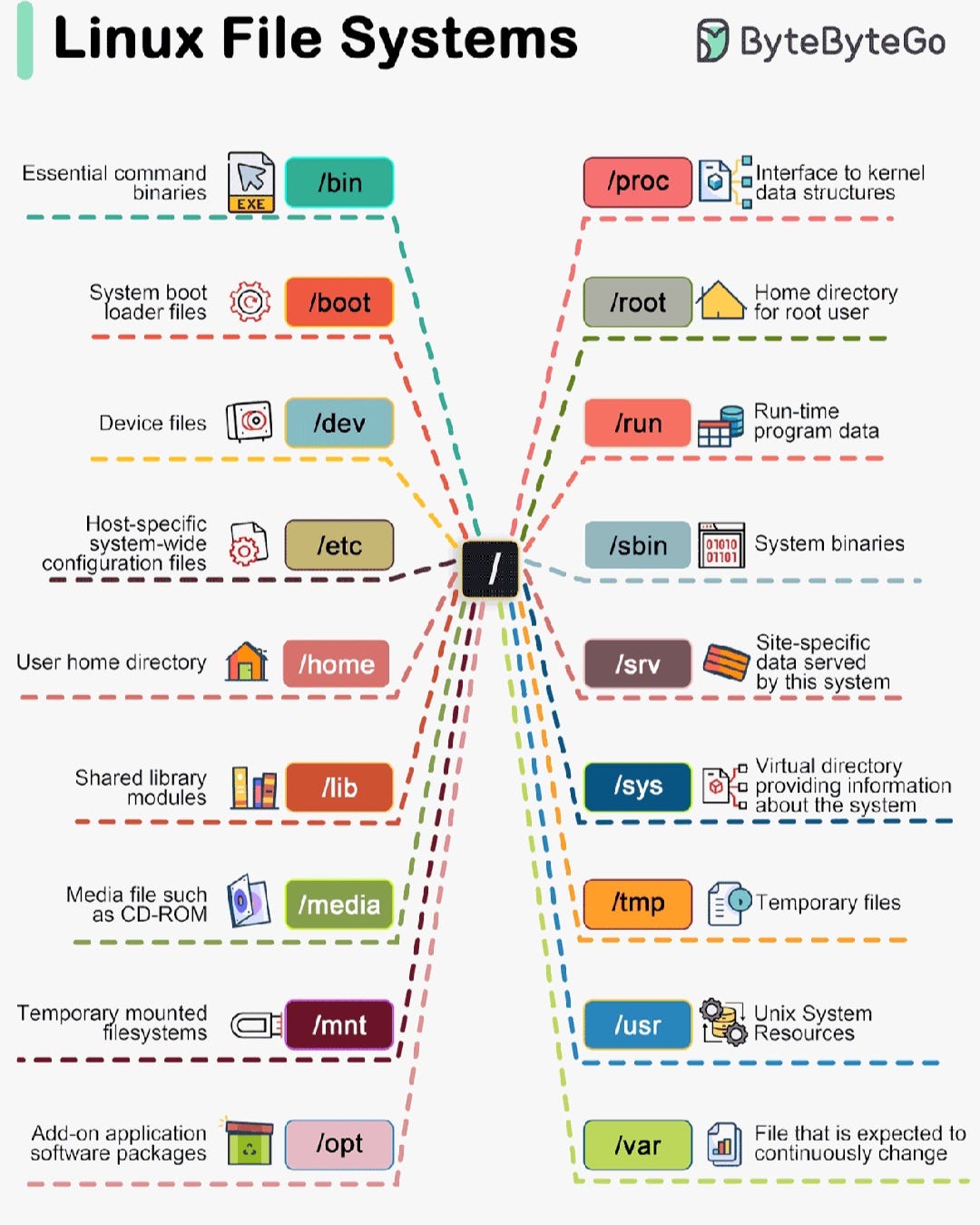
The Linux file system is a hierarchical structure that organizes the operating system's files and directories. In Linux, everything is considered a file, and directories (/) are used to organize these files systematically. Below, we explain the main directories and their purposes one by one:
/bin (Binary)
Description: Contains essential system commands. These commands allow users to interact with the operating system.
Examples: ls, cp, mv, cat.
Usage: Provides the most necessary tools for the system to function and is accessible to all users.
/boot (Boot)
Description: Stores files needed for the system to boot, including kernel files.
Examples: vmlinuz (Linux kernel) and grub (bootloader files).
Usage: Provides the necessary data when the operating system starts.
/dev (Devices)
Description: Contains device files that enable interaction with hardware like disks, USB devices, etc.
Examples: sda (disk device), tty (terminal device).
Usage: Acts as a bridge between hardware and software.
/etc (Configuration Files)
Description: Stores system-wide configuration files.
Examples: passwd (user information), hosts (network settings).
Usage: Used for configuring the system and applications.
/home (Home Directory)
Description: Contains personal files and settings for each user.
Examples: /home/username creates a separate subdirectory for each user.
Usage: Used for organizing user files and storing personal data.
/lib (Libraries)
Description: Stores shared library files used by the system.
Examples: libc.so (standard C library).
Usage: Contains dynamic linking files required for applications and commands to work.
/media (Media)
Description: Directory where external media devices (CDs, DVDs, USB drives) are mounted.
Usage: Manages automatically mounted devices.
/mnt (Mount)
Description: A directory for temporarily mounted file systems.
Usage: Stores manually mounted file systems.
/opt (Optional)
Description: Contains software and add-on packages that are not part of the core system.
Usage: Stores external applications not integrated into the system's core.
/proc (Processes)
Description: A virtual file system that provides information about system processes and kernel data structures.
Examples: cpuinfo, meminfo.
Usage: Used to gather information about the kernel and system processes.
/root (Root Home)
Description: The home directory for the root (superuser) account.
Usage: Exclusive to the root user and used for administrative tasks.
/run (Run-time Data)
Description: Contains temporary files generated while the system is running.
Usage: Used for files required by applications during runtime.
/sbin (System Binaries)
Description: Contains system administration and maintenance tools.
Examples: fsck, reboot, ifconfig.
Usage: Mainly accessible to the system administrator.
/srv (Service)
Description: Stores data for services (web, FTP, etc.) provided by the system.
Usage: Holds configuration and data files for site-specific services.
/sys (System Information)
Description: A virtual file system that provides access to hardware and system components.
Usage: Used to retrieve information about system hardware.
/tmp (Temporary)
Description: Stores temporary files. These files are deleted when the system is restarted.
Usage: Holds temporary files created by applications.
/usr (Unix System Resources)
Description: Contains user applications and system tools.
Examples: bin (user tools), lib (libraries).
Usage: Stores files that can be shared between users and the system.
/var (Variable)
Description: Contains files that change frequently (logs, mail directories, etc.).
Examples: log (system logs), spool (pending tasks).
Usage: Used for storing variable data.
Conclusion
The Linux file system is designed to manage system and user data in an organized way. The directories explained above are crucial for the system's functionality. Understanding the purpose of these directories is essential for Linux administration and troubleshooting.
메타데이터
- post_id
- 9601beccff4a
- slug
- linux-file-system-9601beccff4a
- url
- https://medium.com/@omersz/linux-file-system-9601beccff4a
- canonical_url
- https://medium.com/@omersz/linux-file-system-9601beccff4a
- author_url
- https://medium.com/@omersz
- status
- ok
- fetched_at
- 2026-06-27 07:40:21