Accessify — a free, open-source accessibility widget for the modern web
TL;DR — @glitchlab/accessify is a free, MIT-licensed accessibility widget you can drop into any site. Zero runtime dependencies, ~25 KB…
Accessify — a free, open-source accessibility widget for the modern web
TL;DR — [@glitchlab/accessify](https://www.npmjs.com/package/@glitchlab/accessify) is a free, MIT-licensed accessibility widget you can drop into any site. Zero runtime dependencies, ~25 KB gzipped, first-class React/Vue/Svelte bindings. Live demo at accessify-playground.vercel.app.
npm install @glitchlab/accessify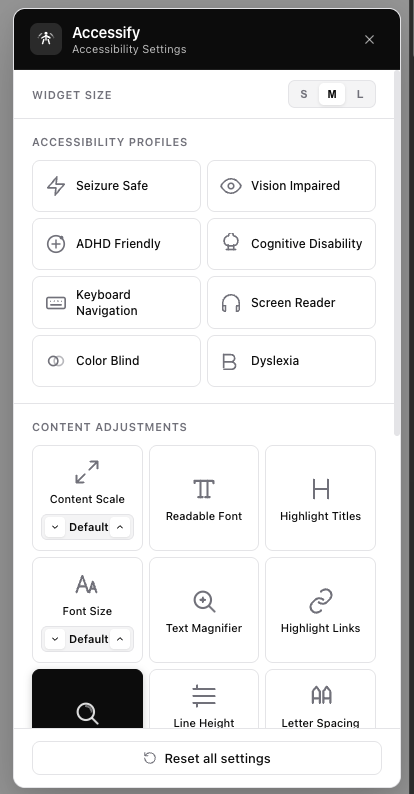

A note on accessibility overlays
Before anything else: an overlay widget is not a substitute for accessible HTML, semantic markup, proper alt text, sensible heading order, and real keyboard support. The accessibility community has consistently pointed out — see the overlay fact sheet — that overlays can mask underlying problems and sometimes interfere with screen readers users have already configured. Read those concerns. They’re valid.
Accessify is built with that critique in mind. It’s positioned as an opt-in preference panel users can toggle when they want it, not a magic “make my site accessible” button. It doesn’t auto-rewrite your DOM, doesn’t claim WCAG compliance on your behalf, and the WCAG scanner reports issues for you to fix in source — it doesn’t try to patch them at runtime. The deepest accessibility work still happens in your codebase.
That said, a well-built preference panel does help. Letting a user toggle a high-contrast mode, bump font size by 40%, switch on a dyslexia-friendly font, or get a circular reading lens for low vision — those are real, measurable wins for real users, and they don’t have to cost $500 a month.
What you get out of the box
One install, every framework
// React
import { AccessifyWidget } from '@glitchlab/accessify/react'
<AccessifyWidget position="bottom-right" />
<!-- Vue 3 -->
<script setup>
import { AccessifyWidget } from '@glitchlab/accessify/vue'
</script>
<template>
<AccessifyWidget position="bottom-right" />
</template><!-- Svelte -->
<script>
import { accessifyStore } from '@glitchlab/accessify/svelte'
accessifyStore.mount()
</script>// Vanilla / TypeScript
import { Accessify } from '@glitchlab/accessify'
new Accessify({ position: 'bottom-right' }).mount()Same core class, framework-native bindings. Peer deps for React/Vue/Svelte are all optional — you only pay for what you use.
Eight accessibility profiles
Each is a one-click preset bundle:
Profile, What activating it does
Seizure Safe: Forces light contrast + monochrome — kills flashing/strobing content
Vision Impaired: +40% font size, +20% content scale, expanded line height
ADHD Friendly: Highlights every link and heading, switches to a readable font
Cognitive Disability: Highlights + larger line spacing for easier parsing
Keyboard Navigation: Strong blue focus rings on every focusable element + skip-to-main link
Screen Reader: Labels every semantic landmark (
main,nav,header...) visually, underlines all links, flags images missingalt
Color Blind: Protanopia SVG filter applied to the page
Dyslexia: OpenDyslexic font + wider letter and line spacing
Fine-grained controls underneath
Beyond the profiles, users can mix:
- Font size stepper, content scale stepper, line height, letter spacing, text alignment
- Six color modes: dark contrast, light contrast, high contrast, monochrome, invert, color-blind
- Readable font, highlight links, highlight titles
- A text magnifier (hover any element, see its text at 20 px)
- A circular reading lens (2.75× cursor-following zoom)
A built-in WCAG scanner
Click Analyze Page inside the widget and it runs a live audit on the current page — missing alt text, unlabeled inputs, color contrast, heading order, tap target size, skip links — and gives you a 0–100 score with each issue's selector. Crucially, it doesn't try to patch anything; it tells you what to fix in source.
A few real-world examples
A small business landing page. A bakery’s site is built in Next.js by a freelancer. The owner gets feedback that an older customer can’t read the menu. Adding Accessify takes one import + one component, costs nothing, and gives that customer a font-size stepper and a high-contrast toggle. No subscription, no vendor account, no contract.
A B2B SaaS dashboard. A team wants to show enterprise buyers that accessibility is a first-class concern, but a third-party overlay would conflict with the dashboard’s own design system. They drop Accessify in, theme it to match their brand (theme={{ primary: '#6d28d9' }}), and ship — the widget UI is themeable and the effects are scoped to a wrapper so they never touch the dashboard chrome.
A documentation site. A docs site is read in long stretches. The team enables persistence (default), so a user who turned on dyslexia font + larger line height on Monday still has those settings on Friday. State lives in the user’s localStorage, not on a server somewhere.
An internal company app. Compliance flags the app as lacking user-facing accessibility controls. The team uses Accessify’s built-in WCAG scanner to find the actual underlying issues (missing alt text on 14 images, three forms without labels), fixes them in source, and ships the widget for runtime preferences. Compliance: satisfied. Users: happier. Code: actually more accessible — not just visually overlaid.
How it’s built (the parts worth knowing)
A few decisions that shaped it:
Zero runtime dependencies. Pure TypeScript and DOM. Framework bindings are separate npm entry points. The tarball is 1.6 MB unpacked, ~25 KB gzipped per entry.
DOM isolation via a #accessify-host wrapper. When the widget mounts, it wraps existing body content in a single #accessify-host div. Every effect (filters, font scales, color modes) is scoped to that wrapper. The widget UI is a sibling of the wrapper, never a descendant, so applying "high contrast" to the page never paints the widget panel black.
The reading lens is a live DOM clone, not a canvas. I tried html2canvas and rejected it — 50 KB extra dependency and 100ms+ per snapshot. Instead, the lens clones #accessify-host into a hidden container with transform: scale(2.75), translates the clone so the cursor lands at the lens center, and runs a requestAnimationFrame + easing loop for smooth motion. A MutationObserver triggers a debounced re-snapshot on any DOM change (with manual mirroring of input/select values, because cloneNode doesn't copy IDL state). 60 fps, zero deps.
Reactive props. In React, changing colorScheme from a parent component re-themes the widget without a remount. lang and size work the same way. Other props (position, theme, persistence) need a remount — pass a key to force one.
i18n in 6 languages, including Arabic with RTL. All panel text is translated. Setting lang="ar" flips the panel to RTL layout.
Try it
- Live demo → accessify-playground.vercel.app — every widget prop is exposed in a sidebar so you can experiment before installing
- npm →
[npm install @glitchlab/accessify](https://www.npmjs.com/package/@glitchlab/accessify) - GitHub → im-fahad/accessify
Help shape the roadmap
If you’re currently paying for an accessibility overlay, or evaluating whether to add one, I’d genuinely like your feedback. Try Accessify on a real project, open an issue for anything missing or broken, and tell me where the gaps are — the roadmap is shaped by what real users hit in real codebases.
Most useful things you could do right now:
- Drop it into a real project — even a personal site — and tell me what breaks
- File an issue for a profile or control you’d add — what does your user base need?
- Star the repo if you’d like to follow the work — issues and PRs are very welcome
The package is MIT-licensed. No accounts, no telemetry, no upsell. Just code.
Built with TypeScript, tsup, vitest, and a lot of caring about accessibility. v0.2.4 at time of writing.
메타데이터
- post_id
- 960e52d4bdae
- slug
- accessify-a-free-open-source-accessibility-widget-for-the-modern-web-960e52d4bdae
- url
- https://javascript.plainenglish.io/accessify-a-free-open-source-accessibility-widget-for-the-modern-web-960e52d4bdae
- canonical_url
- https://javascript.plainenglish.io/accessify-a-free-open-source-accessibility-widget-for-the-modern-web-960e52d4bdae
- author_url
- https://medium.com/@al-fahad
- status
- ok
- fetched_at
- 2026-06-09 15:37:30






