Event-Driven Email Automation with Temporal Workflows and MCP
How we added reliable scheduling and automation to AI-driven email workflows
Event-Driven Email Automation with Temporal Workflows and MCP
How we added reliable scheduling and automation to AI-driven email workflows
Introduction
After building a fully functional Email MCP Server with Gmail integration, one limitation quickly became obvious:
The AI could act — but it couldn’t wait
Sending emails, replying to threads, or checking inboxes worked perfectly in real time. But real productivity workflows demand time-based automation:
- “Send this email tomorrow morning”
- “Reply after 2 hours”
- “Check for unread client emails every 30 minutes”
- “Schedule this for a different timezone”
To solve this properly, we integrated Temporal into the Email MCP Server.
This blog explains what Temporal is, why it fits perfectly with MCP, and how we built a reliable, timezone-aware email scheduling system using Temporal workflows and workers.
What Is Temporal?
Temporal is a durable workflow orchestration engine.
In simple terms, Temporal lets you write code like this:
await sleep(2_days)
send_email()
and guarantees that:
- The sleep survives crashes
- The task resumes after restarts
- The workflow state is never lost
- Retries, failures, and timeouts are handled correctly
Why Not Cron Jobs or Background Threads?
Traditional approaches fail because they are:
| Approach            | Problem                                    |
|---------------------|--------------------------------------------|
| Cron jobs           | No context, no retries, poor observability |
| Background threads  | Die on process restart                     |
| Task queues         | Hard to manage delays + state              |
| Sleep() in app      | Completely unreliable                      |
Temporal solves all of this by persisting workflow state in its engine and replaying it deterministically.
Why Temporal + MCP Is a Perfect Match
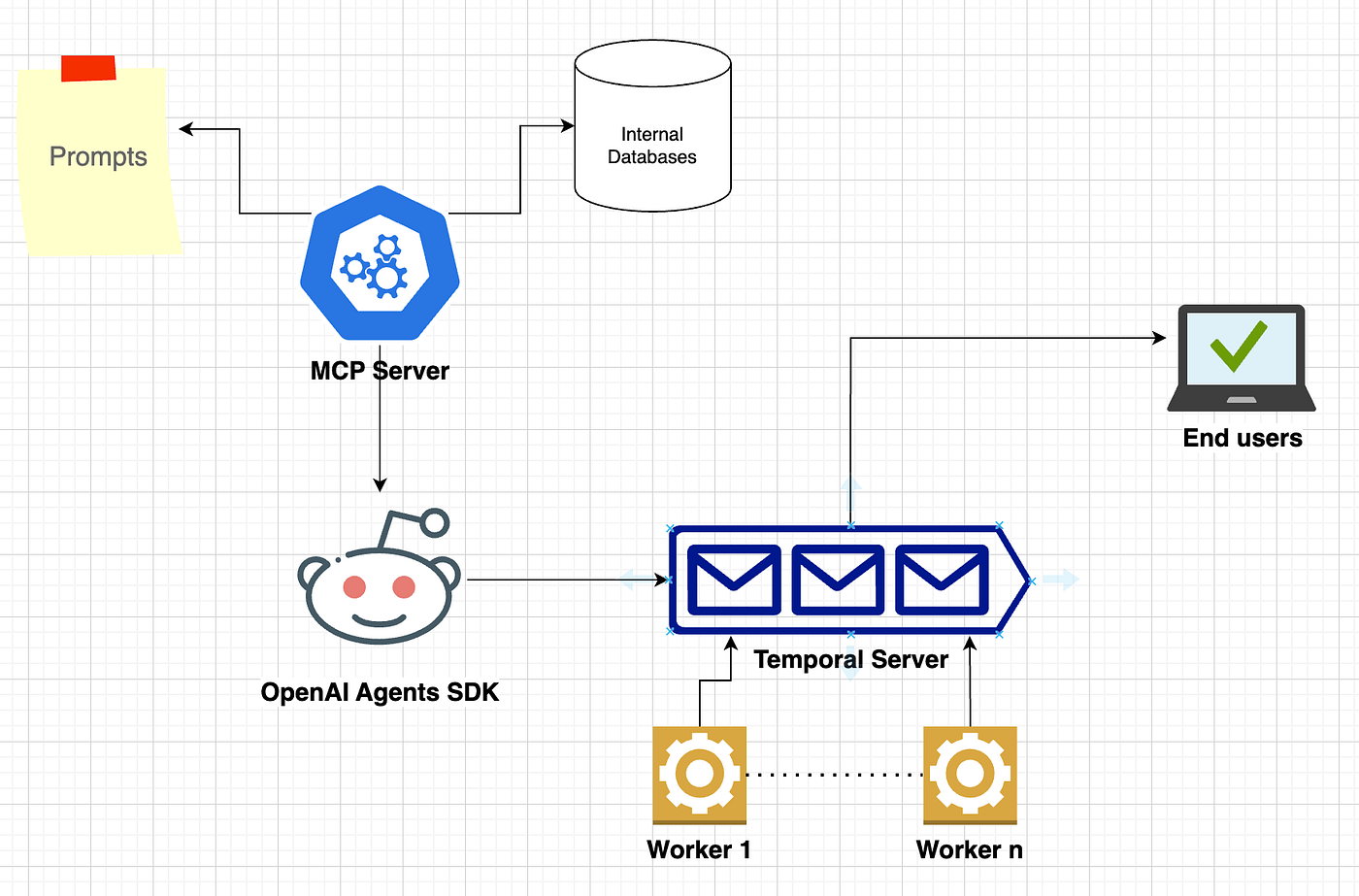
MCP handles:
- Tools
- User intent
- State across conversations
Temporal handles:
- Time
- Delays
- Retries
- Execution guarantees
Together, they enable AI systems that don’t just respond — they plan and execute over time.
System Architecture
Once Temporal was added, the architecture became:
User (Claude)
   ↓
Email MCP Server (Scheduling Tools)
   ↓
Temporal Client
   ↓
Temporal Workflow
   ↓
Temporal Worker
   ↓
Gmail API
Key Components
- MCP Server Exposes scheduling tools to Claude
- Temporal Client Starts workflows with delay and parameters
- Temporal Workflows Handle waiting, orchestration, retries
- Temporal Activities Perform Gmail API operations
- Temporal Workers Execute workflows and activities reliably
New MCP Tools Added
Temporal allowed us to introduce time-aware tools.
1. schedule_email
Send emails at a future time.
Parameters
- to
- subject
- body
- scheduled_time (ISO + timezone)
- cc (optional)
2. schedule_reply
Reply to an existing email thread later.
Parameters
- message_id
- thread_id
- body
- scheduled_time
3. schedule_receive_check
Check inbox at a future time.
Parameters
- scheduled_time
- query
- max_results
4. schedule_recurring_receive
Run recurring inbox checks.
Parameters
- interval_minutes
- iterations
- query
- max_results
5. list_scheduled_tasks
View pending workflows with:
- Workflow ID
- Task type
- Scheduled execution time
6. cancel_scheduled_task
Cancel any scheduled workflow by ID.
7. get_current_time
Helper tool to avoid timezone mistakes.
Natural Language Scheduling Examples
Temporal enables natural interaction like:
“Schedule an email to Aravind@example.com tomorrow at 8am EST”
“Reply to that email from John saying thanks at 10am”
“Check for unread client emails every 30 minutes, 10 times”
“What’s the current time in Tokyo?”
Claude uses MCP tools to convert intent → Temporal workflows.
Temporal Workflow Design
Scheduled Email Workflow
@workflow.defn
class ScheduledEmailWorkflow:
    @workflow.run
    async def run(self, task: EmailTask, delay_seconds: int) -> str:
        logger.info(f"🕐 Workflow started. Waiting {delay_seconds} seconds...")

        await asyncio.sleep(delay_seconds)

        logger.info("⏰ Wait complete! Executing send email activity...")

        result = await workflow.execute_activity(
            send_scheduled_email,
            task,
            start_to_close_timeout=timedelta(seconds=60)
        )

        logger.info(f"✅ Workflow completed: {result}")
        return result
Why This Works
asyncio.sleep()is deterministic in Temporal- Workflow state is persisted
- If the worker crashes, Temporal resumes execution
- No lost schedules
Activities: Where Real Work Happens
Temporal enforces a strict rule:
Workflows must be deterministic. Activities can do anything.
Scheduled Email Activity
@activity.defn
async def send_scheduled_email(task: EmailTask) -> str:
    logger.info("📧 Starting email send activity")

    creds = load_user_credentials(task.user_email)
    service = build('gmail', 'v1', credentials=creds)

    message = create_message(task.to, task.subject, task.body, task.cc)
    result = service.users().messages().send(
        userId='me',
        body={'raw': message}
    ).execute()

    return f"✅ Email sent to {task.to}"
Important: Google API imports happen inside activities, not workflows.
Conflicts We Faced (and How We Solved Them)
Conflict 1: Non-Deterministic Code in Workflows
Problem
Google libraries internally call datetime.today() which Temporal blocks.
Error
RestrictedWorkflowAccessError:
Cannot access datetime.date.today from inside a workflow
Solution
- No external libraries in workflows
- Move all Gmail logic into activities
✅ Key Rule:
Workflows orchestrate. Activities execute.
Conflict 2: Timezone Ambiguity
Problem
datetime.fromisoformat("2024-12-06T11:00:00")Which timezone is that?
Solution
- Enforce timezone-aware scheduling
- Default to IST if not specified
- Added
get_current_timehelper tool
now = datetime.now(scheduled_time.tzinfo)
delay_seconds = (scheduled_time - now).total_seconds()
Conflict 3: Workflows Stuck in RUNNING State
Root Causes
- Missing return statements
- Exceptions not logged
- Silent activity failures
Solution
- Extensive logging
- Explicit returns
- Re-raise exceptions so Temporal can mark failure.
Conflict 4: Credential Handling Across Workflows
Each activity loads credentials independently.
Solution
- Centralized credential loader
- Automatic refresh
- Safe disk persistence
This avoided race conditions and expired tokens.
Conflict 5: Worker Shutdown = Missed Emails
Problem
Workers stop when terminals close.
Solutions
nohupbackground workers- Startup scripts
- macOS LaunchAgents (auto-start on boot)
Temporal guarantees execution only if workers are running — so worker management matters.
Key Learnings
- Temporal workflows must be deterministic
- Activities are the only place for external APIs
- Timezone handling is non-negotiable
- Logging is mandatory for long-running systems
- Workers are production infrastructure
- Temporal + MCP enables true AI automation
- Scheduling is not “delay”, it’s orchestration
Production Considerations
- Run multiple workers for scale
- Monitor via Temporal UI
- Encrypt token storage
- Handle Gmail API quotas
- Test DST and timezone edge cases
- Use system services for worker persistence
Conclusion:
Adding Temporal transformed the Email MCP Server from:
“An AI that can send emails”
into:
“An AI that can plan, wait, retry, and execute reliably over time.”
MCP gives AI context and intent.
Temporal gives AI time and guarantees.
Together, they unlock an entirely new class of long-running, real-world AI systems.
메타데이터
- post_id
- 9619d0bdf403
- slug
- event-driven-email-automation-with-temporal-workflows-and-mcp-9619d0bdf403
- url
- https://medium.com/@Gayathri_krish/event-driven-email-automation-with-temporal-workflows-and-mcp-9619d0bdf403
- canonical_url
- https://medium.com/@Gayathri_krish/event-driven-email-automation-with-temporal-workflows-and-mcp-9619d0bdf403
- author_url
- https://medium.com/@Gayathri_krish
- status
- ok
- fetched_at
- 2026-08-06 13:06:17