Building a Second Brain: Your Personal Knowledge Management System for Focus, Creativity, and…
How to turn information overload into a system that works in your favor
Building a Second Brain: Your Personal Knowledge Management System for Focus, Creativity, and Productivity
How to turn information overload into a system that works in your favor
Have you ever felt lost in your own sea of information? Scattered notes, files in random folders, ideas that evaporate before being recorded? If the answer is yes, you’re not alone. In the digital age, we consume a staggering amount of content every day articles, videos, podcasts, books, emails and our biological brain simply wasn’t designed to retain everything.
The solution isn’t to memorize more. It’s to build a second brain.
What is a Second Brain?
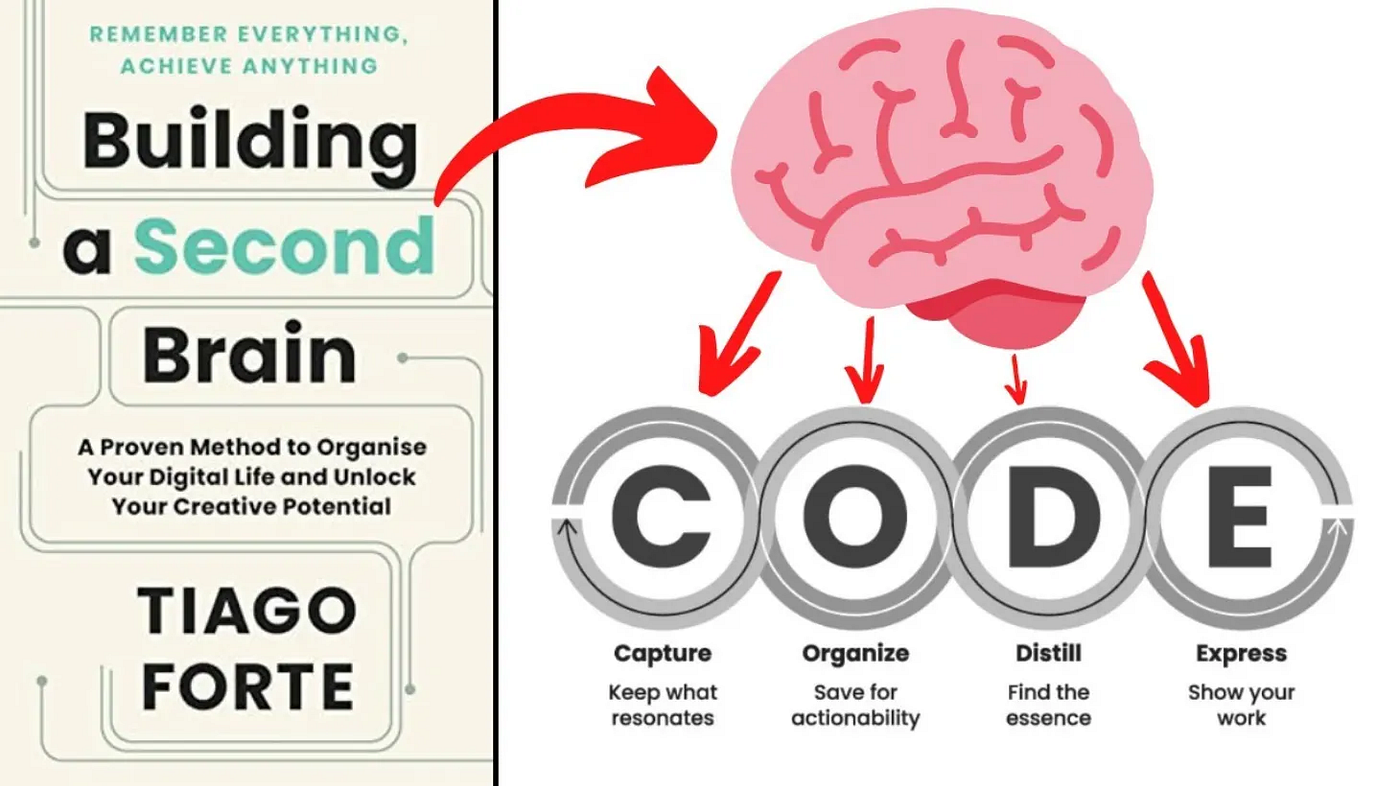
A second brain is your Personal Knowledge Management (PKM) system an external system you can rely on to:
- Access information on demand
- Reuse previous experiences in new projects
- Improve focus by freeing up mental space
- Develop creative capacity in a productive wayIt’s what you turn to when your biological brain fails. An extension of your mind, organized and accessible.
The methodology was popularized by Tiago Forte and is based on a simple idea: the human brain is excellent at connecting ideas, creating solutions, and analyzing data, but not at storing large volumes of information. By outsourcing that function to a digital system, you expand your ability to process and apply knowledge.
How to Build It? The CODE Method
To build your second brain, you need a method that allows you to store and organize your personal
knowledge efficiently. The CODE method: Capture, Organize, Distill, and Express does exactly that.

CODE Method — Source: Workflowy — Build a Second Brain System
1. Capture; What to Keep and How
What to capture? Keep what resonates with you or your work. But be careful: don’t accumulate clutter. Be selective. Ask yourself:
- Does it inspire you?
- Is it useful?
- Is it personal?
- Is it surprising?
If the answer is yes to at least one of these questions, it’s worth keeping.
How to capture?
- Cloud storage: OneDrive, Dropbox, Google Drive — organize your files consistently
- Organized bookmarks: Use thematic folders instead of an endless list
- Note-taking apps: Obsidian, Notion, Evernote — choose the tool that fits your workflow
- Integrator plugins: Web clippers and Outlook extensions to capture without interrupting your flow
Capture should be fast and frictionless. The goal is to ensure nothing is lost the moment an idea arises.
2. Organize — The PARA Method

PARA Method — Projects, Areas, Resources, and Archive
Organizing doesn’t have to be a full-time job. The idea is to organize while adding and while using information. The PARA method divides your second brain into four categories:
Category What goes here Example

PARA Description
Practical suggestions to get started:
Projects: parallel, personal, in progress
Areas: finances, health, family, legal, personal development
Resources: books, important emails, instructions, work tools
Items flow between categories as your life evolves. A resource can become a project; a completed project goes to the archive. The method is dynamic.
3. Distill: Preparing for Selective Reading
Distilling means transforming raw content into something you can absorb quickly in the future.
Progressive summarization works in three layers:
-
Raw text — your original note
-
Bold — highlight the most important parts on the first review
-
Maximum highlight — the essence of the bold parts
Each layer reduces the content by approximately 10–20%. The result is a note that allows selective reading: in seconds, you grasp what matters.
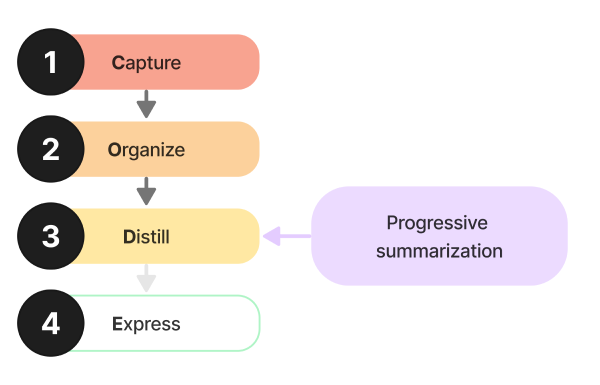
Progressive summarization: each layer distills the essential
Tip: Distill only when you’re about to use the information. It’s not a task to do “just because”, it’s an investment that pays off when you need that content.
4. Express — Where the Magic Happens
The fourth step is to use what you’ve built. Expressing means:
- Accessing all notes, ideas, and files on demand
- Visualizing and connecting distant ideas across time and different categories
- Creating new files, ideas, and documents from your notes

Express: turn your notes into concrete artifacts
Each note in your second brain is a Lego block — it can be reconfigured, combined, and reused in new projects. Over time, you build a personal Wikipedia that gives you an edge in any challenge: presentations, business, hobbies, or career growth.
Extras: Supporting Your Biological Brain
Beyond the main system, small habits make a difference:
- Post-its on the monitor: for what’s important but doesn’t have a defined moment yet
- Organized bookmarks: avoid the infinite “to read” folder
- AI reminders: use assistants to schedule and prioritize
- Calendar: use diffuse mode: blocks of time to think and connect ideas
Amplifying with Artificial Intelligence
The second brain gains even more power when combined with AI. Ask Copilot (or another tool) to:
- Generate artifacts based on your PKM
- Analyze documents and extract insights
- Summarize long notes
- Suggest connections between scattered ideas
Your organized knowledge base makes AI responses much more relevant and contextualized.
Before Starting a Project — Powerful Questions
When starting something new, answer:
- What do I already know about the project?
- What don’t I know and need to discover?
- What is my goal or intention?
- Who can I talk to for insights?
- What can I read or listen to for good ideas?
Your second brain likely already has material for some of these answers. Consult it first.
When Wrapping Up — Don’t Forget the Closure
When a project ends, do a review:
- Post-mortem: What did I learn? What did I do well? What could I improve?
- Communication: Notify stakeholders about completion and results
- Success criteria: Were the objectives achieved? Why or why not
- Celebration: Officially close and acknowledge the effort
These reflections feed your second brain for future projects.
Conclusion
Building a second brain isn’t about being perfect. It’s about having a system that works for you. There’s no one-size-fits-all approach, adapt the method to your needs and preferences.
The result is worth the investment: more organization, more focus, more ability to turn information into action. And above all, the freedom to think about what really matters, knowing that everything else is stored in an accessible place.
What’s the first step you’ll take to build yours?
Sources & References
- Forte, Tiago. Building a Second Brain: A Proven Method to Organize Your Digital Life and Unlock Your Creative Potential. Atria Books, 2022. — Original methodology and CODE/PARA framework.
- Workflowy. “Build a Second Brain — Workflowy Guide.” Workflowy Systems. https://workflowy.com/systems/build-a-second-brain/ — CODE method diagrams and progressive summarization explanations.
- Lucena, Jeniffer Marie. “Criando o Meu Segundo Cérebro: A Jornada de Organização e Produtividade.” Medium, 30 Oct. 2023. https://jeniffermarie.medium.com/criando-o-meu-segundo-c%C3%A9rebro-a-jornada-de-organiza%C3%A7%C3%A3o-e-produtividade-895e6b959ace — PARA method and four pillars of BASB.
- Unsplash. Photo by Darren Coleshill — “Second Brain Concept” hero image. https://unsplash.com/photos/1558494949
- Miro/Medium. PARA method infographic. https://miro.medium.com/
This article is based on the presentation script “Construindo um segundo cérebro” and Second Brain notes of Luiz Fogliato Junior. Methodology developed by Tiago Forte (Building a Second Brain / BASB).
메타데이터
- post_id
- 96429cf092ba
- slug
- building-a-second-brain-your-personal-knowledge-management-system-for-focus-creativity-and-96429cf092ba
- url
- https://medium.com/@luizfogliatojunior/building-a-second-brain-your-personal-knowledge-management-system-for-focus-creativity-and-96429cf092ba
- canonical_url
- https://medium.com/@luizfogliatojunior/building-a-second-brain-your-personal-knowledge-management-system-for-focus-creativity-and-96429cf092ba
- author_url
- https://medium.com/@luizfogliatojunior
- status
- ok
- fetched_at
- 2026-07-14 05:09:12



