What If You Didn’t Have to Train a Regression Model from Scratch?
For more than a decade, gradient-boosted trees — especially XGBoost, LightGBM, and CatBoost — have been the gold standard for tabular…
What If You Didn’t Have to Train a Regression Model from Scratch?
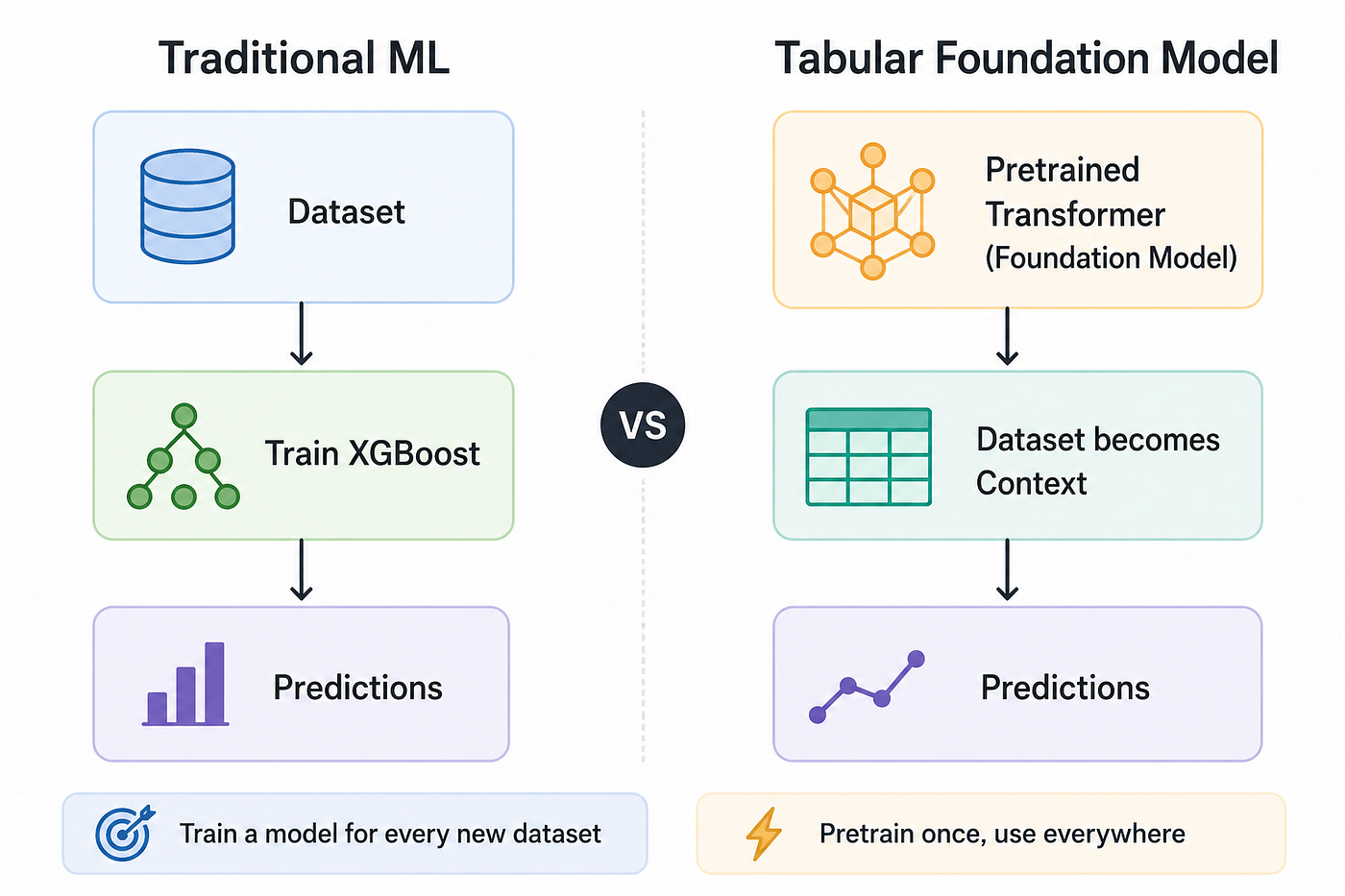
Tabular Foundation Model
For more than a decade, gradient-boosted trees — especially XGBoost, LightGBM, and CatBoost — have been the gold standard for tabular machine learning. While deep learning revolutionized computer vision and natural language processing, structured data remained one of the last strongholds of tree-based models.
That is beginning to change. Tabular Foundation Models (TFMs) bring the “pre-train once, apply broadly” paradigm to structured data, using examples from a new dataset as context instead of training a model from scratch. Notable models include TabPFN, TabICL, TabDPT, and Mitra, each exploring different ways to deliver fast, task-agnostic predictions through in-context learning.
In this post, we’ll understand how Mitra works, build a regression model with AutoGluon, and discuss its key limitations and practical configurations.
Meet Mitra
Among the emerging tabular foundation models, Mitra has quickly become one of the strongest open models for structured data. Developed by Amazon Science and available through AutoGluon, it comes in two variants: a classifier for classification tasks and mitra-regressor for predicting continuous values such as house prices, sales, and demand.
Mitra is a 12-layer Transformer with around 76 million parameters. Unlike traditional machine learning models that are trained from scratch for every new dataset, Mitra is pretrained once and adapts to new regression tasks through in-context learning (ICL). Instead of learning new model weights, it uses the labeled examples in your dataset as context to predict unseen rows.
Let’s understand how Mitra learnt to predict?
How is Mitra Trained?
The answer lies in Mixed Synthetic Priors — the idea behind Mitra’s name and the key innovation that enables it to generalize well to unseen datasets.
During pretraining, Mitra is exposed to millions of synthetic regression tasks generated from diverse mathematical processes. For each task, it is shown context rows (features with known targets) and learns to predict the targets of query rows in a single forward pass. Repeating this across millions of tasks teaches the Transformer a general strategy for solving regression problems.
This also explains how inference works. When you use Mitra, your labeled training data simply becomes the context, while the unseen rows become the queries. The pretrained model then predicts the target values directly — typically without any gradient-based training on your dataset.
Mitra is further described in the NeurIPS 2025 paper, Mitra: Mixed Synthetic Priors for Enhancing Tabular Foundation Models. If you’re interested in the research behind the model, the paper is well worth reading after this blog.
Theory aside, let’s see how easy it is to use Mitra in practice.
Mitra in Action
Using Mitra for a regression task is surprisingly simple. The overall workflow is very similar to using any AutoGluon model, with one important difference: the fit() step does not train Mitra from scratch. Instead, it prepares your labeled data as context for the pretrained model, which then uses in-context learning to make predictions.
The complete workflow consists of just a few steps:
- Step 1 — Install AutoGluon
Install AutoGluon with the Mitra extra.
pip install autogluon.tabular[mitra] - Step 2 — Load the dataset
Load your training (context) and test (query) datasets into pandas data frame. In this example, we use a single dataset and split it into training and test sets.
diabetes_data = load_diabetes()
diabetes_df = pd.DataFrame(diabetes_data.data, columns=diabetes_data.feature_names)
diabetes_df['target'] = diabetes_data.target

diabetes_train, diabetes_test = train_test_split(diabetes_df, test_size=0.2, random_state=42)
Convert the DataFrames into AutoGluon’s TabularDataset format.
diabetes_train_data = TabularDataset(diabetes_train)
diabetes_test_data = TabularDataset(diabetes_test)- Step 3 — Train Mitra
Create a TabularPredictor for regression and call fit() on the training data. This step configures the pretrained Mitra model using your dataset—it does not perform conventional gradient-based training.
mitra_reg_predictor = TabularPredictor(
    label='target',
    path='./mitra_regressor_model',
    problem_type='regression'
)

mitra_reg_predictor.fit(
    diabetes_train_data,
    hyperparameters={
        'MITRA': {'fine_tune': False}
    },
)- Step 4 — Make predictions
Call predict() on the test dataset to generate regression predictions.
predictions = mitra_reg_predictor.predict(diabetes_test_data)The following Jupyter notebook contains the complete end-to-end example, making it easy to run Mitra on your own tabular dataset or use any sample dataset:
Like every foundation model, Mitra comes with a few practical limitations.
The 10,000-Row Limit (and How to Handle It)
Mitra by default accepts at most 10,000 training rows. If you exceed this limit, you’ll see an error similar to:
AssertionError: ag.max_rows=10000 for model 'Mitra'This limit exists because every training row becomes part of the Transformer’s input. As the context grows, memory usage and computation increase rapidly.
Fortunately, you have several practical options if your dataset grows beyond the default limit.
- Option 1 — Sub-sample (recommended): If your dataset is larger than 10,000 rows, randomly sample 10K rows before calling
fit(). Mitra is highly sample-efficient, so this often delivers performance close to using the full dataset while keeping inference fast. - Option 2 — Increase the limit: If you have enough compute-memory (preferably a GPU), you can override the default limit using
ag_args_fit={"ag.max_rows": ...}. This works for moderately larger datasets but increases memory usage and runtime.
predictor.fit(
train_data,
hyperparameters={
  "MITRA": {
    "fine_tune": False,
    "ag_args_fit": {
      "ag.max_rows": 20_000,
        },
}})- Option 3 — Fine-tune Mitra: Instead of relying entirely on in-context learning, enable
fine_tune=True. This allows Mitra to learn from larger datasets using gradient-based training, although a GPU is strongly recommended.
predictor.fit(
  train_data,
  hyperparameters={
    "MITRA": {
      "fine_tune": True,
      "fine_tune_steps": 50,
      "ag_args_fit": { "ag.max_rows": 20_000, },
} }, )- Option 4 — Use a different tabular foundation model: If you’re working with hundreds of thousands or millions of rows, consider models designed for larger contexts, such as TabICLv2, which scales much better than Mitra.
For most use cases, randomly sampling up to 10,000 training rows is the simplest and most effective solution.
Conclusion
Tabular foundation models are reshaping how we approach structured data, and Mitra is one of the most promising examples. By combining synthetic pretraining with in-context learning, it delivers strong regression performance without training a new model from scratch for every dataset.
If you’re working on tabular regression today, Mitra is one of the best places to experience the future of tabular machine learning.
메타데이터
- post_id
- 9677b247fddb
- slug
- what-if-you-didnt-have-to-train-a-regression-model-from-scratch-9677b247fddb
- url
- https://medium.com/@brajens/what-if-you-didnt-have-to-train-a-regression-model-from-scratch-9677b247fddb
- canonical_url
- https://medium.com/@brajens/what-if-you-didnt-have-to-train-a-regression-model-from-scratch-9677b247fddb
- author_url
- https://medium.com/@brajens
- status
- ok
- fetched_at
- 2026-08-01 07:34:08