Enforcing Zero Trust at the Network Layer: Building a Secure Azure Landing Zone
Identity is often the first thing people think about when they hear the term Zero Trust.
Enforcing Zero Trust at the Network Layer: Building a Secure Azure Landing Zone
Identity is often the first thing people think about when they hear the term Zero Trust.
Strong authentication, multi-factor authentication, Privileged Identity Management, and Conditional Access all help ensure that the right people can access the right resources at the right time.
But identity is only one piece of the puzzle.
Once a user or workload has been authenticated, the network itself should still assume nothing is trusted by default. Resources shouldn’t communicate freely simply because they exist inside the same virtual network, and internet-bound traffic shouldn’t leave your environment without inspection.
That was the goal for Week 3.
Instead of focusing on users, I focused on the network itself by building a production-style Azure landing zone using a hub-and-spoke topology, Azure Firewall, Network Security Groups, Private Endpoints, and Azure Policy.
The objective wasn’t simply to deploy Azure networking services. It was to create multiple layers of protection where every connection is intentional, every outbound request can be inspected, and public exposure is minimized wherever possible.
Step 1: Building the Foundation with a Hub-and-Spoke Network
Everything started with the network topology.
Rather than placing every resource inside a single virtual network, I separated the environment into two Virtual Networks following Microsoft’s recommended hub-and-spoke architecture.
The hub network (vnet-hub) hosts shared infrastructure such as Azure Firewall and the subnet reserved for Azure Bastion.
The spoke network (vnet-spoke-app1) contains the application workload itself.
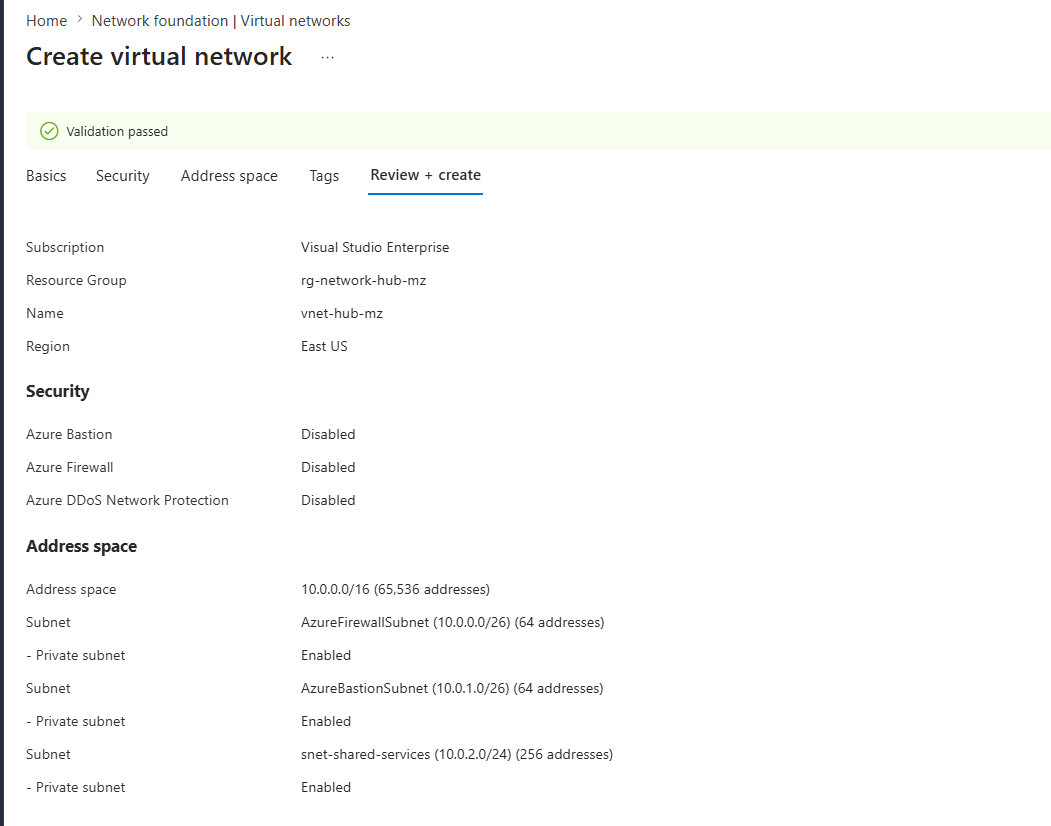

At first glance, creating two virtual networks instead of one might seem unnecessary.
For a small lab, it probably is.
For a production environment, however, the benefits become obvious.
Instead of every application team deploying and managing its own security infrastructure, shared services live centrally within the hub while workloads remain isolated inside their own spokes. That separation makes the environment easier to secure, easier to scale, and easier to manage as additional applications are added over time.
In many ways, it reminded me of the Management Group hierarchy I built during Week 1.
Back then, I centralized governance.
This week, I was centralizing network security.
With both virtual networks deployed, I created a VNet peering connection between them.
The peering allows resources in each network to communicate, but I also enabled forwarded traffic so that traffic originating in the spoke can later be inspected and routed through Azure Firewall.

It’s important to understand what peering does and what it doesn’t do.
Peering simply creates connectivity between virtual networks.
It does not automatically force traffic through a firewall.
That routing decision comes later, and it’s one of the most important parts of the entire design.
Step 2: A Firewall Only Works if Traffic Actually Passes Through It
With the network topology in place, the next step was adding Azure Firewall.
I deployed an Azure Firewall Standard instance into the dedicated AzureFirewallSubnet inside the hub network.

Azure Firewall acts as the central inspection point for outbound and east-west network traffic. Unlike a traditional packet filter, it can evaluate traffic using fully qualified domain names (FQDNs), allowing rules to be written against destinations such as archive.ubuntu.com instead of maintaining lists of IP addresses that may change over time.
Deploying the firewall, however, wasn’t enough.
One of the biggest misconceptions about Azure Firewall is that simply placing it inside a virtual network automatically protects everything around it.
It doesn’t.
Without additional routing, a virtual machine inside the spoke network will continue sending internet-bound traffic directly to Azure’s default internet gateway, completely bypassing the firewall.
In other words, the firewall exists, but nothing is actually using it.
To change that behavior, I created a User Defined Route (UDR) with a single default route.
Every destination matching 0.0.0.0/0, which represents all outbound internet traffic, was configured to use the firewall's private IP address as the next hop.
I then associated that route table with the application subnet inside my spoke network.

That single routing decision completely changed how outbound traffic flowed through the environment.
Instead of taking the shortest path to the internet, every outbound request from the spoke network was now redirected through Azure Firewall, where it could be inspected and evaluated before being allowed to continue.
This is what turns Azure Firewall from a deployed resource into an actual security control.
Without the route table, it’s just another service sitting in the hub.
With the route table, it becomes the mandatory path for outbound communication.
To keep the policy simple for this lab, I created an application rule that allowed access only to specific approved domains.
Everything else would be denied by default.
That gave me a straightforward way to verify that traffic was genuinely passing through the firewall instead of quietly bypassing it.
Step 3: Adding Another Layer with Network Security Groups
Azure Firewall isn’t designed to replace Network Security Groups.
The two services operate at different layers of the network and complement each other rather than compete.
Network Security Groups (NSGs) provide fast Layer 3 and Layer 4 filtering directly at the subnet or network interface level. Azure Firewall sits further along the traffic path, providing more advanced inspection, centralized rule management, and application-aware filtering based on fully qualified domain names.
Using both creates a layered security model.
The NSG acts as the first checkpoint, while Azure Firewall provides a second layer of inspection before traffic reaches its destination.
For my application subnet, I attached an NSG and kept Microsoft’s default deny-all inbound rule in place.
Rather than opening broad access, I created a single inbound rule allowing SSH traffic from only my public IP address.
Everything else remained blocked.

That small exception highlights an important Zero Trust principle.
Instead of asking, “What should I block?”, it’s often better to ask, “What is the minimum access I actually need?”
In this case, the answer was a single management protocol from a single trusted IP address.
Everything else stayed closed by default.
Validating the Design
A security configuration isn’t very useful if you never verify that it behaves the way you expect.
To test the environment, I deployed a virtual machine inside the spoke network without a public IP address.
This was intentional.
The objective wasn’t to expose the VM directly to the internet. It was to prove that outbound traffic could leave the spoke network only by passing through Azure Firewall.
I connected to the VM through Azure Bastion and performed two simple tests.
The first requested content from a domain that I’d explicitly allowed in my Azure Firewall application rules.
curl -I https://archive.ubuntu.comThe request completed successfully.
Next, I tried reaching a domain that wasn’t included in the allow list.
curl -I https://example.comThis request failed, exactly as expected.

Those two commands confirmed that outbound traffic was no longer taking Azure’s default path to the internet.
Instead, every request was being evaluated against the firewall policy, with approved destinations allowed and everything else denied by default.
At this stage, I haven’t yet enabled Azure Firewall diagnostic logs, so I don’t have Log Analytics evidence showing the blocked request.
That’s a deliberate decision rather than an omission.
Week 6 of this series focuses entirely on centralized monitoring and observability, where I’ll route firewall diagnostics into Log Analytics and build dashboards around the data.
For now, the curl tests provide a straightforward validation that the routing and firewall policies are working exactly as intended.
Step 4: Removing Public Exposure with Private Endpoints
Up to this point, I’d focused on controlling how traffic moved through the network.
Azure Firewall inspected outbound requests.
Network Security Groups restricted inbound access.
But there was still another problem to solve.
Many Azure Platform-as-a-Service (PaaS) resources, such as Storage Accounts, are publicly reachable by default. Even if access is protected by Microsoft Entra ID or storage keys, the service still exposes a public endpoint on the internet.
Private Endpoints solve that problem by giving a PaaS resource its own private IP address inside your virtual network.
Instead of communicating with a public Azure endpoint, resources inside the VNet communicate with the service over Azure’s private backbone network.
For this lab, I reused the Storage Account from Week 1.
The first step was disabling Public network access, ensuring the storage account could no longer be reached through its public endpoint.
I then created a dedicated subnet named snet-pe and deployed a Private Endpoint connected to the storage account.
Keeping Private Endpoints in their own subnet isn’t a strict requirement for every deployment, but it keeps the network easier to understand and provides more flexibility as additional private endpoints are added over time.
Once the deployment completed, I connected to my test VM inside the spoke network and verified name resolution.
Running an nslookup against the storage account produced something I hadn't seen before.
                 storagemaaz.blob.core.windows.net
                               │
                               ▼
          storagemaaz.privatelink.blob.core.windows.net
                               │
                               ▼
                           10.1.2.4
The request was automatically redirected to the privatelink DNS zone before resolving to a private IP address inside my virtual network.

That DNS resolution is the real proof that the Private Endpoint is working.
Instead of returning a public Azure address, the storage account now resolves to an internal IP address that’s reachable only from within the connected virtual network.
In practical terms, traffic to the storage account never leaves Azure’s private network.
The resource is no longer exposed to the public internet, significantly reducing its attack surface while still remaining fully accessible to workloads that need it.
This was probably my favorite part of the week’s project because it completely changed how I think about Azure networking.
I used to think securing a Storage Account meant tightening permissions.
Now I see that the stronger approach is preventing the public endpoint from existing in the first place.
Step 5: Turning Best Practices into Guardrails with Azure Policy
Everything I’d built so far depended on making the right decisions during deployment.
I chose to route traffic through Azure Firewall.
I chose to remove public access from the Storage Account.
I chose to deploy resources according to a secure architecture.
But what happens when someone else deploys a resource?
Or when you come back six months later and accidentally forget one of those steps?
That’s where Azure Policy comes in.
Instead of relying on documentation or checklists, Azure Policy allows organizations to define rules that Azure automatically evaluates whenever resources are created or modified.
If a deployment doesn’t comply with those rules, Azure can audit it, deny it, or even remediate it automatically.
For this lab, I assigned one of Azure’s built-in policies that denies the creation of public IP addresses on virtual machine network interfaces.
The policy was scoped at the subscription level, ensuring that every deployment within the subscription would be evaluated against the same requirement.
To verify the policy, I attempted to deploy a virtual machine with a public IP address attached to its network interface.
The deployment failed immediately.

Instead of allowing the resource to be created and relying on someone to notice the mistake later, Azure blocked the deployment before it ever reached the environment.
That simple test demonstrated exactly why Azure Policy is such an important part of a Zero Trust architecture.
Security shouldn’t depend on administrators remembering every best practice.
The platform itself should help enforce those standards consistently.
There are still a few policies I’d like to add as this environment grows.
One is enforcing the resource tags I introduced back in Week 1 so every deployment follows the same governance standards.
Another is requiring modern TLS versions for supported services, preventing weaker protocols from being used by mistake.
I’ll also be reviewing the Azure Policy compliance dashboard once more resources have been deployed, giving me a broader view of how well the environment aligns with the security baseline I’ve been building throughout this series.
By this point, the landing zone had evolved from a collection of Azure resources into something much more intentional.
Traffic was segmented.
Outbound connections were inspected.
Public exposure had been minimized.
And secure configurations were beginning to enforce themselves rather than relying on manual discipline.
That’s exactly the direction I wanted this week’s project to take.
Architecture Overview
By the end of this week’s project, the environment had evolved into a layered network architecture designed around Zero Trust principles rather than convenience.

Each component serves a specific purpose, but none of them works in isolation.
The hub-and-spoke topology separates shared infrastructure from application workloads, making the environment easier to scale and manage.
Azure Firewall acts as the central inspection point, while User Defined Routes ensure that outbound traffic can’t bypass it.
Network Security Groups enforce least-privilege access at the subnet boundary, Azure Bastion removes the need for public management ports, and Private Endpoints eliminate public exposure for platform services such as Azure Storage.
Finally, Azure Policy provides the governance layer that keeps these security standards consistent by preventing non-compliant resources from being deployed in the first place.
Individually, each service improves security.
Together, they create a network where communication is intentional, exposure is minimized, and security controls reinforce one another instead of operating independently.
Key Takeaways
This project reinforced several lessons that are easy to understand in theory but far more meaningful when you build them yourself.
- Network segmentation is the foundation of a secure Azure environment. A hub-and-spoke architecture centralizes shared security services while keeping workloads isolated from one another.
- A deployed firewall doesn’t automatically protect your network. Without User Defined Routes, traffic simply follows Azure’s default routing and bypasses the firewall entirely.
- Security is strongest when it’s layered. Azure Firewall, Network Security Groups, Azure Bastion, and Private Endpoints each solve different problems, and together they provide far stronger protection than relying on a single service.
- Private Endpoints reduce the attack surface instead of just protecting it. Removing public access from Azure services is often more effective than exposing them and relying solely on authentication.
- Azure Policy turns security recommendations into enforceable standards. Rather than trusting every administrator to follow best practices, the platform can enforce them automatically during deployment.
One of the biggest lessons from this week is that Zero Trust extends well beyond identity.
Strong authentication determines who can access your environment.
A well-designed network determines what they can reach, how they reach it, and whether that communication should be trusted at all.
Building this landing zone gave me a much better appreciation for how Microsoft’s networking services work together to enforce those principles in practice.
메타데이터
- post_id
- 96c6da5d4064
- slug
- enforcing-zero-trust-at-the-network-layer-building-a-secure-azure-landing-zone-96c6da5d4064
- url
- https://medium.com/@maazzaam87/enforcing-zero-trust-at-the-network-layer-building-a-secure-azure-landing-zone-96c6da5d4064
- canonical_url
- https://medium.com/@maazzaam87/enforcing-zero-trust-at-the-network-layer-building-a-secure-azure-landing-zone-96c6da5d4064
- author_url
- https://medium.com/@maazzaam87
- status
- ok
- fetched_at
- 2026-07-19 13:52:23





