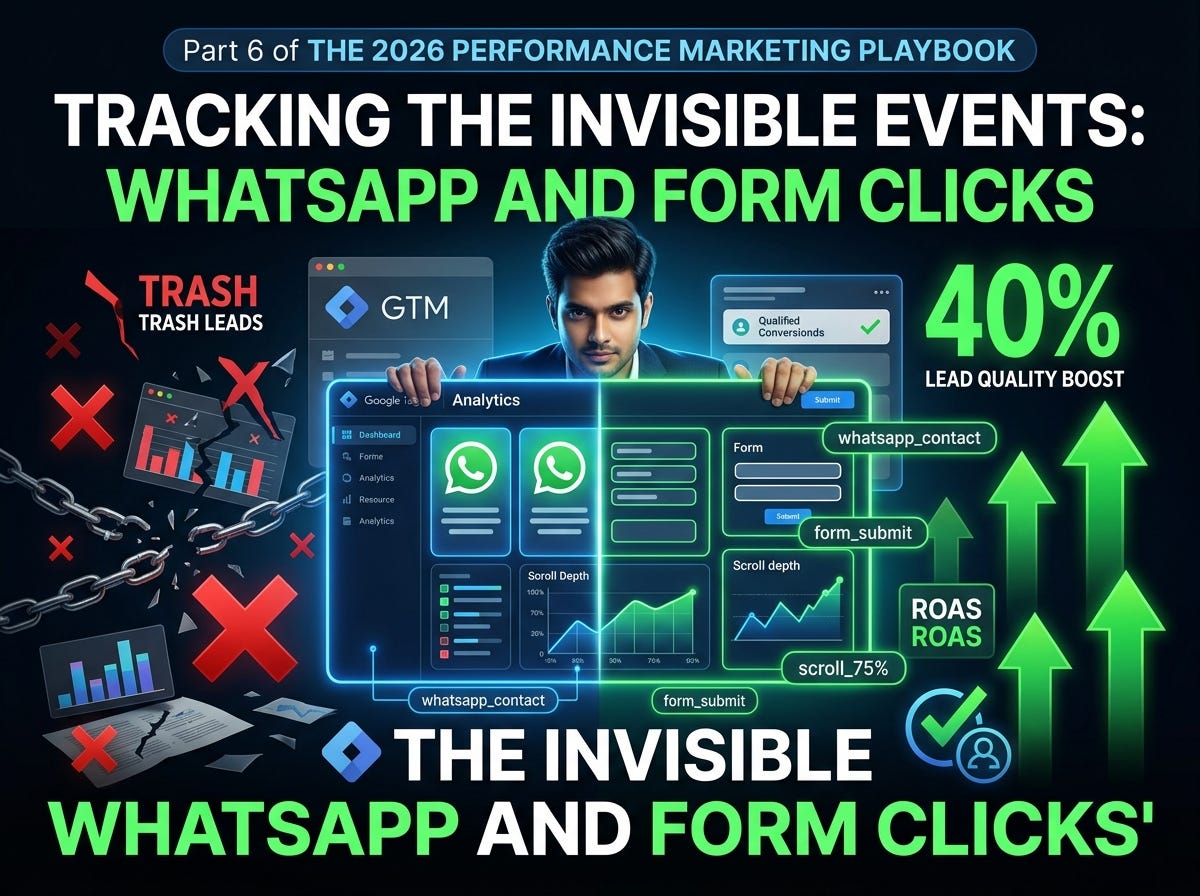
Tracking the “Invisible” Events: WhatsApp and Form Clicks
The micro-conversion framework that improved my client’s lead quality by 40% — and why Google and Meta’s algorithms are starving for these…
Tracking the “Invisible” Events: WhatsApp and Form Clicks
The micro-conversion framework that improved my client’s lead quality by 40% — and why Google and Meta’s algorithms are starving for these hidden signals
**Prince Pandey* Key Account Manager | 40+ Accounts Scaled | Event Architecture Specialist Part 6 of The 2026 Performance Marketing Playbook*
The $23,000 Blind Spot
Three months ago, a real estate client came to me with a familiar complaint: “We’re getting leads, but they’re trash. Low intent. Time-wasters.”
Their Meta dashboard showed 127 “Lead” events. Cost per lead: $18. Seemed reasonable.
But when we dug into their CRM, the story fractured:
- 42 leads never answered the first call
- 31 leads gave fake phone numbers
- Only 54 leads (42%) were actually reachable
The problem wasn’t their targeting. It was their event taxonomy. They were optimizing for “form submitted” — a binary action that treats a 10-second spam submission the same as a 4-minute detailed inquiry.
We rebuilt their tracking to capture invisible micro-events: WhatsApp button hovers, form field interactions, scroll depth past pricing, time spent on location pages. We sent these as custom events to Meta and Google.
Within 30 days:
- Lead volume dropped 22% (scary at first)
- Cost per qualified lead dropped 40% (from $43 to $26)
- Sales team close rate improved from 8% to 19%
- Revenue per ad spend increased 2.3x
The algorithm didn’t just find more people. It found better people — because we taught it what “better” actually looked like.
Yesterday, you built Google’s Enhanced Conversions engine. Today, we’re hunting the behavioral signals that separate browsers from buyers. By the end of this article, you’ll track WhatsApp clicks, form interactions, and engagement depth — without writing code.
Why “Invisible” Events Matter in 2026
Most marketers live in a binary world:
- Clicked ad: Yes/No
- Converted: Yes/No
But the customer journey is analog. It’s messy. It’s layered. And in 2026, the algorithms powering Meta’s Advantage+, Google’s PMax, and TikTok’s Smart Performance are desperate for granular signals to optimize against.

The shift: In 2022, you optimized for the conversion event. In 2026, you optimize for the conversion profile — the sequence of micro-behaviors that predict revenue.
The WhatsApp Click: Your Highest-Intent Micro-Conversion
WhatsApp clicks are gold. A user who clicks “Chat on WhatsApp” isn’t researching. They’re initiating a conversation. They’re past the consideration phase and into negotiation.
But here’s the problem: WhatsApp links (wa.me, api.whatsapp.com, web.whatsapp.com) don't trigger standard page loads. They open external apps. Your standard pageview-based tracking misses them entirely.
The Setup: WhatsApp Click Tracking in GTM
We’re using the Click trigger with URL matching. No code required.
Step 1: Enable Click Variables
In your Web GTM container (Day 3):
- Variables → Configure (Built-In Variables)
- Ensure these are checked:
- Click URL
- Click Text
- Click Classes
- Click ID
- Click Target
Step 2: Create the Click Trigger
- Triggers → New → Name:
Click - WhatsApp - Trigger Type: Click → All Elements
- Fire On: Some Clicks
- Condition: Click URL → contains →
wa.me - Click + to add OR conditions:
- Click URL contains
api.whatsapp.com - Click URL contains
web.whatsapp.com - Click URL contains
whatsapp.com/send
6. Save
Alternative: Trigger by Click Text or Class
If your WhatsApp button uses a generic URL (like a JavaScript popup), trigger by text instead:
- Condition: Click Text → contains →
WhatsApp - OR Click Classes → contains →
whatsapp-button
Step 3: Create the Meta Custom Event Tag
- Tags → New → Name:
Meta - Event - WhatsAppClick - Tag Type: Custom HTML
- Paste:
<script>
fbq('trackCustom', 'WhatsAppClick', {
  content_name: document.title,
  page_url: window.location.href,
  button_text: '{{Click Text}}',
  button_location: window.location.pathname
});
</script>
4. Triggering: Click - WhatsApp
5. Save
Step 4: Create the GA4 Event Tag
- Tags → New → Name:
GA4 - Event - WhatsAppClick - Tag Type: Google Analytics: GA4 Event
- Measurement ID: Your G-XXXXXXXXXX
- Event Name:
whatsapp_clic - Event Parameters:
page_location:{{Page URL}}button_text:{{Click Text}}page_title:{{Page Title}}
-
Triggering:
Click - WhatsApp -
Save
Step 5: Create the Google Ads Conversion Tag (Optional but Powerful)
If WhatsApp clicks are a primary conversion path:
- Tags → New → Name:
Google Ads - Conversion - WhatsApp - Tag Type: Google Ads Conversion Tracking
- Conversion ID & Label: From your Google Ads account
- Conversion Value:
10(or dynamic value based on your lead value) - Triggering:
Click - WhatsApp - Save
Pro Tip: I set WhatsApp click values at 30–50% of a form lead value. They’re higher intent but not yet qualified. This trains Smart Bidding to bid aggressively without overvaluing.
Advanced: WhatsApp Button Visibility Tracking
What if the user sees the button but doesn’t click? That’s still a signal — they noticed the option.
- Triggers → New → Name:
Visibility - WhatsApp Button - Trigger Type: Element Visibility
- Selection Method: CSS Selector
- Element Selector:
.whatsapp-float(or your button's class) - Fire Once Per Page: Yes
- Minimum Percent Visible: 50%
- Save
Create a tag:
- Event Name:
whatsapp_button_visible - Trigger:
Visibility - WhatsApp Button
This tells you: Of people who saw the button, what percentage clicked? If it’s <2%, your button placement or design needs work.
Form Tracking: Beyond the Submit Button
Standard form tracking fires on the thank-you page. But that’s the end of the story. The real narrative is in the interaction.
The Three Layers of Form Intelligence

Layer 1: Form Start Tracking
- Triggers → New → Name:
Form - Start - Trigger Type: Form Submission → Wait, no. We need focus, not submission.
Better method — Custom Event via JavaScript (Developer needed):
Have your developer push this when a user first clicks into any form field:
document.querySelector('#contact-form').addEventListener('focusin', function() {
  if (!this.dataset.trackedStart) {
    window.dataLayer = window.dataLayer || [];
    window.dataLayer.push({
      event: 'form_start',
      form_id: 'contact-form',
      form_name: 'Main Contact Form'
    });
    this.dataset.trackedStart = 'true';
  }
}, true);
No developer? Use Element Visibility:
If your form is below the fold, a visibility trigger approximates intent:
- Triggers → New →
Visibility - Contact Form - Element Selector:
#contact-form - Minimum Percent Visible: 25%
- Save
Tag: GA4 - Event - FormVisible / Meta - FormVisible
Layer 2: Form Field Progress Tracking
This is where it gets powerful. Track which fields users complete before submitting or abandoning.
For a 4-field form (Name, Email, Phone, Message):
Push events on field blur (when user leaves the field):
var formFields = ['name', 'email', 'phone', 'message'];
formFields.forEach(function(field) {
  var input = document.querySelector('input[name="' + field + '"], textarea[name="' + field + '"]');
  if (input) {
    input.addEventListener('blur', function() {
      if (this.value.length > 0) {
        window.dataLayer.push({
          event: 'form_field_complete',
          field_name: field,
          field_position: formFields.indexOf(field) + 1,
          form_id: 'contact-form'
        });
      }
    });
  }
});
Why this matters: If 80% of users complete Name and Email, but only 30% complete Phone, your phone field is killing conversions. Remove it, make it optional, or add trust copy (“We never spam”).
Layer 3: Form Submission (Standard)
You built this on Day 3. But let’s enhance it.
Standard trigger:
- Trigger: Form Submission → Some Forms → Form ID equals
contact-form
AJAX form fix (for forms that don’t redirect):
Many modern forms (Elementor, Webflow, React) submit via JavaScript without page reload. The standard GTM Form Submission trigger often misses these.
Method: Listen for Success Message
- Triggers → New →
Visibility - Form Success - Element Selector:
.form-success-message, .w-form-done, .elementor-message-success
- (Adjust to your site’s success message class)
- Minimum Percent Visible: 10%
4. Save
Tag your conversion event to this visibility trigger instead of Form Submission.
Layer 4: Form Abandonment Tracking
This requires comparing form start to form submit. If start fires but submit doesn’t within 60 seconds:
Implementation via GTM Timer:
- Triggers → New →
Timer - Form Abandon Check - Trigger Type: Timer
- Event Name:
form_abandon_check - Interval: 30000 (30 seconds)
- Limit: 2
- Fire On: Some Timers
- Condition: Cookie
form_started=trueAND Cookieform_submitted!=true
Cookie setup:
- On
form_start, set cookieform_started=true(expires in 5 minutes) - On
form_submit, set cookieform_submitted=true
Abandon tag:
- Fire when timer fires:
GA4 - Event - FormAbandon - Event parameters:
form_id,fields_completed(count from dataLayer)
Use case: Retarget abandoners with a “Still have questions?” creative. They’re warm — they started.
Scroll Depth & Engagement Time: The Quality Multipliers
Scroll Depth Tracking
- Triggers → New →
Scroll Depth - 25/50/75/90 - Trigger Type: Scroll Depth
- Vertical Scroll Depths: 25, 50, 75, 90
- Fire On: All Pages (or specific landing pages)
- Save
GA4 Tag:
- Event Name:
scroll - Parameter:
percent_scrolled:{{Scroll Depth Threshold}}
Meta Tag:
<script>
fbq('trackCustom', 'ScrollDepth', {
  depth: '{{Scroll Depth Threshold}}',
  page: window.location.pathname
});
</script>
Why 90% scroll matters: Users who read your entire landing page convert at 3–4x the rate of <50% scrollers. Feed this to Meta as a custom event, and Advantage+ will find more “readers.”
Engagement Time Tracking
GA4 tracks this automatically via engagement_time_msec. But for Meta, you need custom implementation.
Timer-based approach:
- Triggers → New →
Timer - Engagement 60s - Interval: 60000
- Limit: 5 (fires at 60s, 120s, 180s, 240s, 300s)
- Fire On: Landing pages only
Meta Tag:
<script>
fbq('trackCustom', 'EngagementTime', {
  duration_seconds: 60,
  page: window.location.pathname
});
</script>
Strategic use: Create a Meta custom audience of users with EngagementTime >= 180. These are your deep researchers. Serve them case studies, testimonials, and comparison content.
The Micro-Conversion Value Ladder
Here’s how I assign values to invisible events for algorithm training:

Implementation in Meta:
Use trackCustom with value parameter:
fbq('trackCustom', 'ScrollDepth', {
  depth: 90,
  value: 2.50,
  currency: 'USD'
});
Implementation in Google Ads:
Create separate conversion actions for each micro-conversion with appropriate values. Enable “Include in Conversions” only for your true north metric (usually Qualified Lead or Sale), but use the others as audience signals for PMax.
Real Client Case Study: B2B SaaS, 40% Lead Quality Improvement
The Situation:
- B2B project management SaaS
- Primary CTA: Demo request form
- Problem: 60% of “leads” were students, job seekers, or competitors
- CPA: $67, but cost per qualified demo: $187
The Invisible Event Stack:

The Optimization:
1.Form changes:
- Removed “Phone” field (high abandon point)
- Made “Company Size” required and added validation
- Added trust badge near “Work Email” field
- Pre-qualified with “What’s your team size?” before form access
2.Audience changes:
- Excluded users who visited only careers page
- Created lookalike from
pricing_page_view + scroll_90users - Retargeted
form_abandonwith FAQ video creative
3.Algorithm training:
- Sent all micro-events to Meta CAPI with values
- Optimized Advantage+ for
QualifiedDemo(offline import) instead ofFormSubmit
Results (45 days):
- Form submissions: -18% (scary)
- Qualified demos: +34% (the real goal)
- Cost per qualified demo: $187 → $112 (-40%)
- Demo show rate: 45% → 72%
- Trial-to-paid conversion: 12% → 19%
- Blended ROAS: 2.1x → 4.6x
The lesson: They stopped optimizing for form-fills and started optimizing for the behavioral profile of buyers. Volume dropped. Revenue soared.
Common Invisible Event Mistakes
❌ Mistake 1: Tracking Everything, Optimizing for Nothing
I’ve seen accounts with 47 custom events. The algorithm is confused. The media buyer is overwhelmed.
Fix: Maximum 5–7 micro-conversions. One primary optimization event. Everything else is signal, not target.
❌ Mistake 2: Firing Events on Every Page Element
Tracking every button click creates noise. That “Privacy Policy” link click? Not a buying signal.
Fix: Only track events that correlate with conversion. Validate with GA4 path exploration or BigQuery correlation analysis.
❌ Mistake 3: Ignoring Mobile vs. Desktop Behavior
WhatsApp clicks are 80% mobile. Form starts are 60% desktop. If you aggregate, you miss the story.
Fix: Add device_category parameter to every event. Segment your analysis.
❌ Mistake 4: Not Passing Events to Server-Side
You built micro-events in Web GTM, but ad blockers still eat them.
Fix: Route all custom events through your server container (Day 4). The event_id deduplication applies here too.
Your Action Plan for Today
- Deploy WhatsApp click tracking. If you have a WhatsApp button on your site, build the Click trigger right now. Test it in Preview Mode. Comment “WhatsApp tracked” when it’s live — I want to know.
- Add one form interaction event. Start with Form Start (visibility trigger if no dev, focus event if you have one). Measure your start-to-submit rate.
- Enable scroll depth tracking. Set it to 25/50/75/90. Check in GA4 Events report which depth correlates with your conversions.
- Map your invisible events. List every action a user takes before converting. Which 3 are most predictive? Those become your micro-conversions.
Tomorrow: Day 7 — Q&A Sunday: Weekly Recap and Community Troubleshooting
Today was the last technical build of Week 1. Tomorrow, we rest and repair.
“Q&A Sunday: Weekly Recap and Community Troubleshooting”
I’ll be in the comments for 12 hours straight. Bring me:
- Your broken GTM tags
- Your server-side errors
- Your Enhanced Conversions match rate questions
- Your WhatsApp tracking bugs
- Your form abandonment mysteries
No question too basic. No bug too complex. This is your chance to get personalized debugging from someone who’s fixed 400+ tracking setups.
Set a reminder. Sunday is office hours.
Community Check-In: Day 5 Recap
The most common win: readers discovering their match rate jumped from 0% to 40%+ after fixing their data layer email capture.
Today’s challenge: WhatsApp and forms are where most of you engage actual customers. If you’re only tracking pageviews and purchases, you’re flying blind through the most important part of the journey.
I’m in the comments for the next 24 hours. WhatsApp trigger not firing? Form success message invisible to GTM? Not sure which micro-conversions matter for your industry?
Drop your website URL and your biggest tracking gap. I’ll diagnose it personally.
Connect directly:
- LinkedIn: *Prince Pandey (DM me your GTM Preview Mode screenshot — I debug faster with visuals)*
- Instagram: @mrktngbyprince
The 30-Day Progress Tracker

Week 1 is nearly complete. In six days, you’ve built:
- A server-side tracking infrastructure
- Meta CAPI and Google Enhanced Conversions
- WhatsApp and form micro-conversion tracking
- A data pipeline that captures 90%+ of real user behavior
Most agencies charge $5,000–$15,000 for this setup. You built it in a week.
Tomorrow, we troubleshoot together. Then Week 2 brings the funnel and automation engine.
Which invisible event are you tracking first? WhatsApp? Form start? Scroll depth? Tell me in the comments — I’ll validate your choice for your industry.
Did your WhatsApp click trigger fire in Preview Mode? What micro-conversion surprised you as most predictive? Share your event map below — I’ll optimize it with you.
메타데이터
- post_id
- 972aeca1f32c
- slug
- tracking-the-invisible-events-whatsapp-and-form-clicks-972aeca1f32c
- url
- https://medium.com/age-of-awareness/tracking-the-invisible-events-whatsapp-and-form-clicks-972aeca1f32c
- canonical_url
- https://medium.com/age-of-awareness/tracking-the-invisible-events-whatsapp-and-form-clicks-972aeca1f32c
- author_url
- https://medium.com/@marketingbyprince
- status
- ok
- fetched_at
- 2026-07-18 06:23:57