Building High-Performance Applications with AWS Lambda
Designing high-performance serverless applications is not about a single optimization — it’s about understanding how AWS Lambda actually…
Building High-Performance Applications with AWS Lambda
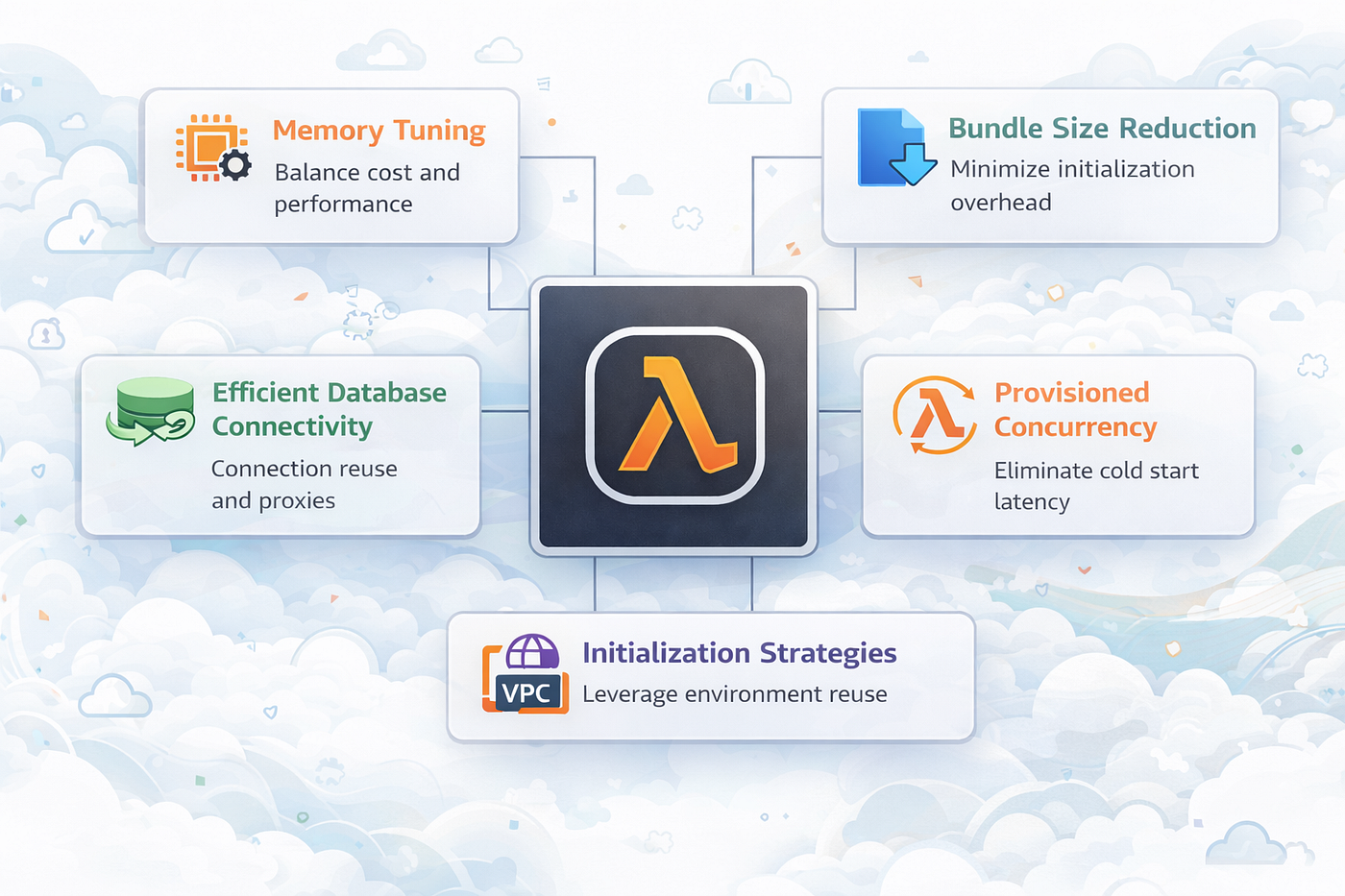
Designing high-performance serverless applications is not about a single optimization — it’s about understanding how AWS Lambda actually works under the hood and making informed decisions across compute, networking, and code structure.
At its core, AWS Lambda operates on an execution environment lifecycle consisting of three key phases:
- Init — The environment is created, the runtime is initialized, and all code outside the handler (e.g., imports, DB connections) is executed. This phase typically occurs during a cold start.
- Invoke — The Lambda handler processes the request. This phase can run multiple times using the same execution environment (warm starts).
- Shutdown — When the environment is no longer needed, Lambda gracefully terminates it and cleans up resources.
Understanding this lifecycle is critical because cold start latency, resource reuse, and performance optimizations are all directly tied to how these phases behave.
This article breaks down practical, real-world strategies to optimize both cold start latency and runtime performance in AWS Lambda.
In this article, several practical optimization strategies are discussed, including:
- 1. Memory tuning to balance cost and performance
- 2. Bundle size reduction to minimize initialization overhead
- 3. Efficient database connectivity using connection reuse and proxies
- 4. Provisioned Concurrency to eliminate cold start latency
- 5. Initialization strategies to leverage execution environment reuse
1. Memory Tuning: Cost vs Performance
A common misconception is that reducing memory saves cost. In AWS Lambda, this assumption is often wrong.
Lambda scales CPU power proportionally with memory.
What this means in practice:
- Higher memory → more CPU power
- More CPU → faster execution
- Faster execution → shorter billed duration
Even though the cost per millisecond increases, the total execution cost can decrease due to reduced runtime.
Measure the optimal memory
Optimization without measurement can lead to incorrect assumptions.
Instead of guessing, it’s essential to benchmark your function across multiple memory configurations to understand how it behaves under different conditions.
A structured approach should include:
- Testing the function at various memory levels
- Comparing execution time, latency, and cost
- Identifying the configuration that delivers the best balance
Tools like **AWS Lambda Power Tuning** are especially useful for this process, as they provide a clear visualization of how performance and cost scale together.
The following outputs represent the performance and cost metrics derived from the AWS Lambda Power Tuning evaluation across multiple memory configurations.
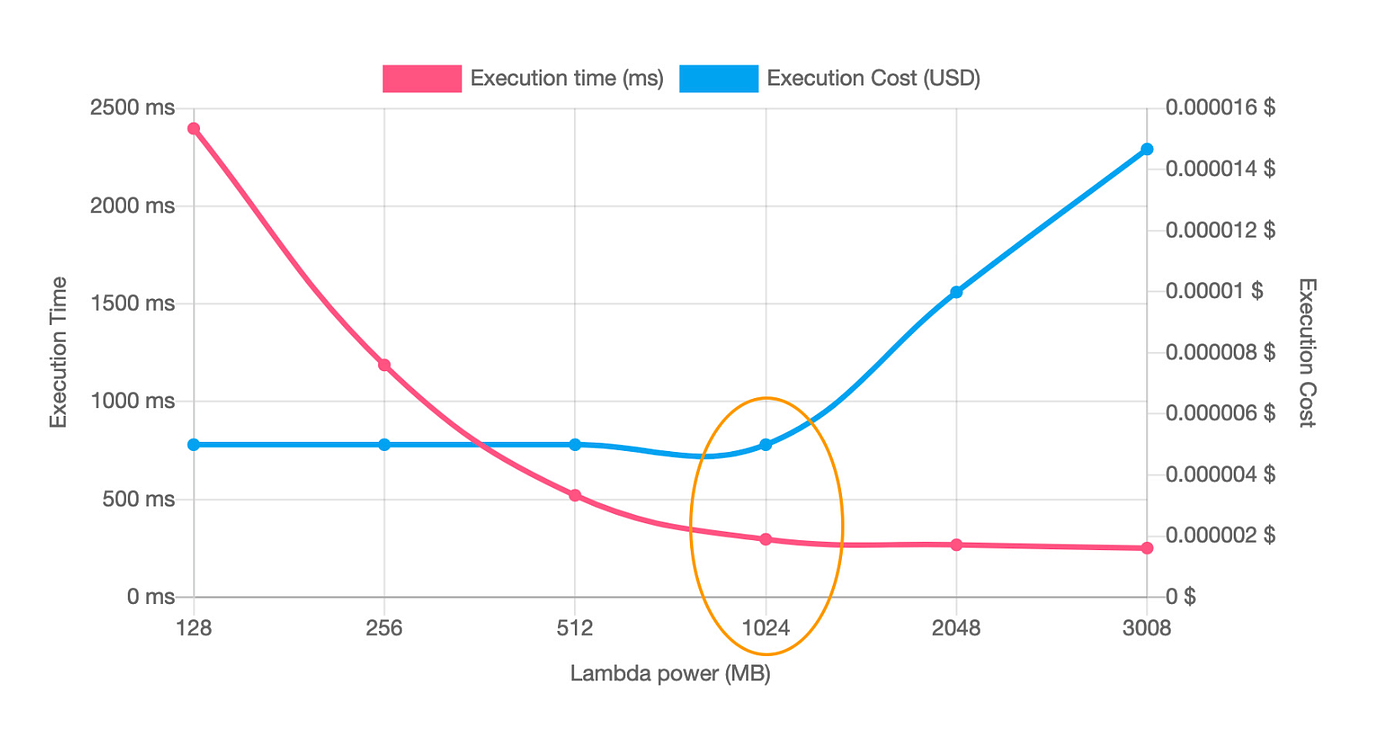
Power tuning app output
🎯 Key Takeaway
Memory in Lambda is not just capacity — it’s a performance tuning lever. Right-sizing it can give you better performance at lower cost.
2. Reduce Bundle Size
Reducing bundle size is one of the most effective ways to improve AWS Lambda cold start performance. During the Init phase, Lambda must download, extract, and initialize your deployment package before executing any code. Larger bundles directly increase this initialization time.
When a Lambda function is invoked (especially during a cold start), AWS performs the following steps:
- Download the deployment package from the configured source (e.g., S3 or internal storage)
- Extract the bundle into the execution environment
- Initialize the runtime (Node.js, Python, etc.)
- Execute initialization code (imports, dependency loading, global variables)
To minimize this overhead:
Bundle Analysis
Use tools such as [esbuild bundle size analyzer](https://esbuild.github.io/analyze/), [webpack-bundle-analyzer](https://www.npmjs.com/package/webpack-bundle-analyzer), or similar to inspect module composition, identify heavy dependencies, and detect unused code paths.
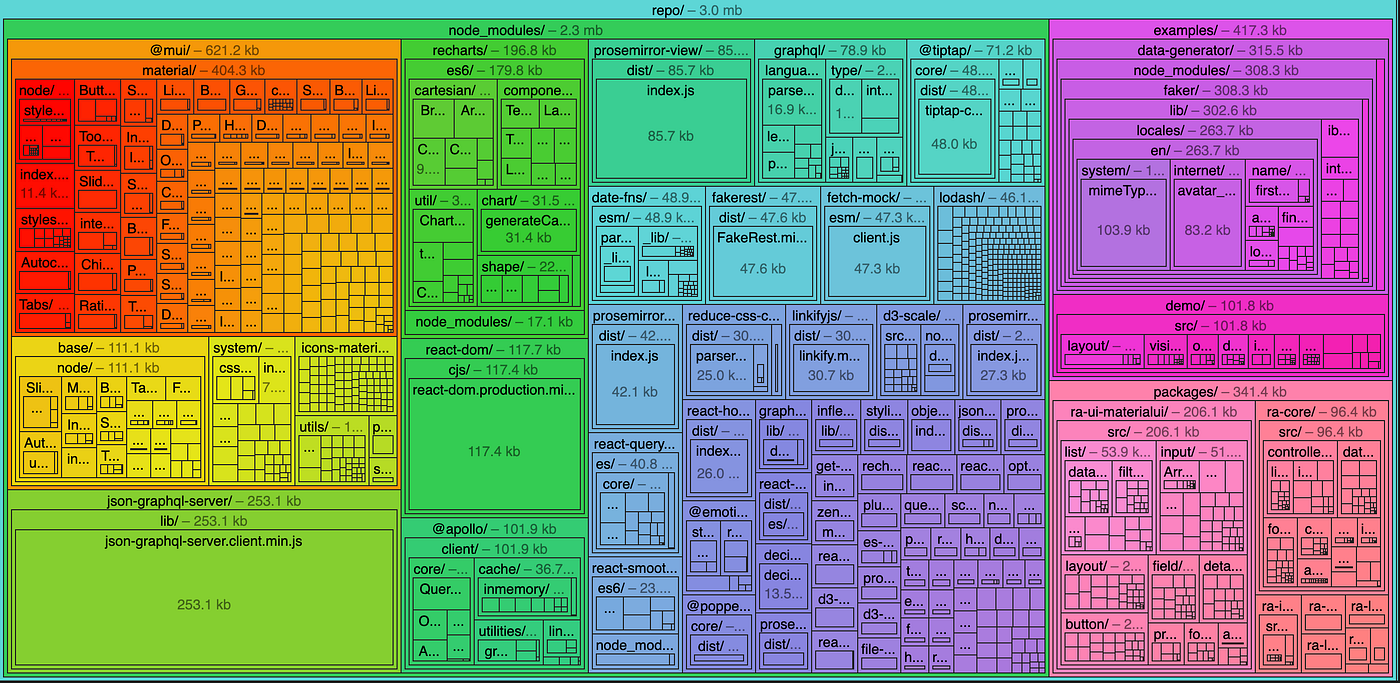
esbuild bundle size analyzer output
Dependency Pruning & Moularization
- Eliminate unused packages
- Avoid full-library imports (e.g., import specific modules instead of entire SDKs)
- Prefer modular SDKs (e.g., AWS SDK v3)
- Enable tree-shaking to remove dead code during build time
Advanced Optimization (AI-Assisted / Static Analysis)
Apply automated analysis tools to:
- Detect unreachable or redundant code paths
- Suggest lighter dependency alternatives
- Optimize dependency graphs for minimal footprint
3. Database Connectivity & RDS Proxy
AWS Lambda functions are short-lived and highly concurrent. Unlike EC2 or ECS, poor connection management can quickly overwhelm your database. Additionally, repeatedly establishing and tearing down connections on each invocation introduces latency overhead, which can further amplify cold start impact and degrade overall performance.
To address these challenges, it is essential to decouple connection management from individual Lambda invocations:
- Use **Amazon RDS Proxy** to handle connection pooling at the infrastructure level
- Initialize database connections outside the Lambda handler, allowing execution environments to reuse connections across warm invocations
This ensures efficient utilization of database resources and reduces connection overhead.
Implementation Best Practices (Aurora / RDS)
For applications using Amazon Aurora or RDS:
- Store database credentials securely in AWS Secrets Manager
- Configure Lambda functions to connect via the RDS Proxy endpoint, rather than directly to the database
A common issue encountered when connecting to RDS Proxy that developers should be aware of:
- IAM roles (for secure access to secrets)
- Security groups (to allow traffic between Lambda, proxy, and database)
- VPC networking (for private connectivity)
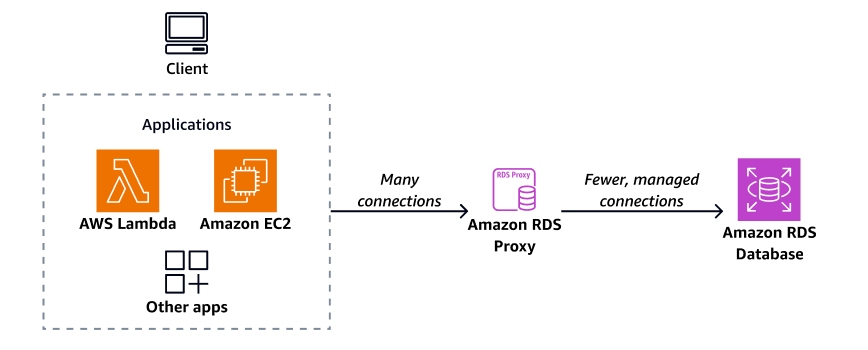
RDS proxy architecture
🎯 Outcome
By introducing RDS Proxy and proper connection reuse strategies:
- Database connection load is stabilized
- Latency becomes more predictable
- Application scalability improves under high concurrency
- Risk of database overload is significantly reduced
4. Provisioned Concurrency
AWS Lambda can introduce cold start latency, especially for VPC-enabled functions or applications with heavy initialization logic. During a cold start, the runtime must initialize, load dependencies, and configure networking before processing requests.
Provisioned Concurrency addresses this by keeping a predefined number of execution environments fully initialized and ready, ensuring consistent, low-latency responses.
When enabled:
- Execution environments are pre-initialized in advance
- Runtime and application code (Init phase) are already executed
- ENIs are pre-attached for VPC-enabled functions
- Requests are served immediately without cold start delays
This makes it ideal for latency-sensitive workloads such as APIs, real-time systems, and user-facing applications.
Determining Required Provisioned Concurrency
The required number of provisioned instances depends on request rate and execution duration.
Concurrency = Requests per second × Average duration (seconds)
Scenario:
- Total requests: 4000
- Time window: 1800 seconds (30 minutes)
- Average duration: 150 ms (0.150 sec)
Step 1 — Requests per second 4000 / 1800 = 2.22 req/sec
Step 2 — Concurrency 2.22 × 0.150 = 0.333
👉 Rounded up → 1 provisioned instance is sufficient
Cost Model
Provisioned Concurrency introduces two cost components:
1. Provisioned Concurrency Cost (Idle + Ready State)
You pay for keeping environments warm:
Cost=Provisioned instances×Memory (GB)×Time (seconds)×price
Example:
- Instances: 1
- Memory: 0.5 GB
- Monthly time: 730 hours = 2,628,000 seconds
- ARM price: $0.0000033334 per GB-sec
1×0.5×2,628,000=1,314,000 GB-sec
👉 Monthly cost ≈ $4.38
2. Execution Cost (Same as Standard Lambda)
You still pay for actual invocations:
- Duration (GB-sec)
- Request count
Provisioned Concurrency does not replace execution cost — it adds a baseline cost for eliminating cold starts.
🎯 Final Perspective
Provisioned Concurrency is not about maximizing performance — it’s about guaranteeing predictable latency.
When used correctly:
- Cold starts are eliminated
- Latency becomes consistent
- User experience improves significantly
However, over-provisioning leads to unnecessary cost, so the goal is to right-size concurrency based on real traffic patterns.
5. Initialization Strategy
AWS recommends initializing reusable resources outside the Lambda handler.
Examples:
- Database connections
- Secrets Manager calls
- Logging frameworks
- SDK clients
This allows execution environments to reuse initialized resources across invocations, reducing both cold and warm latency.
💡 This becomes even more critical when using Provisioned Concurrency, since environments are pre-initialized — meaning your function is ready to execute business logic immediately.
Conclusion
Optimizing AWS Lambda performance is not about applying a single technique — it requires a system-level understanding of how the runtime, infrastructure, and application code interact.
From memory tuning and bundle optimization to connection management and Provisioned Concurrency, each layer contributes to overall performance. The key is to identify bottlenecks, measure impact, and apply the right optimization at the right place.
Well-optimized Lambda applications achieve:
- Consistent and predictable latency
- Efficient resource utilization
- Improved scalability under load
- Better cost-performance balance
Most importantly, optimization should always be data-driven. Assumptions can be misleading in serverless environments — real insights come from benchmarking, load testing, and continuous monitoring.
In the end, high-performance serverless systems are built not by over-engineering, but by making informed, precise decisions based on how the platform actually behaves.
메타데이터
- post_id
- 97ef4e3e28aa
- slug
- building-high-performance-applications-with-aws-lambda-97ef4e3e28aa
- url
- https://medium.com/@wmhindika/building-high-performance-applications-with-aws-lambda-97ef4e3e28aa
- canonical_url
- https://medium.com/@wmhindika/building-high-performance-applications-with-aws-lambda-97ef4e3e28aa
- author_url
- https://medium.com/@wmhindika
- status
- ok
- fetched_at
- 2026-06-21 12:17:11




