How to Add a Mercedes-Benz Key with KEYDIY PAK09?
KEYDIY PAK09 allows you to add up to 6 remote keys to your Mercedes-Benz, including a smartphone key with proximity functionality. Follow…
How to Add a Mercedes-Benz Key with KEYDIY PAK09?
KEYDIY PAK09 allows you to add up to 6 remote keys to your Mercedes-Benz, including a smartphone key with proximity functionality. Follow these clear steps to program your new key easily.
Watch Video Tutorial:
[embed]
Step 1: Prepare the Hardware ① Remove the PCB from your original car key. ② Refer to the wiring diagram in the KDAPP (under Learning Center → Help Center → Wiring Diagram From Original Remotes) to solder the PCB correctly. ③ Connect the adapter cable to the trigger port, then place the PCB into the PAK09 case and close it. ④ Press the power button: short-press once, then long-press for 3 seconds until the indicator flashes.
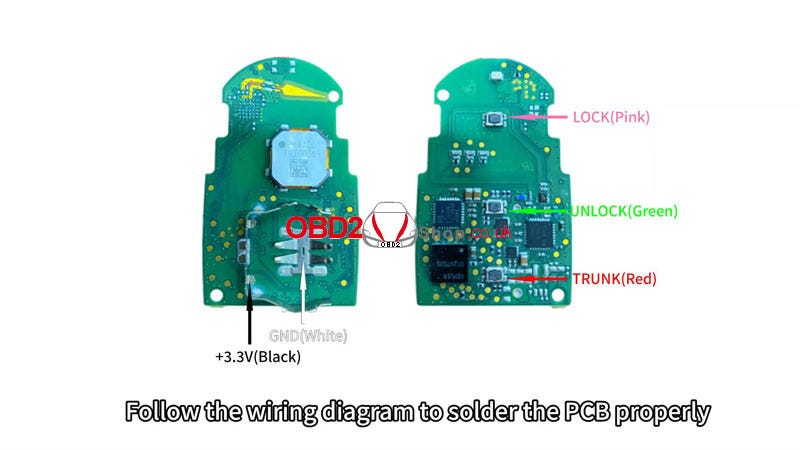


Step 2: Generate Remote Program ① Place the new remote (KDB/ZB Universal Key) into the KD-X4 holder. ② Open KDAPP → Remote Function → Vehicle Remote→ Select the correct remote control → Generate → Wireless Generation. ③ Wait for “Generation Successful.”


Step 3: Pair Key with Car ① In KDAPP, go to Settings → Device Management. ② Search and select your PAK09 kit. Enter default password: 000000 (change it on first use).

Step 4. Add Key ① Go to Settings → Key Management → Enter Matching Mode. ② Before the countdown ends, press any button on the new remote to add it. Confirmation will appear once added.


Final Step: Test the Key Check remote functions: lock, unlock, and proximity detection if using the phone key. Your Mercedes-Benz now supports up to 6 keys, including a convenient phone key.

메타데이터
- post_id
- 980b56d70742
- slug
- how-to-add-a-mercedes-benz-key-with-keydiy-pak09-980b56d70742
- url
- https://medium.com/@obd2eshopcom/how-to-add-a-mercedes-benz-key-with-keydiy-pak09-980b56d70742
- canonical_url
- https://medium.com/@obd2eshopcom/how-to-add-a-mercedes-benz-key-with-keydiy-pak09-980b56d70742
- author_url
- https://medium.com/@obd2eshopcom
- status
- ok
- fetched_at
- 2026-06-29 22:44:20