Step-by-Step Guide to Using ChatGPT on WhatsApp
ChatGPT is no longer limited to websites and apps. Today, people want AI assistance directly inside the apps they already use every day —…
Step-by-Step Guide to Using ChatGPT on WhatsApp
ChatGPT is no longer limited to websites and apps. Today, people want AI assistance directly inside the apps they already use every day — and WhatsApp is at the top of that list.
From answering quick questions to helping businesses manage customer support, ChatGPT on WhatsApp is becoming incredibly popular. It allows users to chat with AI just like they would message a friend.
Whether you are a student, freelancer, content creator, or business owner, integrating ChatGPT with WhatsApp can help you save time, improve communication, and automate repetitive tasks.
In this guide, you’ll learn how to use ChatGPT on WhatsApp, how businesses can connect it with their customer support system, and the safest ways to get started.
What is ChatGPT on WhatsApp?

ChatGPT on WhatsApp means using AI-powered conversations directly within WhatsApp chats.
Instead of opening ChatGPT separately in a browser or app, you can simply send messages through WhatsApp and receive instant AI-generated responses.
You can use it to:
- Ask questions
- Translate text
- Write captions or emails
- Summarize content
- Get study help
- Automate customer support
- Manage business conversations
The biggest advantage is convenience. Since most people already use WhatsApp daily, adding AI to the platform makes communication faster and easier.
Ways to Access ChatGPT on WhatsApp
There are currently two main ways to use ChatGPT on WhatsApp:
- Through the official ChatGPT WhatsApp number
- Through third-party chatbot platforms
Let’s understand both methods.
Use the Official ChatGPT WhatsApp Number
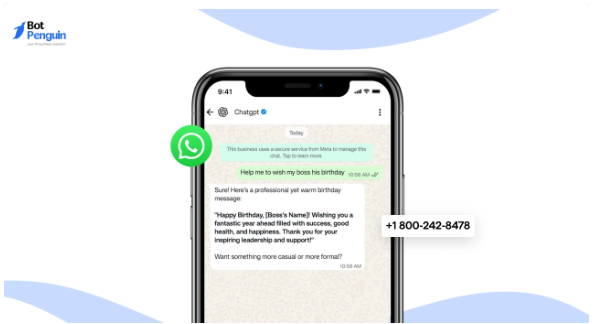
OpenAI has introduced an official WhatsApp access method for ChatGPT. Users can directly message the verified number and start chatting instantly.
You can now message ChatGPT directly through +1 800‑242‑8478.
After saving the number, open WhatsApp and start a conversation like you normally would.
The verified account includes a green badge, which helps users confirm that the account is genuine.
With this method, you can:
- Ask general questions
- Send voice notes
- Upload images
- Get instant replies
- Use AI assistance without downloading extra tools
This option is best for personal and casual use.
However, availability may vary depending on your region, and there may also be message limits for free users.
Use Third-Party Tools to Connect ChatGPT with WhatsApp
Before the official rollout, many users relied on third-party platforms to access ChatGPT on WhatsApp. These tools are still widely used today.
Some tools are designed for personal use, while others focus on businesses and customer support automation.
Popular personal-use platforms include:
- BuddyGPT
- WizAI
- Shmooz AI
These tools usually allow users to sign up quickly and start chatting with AI through WhatsApp.
For businesses, advanced platforms like BotPenguin provide much more than basic AI chatting. They help businesses automate support, manage leads, and handle customer conversations at scale.
Why People Use ChatGPT on WhatsApp
People prefer ChatGPT on WhatsApp because it keeps everything inside one familiar platform.
Instead of switching between multiple apps, users can get help instantly within their chats.
Here are some major reasons why ChatGPT on WhatsApp is becoming popular:
Easy Access
You can use AI directly from WhatsApp without opening another application.
Faster Replies
ChatGPT gives instant responses, saving time during conversations or research.
Daily Productivity
It helps with writing, translations, planning, brainstorming, and learning.
24/7 Availability
Unlike human support teams, AI assistants can respond anytime.
Business Automation
Businesses can automate customer service, FAQs, order updates, and lead qualification.
How Individuals Can Use ChatGPT on WhatsApp
Using ChatGPT personally on WhatsApp is very simple.
You do not need technical knowledge or coding skills.
Step 1: Open WhatsApp
Launch WhatsApp and start a new conversation with the saved contact.
Step 2: Send Your Message
Type your question or request just like you would text another person.
You can ask things like:
- “Write a professional email for me.”
- “Translate this sentence into Spanish.”
- “Give me healthy breakfast ideas.”
- “Summarize this article.”
ChatGPT responds instantly within the same chat window.
Everyday Use Cases for Individuals
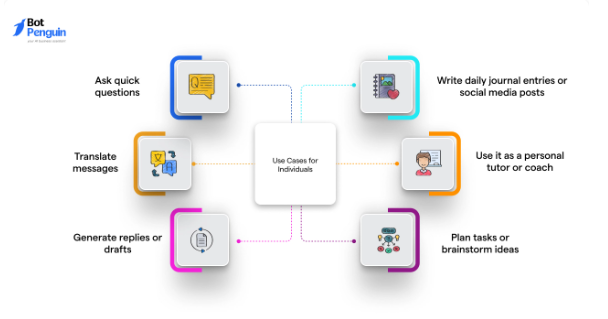
ChatGPT on WhatsApp can make everyday tasks easier and faster.
Writing Help
Need captions, emails, messages, or social media ideas? ChatGPT can draft them quickly.
Language Translation
Translate messages into different languages naturally and accurately.
Study Assistance
Students can ask for explanations, grammar corrections, or study notes.
Travel Planning
Create itineraries, packing lists, and travel recommendations directly in chat.
Brainstorming Ideas
Generate business ideas, video topics, blog headlines, or creative suggestions.
Daily Organization
Plan tasks, create to-do lists, or structure your day more effectively.
How Businesses Use ChatGPT on WhatsApp
For businesses, ChatGPT on WhatsApp is much more powerful.
Companies use it to improve customer communication while reducing manual workload.
Instead of hiring large support teams to answer repetitive questions, businesses can automate responses using AI.
This helps improve response speed and customer satisfaction.
Why Businesses Need Third-Party Platforms
Businesses cannot rely only on the official ChatGPT number because they need advanced features like:
- Customer management
- Lead tracking
- Team collaboration
- CRM integration
- Automated workflows
- Analytics and reporting
That’s why platforms like BotPenguin are useful.
These platforms connect ChatGPT with WhatsApp Business accounts and help companies manage conversations professionally.
How to Connect ChatGPT with WhatsApp Using BotPenguin

Here’s a simple step-by-step process businesses can follow.
Step 1: Create a WhatsApp Bot
First, sign in to your BotPenguin dashboard.
Then:
- Click “Create Bot”
- Choose WhatsApp as your platform
- Fill in the required details
- Complete the setup process
- Verify your WhatsApp account
After verification, your WhatsApp Business account will be connected.
Step 2: Integrate ChatGPT
Once your bot is ready:
- Open your BotPenguin dashboard
- Select your bot
- Go to “Third Party Integrations”
- Find ChatGPT integration
- Click “Connect”
- Enter your OpenAI API key
After setup, ChatGPT starts responding to customer messages automatically.
Business Use Cases for ChatGPT on WhatsApp
Businesses across industries are using AI-powered WhatsApp automation in many ways.
Customer Support
Answer FAQs instantly without human intervention.
Examples include:
- Order tracking
- Refund policies
- Shipping updates
- Product details
Lead Qualification
The chatbot can ask questions, collect customer details, and identify high-quality leads automatically.
Appointment Booking
Businesses can schedule consultations, demos, or meetings directly through WhatsApp.
Sales Assistance
AI can recommend products and guide users during the buying process.
Internal Team Support
Employees can ask for company information, policies, or quick updates through WhatsApp.
Marketing Campaigns
Businesses can run WhatsApp campaigns and let ChatGPT handle customer responses automatically.
How to Use ChatGPT on WhatsApp Safely
As AI becomes more popular, many fake tools and scam links are also appearing online.
It’s important to stay cautious while connecting ChatGPT with WhatsApp.
Use Verified Platforms
Only trust official numbers and recognized platforms.
The official ChatGPT WhatsApp account includes a verified green badge.
For business automation, use trusted services like BotPenguin.
Avoid Suspicious Downloads
Never install random APK files or tools asking for unnecessary permissions.
These may compromise your privacy or WhatsApp account.
Protect Sensitive Information
Do not share:
- Banking details
- Passwords
- Government IDs
- Personal security information
AI tools should not be used for storing confidential information.
Best Practices for Using ChatGPT on WhatsApp
To get better results, follow these simple best practices.
Ask Clear Questions
Specific prompts usually produce better answers.
Instead of: “Help me write something.”
Try: “Write a short professional email requesting a meeting.”
Keep Conversations Focused
Avoid asking too many unrelated questions in a single message.
This improves response quality.
Review AI Responses
Businesses should regularly check chatbot replies to ensure accuracy and brand consistency.
Combine AI with Human Support
AI works best when combined with real human assistance for complex issues.
Update Knowledge Regularly
Businesses should update FAQs, product details, and workflows to keep responses accurate.
The Future of ChatGPT on WhatsApp
The combination of AI and messaging apps is still evolving rapidly.
In the future, ChatGPT on WhatsApp may become even more advanced.
Possible improvements include:
- Better voice support
- Image recognition
- Personalized memory
- Smarter recommendations
- Advanced business automation
- Multi-language conversations
Businesses are expected to rely even more on AI-powered communication in the coming years.
As customer expectations continue to grow, companies that adopt AI early may gain a strong competitive advantage.
Final Thoughts
ChatGPT on WhatsApp is changing how people communicate, learn, and manage daily tasks.
For individuals, it offers quick and convenient AI support directly inside a familiar messaging app.
For businesses, it provides a powerful way to automate customer service, improve response times, and scale communication without increasing workload.
The official ChatGPT WhatsApp number makes personal use incredibly simple, while platforms like BotPenguin help businesses unlock advanced automation features.
As AI technology continues to improve, WhatsApp is likely to become one of the biggest platforms for intelligent conversations.
If you want faster communication, better productivity, and smarter customer interactions, now is the perfect time to start using ChatGPT on WhatsApp.
Frequently Asked Questions (FAQs)
Is it free to use ChatGPT on WhatsApp?
Yes, the official ChatGPT WhatsApp service offers free access with limited daily usage. If you need additional features, higher usage limits, or business automation tools, you may need to use third-party platforms with paid plans.
Can businesses use ChatGPT on WhatsApp for customer support and automation?
Yes, businesses can connect ChatGPT with their WhatsApp Business account using platforms such as BotPenguin.
This helps automate customer conversations, manage leads, answer common questions, schedule appointments, and provide faster support without constant manual effort.
Does ChatGPT on WhatsApp support multiple languages?
Yes, ChatGPT can communicate in many different languages. Users can ask questions, translate messages, or provide customer support in multiple languages, making it useful for both personal and international business communication.
What is the difference between personal and business use of ChatGPT on WhatsApp?
Personal use is mainly focused on one-on-one conversations for tasks like writing help, translations, learning, or general questions.
Business use is more advanced. Companies can automate customer interactions, manage team conversations, track leads, and integrate AI into their support and sales workflows using dedicated platforms.
메타데이터
- post_id
- 9899efb2b5e4
- slug
- step-by-step-guide-to-using-chatgpt-on-whatsapp-9899efb2b5e4
- url
- https://medium.com/@botpenguin/step-by-step-guide-to-using-chatgpt-on-whatsapp-9899efb2b5e4
- canonical_url
- https://medium.com/@botpenguin/step-by-step-guide-to-using-chatgpt-on-whatsapp-9899efb2b5e4
- author_url
- https://medium.com/@botpenguin
- status
- ok
- fetched_at
- 2026-06-09 15:37:30