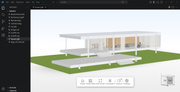
DWG Viewer for Confluence
Embed Live Interactive CAD Drawings Inside Wiki Pages
DWG Viewer for Confluence
Embed Live Interactive CAD Drawings Inside Wiki Pages
[embed]DWG Viewer for Confluence Edit descriptionThingraph.sith
Try it: https://cad.thingraph.site/dwg-viewer
Confluence lacks native DWG preview, forcing engineers to convert drawings into static PDF/PNG or ask teammates to download files and open via AutoCAD. This fragmented workflow wastes engineering hours and breaks cross-team collaboration.
A dedicated DWG Viewer Confluence add-on fixes the pain with embedded browser-based CAD rendering.
Core Benefits
- Keep full DWG data intact: layers, dimensions and blocks won’t get stripped like PDF exports
- Built-in CAD tools: pan, zoom, toggle layers and on-page measurement without AutoCAD licenses
- Zero extra desktop software; works on all modern browsers
- Seamlessly bind drawings to specs, checklists and project docs on Confluence pages
3 Quick Setup Steps
- Install DWG Viewer from Atlassian Marketplace
- Insert DWG Viewer macro and pick your uploaded file; save to activate interactive preview
[embed]DWG Viewer for Confluence — Config *Edit description*
Ideal Users
Mechanical, architecture, construction and manufacturing teams that manage technical documentation on Confluence. PMs, QA and clients view drawings inline without CAD software.
Wrap-up
Turn Confluence into your single source of CAD truth. Cut repetitive format conversion and unify design review within your existing wiki workspace.
메타데이터
- post_id
- 98ee492b0a7d
- slug
- dwg-viewer-for-confluence-98ee492b0a7d
- url
- https://medium.com/@thingraph/dwg-viewer-for-confluence-98ee492b0a7d
- canonical_url
- https://medium.com/@thingraph/dwg-viewer-for-confluence-98ee492b0a7d
- author_url
- https://medium.com/@thingraph
- status
- ok
- fetched_at
- 2026-06-09 15:37:30