How I Achieved 99% Performance Improvement on a SQL Server CDC Process
We had a performance improvement of 15 minutes for 10 seconds, 98.9% performance improvement.
How I Achieved 99% Performance Improvement on a SQL Server CDC Process
Source: Author
Not a medium member? Read here!
One of my recent challenges was to support and improve the performance of a CDC procedure, the first goal was to reduce by at least 50%. It went better than I expected, we had a performance improvement of 15 minutes for 10 seconds, 98.9% performance improvement.
So, this article is not just about CDC, I will explain some good practices that I applied in a procedure with more than 1k lines.
I know you want to understand and see results right away, but wait… What is CDC?
What is Change Data Capture
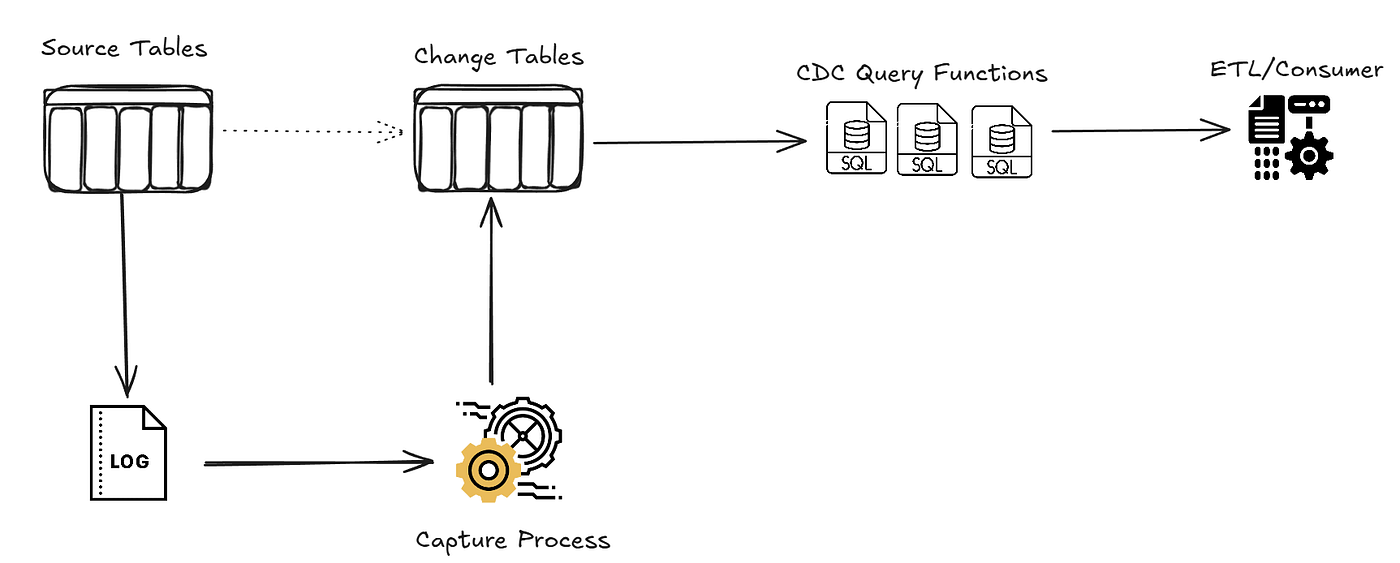
Is a SQL Server feature (not only sql server) that records insert, update and delete activity on tables, all the DML commands.
Instead of querying entire tables to find what changed, CDC maintains a history of changes that you can query incrementally.
How CDC Works
When you enable CDC on a table, SQL Server automatically:
- Creates a change table (cdc.dbo_mytable_CT) that stores all changes
- Records the LSN (Log Sequence Number) for each change, it’s a unique identifier that orders transactions
- Provides built-in function to query changes between two LSN points
The CDC Processing Pattern
A typical CDC consumer follows this pattern:
-- 1. Get the last processed LSN (your watermark)
declare @FromLsn binary(10) = /* get from your tracking table */;

-- 2. Get the current maximum LSN
declare @ToLsn binary(10) = sys.fn_cdc_get_max_lsn();

-- 3. Query changes between these two points
select *
from cdc.fn_cdc_get_all_changes_dbo_MyTable(@FromLsn, @ToLsn, 'all');

-- 4. Process the changes...

-- 5. Update your watermark
update MyLsnTracker set LastLsn = @ToLsn where TableName = 'MyTable';
This ensures you only process each change once and can resume from where you left off.
Understanding the Two CDC Functions
Here is a tricky part, SQL Server provides two main functions to query CDC data. The difference between them was the key to my biggest performance win.
fn_cdc_get_net_changes
Returns the final state of each row that changed. If a row was inserted then updated multiple times, you only see the final values.
select *
from cdc.fn_cdc_get_net_changes_dbo_MyTable(@FromLsn, @ToLsn, 'all');
This is good? Of course. But internally, this function:
- Scans all changes in the range
- Groups by primary key
- Merges insert/update/delete operations
- Returns only the “net” result
You should use this one when you a need final state per row. This is heavier.
fn_cdc_get_all_changes
Returns all changes that have occurred. If a row was updated 5 times, you will see 5 rows.
select *
from cdc.fn_cdc_get_all_changes_dbo_MyTable(@FromLsn, @ToLsn, 'all');
Internally, this function:
- Scans all changes in the range
- Returns raw data with no aggregation
You should use this when you’ll aggregate yourself. This is light.
Here’s what I discovered when benchmarking on a high-volume test table:
fn_cdc_get_net_changes + GROUP BY:  19,560 ms
fn_cdc_get_all_changes + GROUP BY:   1,306 ms

Improvement: 93% faster
If you’re going to GROUP BY the results anyway, use fn_cdc_get_all_changes. You’re doing the aggregation yourself, so why pay for SQL Server to do it first?
Just is the main and most impatcful performance improvement. But I made other that could help you.
All CDC Optimizations
Optimization #1: Single CDC Call with Caching
- Instead of calling the CDC function twice, cache the results. Never scan the same CDC data twice.
Optimization #2: Switch to fn_cdc_get_all_changes
- When you’re aggregating the results anyway, use the faster function. Let SQL Server return raw data, handle aggregation yourself.
Optimization #3: Deduplicate Early
- Reduce row counts before expensive operation. Is a good practice and could be used in different scenarios.
Optimization #4: Pre-Compute Expensive Calculations
- Move complex calculations out of the MERGE into a pre-computation phase, temp tables in the case.
CDC is a powerful feature for incremental data, but some patterns could be tricky. That’s why I wanted to write this article and explain the changes between these two functions.
Others optimizations could be adapted to your CDC reality.
Enjoying the content?
Support me saying thanks by buying me a coffee! ☕
메타데이터
- post_id
- 992b419a34e1
- slug
- how-i-achieved-99-performance-improvement-on-a-sql-server-cdc-process-992b419a34e1
- url
- https://blog.devops.dev/how-i-achieved-99-performance-improvement-on-a-sql-server-cdc-process-992b419a34e1
- canonical_url
- https://blog.devops.dev/how-i-achieved-99-performance-improvement-on-a-sql-server-cdc-process-992b419a34e1
- author_url
- https://medium.com/@lorenzouriel
- status
- ok
- fetched_at
- 2026-07-15 02:34:55