How to Find Out Who Made a Fake Instagram Account
Dealing with an imposter? Learn 5 proven methods to identify who owns a fake Instagram account and how to report them.
How to Find Out Who Made a Fake Instagram Account
Photo by Kate Torline on Unsplash
The Instagram platform is not empty from fake profiles like all other social media apps. And if you’ve recently received a follow request from an account that looks eerily familiar, or worse, found a profile using your photos under a different name, you aren’t alone. The rise of fake profiles on social media is more than just a nuisance; it’s a growing privacy concern that affects millions of users worldwide.
In the United States alone, the prevalence of bot accounts and impersonators has skyrocketed. Recent studies suggest that a significant percentage of active social media accounts are inauthentic. These fake profiles complicate the online landscape, leading to misinformation, scams, and harassment. For the average user, this means that simply existing online requires a new set of skills: the ability to verify who is actually behind the screen.
Now, let’s face it, knowing how to identify the owner of a fake Instagram account is no longer just for private investigators or tech experts. It is a necessary verification for anyone who wants to protect their digital identity. So, whether you are dealing with a harmless prankster or a potential scammer, when you understand the methods to uncover the truth, it gives you the power to take action and secure your online presence.
In this guide, I’ll walk you through step-by-step methods to help you trace the origins of fake Instagram accounts.
Methods to check who owns an Instagram account
In fact, uncovering the identity behind an anonymous Instagram profile requires a mix of technical tools and detective work. While Instagram protects user privacy (meaning you can’t just click a button to see an email address), slip-ups by the account creator often leave breadcrumbs. Here are the most effective strategies to find out who is lurking behind a fake profile.
1. Use reverse username search tools
One of the quickest ways to gather information about suspicious Instagram account is by leveraging the username itself. In fact, people are creatures of habit. Often, the person behind a fake account will reuse a username, or a variation of it that they have used on other platforms where they might have revealed their real identity.
By doing my own testing and research, I found some great solutions for this:
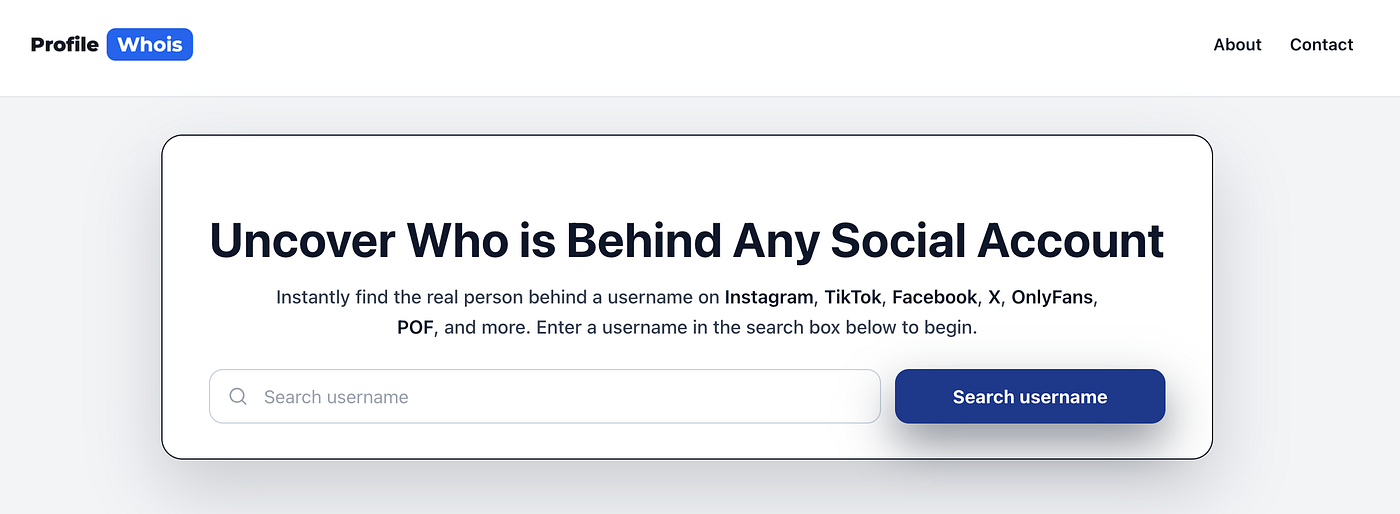
**Profile Who Is** is a friendly online tool that can help you identify anonymous Instagram users. It allows you to enter a username and scans dozens of social and dating platforms instantly. After that, if the person created a fake Instagram but used the same handle on a public Twitter, TikTok, or forum account, this tool connects those dots for you. As a result, it simplifies the process by aggregating the data that would take hours to find manually. The best thing is that it’s totally free to use.
Beyond specialized tools, don’t underestimate the power of standard search engines. I tested Bing multiple times, and it helped me spot fake users on social media by finding their other profiles on Facebook and Instagram with an easy search.
Google: Type the username in quotes (e.g., “fakeuser123”) to find exact matches across the web.
Bing and Yahoo: different search engines index pages differently. What Google misses, Bing might catch, especially if the username appears on older forums or niche websites.
Manual Cross-Platform Search
If automated tools don’t yield results, you should try searching the username manually on major platforms like Snapchat, TikTok, and X (formerly Twitter). In reality, scammers or impersonators often create “burner” accounts on multiple platforms simultaneously. Thus, if you find a match on a platform like Facebook, you might find their real name or location attached to that profile, blowing their cover on Instagram.
2. Reverse image search
A picture is worth a thousand words, and in the world of online investigation, it can be the key to unlocking an identity. Remember that fake accounts on social media platforms, including Instagram, rarely generate original content. Instead, they typically steal photos from stock image sites, influencers, or regular users on Facebook or other sites.
Now, if the fake account has a profile picture or has posted images, you can use a reverse image search to find the original source.
Google Images: You can upload the photo directly or paste the image URL. Google will show you where else that image appears online.
TinEye: This tool is excellent for finding the exact date an image was first seen online, which helps determine if the photo was stolen from an older profile.
Yandex: This search engine is particularly strong at facial recognition and finding matching social media profiles, even if the photo has been slightly altered or cropped.
Why this works:
If the search results show that the profile photo belongs to a celebrity, a stock model, or a random person in a different country, you have confirmed the account is fake. More importantly, if the photo traces back to a real Facebook or LinkedIn profile of a specific individual who is not the person the Instagram account claims to be (or if it leads back to the harasser’s real personal blog), you have successfully identified the source.
3. Search for their identities by their display name
The username (the handle with the @ symbol) is unique, but the “Display Name” (the name in bold at the top of the bio) does not have to be. This is a common place for slip-ups.
Sometimes, a person creating a fake account might accidentally leave their real nickname, a variation of their real name, or a pseudonym they use in their gaming circle as the Display Name.
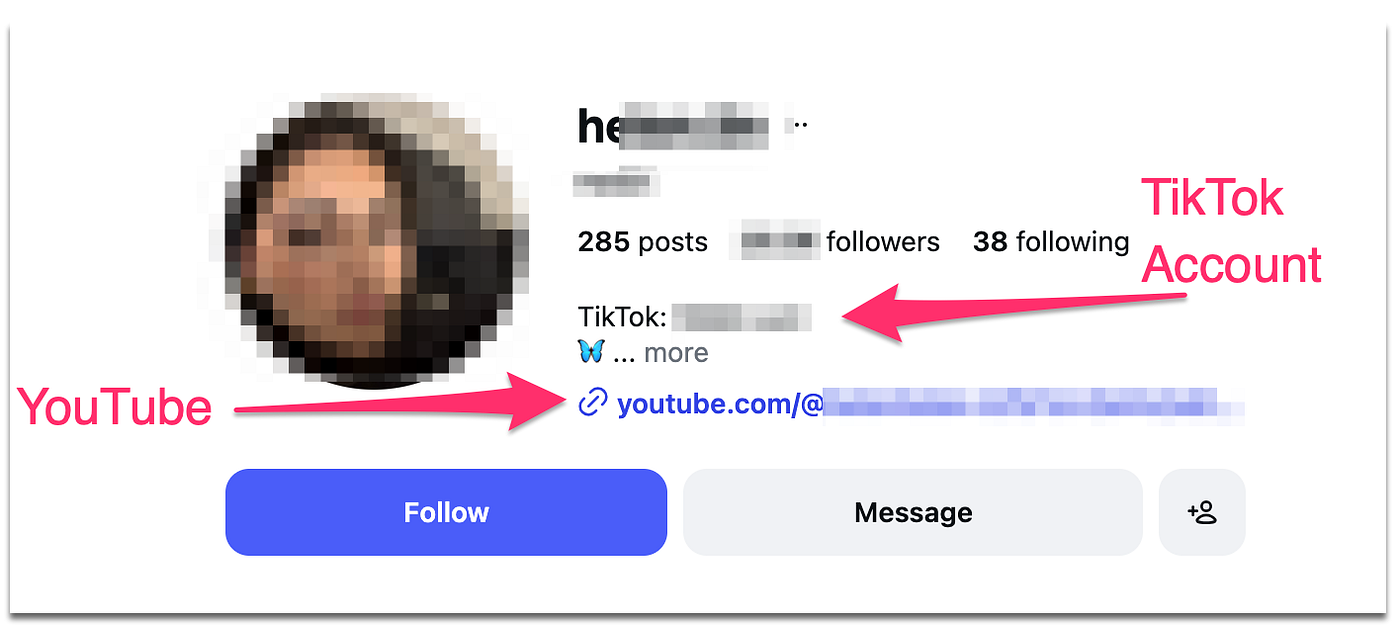
In the following screenshot I create, you can see an example of Instagram user account with their display name, and also links to other accounts on TikTok and YouTube. So, always check that bio section and you may find some details.
- Copy the Display Name: Take the name exactly as it appears.
- Run a broad search: Plug that name into Facebook, LinkedIn, and YouTube.
- Check contact syncing: Save the fake account’s possible phone number (if you have a suspicion of who it is) into your phone contacts. Then, use Instagram’s “Discover People” or “Sync Contacts” feature. If the fake account pops up under a friend’s name, you have your answer.
This method relies on human error. People often forget that the Display Name is searchable and public, making it a valuable data point in your investigation.
4. Use Google advanced search
When a basic Google search fails, Google Advanced Search offers a more surgical approach. This feature allows you to filter results to specific websites, regions, or languages, cutting through the noise of general search results.
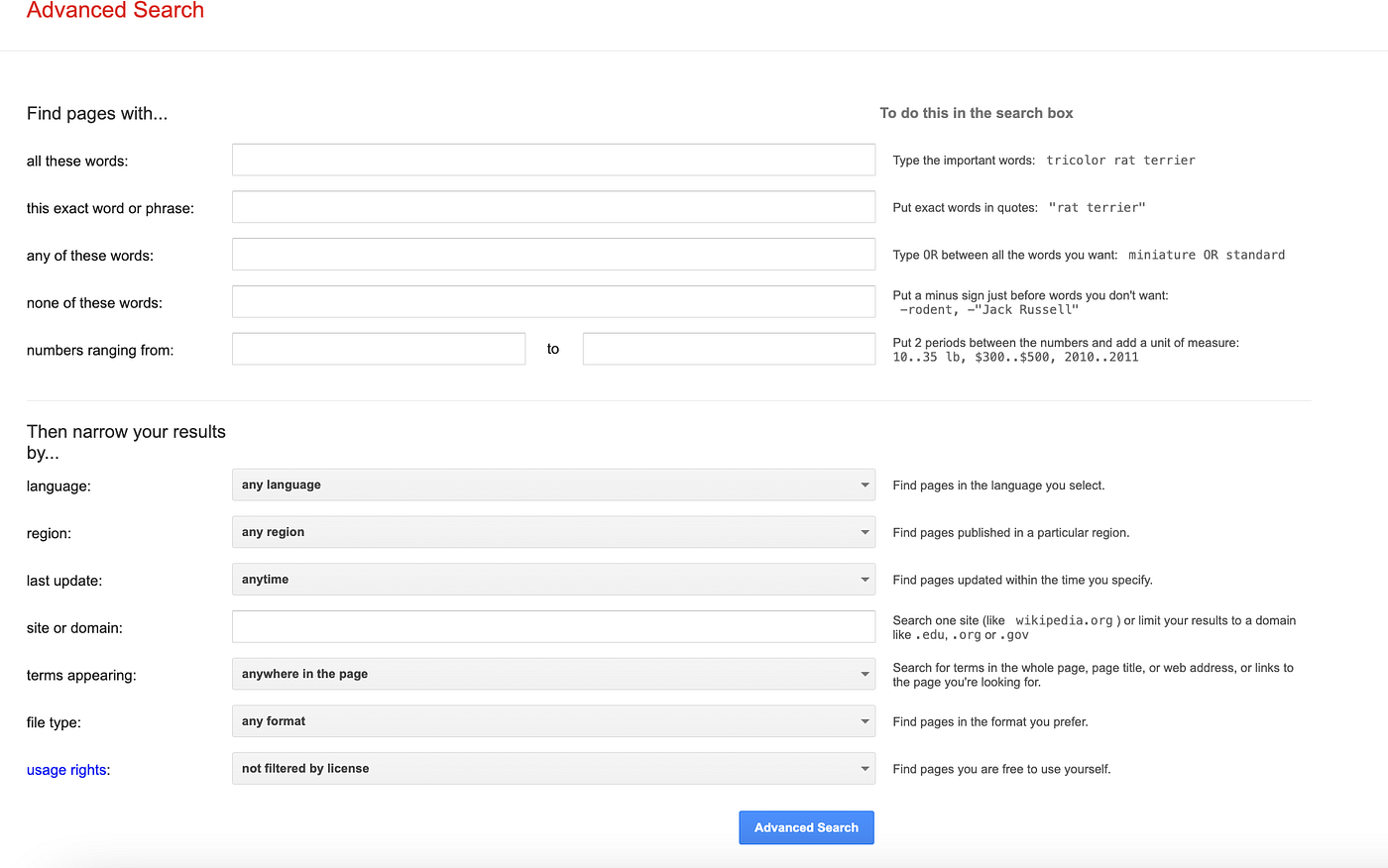
You can use “search operators” to dig deeper into the Instagram platform specifically.
The “site:” operator: Type site:instagram.com “username” into Google. This forces Google to look only at Instagram pages. This can sometimes reveal comments the user left on other public posts, or older versions of their bio that Google cached before they changed it.
The “intext:” operator: Type intext:”username” to find any web page where that specific text appears in the body of the page. This is useful for finding blog comments or forum posts where the user might have linked their Instagram account.
By refining your search parameters, you can uncover digital footprints that the user thought were long buried or irrelevant.
5. Instagram profile checker tools
This is not new. In fact, several third-party analytics tools are designed to help influencers and brands audit their followers, but they are equally useful for spotting fakes. These tools analyze the metadata and behavior of an account to determine its authenticity. Here is what you can do to check if an Instagram user is real or fake:
What these tools analyze:
Engagement Rate: Fake accounts often have very low or impossibly high engagement rates (e.g., thousands of likes but zero comments).
Follower-to-Following Ratio: Bots usually follow thousands of people but have very few followers in return.
Account Age: Some tools can estimate when an account was created. A profile that claims to be a long-time friend but was created two days ago is a major red flag.
Username History: Instagram itself now allows you to see “About this Account” for profiles with a large reach, showing former usernames. However, third-party tools can sometimes track name changes for smaller accounts, revealing if the user previously went by a different (and perhaps real) identity.
Using an Instagram profile checker adds a layer of data-backed evidence to your suspicion, confirming whether the account behavior aligns with a real human or a deceptive bot.
How to tell if an Instagram account is fake?
Identifying a fake account isn’t always about high-tech tools; often, it requires simple observation. Fake profiles tend to follow specific patterns because they are usually created in bulk or in a hurry. If you know what to look for, the signs become obvious.
1. The Profile Photo is Generic or Missing
A real user typically has a clear profile picture. Fake accounts often use:
- No photo at all (the default silhouette).
- A photo of a celebrity or influencer.
- A stock image of nature, a car, or a generic “attractive person” that looks too perfect.
- Blurry, pixelated images that look like they were screenshotted multiple times.
2. The Bio is Empty or Generic
Real people usually put effort into their bios — adding emojis, quotes, their location, or links to other socials. Fake accounts often have:
- A completely blank bio.
- A generic phrase like “Loving life” or “Follow for follow.”
- A suspicious link (e.g., to an adult site or a “get rich quick” scheme).
- Broken English or strange formatting that suggests it was auto-generated.
3. Spammy Following Patterns
Look at the numbers.
The Ratio: If they are following 7,500 people (the maximum limit) but only have 50 followers, it is likely a bot designed to spam-follow for attention.
The Followers: Click on their followers. Do they look like real people with diverse backgrounds, or are they all other blank profiles with strange usernames? A network of fake followers usually indicates a fake account.
4. Lack of Activity or Content
Check their posts.
Zero Posts: A private account with no posts and hundreds of followers is highly suspicious.
Bulk Posting: Did they upload 10 photos all on the same day, and then nothing since? Scammers often “populate” a feed quickly to make it look real at a glance, but the dates tell a different story.
Generic Comments: Look at what they comment on other posts. Comments like “Nice pic!”, “Collab?”, or emojis that don’t match the context, are signs of automation.
5. Direct Messages (DM) Behavior
If the account messages you, pay attention to the content.
Immediate Links: If they send a link immediately without context, do not click it. It is likely a phishing attempt.
Urgency: Scammers often create false urgency (e.g., “You won a prize! Claim in 10 minutes!”).
Poor Grammar: While not definitive, consistent spelling errors and awkward phrasing can indicate a scammer operating from a different region.
By combining these observations, you can usually determine within seconds if an account is genuine or a fabrication.
How to report a fake Instagram profile
Once you have identified a fake account, taking action is crucial. Reporting the profile not only protects you but also helps clean up the platform for everyone else. In all cases, Instagram relies on user reports to flag and remove impersonators and bots.
Why Reporting Matters
When you report a fake account, that will stop the user from scamming others, harassing more victims, or stealing more photos. If the account is impersonating you, it is even more critical to report it to prevent damage to your reputation.
Step-by-Step Guide to Reporting:
1. Report an account that is impersonating you:
If someone created an account pretending to be you:
- Go to the profile of the fake account.
- Tap the three dots (…) in the top right corner.
- Select Report.
- Choose Report Account.
- Select It’s pretending to be someone else.
- When asked “Who is this account pretending to be?”, select Me.
- Follow the on-screen instructions. You may need to provide a photo of your ID to prove your identity to Instagram.
2. Report a spam or bot account:
If the account is just a generic fake or spammer:
- Go to the profile.
- Tap the three dots (…).
- Select Report.
- Select It’s spam or Something else.
- If you choose “Something else,” you can select options like “Fraud or Scam” or “I just don’t like it.”
3. Report via a Computer:
You can also report accounts using the desktop version of Instagram.
- Visit the profile URL.
- Click the three dots next to the username.
- Select Report and follow the same steps as above.
What happens next?
Instagram will review the report. This process can take anywhere from a few hours to a few days. If they determine the account violates their Community Guidelines, they will remove it. You will usually receive a notification in your “Support Requests” (found in your Settings) updating you on the status of your report.
Pro-Tip: If the account is impersonating you and Instagram is slow to react, ask friends and family to report the account as well. Multiple reports often trigger a faster review from the moderation system.
Conclusion
As you can see, a lot of the social media profiles you see are real. So many people create multiple accounts and they use fake details and photos of other people. While fake Instagram accounts are a persistent issue, you are not powerless against them. So, you can use reverse search tools like Profile WhoIs, Google, Bing, etc….After that, make sure you analyze the image origins and scrutinize the profile behaviors. By doing that, you can strip away the anonymity that impostors rely on.
메타데이터
- post_id
- 99d4cb034eef
- slug
- how-to-find-out-who-made-a-fake-instagram-account-99d4cb034eef
- url
- https://medium.com/@rossicloudia/how-to-find-out-who-made-a-fake-instagram-account-99d4cb034eef
- canonical_url
- https://medium.com/@rossicloudia/how-to-find-out-who-made-a-fake-instagram-account-99d4cb034eef
- author_url
- https://medium.com/@rossicloudia
- status
- ok
- fetched_at
- 2026-06-20 20:29:01