A Complete Guide on Return and Claim Management in E-commerce to Save Revenue Across Channels
Are your margins quietly shrinking because of claims you can’t defend? What happens when a customer says the package was empty, or that the…
A Complete Guide on Return and Claim Management in E-commerce to Save Revenue Across Channels
Return and Claim Management in E-commerce
Are your margins quietly shrinking because of claims you can’t defend? What happens when a customer says the package was empty, or that the returned item isn’t what you shipped, and you have no proof to challenge it?
For sellers operating across Amazon, Flipkart, Myntra, Meesho, and their own D2C store, this isn’t an occasional issue. Let’s quickly assess how much revenue your business might be losing to rejected claims.
When you sell on multiple marketplaces, managing returns on each becomes a challenge in itself.
Returns Across Marketplaces: The Hidden Challenge Hurting Your Margins
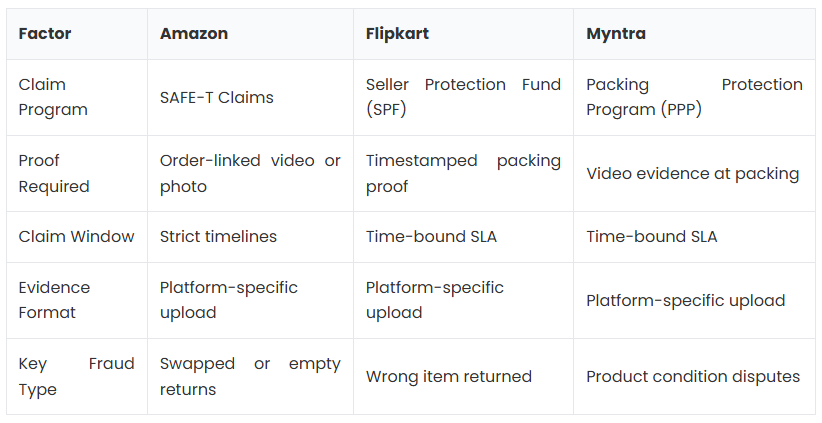
Managing returns from a single channel is already complex. Doing it across Amazon, Flipkart, Myntra, Meesho, Nykaa, and your own website simultaneously will make things more complex, as each channel has its own requirements and processes.
A quick snap of different key factors to keep in mind while managing returns on different sales channels.
Going through these complex processes is time-consuming in itself, and when you handle returns at scale, things are likely to break! Have you faced any of the scenarios given below?
5 Scenarios When Your Claims Management Breaks Down at Scale
1. Lack of Solid Evidence:
Most warehouses record packing on CCTV. But CCTV footage is not order-linked, not searchable by order ID, and often not in the format marketplaces require for claim submissions. When a dispute comes in, your team is manually scrubbing through hours of footage, if the evidence even exists.
2. Tight Claim Windows Get Missed:
Marketplace claim requests have strict SLA windows. Amazon SAFE-T, Flipkart SPF, and Myntra PPP all require sellers to respond within days, sometimes 48 to 72 hours. Without an automated retrieval system, your team simply can’t respond in time, and the claim is auto-rejected.
3. Return Fraud Goes Undetected:
Customers return incorrect items, damaged goods, or empty boxes, and sellers absorb the loss because they can’t prove what was originally shipped. Without video proof at the packing stage, you have no ground to stand on.
Common fraud patterns include: empty-box returns, swapped-product returns (the original replaced with a cheaper or broken item), “item not received” claims despite delivery confirmation, and partial return claims in which only some items are sent back.
4. Lack Central View To Manage Returns:
Returns from Amazon, Flipkart, and Myntra arrive at your warehouse at the same time and are processed by different teams following different SOPs. There’s no central view of what came back, in what condition, and what claims were filed against it.
5. Manual Reconciliation Leaves Financial Blind Spots:
Finance teams can’t reconcile settlements when claim data is scattered across five different marketplace portals, courier dashboards, and spreadsheets. Unsettled claims often go unnoticed until month-end, by which time the window is long closed.
If you have faced any of the scenarios above, you must know what risk your business is facing right now!

When you know that your system may not survive at scale, it’s time to revamp it! But can you build a system that saves you revenue when operating at scale?
A Returns and Claims Management System That Saves You Revenue
The brands that win at marketplace claims management have one thing in common: they treat proof capture as a non-negotiable part of the packing process, not an afterthought.
Here’s the framework:
Step 1: Capture Evidence at the Source
Every order should be video-recorded at the time of packing, with the footage automatically linked to a unique order identifier. This creates an unambiguous, timestamped record of what was packed and dispatched.
Use order-scanning triggers to start recordings automatically Capture short clips linked to each order ID, not hours of unlinked CCTV Include photos for high-value or fragile SKUs
Step 2: Record Returns at the Reverse Touchpoint
When a return arrives, record the unboxing. A short condition video showing the returned product compared against the original packing footage is the most powerful evidence you can submit for a claim.
Tag returned items as ‘Good’ or ‘Bad’ at the point of assessment Link return footage to the same order ID as the original packing video Flag condition mismatches immediately for claim filing
Step 3: Centralize Evidence Storage
All packing and return footage should be stored in a centrally accessible, searchable cloud system, not on local hard drives or individual warehouse computers.
- Cloud storage with enterprise-grade encryption
- Searchable by order ID, date, channel, or warehouse
- Minimum 90-day retention, customizable based on marketplace SLAs
Step 4: Automate Marketplace-Ready Evidence Packs
Different marketplaces require different evidence formats. Your system should auto-compile claim-ready evidence packs in Amazon SAFE-T, Flipkart SPF, Myntra PPP, and Meesho SAFE formats, without your team manually formatting files.
Step 5: Track Claims Centrally Across All Channels
A centralized claims dashboard lets your ops and finance teams see the status of every claim, filed, pending, approved, and rejected across all marketplace channels in one place. This eliminates reconciliation blind spots and ensures nothing falls through the cracks.
With an automated evidence capture system, packing proof already exists for every order. The return condition is tagged at assessment. Claims are filed with a few clicks, no manual evidence hunting required.
How Unicommerce’s Video Management Solution (UniCapture) Solves This End-to-End
UniCapture is Unicommerce’s purpose-built Video Management Solution (VMS) for ecommerce sellers. It’s designed specifically for the Indian sellers juggling on Amazon, Flipkart, Myntra, Meesho, and D2C websites simultaneously.
How UniCapture Solves It
1. Start Recording Instantly Just scan the Order ID, SKU, or AWB. Recording starts automatically and links to the correct order.
2. Auto-Capture and Tag Evidence Every packing or return video is captured and tagged to the order. No manual work needed.
3. Secure Cloud Storage All videos are stored safely in the cloud. They are encrypted, organized, and accessible anytime.
4. Find Proof in Seconds Search by Order ID or SKU and instantly access claim-ready videos. No need to go through hours of CCTV footage.

This blog was originally published on the Unicommerce blog page, where we regularly share in-depth insights on e-commerce operations, inventory control, fulfilment, and growth challenges. You can explore more related topics, industry analysis, and practical guidance by visiting Unicommerce.
메타데이터
- post_id
- 99fae85d8d91
- slug
- a-complete-guide-on-return-and-claim-management-in-e-commerce-to-save-revenue-across-channels-99fae85d8d91
- url
- https://medium.com/@unicommerce_esolutions/a-complete-guide-on-return-and-claim-management-in-e-commerce-to-save-revenue-across-channels-99fae85d8d91
- canonical_url
- https://medium.com/@unicommerce_esolutions/a-complete-guide-on-return-and-claim-management-in-e-commerce-to-save-revenue-across-channels-99fae85d8d91
- author_url
- https://medium.com/@unicommerce_esolutions
- status
- ok
- fetched_at
- 2026-07-22 09:22:29