An integrated platform: BPO customer service solution
Based on your requirements for a comprehensive BPO customer service solution, here are the most suitable integrated platforms:
An integrated platform: BPO customer service solution
Based on your requirements for a comprehensive BPO customer service solution, here are the most suitable integrated platforms:
Best All-in-One Solutions
1. Zendesk Suite (Recommended for most BPOs)
- Native Integration: Chat, voice, ticketing, and knowledge base in one platform
- AI Capabilities: Zendesk AI can handle RAG-based responses from your knowledge base
- Telephony: Built-in voice support or integrate with Twilio for advanced features
- Multi-agent: Robust agent management, routing, and workforce management
- Handoff: Seamless bot-to-human transfer with full conversation context
- Hallucination Control: You can configure response confidence thresholds and fallback rules
2. Freshdesk Omni (Freshworks)
- Unified inbox for chat, email, phone, and social media
- Freshdesk Freddy AI for knowledge base-powered responses
- Built-in telephony (Freshcaller) or Twilio integration
- Automatic ticket creation from any channel
- Strong anti-hallucination controls with confidence scoring
3. Genesys Cloud CX
- Enterprise-grade contact centre platform
- Native AI with knowledge management integration
- Excellent multi-channel support (voice, chat, email, SMS)
- Advanced routing and workforce optimization
- Strong RAG capabilities with their AI features
4. Salesforce Service Cloud with Einstein
- Comprehensive omnichannel platform
- Einstein Bots for AI-powered chat with knowledge base integration
- Integrates with telephony providers (Twilio, Amazon Connect)
- Robust ticketing and case management
- Advanced AI with hallucination detection controls
Custom Integration Stack
If you prefer building with specialized tools:
- Knowledge Base + RAG: Integrate OpenAI Assistant API or Anthropic Claude with your knowledge base
- Orchestration: Use Kore.ai or Yellow.ai as middleware to connect everything
- Telephony: Twilio for voice + programmable voice AI
- Ticketing: Zendesk or Freshdesk (just the ticketing module)
- Chat: Intercom or Drift
- Hallucination Prevention: Implement confidence threshold checks and always provide a human handoff option
Key Features to Ensure
Whatever solution you choose, verify it has:
- Confidence scoring for AI responses (reject low-confidence answers)
- Explicit knowledge base grounding (RAG with citations)
- Fallback mechanisms when AI is uncertain
- Conversation context preservation during transfers
- Automatic ticket creation with conversation history
- Analytics dashboard to monitor AI performance and hallucinations
For most BPO use cases, Zendesk Suite or Freshdesk Omni offer the best balance of integration, cost-effectiveness, and AI capabilities with proper guardrails against hallucinations. For enterprise-scale operations with complex routing needs, consider Genesys Cloud CX.
Q1: Can ServiceNow, be another alternative?
ServiceNow for BPO Customer Service
ServiceNow Customer Service Management (CSM) offers:
Strengths
- Omnichannel Support: Chat, email, phone, self-service portals, and mobile
- AI Capabilities: Now Assist with Virtual Agent for conversational AI powered by knowledge base (strong RAG capabilities)
- Telephony Integration: Integrates with Twilio, Genesys, Amazon Connect, and other providers
- Ticketing: Industry-leading case/incident management with powerful workflows
- Multi-agent: Advanced agent workspace with intelligent routing and workload distribution
- Knowledge Management: Robust knowledge base with AI-powered search and article recommendations
- Hallucination Control: Virtual Agent can be configured with confidence thresholds and fallback to human agents
- Integration: Excellent API and integration capabilities with other systems
Considerations
- Cost: Generally, more expensive than Zendesk or Freshdesk — better suited for mid-to-large enterprises
- Complexity: More powerful but steeper learning curve and longer implementation time
- Licensing: Modular pricing — you pay for what you use
- Best For: Organizations already using ServiceNow for ITSM or those needing deep workflow automation
Comparison with Other Options
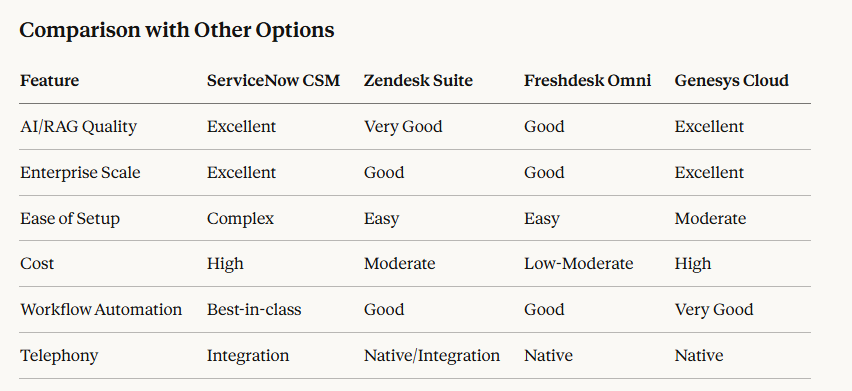
Comparisons
When to Choose ServiceNow
ServiceNow CSM is ideal if you:
- Already use ServiceNow for IT Service Management
- Need complex workflow automation and orchestration
- Have enterprise-scale requirements (1000+ agents)
- Require deep integration with backend systems (ERP, CRM, HR)
- Need unified service management across departments
- Have budget for premium enterprise solution
When to Choose Alternatives
Go with Zendesk/Freshdesk if you:
- Need faster deployment (weeks vs months)
- Have smaller scale operations or budget constraints
- Want simpler administration and maintenance
- Need primarily customer-facing support tools
ServiceNow is definitely a comprehensive solution that ticks all your boxes — multi-agent, RAG-based AI, telephony integration, ticketing, and hallucination controls. The decision really comes down to your scale, budget, existing tech stack, and implementation timeline.
Q2: Guide me how SNOW integration is possible?
ServiceNow Virtual Agent Setup & Twilio Integration
Let me walk you through both components in detail:
ServiceNow Virtual Agent Setup
1. Architecture Overview
Customer Query → Virtual Agent → NLU Engine → Knowledge Base (RAG)
                      ↓
            Confidence Check
                      ↓
        High Confidence → Automated Response
        Low Confidence → Human Handoff → Agent Workspace → Ticket Creation
2. Virtual Agent Configuration
A. Enable Virtual Agent
- Navigate to: Virtual Agent > Designer
- Activate the Virtual Agent plugin
- Configure your bot personality and greeting messages
B. Knowledge Base Integration (RAG Setup)
- Knowledge Management: Create and organize knowledge articles
- Search Configuration: Enable semantic search for better intent matching
- Article Scoring: Configure relevance thresholds
- ServiceNow uses Now Assist which employs generative AI with grounding in your knowledge base
C. Intent & Topic Creation
- Define Topics (customer intents like “password reset”, “billing inquiry”)
- Map topics to knowledge articles or workflows
- Create utterances (example phrases customers might use)
- ServiceNow’s NLU will learn from these patterns
D. Conversational Flow Design
Topic: Billing Inquiry
├── Gather Information (account number, issue type)
├── Search Knowledge Base
├── Present Answer
├── Confirmation ("Did this help?")
└── Escalation Path (if "No" → create ticket + transfer)
3. Hallucination Prevention & Controls
A. Confidence Thresholds
// In Virtual Agent Designer
if (confidence_score < 0.7) {
    // Low confidence - don't hallucinate
    triggerHumanHandoff();
} else if (confidence_score < 0.85) {
    // Medium confidence - provide answer with disclaimer
    response = knowledgeArticle + "Would you like to speak with an agent?";
} else {
    // High confidence - provide direct answer
    response = knowledgeArticle;
}
B. Response Grounding
- Source Attribution: Always cite knowledge article IDs
- Strict RAG Mode: Only answer from knowledge base, never generate
- Fallback Responses: "I don't have enough information. Let me connect you with an agent."
**C. Configuration Settings**
- Navigate to: **Virtual Agent > Settings**
- Enable: "Require knowledge article match"
- Set: Minimum confidence score (recommended: 0.70-0.80)
- Enable: "Show source articles in response"
- Disable: "Allow generative responses without sources"
**D. Monitoring & Quality Control**
- **Analytics Dashboard**: Track response accuracy, handoff rates
- **Conversation Review**: Regularly audit bot conversations
- **Feedback Loop**: Collect user ratings ("Was this helpful?")
- **A/B Testing**: Test different confidence thresholds### 4. **Multi-Agent Support****A. Agent Workspace Configuration**
- Enable **Agent Workspace** for unified desktop
- Configure **assignment rules** based on:
- Skills (technical, billing, general)
- Language
- Workload
- Availability**B. Routing Logic**Intelligent Work Assignment (IWA) ├── Skill-based routing ├── Load balancing ├── Priority queuing └── Overflow handling
**C. Queue Management**
- Set up **Assignment Groups** by department/skill
- Configure **Service Level Agreements (SLAs)**
- Enable **real-time queue monitoring**---## Twilio Integration with ServiceNow
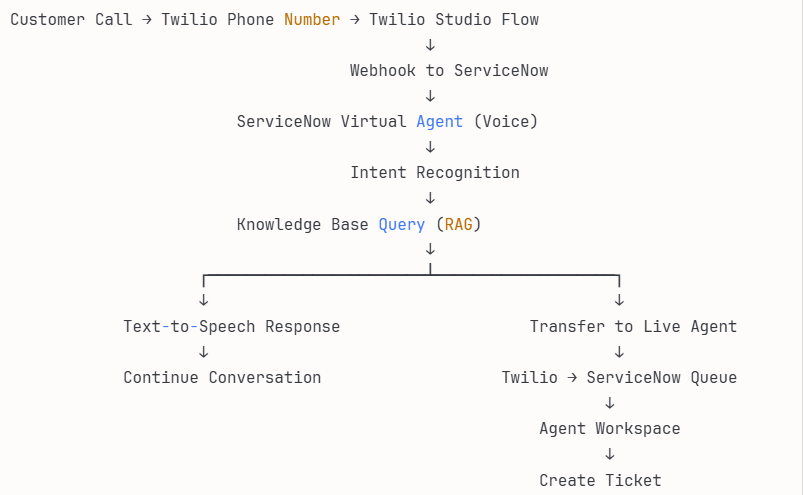
### 1. **Integration Architecture**### 1. **Integration Architecture**
### 2. **Step-by-Step Integration****A. Twilio Setup**1. **Get Twilio Account**
- Sign up at twilio.com
- Purchase phone number(s)
- Note your Account SID and Auth Token2. **Twilio Studio Flow** (IVR Design)Incoming Call ↓ Gather Input (IVR Menu) ├── "Press 1 for Sales" ├── "Press 2 for Support" └── "Say your question" (Voice AI) ↓ Send to Webhook (ServiceNow endpoint)
**3. Enable Twilio Programmable Voice**
- Voice with Speech Recognition
- Text-to-Speech (TTS) for responses

**B. ServiceNow Configuration**
1. **Install Integration**
- Search ServiceNow Store for “Twilio” spoke
- Or use **IntegrationHub** to build custom integration

**2. Create REST API Endpoints**

Navigate to: **System Web Services > Scripted REST APIs**
// Inbound Webhook - Receive call from Twilio (function process(/RESTAPIRequest/ request, /RESTAPIResponse/ response) {
var requestBody = request.body.data;
var callSid = requestBody.CallSid;
var from = requestBody.From;
var speechResult = requestBody.SpeechResult; // Customer's spoken query

// Create interaction record
var interaction = new GlideRecord('interaction');
interaction.initialize();
interaction.channel = 'voice';
interaction.phone_number = from;
interaction.call_sid = callSid;
interaction.status = 'active';
interaction.insert();

// Send to Virtual Agent for processing
var vaResponse = processWithVirtualAgent(speechResult, interaction.sys_id);

// Return TwiML response
var twiml = buildTwiMLResponse(vaResponse);
response.setBody(twiml);
response.setStatus(200);
})(request, response);
function processWithVirtualAgent(query, interactionId) { // Call Virtual Agent API var request = new sn_ws.RESTMessageV2(); request.setEndpoint('https://yourinstance.service-now.com/api/now/va/bot'); request.setHttpMethod('POST');
var payload = {
    message: query,
    interaction_id: interactionId,
    channel: 'voice'
};

request.setRequestBody(JSON.stringify(payload));
var vaResponse = request.execute();
var responseBody = JSON.parse(vaResponse.getBody());

return responseBody;
} function buildTwiMLResponse(vaResponse) { var twiml = '<?xml version="1.0" encoding="UTF-8"?>'; twiml += '<Response>';
if (vaResponse.confidence > 0.7) {
    // High confidence - speak the answer
    twiml += '<Say>' + vaResponse.answer + '</Say>';
    twiml += '<Gather input="speech" action="/api/now/twilio/continue">';
    twiml += '<Say>Is there anything else I can help with?</Say>';
    twiml += '</Gather>';
} else {
    // Low confidence - transfer to agent
    twiml += '<Say>Let me connect you with a specialist.</Say>';
    twiml += '<Dial>' + getAvailableAgent() + '</Dial>';
}

twiml += '</Response>';
return twiml;
}
**3. Configure Outbound Integration** (ServiceNow → Twilio)
// Transfer call to live agent function transferToAgent(callSid, agentPhone) { var request = new sn_ws.RESTMessageV2(); request.setEndpoint('https://api.twilio.com/2010-04-01/Accounts/' + TWILIO_ACCOUNT_SID + '/Calls/' + callSid + '.json'); request.setHttpMethod('POST'); request.setBasicAuth(TWILIO_ACCOUNT_SID, TWILIO_AUTH_TOKEN);
var params = {
    'Url': 'http://demo.twilio.com/docs/voice.xml',
    'Method': 'POST',
    'Status': 'in-progress'
};

request.setQueryParameter('Url', buildTransferTwiML(agentPhone));
var response = request.execute();

return response.getStatusCode() == 200;
}
function buildTransferTwiML(agentPhone) { // This URL should return TwiML that dials the agent return 'https://yourinstance.service-now.com/api/now/twilio/dial/' + agentPhone; }
**C. Agent Desktop Integration**
1. **CTI (Computer Telephony Integration)**
// Softphone integration in Agent Workspace // Shows caller info, conversation history, and call controls
// When call arrives at agent function handleIncomingCall(callSid, customerPhone, interactionId) { // Pop screen with customer info var customer = lookupCustomer(customerPhone); var interaction = getInteractionHistory(interactionId);
// Display in Agent Workspace
displayCallerInfo({
    name: customer.name,
    phone: customerPhone,
    history: interaction.conversation_log,
    sentiment: interaction.sentiment_score
});

// Enable call controls
enableCallControls(['mute', 'hold', 'transfer', 'end']);
}
**2. Automatic Ticket Creation**
// When agent ends call or during escalation function createTicketFromCall(interactionId) { var interaction = new GlideRecord('interaction'); interaction.get(interactionId);
var ticket = new GlideRecord('incident'); // or 'case' for CSM
ticket.initialize();
ticket.caller_id = interaction.customer;
ticket.short_description = interaction.topic;
ticket.description = interaction.conversation_log;
ticket.contact_type = 'phone';
ticket.u_call_sid = interaction.call_sid;
ticket.assignment_group = interaction.assigned_group;
ticket.assigned_to = interaction.agent;
ticket.insert();

// Link interaction to ticket
interaction.ticket = ticket.sys_id;
interaction.update();

return ticket.number;
}
### 3. **Complete Workflow Example**
**Scenario: Customer calls about password reset**- Customer dials Twilio number → Twilio Studio answers
- IVR: "Say your question or press 2 for support" → Customer says: "I need to reset my password"
- Twilio sends speech to ServiceNow webhook → ServiceNow Virtual Agent receives query
- Virtual Agent:
- Recognizes intent: "password_reset"
- Searches knowledge base
- Finds article: "Self-Service Password Reset"
- Confidence: 0.92 (HIGH)
- Response via TwiML: → Text-to-Speech: "You can reset your password by visiting portal.company.com and clicking 'Forgot Password'. You'll receive a reset link via email. Did this help?"
- Customer: "No, I'm not receiving the email" → Confidence: 0.65 (LOW - needs human)
- Transfer to Agent: → "Let me connect you with a specialist" → Twilio dials available agent from queue → Agent Workspace pops with full context
- Agent resolves issue
→ Ticket auto-created with:
- Call recording
- Conversation transcript
- VA interaction history
- Resolution notes
# 4. Advanced Features

**A. Call Recording & Transcription**
// Enable in Twilio Studio <Record maxLength="3600" transcribe="true" transcribeCallback="https://yourinstance.service-now.com/api/now/twilio/transcription"/>
**B. Sentiment Analysis**
// Analyze customer sentiment during call function analyzeSentiment(transcript) { // Use ServiceNow NLU or integrate with external service var sentiment = nlpAnalyze(transcript);
if (sentiment.score < -0.5) {
    // Negative sentiment - priority escalation
    escalateToPriority(interactionId);
}
}
**C. Real-time Metrics**
- Average handle time
- First call resolution
- VA containment rate
- Transfer rate
- Customer satisfaction scores
### 5. **Testing & Deployment**
**A. Test Scenarios**
1. Happy path: VA answers correctly
2. Escalation: Low confidence → agent transfer
3. Multi-turn conversation
4. Call drops/reconnection
5. No available agents (queue management)
**B. Pilot Approach**
Week 1-2: Internal testing with support team Week 3-4: Soft launch with 10% of calls Week 5-6: Monitor, tune confidence thresholds Week 7+: Full rollout
**C. Monitoring**
- ServiceNow Performance Analytics
- Twilio Console for call metrics
- Custom dashboards for VA performance

# Cost Considerations

**ServiceNow CSM**: ~$100–150/user/month (enterprise pricing) **Twilio**:
- Phone numbers: ~$1–2/month each
- Voice minutes: ~$0.013–0.02/minute
- SMS: ~$0.0075/message

**Total for 50-agent BPO**: ~$5,000–8,000/month (ServiceNow) + Twilio usage
메타데이터
- post_id
- 9ac36a962e43
- slug
- an-integrated-platform-bpo-customer-service-solution-9ac36a962e43
- url
- https://medium.com/@ipvikas/an-integrated-platform-bpo-customer-service-solution-9ac36a962e43
- canonical_url
- https://medium.com/@ipvikas/an-integrated-platform-bpo-customer-service-solution-9ac36a962e43
- author_url
- https://medium.com/@ipvikas
- status
- ok
- fetched_at
- 2026-06-14 11:28:49