Exploring Adobe Target with an AI-Powered MCP Client
A hands-on look at how Adobe’s Model Context Protocol support for Target opens its experimentation and personalization data to AI agents —…
Exploring Adobe Target with an AI-Powered MCP Client
A hands-on look at how Adobe’s Model Context Protocol support for Target opens its experimentation and personalization data to AI agents — and what’s worth knowing before pointing one at it.
AI agents are quickly changing how users interact with enterprise systems. Instead of navigating dashboards and predefined workflows, organizations are starting to expose their platforms through AI-native interfaces powered by the Model Context Protocol (MCP).
Adobe recently introduced MCP support for Adobe Target, letting AI clients discover tools, inspect activities, and pull performance reports conversationally. This post walks through what the Target MCP server actually exposes, how it’s structured, and what’s worth knowing before pointing an agent at it.
What Is MCP?
The Model Context Protocol is an emerging standard for letting AI applications interact with external systems through standardized, discoverable tools. Rather than tightly coupling APIs into each application, MCP exposes systems as a catalog of tools with structured input/output schemas that any AI client can introspect and call.
Traditional integration:
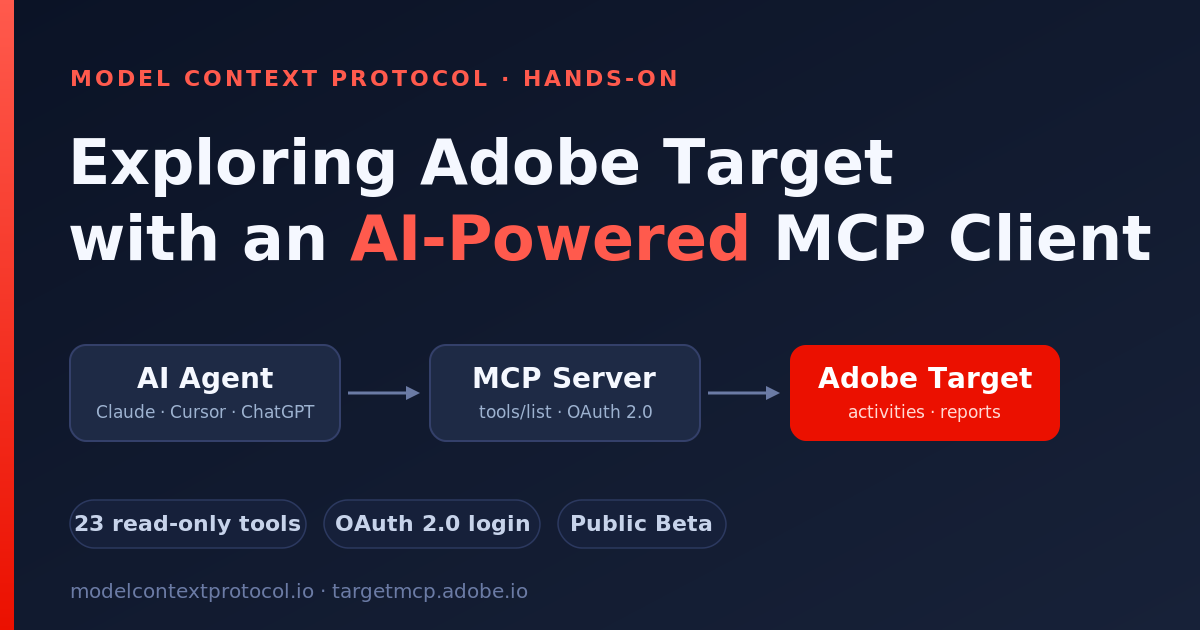
Frontend → Backend → Target Admin APIMCP-style integration:
AI Agent → MCP Server → Adobe Target```The shift is small in protocol terms but large in consequence: AI agents discover tools at runtime, reason over their schemas, and orchestrate workflows without hardcoded knowledge of the underlying API.
This continues a thread from two earlier posts. In Edge AI with My Profile the focus was on client-side, browser-local intelligence. In Adobe Customer Journey Analytics MCP it was server-side analytics exposed for autonomous agents. Target MCP sits squarely in the same enterprise-agent territory as CJA — but where CJA answers ”what happened,” Target governs ”what we’re testing and personalizing.” Together they sketch how the experimentation and analytics halves of the stack are both becoming agent-addressable.
Adobe Target MCP
Adobe operates a hosted MCP server for Target. The endpoint is:
https://targetmcp.adobe.io/mcpIt speaks the standard MCP streamable-HTTP transport, so any compliant MCP client can call it. The server is currently in Public Beta and is available to all Target customers.
Authentication
Unlike the Adobe Analytics and CJA MCP servers — which lean on OAuth 2.0 server-to-server credentials — the Target MCP server uses an interactive OAuth 2.0 flow. The first time you invoke a Target tool, you are redirected to Adobe Experience Cloud to log in, select your organization, and grant the requested permissions. No static credentials are required.
The scopes requested are:
AdobeID— basic Adobe identityopenid— OpenID Connect authenticationadditional_info.projectedProductContext— tenant discoveryread_organizations— organization-level operationsadditional_info.roles— role-based access control
Tokens are validated against Adobe IMS on every request and are not stored persistently by the MCP server. Access is gated by Target role: an Observer role (or higher) grants all 23 read-only tools available in Public Beta.
The Target Data Model — What the MCP Server Actually Wraps
Adobe Target is an experimentation and personalization engine. The MCP surface mirrors the objects you’d manage in the Target UI and Admin API:
- Activities— the experiments themselves, in three flavors: A/B (
ab), Experience Targeting (xt), and Automated Personalization (abt) - Experiences — the variants inside an activity, each mapping content to one or more locations
- Offers — reusable content blocks (
content,json, orredirect) - Audiences— targeting rules that scope who sees what
- Mboxes — the named delivery locations on a page where content is served
- Properties — logical groupings of activities that control workspace access
- Response tokens — profile/activity attributes returned in the delivery response for debugging and analytics
- Reports — conversion, lift, confidence, order, and Analytics-for-Target metrics per activity
The Tool Surface
The hosted server exposes 23 read-only tools across nine categories:
- Activities (4)
list_target_activities(paginated, with server-side filtering by state, type, dates, workspace, mbox, and more), plus the type-specific readersget_ab_activity,get_xt_activity, andget_abt_activity. The type-specific split is deliberate: an A/B test and an Automated Personalization activity have genuinely different configuration shapes. - Offers (2)
list_target_offers(filter bytypeandname) andget_target_offer(full content byoffer_id). - Audiences (2)
list_target_audiencesandget_target_audience— targeting rules and the activities each audience is associated with. - Mboxes (3)
list_target_mboxes,get_target_mbox(keyed bymbox_name, and reports which activities use that location), andlist_target_mbox_profile_attributes(the profile attributes available for targeting). - Properties (1)
list_target_properties— properties that organize activities and control access. It takes no parameters, which makes it a handy connectivity check. - Reporting (6)
get_ab_performance_report(conversion rate, lift, confidence),get_ab_orders_report(order counts and revenue), the XT equivalentsget_xt_performance_reportandget_xt_orders_report,get_activity_report_by_name(look up performance by activity name rather than ID), andget_a4t_report(Analytics for Target metrics pulled from Adobe Analytics). - Preview (1)
preview_activity— generates QA preview URLs that force a specific experience for testing, optionally against a given pageurl. - Response tokens (1)
list_target_response_tokens— built-in and custom response tokens. - Revisions (2)
get_target_revisions(audit log, scoped by resource type and author — both required by the live schema) andget_target_entity_revisions(full revision history for one entity).
There is also a Templates helper, list_target_templates, that lists the MCP resources and templates available for creating items.
Read-Only Today, Write Tools Later
Every tool in Public Beta is read-only— you can inspect activities, audiences, offers, and reports, but you cannot mutate state through the public MCP catalog yet. Adobe has signalled that write tools are coming, and that when they land they’ll ship with safety annotations and confirmation gates so no state-changing action runs without explicit user confirmation.
Which AI Clients Adobe Officially Supports
Per Adobe’s Get started with the Adobe Target MCP server documentation, the supported clients in Public Beta are:
- Claude (web app) — via the Connectors menu
- Claude Desktop
- Claude Code
- Cursor— via an
mcp.jsonconfiguration - ChatGPT— via Settings → Apps (requires a Plus or Pro subscription)
A Small Client for Exploration (https://github.com/techforum-repo/ai-share/tree/main/target-mcp)
To learn the protocol concretely I built a lightweight Streamlit app that wraps the Python MCP SDK and Adobe’s hosted endpoint. It exposes the tool catalog (via the standard tools/list introspection), drives the discovery / inspection / reporting tools with payload previews, and renders responses as JSON, tables, and charts. The code stays close to the protocol on purpose — it’s a learning surface, not a product.

Sign-in is a single Sign in with Adobe button that kicks off the OAuth flow described above; once you’re authenticated, the tabs map directly onto the tool categories:
- Test Connection—
list_target_propertiesas a no-parameter health check,tools/listfor live schemas, and discovery buttons for activities, offers, audiences, and mboxes. - Inspect Entities— type-aware activity reads, plus offer, audience, and mbox lookups.
- Performance Reports— every reporting tool behind one selector. It loads activities so you can pick one by name and state instead of typing an opaque ID, then flattens the deeply nested report into one row per experience (with a chart).
- Raw Tool Call — call any tool with arbitrary JSON arguments.
- AI Query Simulator — sample natural-language questions mapped to concrete tool calls, configured in
.env.
The Natural Discovery Workflow
Once the tool surface clicks, a well-behaved client (human or AI) navigates Target in a consistent loop:
list_target_properties/list_target_activities— find the property and activity to work withget_ab_activity/get_xt_activity— read the full configuration for a chosen activitylist_target_audiences/list_target_offers— discover the components it usesget_ab_performance_report(or the XT / A4T variant) — pull resultspreview_activity— generate a QA link to eyeball a specific experience
“How is the homepage hero test performing?” stops feeling magical when you see how it decomposes into this sequence, with an LLM choosing the activity type, ID, and report interval from natural language.
Why MCP Matters for Experimentation
Traditional APIs were designed for developers writing applications. MCP introduces interfaces designed for AI agents, copilots, and autonomous workflows. The same Target capability can now be consumed by:
- A human in a chat session asking “which of my active tests has the highest lift?”
- An autonomous reporting agent summarizing weekly experiment results
- A copilot embedded in another product
- A scheduled agent flagging activities that should be wrapped up
Instead of building rigid integrations for every workflow, organizations expose a reusable tool surface that any AI client can discover and orchestrate. The read-only Public Beta is a deliberate first step; the promised write tools — with confirmation gates — are where this turns from “ask about your experiments” into “manage them.”
Final Thoughts
The takeaway isn’t reporting capability — Adobe already had a perfectly good Admin API for that. It’s the architectural shift. MCP moves enterprise integrations away from tightly coupled, application-specific APIs and toward AI-native interfaces designed for intelligent agents.
In the Edge AI post I argued that lightweight, client-side intelligence is reshaping the front of the stack. CJA MCP made the case that analytics is becoming agent-addressable. Target MCP extends that same shift to experimentation and personalization — the systems that decide what each visitor actually sees.
As AI adoption accelerates, protocols like MCP are likely to become foundational patterns for how analytics platforms, experimentation tools, and AI agents interact.
Resources
- Adobe Target MCP Server Overview — https://experienceleague.adobe.com/en/docs/target/using/mcp/target-mcp
- Get Started with the Target MCP Server — https://experienceleague.adobe.com/en/docs/target/using/mcp/target-mcp-get-started
- Target MCP Server Tools Reference — https://experienceleague.adobe.com/en/docs/target/using/mcp/target-mcp-tools-reference
- Target MCP Use Cases & Walkthroughs — https://experienceleague.adobe.com/en/docs/target/using/integrate/mcp/target-mcp-use-cases
- Model Context Protocol Spec — https://modelcontextprotocol.io/
- MCP Python SDK — https://github.com/modelcontextprotocol/python-sdk
메타데이터
- post_id
- 9accf62cb83b
- slug
- exploring-adobe-target-with-an-ai-powered-mcp-client-9accf62cb83b
- url
- https://medium.com/tech-learnings/exploring-adobe-target-with-an-ai-powered-mcp-client-9accf62cb83b
- canonical_url
- https://medium.com/tech-learnings/exploring-adobe-target-with-an-ai-powered-mcp-client-9accf62cb83b
- author_url
- https://medium.com/@techforum
- status
- ok
- fetched_at
- 2026-06-09 15:37:30