Use Firebase-Functions with yarn2
In this small demo I show you how to set up a fully functional Firebase Functions project with yarn2 using the nodeLinker setting.
Use Firebase-Functions with yarn2
Example usage of yarn2 with firebase cloud functions
In this small demo I show you how to set up a fully functional Firebase Functions project with yarn2 using the nodeLinker setting.
Create project
First create an empty directory…

create project directory
Then create the Firebase project:
For this, the Firebase CLI must already be installed. If this has not happened yet, follow the instructions here.
Here, you actually proceed quite normally, except that you don’t install the dependencies with npm at the end — because we want to do that right away with yarn2.
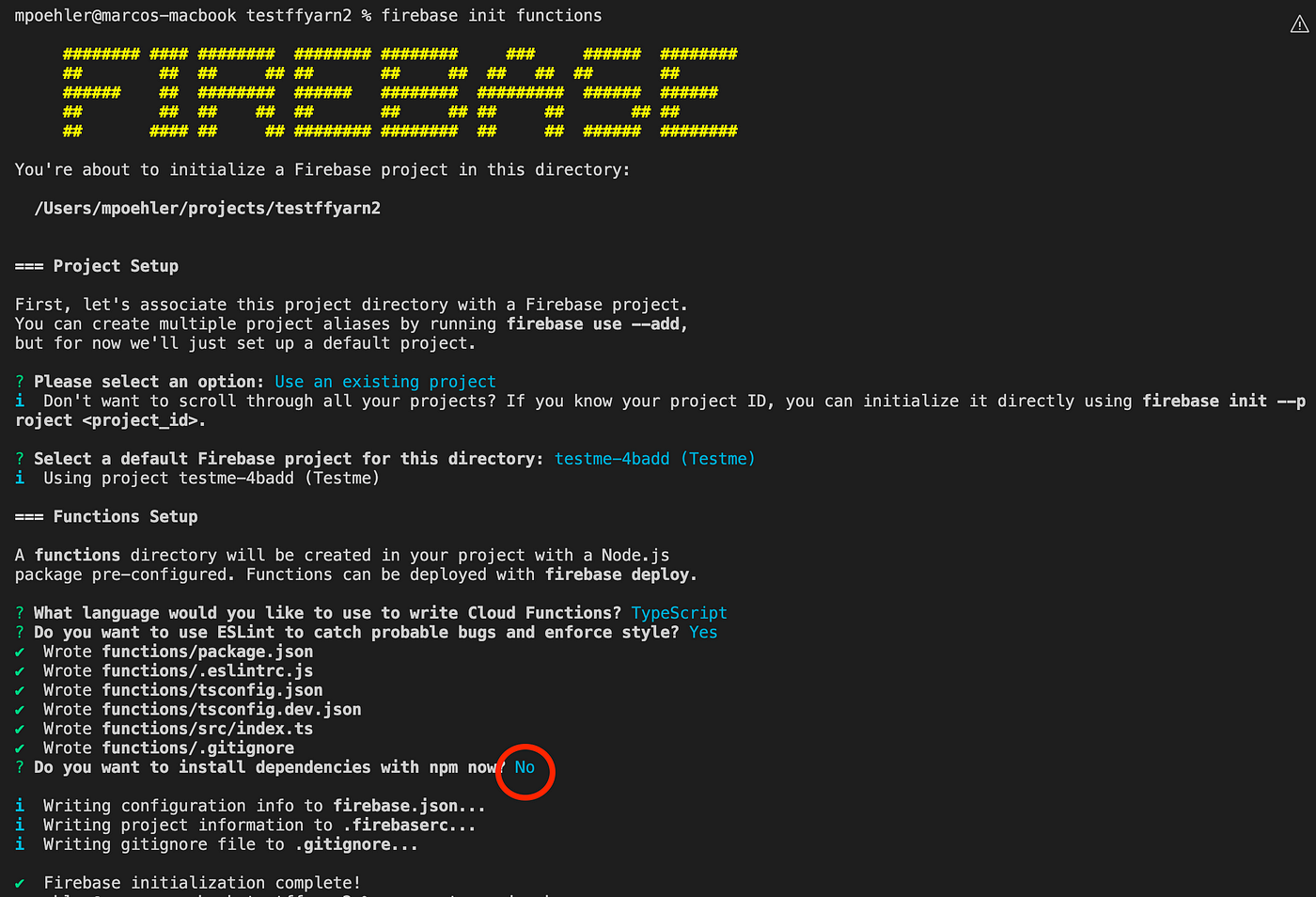
Create a Firebase project with Firebase CLI
Install dependencies with yarn2
Now we continue in the functions folder. There we first initialize yarn2.

install yarn2 in functions folder
Now you have to know that yarn2 works in the so-called plug and play mode. This means that the dependencies are stored as ZIP files in the .yarn folder and there is no longer a node_modules folder.
However, the firebase functions emulator has a problem with this if there is no longer a node_modules folder.
Therefore, Yarn2 has a solution for this in the form of a nodeLinker setting that ensures that there is a node_modules folder again. We have to make this setting in the .yarnrc.yml.

add nodeLinker to .yarnrc.yml
And then we can install the dependencies as usual:

install dependencies with yarn2
As you can see, there is now the node_modules folder in the functions directory.

see node_modules in functions folder
Adjustments in the package.json
Before we can test this now we have to make some changes in the package.json and replace the npm commands:

npm run -> yarn
Prepare the demo function for a test
In order to be able to test anything in the emulator, we have to remove the comments in functions/src/index.ts. This must then look like this:

uncomment demo function
Build the project and run the emulator
Now the project can be built and the emulator also works.

build project and run emulator

successful test the emulated function
That was it. Please write me a comment if you find a mistake. Of course, you are also welcome to comment if you liked it and it helped you.
메타데이터
- post_id
- 9b71bdc25e1e
- slug
- use-firebase-functions-with-yarn2-9b71bdc25e1e
- url
- https://medium.com/@marco_37432/use-firebase-functions-with-yarn2-9b71bdc25e1e
- canonical_url
- https://medium.com/@marco_37432/use-firebase-functions-with-yarn2-9b71bdc25e1e
- author_url
- https://medium.com/@marco_37432
- status
- ok
- fetched_at
- 2026-07-28 04:44:15