I Gave My Solution Architecture Practice a Memory — With a Git Repo and Claude Code
How I turned markdown files, six small skills, and one hard confidentiality rule into a knowledge base that makes every architecture…
I Gave My Solution Architecture Practice a Memory — With a Git Repo and Claude Code
How I turned markdown files, six small skills, and one hard confidentiality rule into a knowledge base that makes every architecture diagram better than the last.
I’m a solution architect. I design cloud architectures — GCP, AWS, Azure, hybrid — for multiple client accounts at once. And for years, my working process had a flaw I could feel but never fixed:
Everything I learned evaporated.
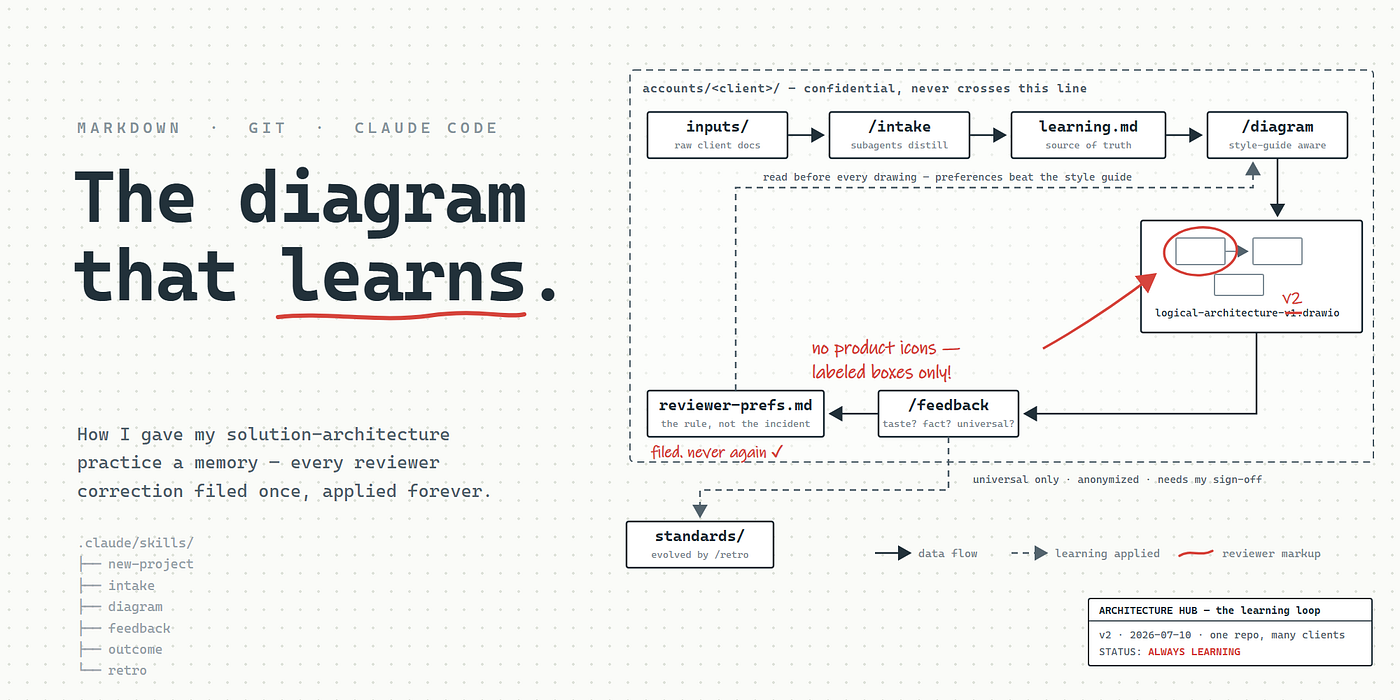
A reviewer tells me “no product icons on data-flow views, labeled boxes only.” I fix the diagram. Three weeks later, on the next engagement with the same reviewer, I make the same mistake — because the correction lived in a call, or a chat thread, or my head. Requirements arrive as a 40-page RFP, a slide deck, and three contradictory emails, and I re-open all of them every time I need to check an SLA. We lose a deal, do a thoughtful post-mortem in a meeting, and the lessons go… nowhere structural.
AI assistants made the individual tasks faster, but made the amnesia worse. Every chat session started from zero. The assistant that helped me draw last month’s diagram remembered nothing about how my reviewer likes diagrams drawn.
So I built what I now call my Architecture Hub: a plain git repository of markdown files, driven almost entirely by Claude Code, with one design goal — nothing I learn is allowed to die in a chat transcript.
No database. No app. No vector store. Files, folders, and a few well-written instructions. Here’s how it works.
The layout: accounts, projects, and one global brain
architecture-hub/
├── CLAUDE.md                  # my rules — loaded into every session
├── standards/                 # MY conventions, cross-client by design
│   ├── diagram-style-guide.md
│   ├── gcp-patterns.md / aws-patterns.md / azure-patterns.md
│   └── CHANGELOG.md           # audit trail of how standards evolved
├── templates/                 # skeletons for new accounts/projects
├── accounts/
│   └── <client>/              # one folder per client account
│       ├── CLAUDE.md          # auto-loads when I work in this folder
│       ├── account-profile.md # who they are, how to win with them
│       ├── reviewer-preferences.md
│       ├── deal-history.md
│       └── projects/<engagement>/
│           ├── inputs/        # raw client docs (RFPs, decks, transcripts)
│           ├── learning.md    # distilled understanding — the doc of record
│           ├── decisions.md   # decision log + explicit assumptions
│           └── diagrams/      # .drawio / .mmd sources, versioned in git
└── .claude/skills/            # the workflows: /intake /diagram /feedback ...
Two ideas carry most of the weight:
1. Nested CLAUDE.md files. Claude Code loads instruction files by directory. The root one carries my global rules. Each account folder has its own, which auto-loads the moment I work inside that folder — so client context is always on, without me re-explaining anything, and it points the assistant straight at the account's profile and reviewer preferences before any work starts.
2. Separation of what’s mine vs. what’s the client’s. standards/ holds my craft — diagram style, reusable cloud patterns. accounts/ holds their reality. This split is what makes the confidentiality model (below) possible at all.
Confidentiality is a structural rule, not a vibe
If you put client material anywhere near an AI workflow, this is the part that matters most. My root CLAUDE.md contains a hard rule, stated bluntly:
Never cross-reference client material. When working inside
accounts/X/, do not read, quote, or draw on anything under any otheraccounts/Y/folder. Not for inspiration, not for comparison, not "just to check how we did it before."
The only knowledge allowed to cross account boundaries is what’s been deliberately generalized and stripped of client names, system names, and figures — and it can only live in standards/, and it only gets there with my explicit approval.
Exactly one workflow is allowed to look across accounts (the monthly retro, below), and it’s structured so that anonymization is enforced by the architecture, not by hoping the model behaves: subagents scan each account in isolation and return only anonymized pattern summaries to the main session. Client-identifying detail physically never enters the cross-account context.
(Obvious caveat: check your firm’s policy on client documents in AI tooling before doing anything like this. If an account demands hard isolation, use one repo per client — the structure works identically.)
The daily loop: six skills
Claude Code lets you define skills — markdown files describing a workflow, invoked like slash commands. Mine map to the actual lifecycle of an engagement:
**/new-project** — I say "new client, we're pitching a data platform" and the account and project folders are scaffolded from templates in seconds, with three quick seed questions to fill the account profile.
**/intake — I drop whatever the client sent (PDF, DOCX, PPTX, transcripts, email dumps) into inputs/ and run intake. Large documents go to subagents** — isolated contexts that each read one document and return a structured extraction (requirements, constraints, current-state systems, stakeholders, SLAs, risks, open questions) instead of raw text. The main session merges those into learning.md, the single source of truth for the engagement. Rules that took me a while to get right:
- Every claim carries its source:
(RFP §3.2),(kickoff call, 2 Jul). - Conflicting sources are recorded as conflicts, never silently resolved.
- Unknowns are written as “Unknown — ask client”, never guessed. A confident blank beats a plausible hallucination in a document I’ll pitch from.
The bar: learning.md must be readable in five minutes by someone who never saw the inputs. After intake, nobody re-opens the raw documents for day-to-day work.
**/diagram* — before drawing a single box, the workflow must* read, in order: the project's learning.md, my global style guide, the account's reviewer-preferences.md, and the relevant cloud pattern file. Reviewer preferences override my style guide — the person reviewing the diagram defines what "good" looks like for their account. Every component on the diagram must be justified by learning.md or logged as an explicit assumption in decisions.md. Output is text-based diagram source — draw.io XML for client deliverables (hand-tweakable, official provider shape libraries), Mermaid for quick internal sketches — committed to git next to any exported image.
**/feedback** — the heart of the system. Every piece of feedback does two jobs: fix today's artifact, and make sure the same correction is never needed again. Each feedback item gets classified:
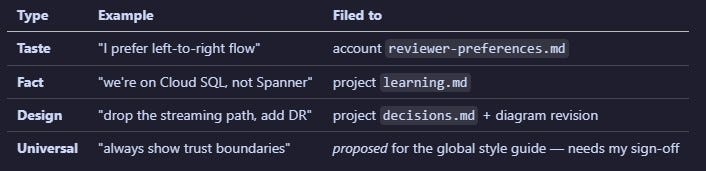
Two guardrails I’d call hard-won. First: store the rule, not the incident. Not “reviewer asked to remove the queue icon on the v1 data flow” but “this reviewer: no product icons on data-flow views; labeled boxes only” — with a dated example underneath for provenance. Second: universal-sounding feedback needs human approval before touching standards/, because one person's strong taste loves to masquerade as a universal law.
And the fix itself creates a new diagram version (-v2) rather than overwriting the one the reviewer saw — git history is my version trail, and reviewers notice when their feedback is visibly honored, comment by comment.
**/outcome* — when a deal closes (won, lost, stalled, expanded), it's logged in the account's deal-history.md with the stated reason and the suspected* reason in separate columns — clients rarely tell you the real one, and both are worth keeping. Reviewer happiness is a proxy metric; signed deals are the ground truth the whole system ultimately optimizes for.
**/retro* — roughly monthly, the cross-account retrospective. Subagents scan every account's preferences, decisions, and deal history and return anonymized pattern summaries. The bar for a pattern: it appears in at least two independent accounts, or in one account but tied to a won/lost outcome. The retro then proposes* changes to standards/ — each with its anonymized evidence and the risk of adopting it — and I approve per item. Approved changes land with a dated entry in standards/CHANGELOG.md, so the evolution of my own standards is auditable. It also flags decay: preferences nobody has referenced in a year get queued for confirmation or archival, so the knowledge base doesn't fossilize.
Why this compounds
The loop is the point. Intake feeds diagrams. Diagrams generate feedback. Feedback becomes filed preferences and corrected facts. Outcomes reveal what actually wins. Retro distills all of it into better global standards — which make the next intake and the next diagram better, for every account, without leaking anything between them.
The second diagram for any reviewer is noticeably better than the first, because their first round of corrections is now load-bearing configuration, applied automatically before drawing. That’s the difference between an AI assistant and a system that learns.
A few things I’d tell anyone building their own version:
- Make the assistant write learning down immediately, mid-session. The instruction in my root
CLAUDE.mdis literally "do not let learning die in the chat transcript." Corrections get filed the moment they happen, to the specific file where they'll be found again. - Keep diagram sources as text, in git.
.drawioXML and Mermaid diff, version, and regenerate. Screenshots don't. - Separate taste, fact, and universal truth. Most feedback-capture systems fail because they file everything in one bucket. The classification is the feature.
- Templates make consistency free. Every
learning.mdacross every project reads the same way, so I (and the assistant) always know where to look. - Human-in-the-loop where it counts. Anything that changes global standards or crosses the account boundary requires my approval. Everything else is autonomous.
The whole thing is markdown, folders, git, and a handful of carefully written instruction files. No infrastructure to maintain, fully portable, and every piece of it is readable and editable by hand — which, for a knowledge base meant to outlive any single tool, is exactly the property I want.
Here is the starter GitHub repo: https://github.com/LokeshNanda/architecture-hub
The structure described here contains no client material — that’s rather the point. If you build your own, start with the folder layout and the feedback classification; the rest grows from use.
메타데이터
- post_id
- 9b8490b7de11
- slug
- i-gave-my-solution-architecture-practice-a-memory-with-a-git-repo-and-claude-code-9b8490b7de11
- url
- https://medium.com/@lokeshnanda04/i-gave-my-solution-architecture-practice-a-memory-with-a-git-repo-and-claude-code-9b8490b7de11
- canonical_url
- https://medium.com/@lokeshnanda04/i-gave-my-solution-architecture-practice-a-memory-with-a-git-repo-and-claude-code-9b8490b7de11
- author_url
- https://medium.com/@lokeshnanda04
- status
- ok
- fetched_at
- 2026-07-13 06:23:13



