Boring React Optimizations That Cut Our Vendor Bundle by 67%
The fastest wins in old React apps often come from boring places: imports, duplicate packages, and large code that loads too early.
Boring React Optimizations That Cut Our Vendor Bundle by 67%
The fastest wins in old React apps often come from boring places: imports, duplicate packages, and large code that loads too early.
This is the story of how we found those wins in an internal console that had worked fine for years, until field users started using it on low-end devices and weak mobile networks.
We reduced vendor.js from 11.81 MB to 3.87MB and lighthouse score moved from 39 to 85.
Photo by Sebastian Pena Lambarri on Unsplash
The Trigger
Our internal console started as a normal back office tool. Office teams used it on laptops, inside a stable network, and the app did its job. A slow first load did not hurt enough for anyone to stop and inspect the bundle.
That changed when we reused the same React back office app inside an existing Flutter app for field sales. The workflow looked simple: visit a customer, take a photo at the location, capture location data, add notes, and submit the visit. The pilot worked. I sat with one salesperson in the field and helped complete the flow end to end.
The problems showed up after we scaled the pilot.
Some users had weak mobile networks. Some used low-end Android phones. The same app that felt acceptable on an office laptop started taking too long to load in the field.
We had not looked at the bundle with care for years. The first Webpack Bundle Analyzer report gave us the answer we expected and the mess we deserved.
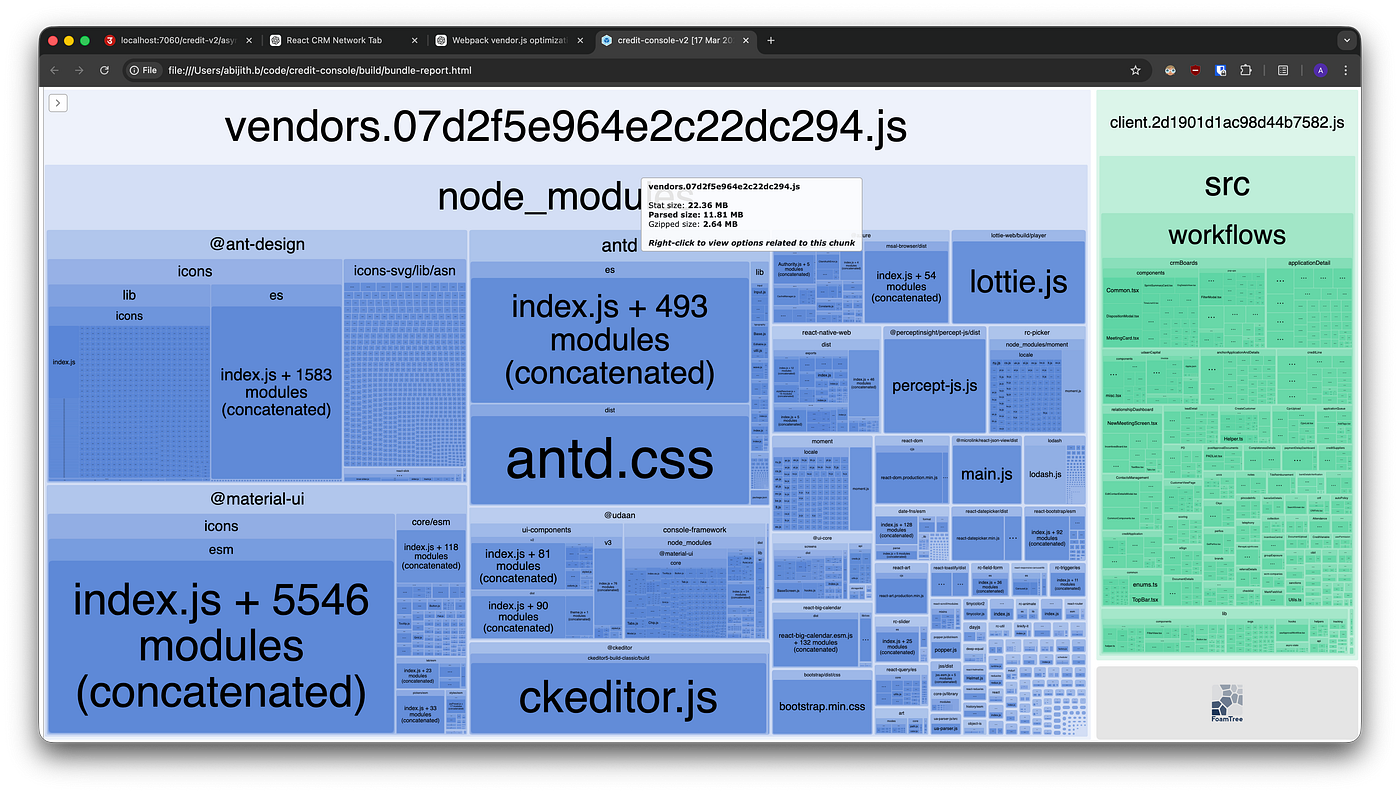
Initial Webpack Bundle Analyzer screenshot showing vendor.js and client.js.
For the numbers in this post, I am using parsed size unless I mention otherwise. Webpack Bundle Analyzer shows a few different sizes, so it helps to define the terms once.
- Stat size comes from Webpack’s stats file. It helps you compare modules inside Webpack, but it does not represent the exact file users download.
- Parsed size is closer to the JavaScript size after Webpack builds and minifies the bundle, before gzip. The browser still has to parse and execute this JavaScript, so this number matters on slower devices.
- Gzipped size is the compressed size sent over the network when gzip is enabled. It matters for download time, but it does not remove the browser’s parsing cost.
At the start, vendor.js was 11.81 MB and client.js was 3.18 MB in parsed size. Lighthouse score before optimization was 39.
The Constraints
We could see plenty of cleanup opportunities, but we could not treat this like a weekend rewrite.
This console supported core operations across office and field teams. If we broke it, business work could stop. We also had a release constraint: we preferred shipping these changes at the start of the month because month-end usage carried more operational risk. In practice, that meant one meaningful production release per month.
I split the work into phases:
- First, take low-risk, high-impact wins.
- Then, remove heavier dependencies and lazy load isolated features.
- After that, touch package upgrades and route-level code splitting.
The goal was not to make the repo perfect. The goal was to reduce the initial JavaScript cost without creating a support incident.
Phase 1: Fix Imports Before Touching Architecture
The first round focused on imports. This is the kind of cleanup that looks boring until you see the bundle analyzer.
We had barrel imports from packages like Ant Design icons:
import { SearchOutlined, WarningFilled } from “@ant-design/icons”;We replaced them with direct imports:
import SearchOutlined from "@ant-design/icons/SearchOutlined";
import WarningFilled from "@ant-design/icons/WarningFilled";
We applied the same idea to Ant Design components, Ant Design icons, Material UI icons, and lodash usage.
Barrel imports can stop tree shaking from doing what you expect. Sometimes the package exports, transpilation format, or bundler configuration prevents Webpack from proving that unused modules can be dropped. A direct import removes that ambiguity. You import the exact module you need, and the bundle stops pulling a whole family of components or icons into the entry path.
We also noticed that the app imported the non-minified Ant Design CSS file. We switched it to the minified CSS file.
The result surprised me. vendor.js dropped from 11.81 MB to 6.58 MB a reduction of 44.28%.
Lighthouse score after Phase 1: 53.
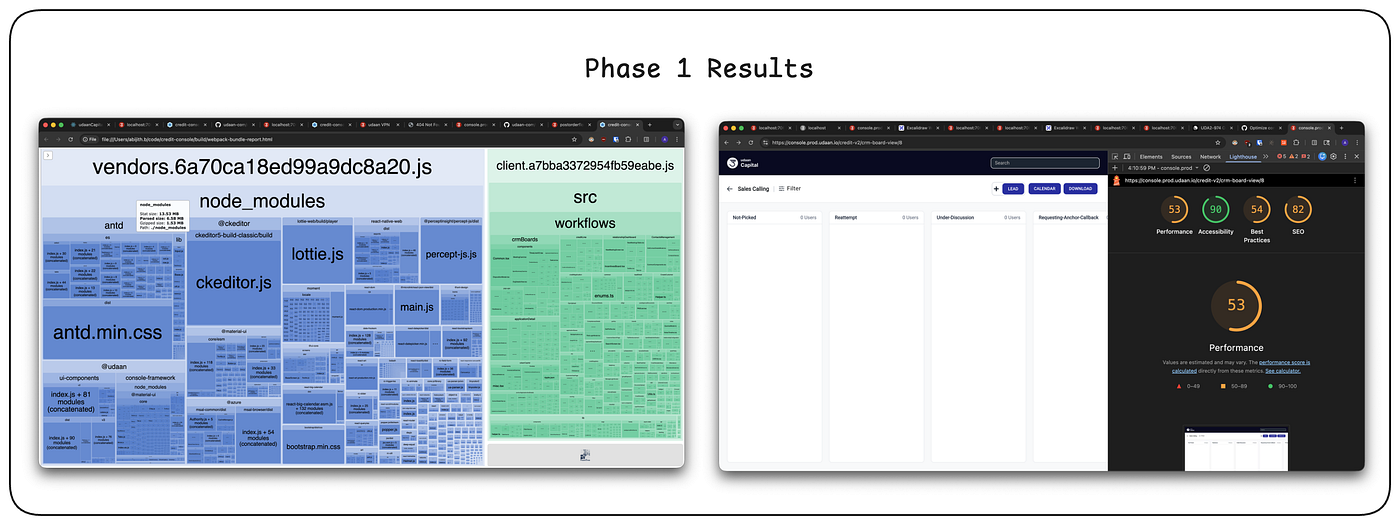
bundle analyzer and lighthouse score after import optimization
This was the cleanest release in the whole effort. The change had low product risk because we did not change user flows or business logic. We changed how the app reached the same library code.
We released it and did not get production issues from the operations teams.
Phase 2: Move Heavy Features Out
After Phase 1, a few new packages landed in the repo and vendor.js moved up to 6.88 MB.
The next set of changes had more risk, so I grouped them by feature area and kept the release scope clear.
Lazy Load Heavy Components
Lazy loading means you do not load a piece of code during the first app load. You split it into a separate chunk and ask the browser to fetch it when the user opens the feature that needs it.
Our app had a few heavy components that only appeared on specific screens:
- CKEditor for rich text editing
- React big calendar for calendar and scheduling flows
- JSON viewer for debugging or structured data views
These components did not need to sit inside the initial vendor.js path. A user opening a visit flow should not pay the startup cost for a rich text editor unless that screen needs it.
We split these packages into separate chunks. The initial vendor.js parsed size dropped from 6.88 MB to 5.97 MB. That moved 0.91 MB out of the startup path, a 13% initial-load reduction.
The total JavaScript did not vanish. We moved code away from the startup path. That still matters because users need the first screen fast, especially on weaker devices and networks. The editor and calendar can load later on the screens that use them.
Remove Packages We Did Not Need
The next group came from package removals.
- We removed Lottie from this app. The animation looked nice, but this was an internal workflow tool. A small CSS animation did the job with less JavaScript and without animation JSON payloads.
- We replaced Moment.js with a lighter Day.js
- We removed Bootstrap. The app used Bootstrap for navigation styling, but the navbar behavior was small enough to implement inside the app. We inspected the existing styles, recreated the needed layout, and removed the generic framework cost.
- We also removed an internal utility library used for simple viewport checks like desktop versus mobile. A small hook inside the app replaced it.
After these removals, the initial vendor.js parsed size dropped from 5.97 MB to 4.64 MB, a reduction of 32.56%.
Align Duplicate Versions
The analyzer also showed duplicate Material UI versions. One internal library depended on Material UI v3 while the app used Material UI v4.
For our usage, the internal library did not depend on breaking behavior from v3. We resolved it to use the app’s Material UI v4 version and removed the duplicate copy.
This reduced the initial vendor.js parsed size from 4.64 MB to 4.26 MB, a reduction of 8.19%.
Phase 2 started at 6.88 MB and ended at 4.26 MB, a 38.08% reduction for that phase.
Lighthouse score after Phase 2: 68.
This release had one issue. Some table tags had relied on Bootstrap styles without making that dependency clear in the component code. Once Bootstrap left, those tags lost styling. I fixed that after release. The rest of the app held up.
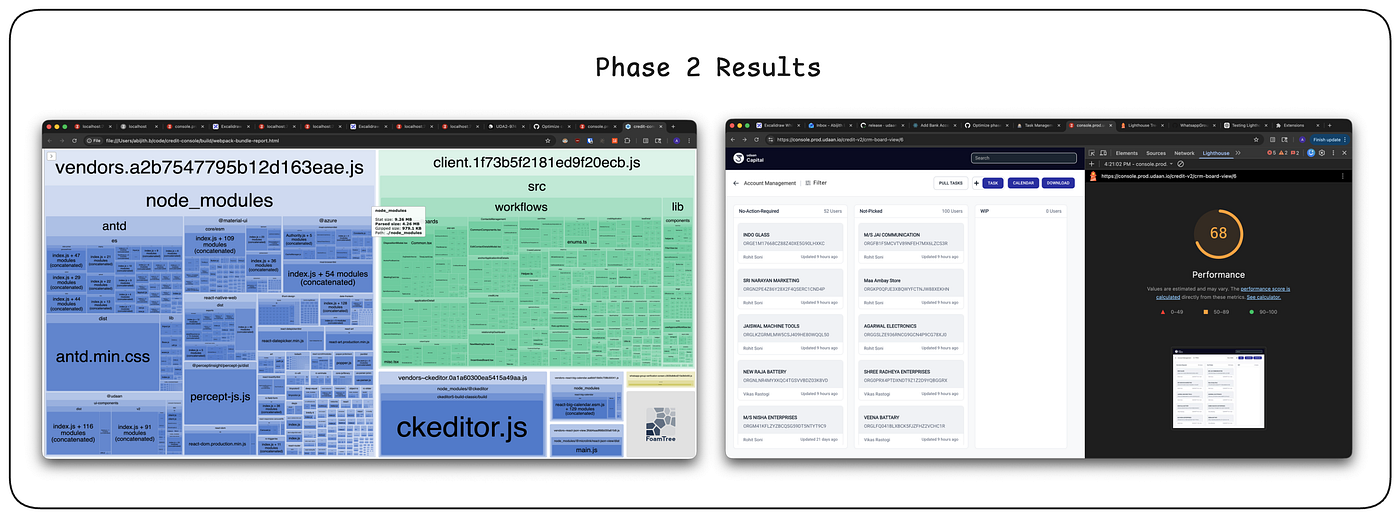
bundle analyzer and lighthouse score after phase 2 optimization.
Phase 3: Package Upgrades and Screen-Level Splitting
The biggest visible item in the analyzer was antd.min.css. We used Ant Design v4, which required a large CSS file containing styles for the full component set. Ant Design v5 changed the styling model, so components do not need the same global CSS payload.
After upgrading Ant Design, the initial vendor.js parsed size dropped from 4.26 MB to 3.87 MB.
Lazy Load Screens
The next change split screens themselves.
The old app could not use newer routing conventions, so we used Webpack-based lazy loading for screen bundles. The idea was simple: load the app shell, common utilities, and the current screen. Do not load every screen on startup.
Before this work, client.js was 3.18 MB.
After screen-level splitting, client.js became 146 KB, common.jsbecame 421 KB, the largest screen bundle was 699 KB, and the smallest screen bundle was 1.84 KB.
For the largest screen path, the browser now loads:
146 KB + 421 KB + 699 KB = 1.266 MBThat is much smaller than loading the full 3.18 MB client bundle up front. It also reduces the amount of JavaScript the browser has to parse before the first useful screen.
Lighthouse score after Phase 3 in test: 85.

Why Bundle Size Hurt This App
Caching helped us in normal usage. Returning users did not download the same assets from scratch each time. That did not solve the whole problem.
Large JavaScript still costs CPU time. The browser has to parse it, compile it, and execute enough code to render the app. On a low-end phone, this can hurt even when the network cache works. On a weak mobile network, the first load hurts twice: download time and execution time.
This setup was not ideal. We had a React operations tool running inside a Flutter app because that let us reuse an existing system for a pilot. Once the pilot scaled to field usage, the original assumptions stopped holding.
Office usage had hidden the bloat for years. Field usage exposed it.
Impact
vendor.jswent from 11.81 MB to 3.87 MB in the Phase 3 result, a 67% reduction.client.jswent from a single 3.18 MB file to route-level chunks. In the worst case, the initial screen path loaded about 1.26 MB.- Lighthouse moved from 39 to 85 in production.
The work did not need a new frontend architecture. It needed measurement, boring cleanup, and releases that respected the business calendar.
메타데이터
- post_id
- 9b9001d6cf3f
- slug
- boring-react-optimizations-that-cut-our-vendor-bundle-by-67-9b9001d6cf3f
- url
- https://medium.com/@abijith.b/boring-react-optimizations-that-cut-our-vendor-bundle-by-67-9b9001d6cf3f
- canonical_url
- https://medium.com/@abijith.b/boring-react-optimizations-that-cut-our-vendor-bundle-by-67-9b9001d6cf3f
- author_url
- https://medium.com/@abijith.b
- status
- ok
- fetched_at
- 2026-07-14 01:25:32






