Abbreviation of firewall commands
“After outlining the basics of the network and understanding the transport layers used in devices, and comprehending the ports and…
Abbreviation of firewall commands
“After outlining the basics of the network and understanding the transport layers used in devices, and comprehending the ports and protocols that devices rely on for communication and data transfer in the form of exports and imports, we previously mentioned that there are open, closed, and filtered ports. But to control the incoming and outgoing data from the open port, which is the subject of our article today, there are terms we need to understand before explaining the firewall. We will clarify them as follows:
NETFILTER: A framework that manages the movement of network packets on the Linux system specifically within the Kernel. It filters and alters packets upon reaching the network, acting as a firewall that can control inputs and outputs using iptables.
It is divided into two sections, each containing chains: NAT:
- PREROUTING
- POSTROUTING
- OUTPUT
FILTER:
- INPUT
- OUTPUT
- FORWARD
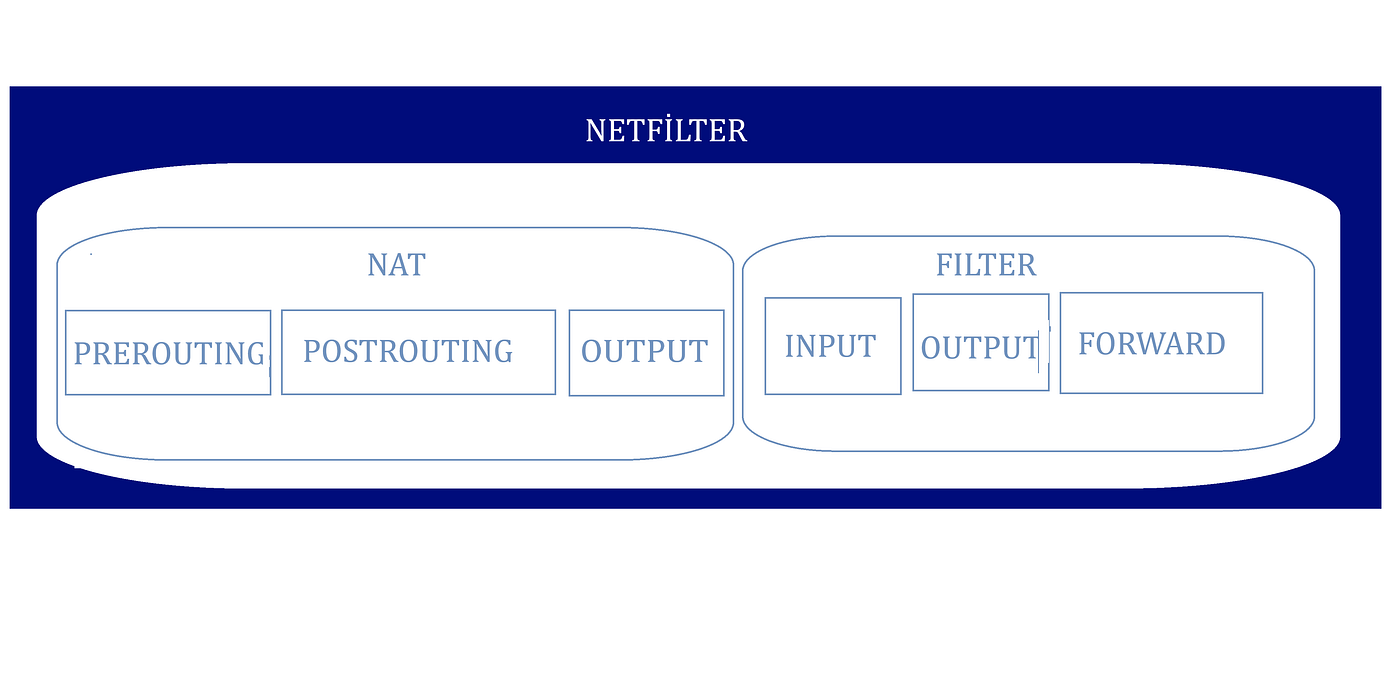
Example! Netfilter contents
There are also two types of destinations for NAT: SNAT (Source NAT): A technique used in networks to modify the IP addresses in data packets while they pass through the firewall. DNAT (Destination NAT): Used to modify the destination IP addresses of data packets, allowing them to be directed to specific devices within the internal network.
Returning to Iptables: Commands issued by the security executor to allow or deny based on the policies in place, whether for the company or even for personal use. To execute the commands, we open a Linux distribution, open the terminal, change permissions to root (ROOT). Each command starts with iptables. For example, to prevent any request using port 22, which is SSH, we write the command as follows:
iptables -t filter -A INPUT -p tcp — dport ssh -j DROP
I will explain each part of this command: iptables: Directed to NETFILTER for filtering. -t filter: Represents the start of the table keyword, meaning the array will be for the filter chain. -A: Represents append, meaning it is appended to INPUT. INPUT: An element under the filter chain. -p tcp: Represents the protocol containing the port. — dport ssh: The name of the port, there are two types of ports, dport and sport (destination port), (source port). -j: Represents Jump, specifying the target to jump to if the rule matches. DROP: Means dropping, there are several types of rules:
- ACCEPT: Accept the packet.
- REJECT: Reject the packet.
- DROP: Drop the packet.
- LOG: Log the packet in the system logs.
I will also mention some used parameters such as: iptables -L: List all chains and rules.
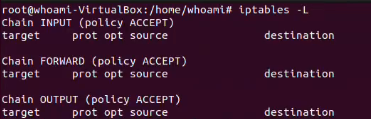
Example!View empty policies and rules” are shown as ACCEPT
iptables -P: Show the policies usually set to ACCEPT. iptables -D: Delete an array from the chains by writing the number of the row to be deleted. iptables -X: Delete a chain. iptables -s: Source, specifying the source IP address or range. iptables -p: Protocol, specifying the network protocol tcp, udp, icmp.
There are many details, I will include a link containing all the used parameters and their functions. more information Here
메타데이터
- post_id
- 9b92fa67f2ba
- slug
- abbreviation-of-firewall-commands-9b92fa67f2ba
- url
- https://medium.com/@YKHSK/abbreviation-of-firewall-commands-9b92fa67f2ba
- canonical_url
- https://medium.com/@YKHSK/abbreviation-of-firewall-commands-9b92fa67f2ba
- author_url
- https://medium.com/@YKHSK
- status
- ok
- fetched_at
- 2026-07-16 15:20:23



