Inside WAFL: How ONTAP Actually Lays Out and Writes Data.
Part 2 of Inside NetApp ONTAP Storage
Inside WAFL: How ONTAP Actually Lays Out and Writes Data.
Part 2 of Inside NetApp ONTAP Storage
~ Tanvi Gunjal and Kanishka Vishwasrao
In Part 1, we stopped at a simple question:
A host writes data to a LUN. Where does that data actually go?
So, instead of looking at WAFL as another collection of storage concepts, let us follow one write.
Imagine an application changes a block of data.
From the host’s perspective, nothing unusual happens. It sees a disk, sends a block write over iSCSI or Fibre Channel, and waits for ONTAP to confirm that the write is safe.
The host’s version of the story is remarkably short.
Host ──> WRITE (Block X) ──> ONTAP
Inside ONTAP, the story has only just started.
The Write Arrives
When ONTAP receives the write, it does not immediately wait for the physical drives to place the data in its final location.
The write is first protected in non-volatile memory. In an HA pair, the write is also protected across the controllers before ONTAP acknowledges it.
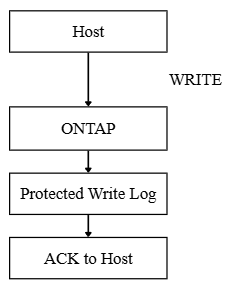
For the host, the write is complete.
For WAFL, there is now a new piece of data that needs a home.
This is where Write Anywhere File Layout earns its name.
WAFL Finds a New Home for the Data
Suppose the previous version of the data lives in Block 101.
Metadata ─────> Block 101
                [ VERSION A ]
The application has now created Version B. A traditional mental model might suggest overwriting Block 101 with the new data. WAFL does not have to do that. Instead, it can write the changed data to another available block.
Block 101              Block 305
[ VERSION A ]          [ VERSION B ]
The data has moved, but there is one small problem. The metadata still points to Block 101. So WAFL updates the reference.
Before:
Metadata ─────> Block 101
After:
Metadata' ────> Block 305
That is the important idea behind WAFL.
The new version of the data can be written elsewhere, and the metadata path changes to find it.
Of course, metadata rarely exists as one convenient pointer.
WAFL organizes data through a tree of metadata blocks.
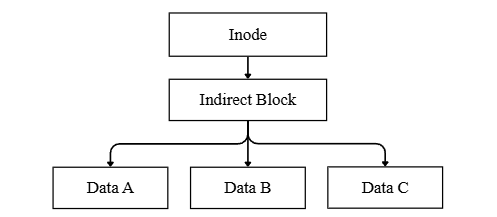
If Data B changes, the metadata pointing to Data B changes too. If that metadata block has a parent, the change can continue upwards through the tree. One changed block can therefore leave a small trail of updated metadata behind it. WAFL now has the new data and the metadata required to reach it. The next task is to make this a consistent on-disk state.
The Consistency Point
WAFL does not treat every incoming write as a separate disk transaction.
Instead, changed data and metadata are collected and written as part of a consistency point, or CP. Think of the write we have been following.
WAFL has:
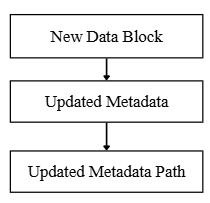
During a consistency point, the changed blocks are written first. WAFL then commits the updated root, representing the new file-system state.
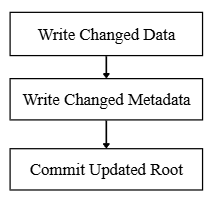
The order matters.
When the new root is committed, it points to a complete set of data and metadata representing a consistent state. Our single block write has now found its physical storage, updated its metadata path, and become part of a new WAFL consistency point. But the old Block 101 is still sitting there.
And that is where snapshots become interesting.
The Old Block Has Not Disappeared Yet
Imagine a snapshot was created before our application changed the data.
At that moment, both the active file system and the snapshot referenced Block 101.
Active ────────┐
               ├────> Block 101 [ VERSION A ]
Snapshot ──────┘
Then our write arrived. WAFL placed Version B in Block 305 and updated the active metadata.
Active ───> Block 305 [ VERSION B ]
Snapshot ───> Block 101 [ VERSION A ]
The snapshot does not need a complete copy of the volume.
It simply continues to reference the blocks that represented the earlier consistent state. Unchanged blocks can still be shared between the active file system and the snapshot. Only as data changes do their references begin to diverge. This is why ONTAP snapshots are closely tied to WAFL’s data layout. The snapshot is not asking WAFL to duplicate everything.
It is effectively saying:
“Keep the path to the version I saw.”
One Write, Two Perspectives
Our write has finally completed its journey.
The host saw this:
WRITE Block X ───> ACK
WAFL saw this:
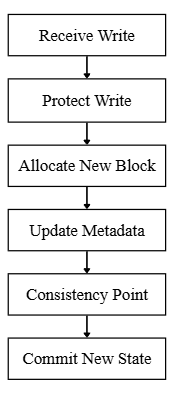
The host thinks it changed a block on a disk.
WAFL created a new data block, adjusted a metadata tree, committed a new consistent file-system state, and potentially preserved the old version for a snapshot.
Both views are correct. One is simply having a much quieter day.
And that, in many ways, is the purpose of ONTAP’s storage architecture: keep the complexity inside the storage system while presenting something predictable to the host.
Aggregates and volumes organize the storage. LUNs present it.
WAFL handles the complicated part when the data actually starts moving.
메타데이터
- post_id
- 9b937f148370
- slug
- inside-wafl-how-ontap-actually-lays-out-and-writes-data-9b937f148370
- url
- https://medium.com/@tanvi.gunjal22/inside-wafl-how-ontap-actually-lays-out-and-writes-data-9b937f148370
- canonical_url
- https://medium.com/@tanvi.gunjal22/inside-wafl-how-ontap-actually-lays-out-and-writes-data-9b937f148370
- author_url
- https://medium.com/@tanvi.gunjal22
- status
- ok
- fetched_at
- 2026-07-13 06:23:13





