Docker — Operations with Detailed Examples
1. What is Docker?
Docker — Operations with Detailed Examples
1. What is Docker?
Docker is a containerization platform that allows developers to package applications along with all required dependencies and run them consistently across different environments.
Benefits: -
Lightweight and fast
Consistent environments
Easy deployment and scaling
2. Docker Image
A Docker Image is a read-only blueprint used to create containers. It contains the application code, runtime, system tools, libraries, and dependencies required to run an application.
Where do Docker images come from?
By default, Docker downloads images from Docker Hub, which is Docker’s official public image registry.
Default registry: Docker Hub
Maintained by Docker & the community
Contains official images (ubuntu, nginx, mysql, etc.)
When you run:
docker pull ubuntu

Docker actually pulls:
docker.io/library/ubuntu:latest
Explanation:
docker.io → Docker Hub (default registry)
library → Official images namespace
ubuntu → Image name
latest → Default tag
Image Tags
Tags are used to identify image versions.
Examples:
docker pull ubuntu:20.04

docker pull nginx:1.25
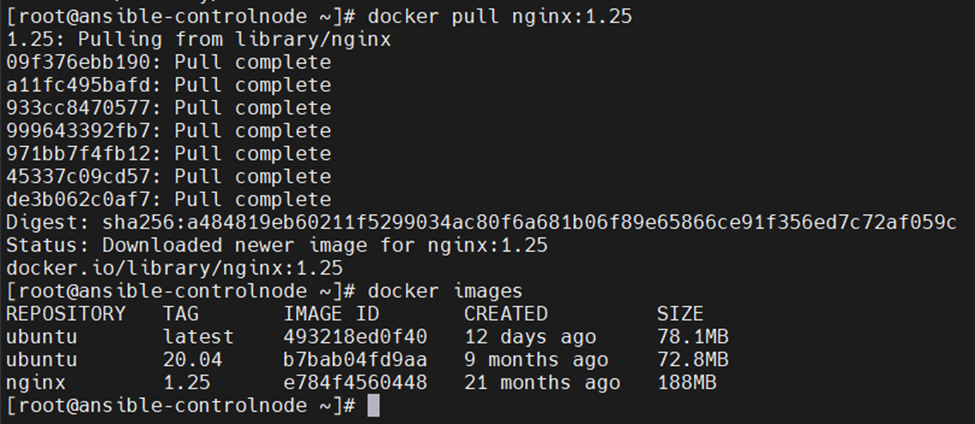
If no tag is specified, Docker uses:
latest
Private & Other Registries
Docker images can also be pulled from:
Private registries
Company internal registries
Cloud registries, such as:
Amazon ECR
Azure Container Registry (ACR)
Google Artifact Registry
Example:
docker pull myregistry.example.com/app:v1
Listing Images
Command — docker images

Shows:
Repository name,
Tag
Image ID
Created
Size
Analogy
Image = Recipe 📄
Container = Cooked dish 🍲
Registry = Recipe book 📚
3. Docker Container
Definition: A Docker Container is a running instance of a Docker image.
Examples:
docker run nginx

docker ps
docker ps -a

4. Running a Container with Options
docker run -it ubuntu /bin/bash

-i: Interactive
-t: Terminal
/bin/bash: Shell access
5. Port Mapping (Web Server Example)
docker run -d -p 8080:80 nginx

Access via: http://machine-ip:8080

Or in the terminal itself you can use
curl http://localhost:8080 to verify the nginx container is running fine.

6. Stop, Start, Remove Containers
docker stop <container_id>

docker start <container_id>

docker rm <container_id>

7. Dockerfile — Build Custom Images
Definition: A Dockerfile is a text file with instructions to build a Docker image.
Example (Python App):
FROM python:3.10 WORKDIR /app COPY app.py . CMD [“python”, “app.py”]

Build and run:
docker build -t python-app .

docker run python-app


8. Docker Volumes
Definition: Volumes persist data outside containers.
Use Case
A company wants to host a static website using Nginx. The website files must persist even if the container crashes or is recreated.
Docker Volumes solve this problem.
Step 1: Create a Docker volume
docker volume create webdata
Verify:
docker volume ls

Step 2: Create HTML on the host (BEST PRACTICE)
mkdir -p /opt/nginx-html
vi /opt/nginx-html/index.html
<!DOCTYPE html>
<html>
<head>
<title>Docker Volume Persistence</title>
</head>
<body>
<h1>🚀 Persistent Nginx Page</h1>
<p>Data survives container recreation</p>
</body>
</html>

Step 3: Run Nginx using bind mount
docker run -d — name nginx-persist -p 8080:80 -v /opt/nginx-html:/usr/share/nginx/html nginx

Step 4: Test


Step 5: Prove persistence
docker rm -f nginx-persist

Run again:
docker run -d — name nginx-persist -p 8080:80 -v /opt/nginx-html:/usr/share/nginx/html nginx

Test Again :- Same page = persistence proven


9. Docker Networks
Docker Networks allow containers to communicate with each other and the outside world in an isolated and controlled manner.
By default, Docker creates networking rules automatically, but we can also define custom networks for better security and communication.
Why Docker Networks are needed
Without networks:
· Containers cannot talk to each other reliably
· IPs change when containers restart
· Exposing ports manually becomes messy
With Docker networks:
· Containers communicate using container names
· Built-in DNS resolution
· Network-level isolation
· Cleaner application architecture
Types of Docker Networks
Docker supports 5 network drivers, but you mainly use 3.
1️⃣ Bridge Network (Default — Most Common)
Description:
· Default network driver
· Used for containers on a single Docker host
· Containers can communicate with each other
Check default bridge:
docker network ls

You’ll see:
bridge
host
none
Test: Default bridge network
Run two containers:
docker run -d — name c1 busybox sleep 3600
docker run -d — name c2 busybox sleep 3600

Inspect network:
docker network inspect bridge

Problem with default bridge
· No automatic DNS by container name
· IP-based communication only
2️⃣ User-Defined Bridge Network (Recommended)
Description:
· Custom bridge network
· Automatic DNS resolution
· Containers communicate using names
· Best practice for microservices
Create a custom network
docker network create mynet
Verify:
docker network ls

Test container communication (IMPORTANT)
Run containers:
docker run -d — name app1 — network mynet busybox sleep 3600
docker run -d — name app2 — network mynet busybox sleep 3600

Enter one container:
docker exec -it app1 sh
Ping the other container by name:
ping app2

✅ SUCCESS = Docker DNS working
3️⃣ Host Network
Description:
· Container shares host’s network stack
· No isolation
· High performance
· Linux only
Run example:
docker run — rm — network host nginx

Access directly:
curl http://localhost

⚠️ Not recommended unless required
4️⃣ None Network
Description:
· No networking at all
· Fully isolated container
Example:
docker run — rm — network none busybox

Docker Network Summary Table
Network Type - Use Case
Bridge — Single-host apps
User-defined Bridge — Microservices (BEST)
Host — Performance-critical
None — Security / Isolation
Real-World Use Case
A web application where:
· Nginx (frontend)
· App container (backend)
· Database container
All containers communicate via a user-defined bridge network.
10. List of Docker Operations Used in the Industry
Below is a comprehensive, market‑relevant list of Docker operations commonly used by developers, DevOps engineers, and SREs in real projects.
🖼️ Image Operations
Used to manage Docker images.
docker pull <image> docker push <image> docker images docker image ls docker image inspect <image> docker image history <image> docker image rm <image> docker image prune
📦 Container Lifecycle Operations
Used to manage container states.
docker run <image> docker create <image> docker start <container> docker stop <container> docker restart <container> docker pause <container> docker unpause <container> docker kill <container> docker rm <container> docker container prune
🔍 Container Inspection & Debugging
Used for monitoring and troubleshooting.
docker ps docker ps -a docker inspect <container> docker logs <container> docker top <container> docker stats docker exec -it <container> /bin/bash docker attach <container>
📁 Volume Operations (Data Persistence)
Used to manage persistent data.
docker volume create <volume> docker volume ls docker volume inspect <volume> docker volume rm <volume> docker volume prune
🌐 Network Operations
Used for container communication.
docker network create <network> docker network ls docker network inspect <network> docker network connect <network> <container> docker network disconnect <network> <container> docker network rm <network> docker network prune
🔐 Registry & Authentication Operations
Used for image security and access control.
docker login docker logout docker tag <source_image> <target_image>
🧹 Cleanup & Maintenance Operations
Used to clean unused Docker resources.
docker system df docker system prune docker system prune -a docker builder prune
⚙️ Docker Engine & System Operations
Used for Docker host management.
docker info docker version docker events docker context ls docker context use <context>
Industry Perspective
The Docker commands listed in this document are widely used by developers, DevOps engineers, and SREs.
While not all commands are used daily, understanding them helps in automation, troubleshooting, and production support
메타데이터
- post_id
- 9b94ea7babfa
- slug
- docker-operations-with-detailed-examples-9b94ea7babfa
- url
- https://medium.com/@anujpal1142110/docker-operations-with-detailed-examples-9b94ea7babfa
- canonical_url
- https://medium.com/@anujpal1142110/docker-operations-with-detailed-examples-9b94ea7babfa
- author_url
- https://medium.com/@anujpal1142110
- status
- ok
- fetched_at
- 2026-06-15 20:49:13


