Bypass GPO Security Policy in Windows machine
While security this days is a must, sometimes company legacy mandates differently.
Bypass GPO Security Policy in Windows machine
While security this days is a must, sometimes company legacy mandates differently.
So you company’s security policy is configured to enforce password policy, maximum/minimum age, complexity and alike. For example:
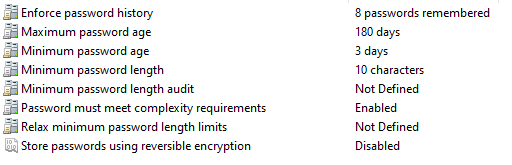
Trying to change it through gpedit.msc fails as all is greyed out due to Group Policy:

Though there are some workaround like taking the computer out of the domain or moving it to another OU (which will result in waiting from the sysadmin side), this solution is much simpler and even doesn’t require a restart.
- Export the current security policy with the following syntax:
secedit /export /cfg C:\temp\securityconfig.cfg-
Open the file using notepad or alike
-
Change the required field. i.e. Password complexity = 0 instead of 1.
-
Reload the configruation file back with the following:
secedit /configure /db C:\Windows\security\new.sdb /cfg C:\temp\securityconfig.cfg /areas SECURITYPOLICY- gpedit will now show the new configurations per the changes you’ve amidted.

메타데이터
- post_id
- 9bab7ca50811
- slug
- bypass-gpo-security-policy-in-windows-machine-9bab7ca50811
- url
- https://medium.com/@nadavsvirsky/bypass-gpo-security-policy-in-windows-machine-9bab7ca50811
- canonical_url
- https://medium.com/@nadavsvirsky/bypass-gpo-security-policy-in-windows-machine-9bab7ca50811
- author_url
- https://medium.com/@nadavsvirsky
- status
- ok
- fetched_at
- 2026-07-28 11:28:17